


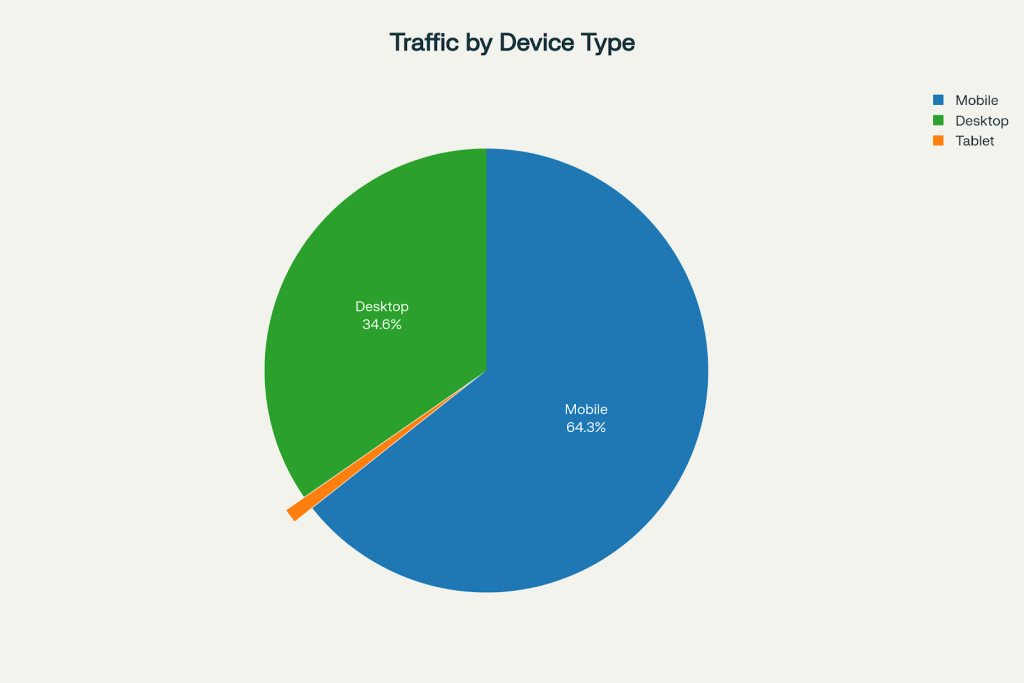
Creating an SEO-friendly website doesn’t require a computer science degree or years of coding experience. In today’s digital landscape, 64.35% of all web traffic comes from mobile devices, making it more crucial than ever to build websites that not only look good but perform exceptionally well in search engines. This comprehensive guide will walk you through everything you need to know to create a website that both Google and your visitors will love.
Why SEO-Friendly Website Design Matters More Than Ever
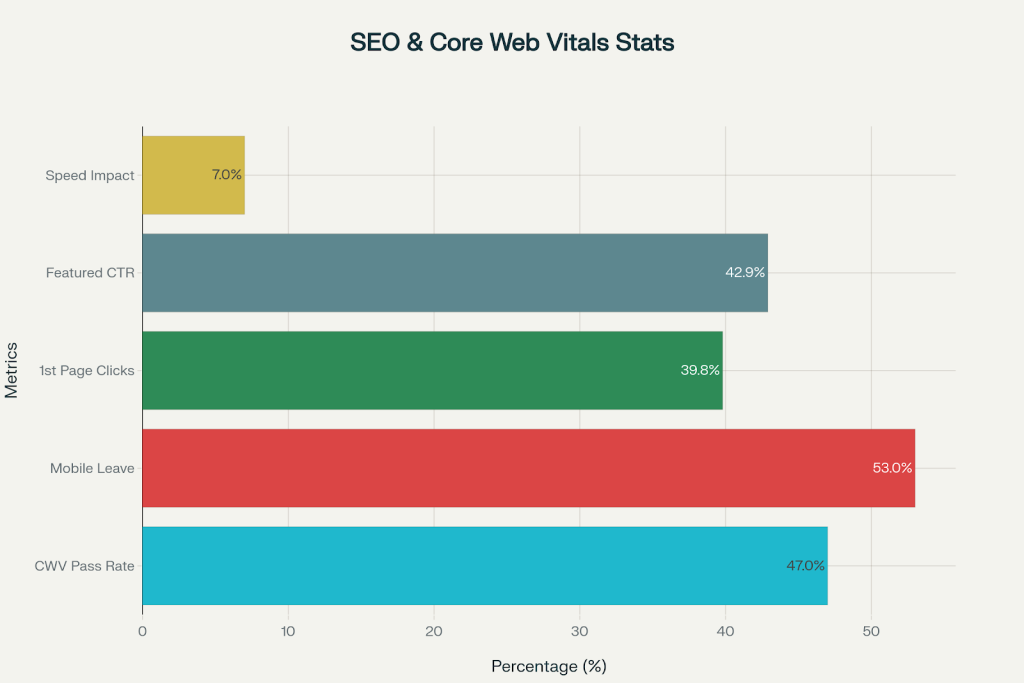
The statistics paint a clear picture: only 47% of websites currently pass Google’s Core Web Vitals assessment, leaving a massive opportunity for those who get it right. When your website loads quickly and provides a smooth user experience, the rewards are substantial. Sites with good Core Web Vitals scores see a 24% reduction in bounce rates, and businesses that improve their largest content loading time by just 0.1 seconds experience a 10% increase in conversions.
Global Web Traffic Distribution by Device Type (2025)
The mobile-first era has fundamentally changed how we approach website design. With mobile users now representing nearly two-thirds of all web traffic, Google has shifted to mobile-first indexing, meaning your mobile experience directly impacts your search rankings across all devices.
The Foundation: Technical Basics That Drive Results
Mobile Optimization: Your First Priority
Mobile users are ruthless about speed. Research shows that 53% of mobile users abandon websites that take longer than 3 seconds to load. Your website must be responsive, adapting seamlessly to different screen sizes while maintaining fast loading times.

Advantages of mobile-first websites include increased traffic, better user experience, enhanced SEO, faster loading, and higher conversion rates
Key mobile optimization elements include:
- Responsive design that adjusts to any screen size
- Touch-friendly navigation and buttons
- Compressed images optimized for mobile networks
- Simplified checkout processes for e-commerce sites


Core Web Vitals: Google’s Speed Standards
Google’s Core Web Vitals measure three critical aspects of user experience:
| Metric | Good Performance | What It Measures |
| Largest Contentful Paint (LCP) | Under 2.5 seconds | How quickly main content loads |
| Interaction to Next Paint (INP) | Under 200ms | How fast your site responds to clicks |
| Cumulative Layout Shift (CLS) | Under 0.1 | How much content jumps around while loading |
Key SEO Performance Statistics (2025)
The impact of page speed on your business cannot be overstated. For every second delay in page loading, conversion rates drop by 7%, while a 2-second delay increases bounce rates by 103%.

Page Load Time Impact on Bounce Rate (2025)
SSL Certificate and Security
Security is non-negotiable in 2025. Google requires HTTPS for all websites, and visitors expect to see that secure lock icon in their browser. An SSL certificate:
- Encrypts data between your website and visitors
- Builds trust with users and search engines
- Prevents browser security warnings that scare away visitors
- Is required for many third-party integrations
Essential SEO Setup Steps
1. Set Up Google Search Console and Analytics
Before diving into optimization, establish your measurement foundation:
Google Search Console allows you to:
- Monitor your site’s search performance
- Submit your sitemap to Google
- Identify and fix crawling errors
- Track your Core Web Vitals scores
Google Analytics provides insights into:
- Traffic sources and user behavior
- Most popular pages and content
- Conversion tracking and goal completion
- Audience demographics and interests
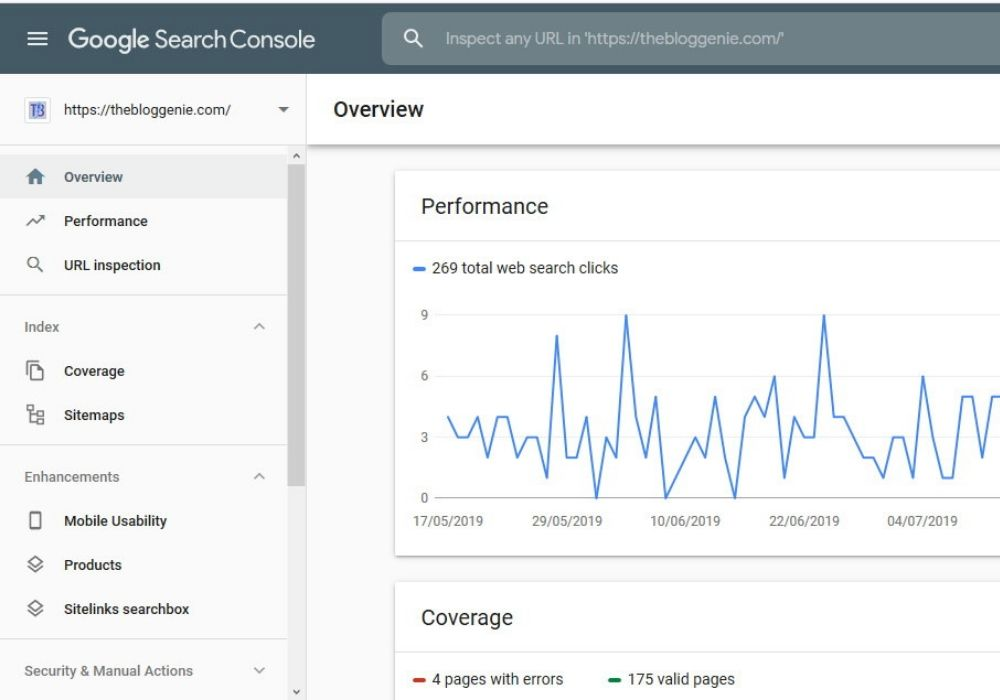
Google Search Console overview dashboard showing web search clicks performance and page coverage for a website
2. Create a Logical Site Structure
Think of your website as a library. Both visitors and search engines need to understand how your content is organized. Create a hierarchical structure:
- Homepage → Main Categories → Subcategories → Individual Pages
- Ensure every page is reachable within 3 clicks
- Use descriptive, keyword-rich URLs (example.com/seo-guide rather than example.com/page123)
3. Optimize Your Content Strategy
Content remains king, but context is queen. Focus on creating valuable, comprehensive content that answers your audience’s questions:
- Long-form content (3,000+ words) receives 77.2% more backlinks and 3x more traffic than average-length content
- Use header tags (H1, H2, H3) to structure your content logically
- Include your target keywords naturally throughout the text
- Add descriptive alt text to all images for accessibility and SEO
Technical Optimization Made Simple
Image Optimization
Images often account for the majority of a webpage’s file size. Optimize them by:
- Compressing images without losing quality
- Using modern formats like WebP when possible
- Adding descriptive alt text for accessibility
- Implementing lazy loading for images below the fold
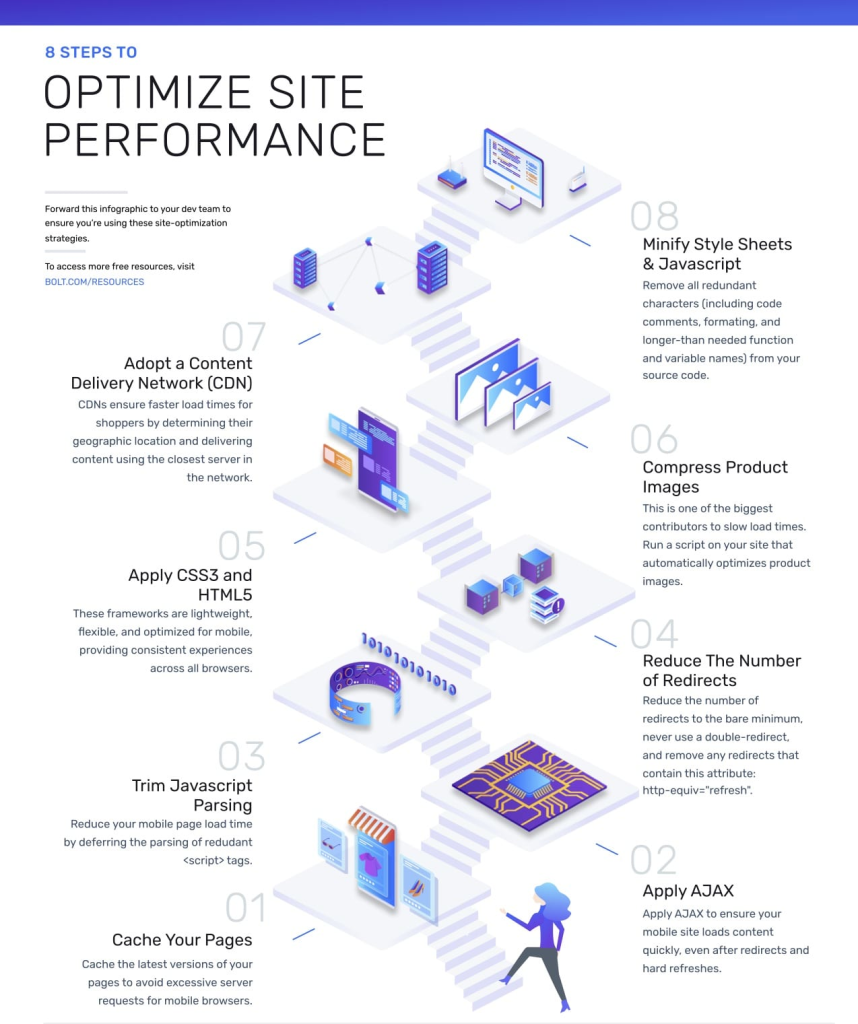
Infographic showing 8 steps to optimize website performance, including caching, AJAX, script trimming, and content delivery networks
Internal Linking Strategy
Internal links are your secret weapon. They help search engines understand your site structure while keeping visitors engaged:
- Link to related articles and pages within your content
- Use descriptive anchor text instead of “click here”
- Create topic clusters around your main keyword themes
- Ensure important pages receive links from multiple other pages
XML Sitemaps and Robots.txt
Make it easy for search engines to find your content:
- Create and submit an XML sitemap to Google Search Console
- Use robots.txt to guide search engine crawlers
- Regularly update your sitemap when adding new pages
- Monitor for crawling errors and fix them promptly
Performance Optimization That Converts
Page Speed Optimization
Speed directly impacts your bottom line. Here’s what the data shows about page speed impact:
| Load Time | Bounce Rate Increase | Conversion Rate | Sales per 1000 Visitors |
| 1 second | 0% | 2.5% | 30.5 |
| 2 seconds | 103% | 1.9% | 25.0 |
| 3 seconds | 132% | 0.9% | 20.0 |
| 5 seconds | 190% | 0.6% | 15.0 |
| 10 seconds | 223% | 0.3% | 10.8 |
Practical speed optimization techniques:
- Minimize HTTP requests by combining files
- Enable browser caching for returning visitors
- Use a Content Delivery Network (CDN) for global reach
- Minimize and compress CSS and JavaScript files
- Choose a reliable, fast web hosting provider
Content Delivery and Caching
Smart caching strategies can dramatically improve performance:
- Enable browser caching for static resources
- Use server-side caching for dynamic content
- Implement a CDN to serve content from locations closer to users
- Optimize database queries and server response times
Learn how to set up an SEO-friendly website easily today

Pooja Upadhyay
Director Of People Operations & Client Relations
Common SEO Mistakes to Avoid
Duplicate Content Issues
Duplicate content confuses search engines and dilutes your ranking power:
- Ensure each page has unique, valuable content
- Use canonical tags to specify preferred versions of similar pages
- Avoid thin or auto-generated content
- Create comprehensive, original content that adds value
Poor URL Structure
Clean URLs help both users and search engines:
- Use descriptive keywords in your URLs
- Keep URLs short and readable
- Avoid unnecessary parameters and session IDs
- Use hyphens to separate words, not underscores
Missing Meta Data
Don’t let search engines guess what your pages are about:
- Write unique, compelling title tags for each page (under 60 characters)
- Create descriptive meta descriptions that encourage clicks (under 160 characters)
- Use header tags (H1, H2, H3) to structure your content
- Include schema markup for rich snippets
Measuring and Monitoring Success
Key Performance Indicators (KPIs)
Track metrics that matter to your business:
- Organic traffic growth from search engines
- Average session duration and pages per session
- Bounce rate and user engagement metrics
- Conversion rates and goal completions
- Core Web Vitals scores and page speed metrics

Core Web Vitals performance report showing good and needing improvement URLs over time with detailed issue types for mobile experience
Tools for Ongoing Monitoring
Use these free tools to track your progress:
- Google Search Console for search performance data
- Google Analytics for user behavior insights
- Google PageSpeed Insights for Core Web Vitals scores
- Google Mobile-Friendly Test for mobile optimization
Regular Maintenance Tasks
SEO is not a set-it-and-forget-it strategy:
- Monitor search rankings for target keywords
- Update and refresh older content regularly
- Fix broken links and crawl errors promptly
- Analyze competitor strategies and adapt accordingly
- Stay updated with Google algorithm changes
Looking Ahead: Future-Proofing Your SEO
The SEO landscape continues evolving, with AI and machine learning playing increasingly important roles. 65% of businesses report improved SEO results using AI tools, but the fundamentals remain constant: create valuable content, ensure fast loading times, and provide excellent user experiences.
Key trends shaping SEO in 2025:
- Increased focus on E-A-T (Expertise, Authoritativeness, Trustworthiness)
- AI-generated content detection and quality assessment
- Voice search optimization for conversational queries
- Video content integration for enhanced engagement
Take Action: Your SEO Roadmap
Building an SEO-friendly website is a journey, not a destination. Start with the technical foundations—ensure your site is secure, mobile-friendly, and fast-loading. Then focus on creating valuable content that serves your audience’s needs while following SEO best practices.
Remember: 39.8% of all clicks go to the first search result, and featured snippets receive 42.9% click-through rates. By implementing the strategies in this guide, you’re positioning your website to compete for those valuable top positions.
The statistics are clear: websites that prioritize user experience and follow SEO best practices consistently outperform their competitors. With 95% of pages having zero backlinks and only 47% of websites passing Core Web Vitals assessments, there’s tremendous opportunity for businesses that get SEO right.
Start implementing these strategies today, monitor your progress regularly, and watch your organic traffic grow. Your future customers are searching for what you offer—make sure they can find you.
