


This blog was originally published on November 5, 2025, and has been fully updated on Jun 26, 2026. All statistics, trends, technology references, and best practices have been revised to reflect the current landscape of custom software development.
Real Talk: Why Your Local Business Probably Isn’t Showing Up in “Near Me” Searches
I got a call last week from a client who runs three dental offices across the city. She was frustrated; genuinely frustrated. “People search for dentists near them constantly,” she told me. “So why aren’t they finding me?”
I asked her to Google “dentist near me” from different parts of her service area. Her offices didn’t show up in the first three results. In fact, one competitor; who’d been open for just two years, was ranked above her, despite her having a 15-year reputation.
That conversation stuck with me because it’s the exact same frustration I hear from hundreds of local business owners every single month.
Here’s what most people don’t understand: hyperlocal SEO is completely different from regular SEO. And if you’re running a website that uses WordPress for a local business in 2025, you’re literally leaving thousands of dollars on the table if you’re not optimizing for ‘near me’ searches.
This isn’t about vanity metrics or feeling good about high rankings. This is about real customers, real phone calls, real money. When someone types “emergency plumber near me” at 2 AM because their pipe burst, they’re not comparison shopping. They’re desperate, they’re ready to pay, and they’ll call the first competent option they see.
That could be you. Or it could be your competitor.
The Numbers That Should Make You Uncomfortable
Let me give you some context that honestly blew my mind when I first dug into the research.
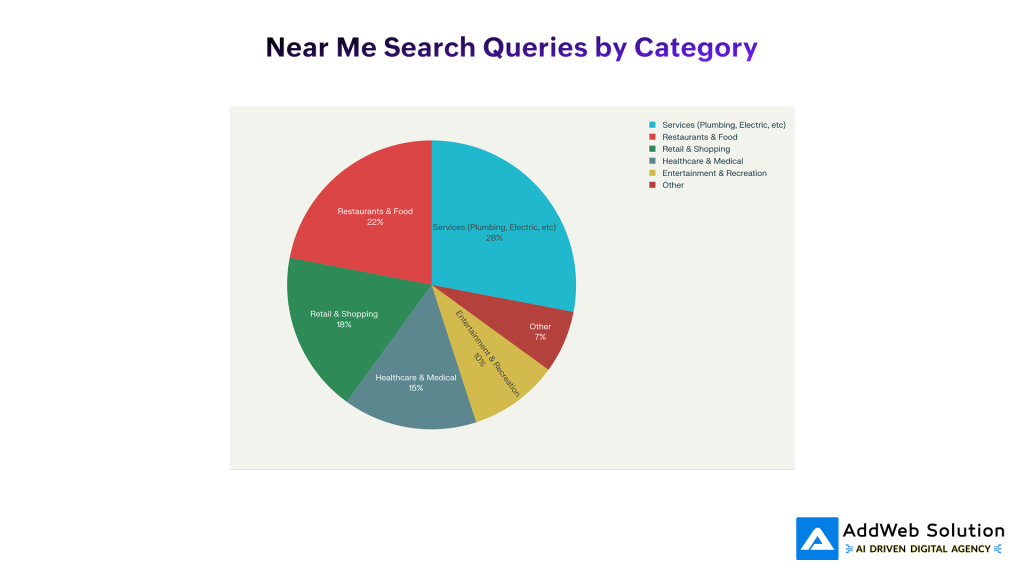
Every single day, Google processes 50 million searches that include “near me” or location-based variations. That’s not per month. That’s daily. Per day. Fifty million times, someone on their phone is looking for a business in their neighborhood.
Now, most of those aren’t relevant to your business. If you’re a plumber in Chicago, you don’t care about the million “restaurants near me” searches happening in New York. But here’s what matters: of those 50 million daily searches, a chunk are specifically for businesses exactly like yours, in neighborhoods exactly where you serve.
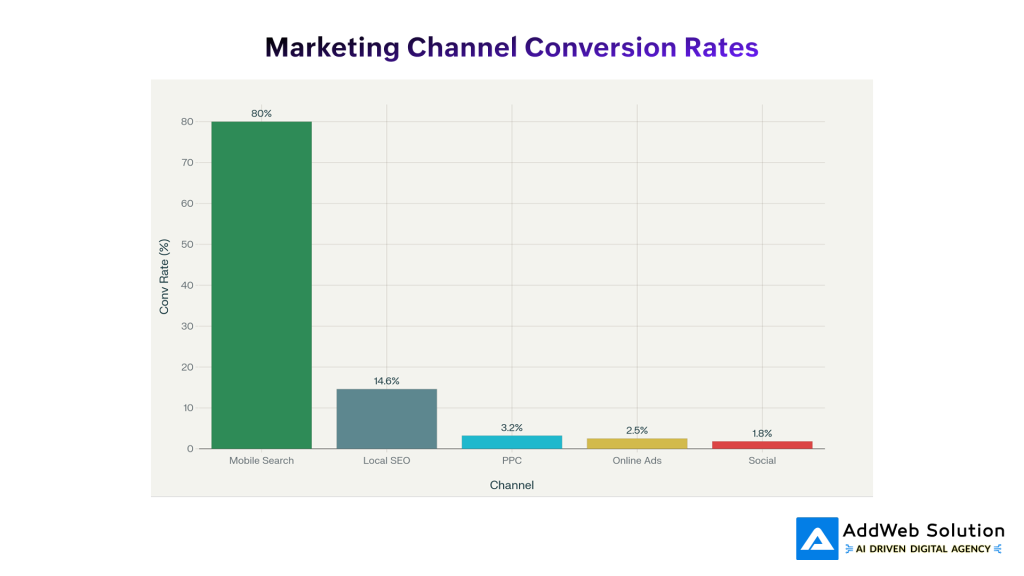
And here’s the uncomfortable truth: 80% of these searches lead to someone taking action; they either visit the business, call them, or make a purchase. That’s not passive browsing. That’s the intent. That’s money.
Think about the math for a second. If you run a plumbing business and you’re showing up for hyperlocal “near me” searches, and even just 2% of those people in your area searching for plumbers become customers, that’s transformational for your business.
But if you’re not optimized for these searches? You’re competing against plumbers who are. And they’re getting the calls. You’re not.
Why This Year Is Actually Different
I’ve been doing this long enough to know when something’s actually changing versus when it’s just marketing hype. 2025 feels different for local search.
First, mobile search has completely taken over. We’re not talking about this being “the future” anymore. It’s just reality. Over 60% of all searches happen on phones. And most of those mobile searches happen on the go; people are literally walking down the street looking for “coffee near me” or “gas station near me.”
The behavior has fundamentally shifted. It’s not “I’ll research businesses later when I get home.” It’s “I need this now, where is it?”
Second, voice assistants are reshaping how people search. My mom uses voice search now. She’ll just say “Hey Google, best pizza place near me” while cooking dinner. And Google’s gotten scarily good at understanding these conversational, location-based queries.
Third – and this is important Google’s algorithm has become way more sophisticated about understanding location. Google isn’t just looking at whether you mention your city on your website anymore. They’re looking at neighborhood-level intent, they’re understanding service areas, they’re getting granular about hyperlocal relevance.
And here’s the kicker: most local businesses haven’t adapted. They’re still playing the old local SEO game. They’re optimizing for city-wide searches. Meanwhile, the entire search landscape has shifted to hyperlocal.
That’s your opportunity.
Understanding What Hyperlocal Actually Means
Before we go further, let me clarify something because this distinction matters more than you’d think.
When I say “hyperlocal,” I’m not talking about city-wide local SEO. I’m talking about neighborhood-level, sometimes block-by-block specific targeting.
Traditional local SEO: “restaurants in Chicago”
Hyperlocal SEO: “Italian restaurants in Lincoln Park Chicago that are open now”
See the difference? One is broad. The other is laser-focused.
When someone searches “dentist near me,” they’re not just saying “I want a dentist in my city.” They’re saying “I want a dentist within a 3-5 mile radius of where I am right now.” They want convenience. They want proximity. They want to walk in within the next 30 minutes.
That’s hyperlocal. And it fundamentally changes your strategy.
Here’s why this matters: when you optimize for hyperlocal searches, you’re not competing against every business in your city. You’re competing against maybe 5-10 businesses in a specific area. That’s way more achievable.
You can actually dominate your neighborhood.
WordPress Isn’t Just for Blogs Anymore
Okay, I need to address something because I see a lot of local business owners who think WordPress is “outdated” or “not professional enough” for a real business website.
That’s outdated thinking.
WordPress now powers 43% of all websites on the internet. More importantly, it powers websites for some of the most sophisticated local businesses; multi-location chains, professional services firms, e-commerce companies. It’s flexible, it’s powerful, and it’s perfect for hyperlocal optimization.
Here’s why specific use of WordPress crushes it for hyperlocal SEO:
The plugin ecosystem is genuinely incredible. I’m not exaggerating. There are plugins specifically designed for local businesses. Plugins that automatically generate location pages, plugins that sync your business info with Google automatically, plugins that handle review management. You can do things in WordPress with a few clicks that would take developers weeks to build from scratch on other platforms.
WordPress makes schema markup stupid easy. You don’t need to be a developer. You install a plugin, answer a few questions, and boom; Google understands your business structure. You’ve got LocalBusiness schema, service area schema, opening hours schema. Google can read it all.
Mobile optimization is built in. Modern themes designed for WordPress are mobile-first by design. They’re not “also works on mobile.” They’re designed mobile-first, everything else is secondary. And Google absolutely loves that.
You can create location-specific content without drowning in duplicates. One of the biggest mistakes I see is businesses copying the same content across multiple location pages. Google penalizes that. But with WordPress, you can create truly unique content for each neighborhood while keeping management simple.
The bottom line: if you’re running a local business on WordPress, you’ve already got 70% of what you need. You just need to know how to optimize it.
Essential Plugins for the WordPress platform for Hyperlocal SEO
I’ve tested basically every local SEO plugin on the market. Here are the ones that actually deliver:
Rank Math (Free + Pro) — The One I Recommend Most
I’m going to be honest: Rank Math is my go-to for most clients. Not because it’s the fanciest. Because it works, it’s affordable, and it doesn’t make you want to tear your hair out.
The free version includes a dedicated Local Business module. You go through a simple setup wizard, answer questions about your business, and the plugin handles the rest. It generates proper LocalBusiness schema markup; the structured data that tells Google exactly what your business is, where it’s located, and what services you offer.
For multi-location businesses, you can create individual location setups for each branch. Chicago office, Nashville office, each one can have its own schema, its own local optimization.
The Pro version adds features like local keyword research and local ranking tracking. You can actually monitor your position for hyperlocal keywords across different neighborhoods.
What I love most: Rank Math’s support community is helpful, the plugin is lightweight (doesn’t slow down your site), and it integrates cleanly with Google Search Console.
Best for: Small to mid-size local businesses, multi-location companies, budget-conscious owners
All in One SEO (AIOSEO) — The Beginner-Friendly Option
If you’ve never done local SEO before and the thought of technical schema markup makes your brain hurt, AIOSEO is your friend.
The setup wizard is genuinely foolproof. It walks you through everything step by step. What’s your business name? Where are you located? What neighborhoods do you serve? After maybe 15 minutes of answering questions, your site has proper local optimization.
The free version includes basic local SEO features. The Pro version adds Google Business Profile synchronization; this is important because it means you’re not manually updating information in two places. Change something in one place, it updates everywhere.
AIOSEO also includes a review aggregation feature. You can display customer reviews from Google, Yelp, Facebook; all in one place on your website. Customers see a portfolio of positive reviews, and your site gets fresher content.
The interface is probably the most user-friendly of any option. If you’re not technically inclined, this is your best bet.
Best for: Beginners, single-location businesses, people who want simplicity
Yoast Local SEO — If You’ve Got Multiple Locations
Yoast is the premium option, and there’s a reason: it handles complexity beautifully.
If you’ve got multiple office locations, multiple storefronts, or you’re managing a franchise, Yoast Local SEO was built for you. You can create individual optimizations for each location. Each one gets its own Google Business Profile connection, its own schema markup, and its own opening hours configuration.
The plugin also handles some really nuanced stuff – holiday hours, specific location contact info, location-specific content. You can have completely different service offerings and pricing at different locations, and Yoast helps you present each location optimally.
If you’re serious about local business and you’ve got more than one location, Yoast is worth the investment.
Best for: Multi-location businesses, chains, franchises, companies with multiple service centers
SEOPress — For Developers and Agencies
SEOPress is the lightweight speedster. It doesn’t come with all the hand-holding of AIOSEO, but that’s kind of the point. If you know what you’re doing, SEOPress gets out of your way and lets you work.
The local SEO module is powerful and customizable. You can configure schema markup however you want, you can create complex local setups, and the plugin runs lean; it doesn’t bog down your site.
For agencies managing multiple client sites, SEOPress offers white-label options. You can remove the SEOPress branding and present it as your own tool.
Best for: Developers, agencies, advanced users, high-performance sites
Key Hyperlocal SEO Strategies for the WordPress Platform
Alright, let’s get tactical. Here’s exactly what you do to dominate hyperlocal search with WordPress.
Step One: Get Your Google Business Profile Completely Dialed In
This might seem obvious, but you’d be shocked how many local business websites have mediocre Google Business Profiles.
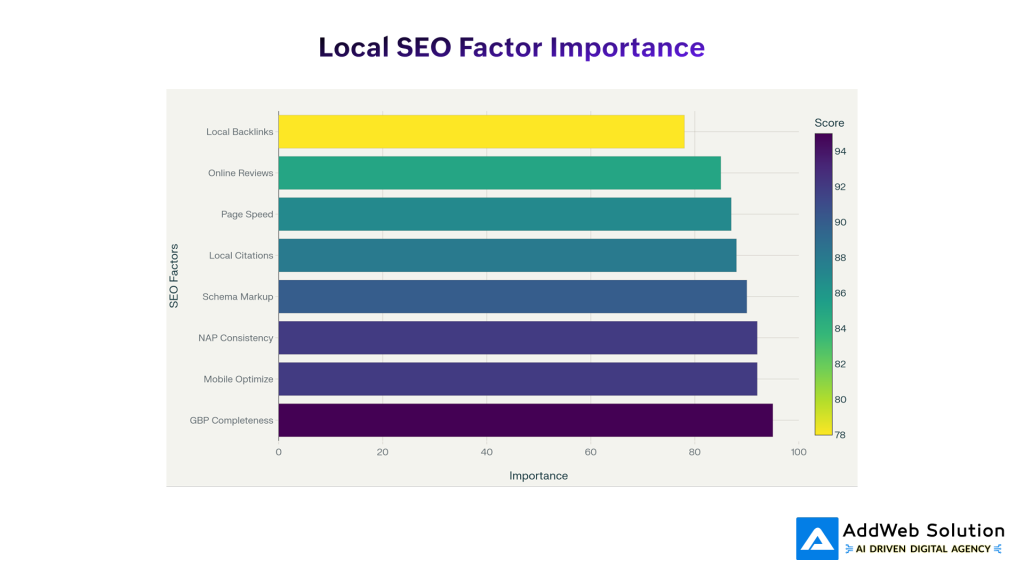
Your GBP is arguably more important than your website. When someone searches “plumber near me,” Google often shows the map pack results before showing any websites. You need to be in that map pack. You need to be top three.
Here’s what “dialed in” means:
- Complete verification. You’ve claimed your business on Google, verified your location, the whole thing.
- Professional photos. Not the picture you took with your phone. Real photos showing your business, your team, your work.
- Every single field filled out. Business hours. Phone number. Service categories. Website link. Address. All of it.
- Detailed business description. Not one sentence. I’m talking 300+ words describing what you do, why you’re different, what neighborhoods you serve.
- Service areas clearly listed. If you’re a handyman serving three neighborhoods, list those neighborhoods specifically.
- Responding to every review. Not just positive ones. Every single review gets a response.
Here’s a number that stuck with me: businesses with complete Google Business Profiles get 70% more visits than those without. That’s not incremental improvement. That’s transformational.
And you should be updating it weekly. Post about special offers, post about new services, post content. Businesses that post regularly outrank those that don’t.
I know this isn’t “technical” SEO, but I’m telling you, this step alone moves the needle more than most people realize.

Step Two: Actually Implement Schema Markup (The Right Way)
Schema markup is basically the language you use to tell Google about your business. It’s structured data; XML that says “this is a business, it’s located here, it’s a dentist, these are the neighborhoods it serves.”
Without schema markup, Google has to guess. With it, Google knows exactly who you are.
Using one of the plugins I mentioned above, you’re going to:
- Install the plugin (like Rank Math)
- Go to Local SEO settings
- Answer the setup questions: business name, address, phone number, what kind of business you are
- Add your service areas (the neighborhoods you target)
- Set your hours
- Save
The plugin creates the schema automatically. You don’t need to understand code. You don’t need to hire a developer. It’s built in.
To verify it worked, go to Google’s Rich Results Test tool, paste your homepage URL, and check the preview. You should see LocalBusiness schema showing up with all your information properly structured.
That’s hyperlocal optimization at a fundamental level. Google now understands your location and service areas at a granular level.
Step Three: Build Real Hyperlocal Landing Pages
This is where I see most sites built with WordPress completely drop the ball.
Too many local businesses have one generic “Services” page. One “About Us” page. One homepage. And they expect that to rank for hundreds of hyperlocal variations.
It doesn’t work that way.
Here’s what actually works: Create dedicated landing pages for each neighborhood you serve.
Let me give you a real example. Say you’re a plumbing business in a city with five distinct neighborhoods: North District, West End, Downtown, Eastside, and South Hills. Here’s what you’d do:
- Main services page: /services/
- North District plumbing: /plumbing-services-north-district/
- West End plumbing: /plumbing-services-west-end/
- Downtown emergency plumbing: /emergency-plumbing-downtown/
And so on.
Here’s the crucial part: each page needs unique content. I’m not talking about swapping out the neighborhood name and calling it a day. I mean genuinely different content.
The North District page mentions local schools nearby, mentions specific landmarks, references neighborhood characteristics. You write 1,000+ words. You include photos from projects in that specific area. You add testimonials from customers in that neighborhood.
When someone in the North District searches for “plumber near me,” they find your North District page. It’s written for them, specifically. It mentions their neighborhood. It shows them work you’ve done in their area. They’re way more likely to call you.
Compare that to what happens when they land on your generic “we serve the whole city” page. Less relevant. Less conversion.
Step Four: Get Your NAP Right (This Matters More Than You Think)
NAP = Name, Address, Phone
And I mean it has to be exactly the same everywhere.
Not “Williams Plumbing” on your website and “William’s Plumbing” on Google. Not “123 Main Street” on your site and “123 Main St” on Yelp. Not “555-1234” in one place and “+1 (555) 1234” somewhere else.
Google uses NAP consistency as a trust signal. If your information is inconsistent across the web, Google gets confused about whether you’re actually one business or multiple businesses. It demotes your rankings because it doesn’t trust the data.
Here’s what you do:
- Audit every place your business appears online: your Site built on the WordPress platform, Google Business Profile, Yelp, Apple Maps, Facebook, any industry directories, citation sites, everything.
- Write down exactly how your NAP appears in each place.
- If there are inconsistencies, fix them. Pick one correct format and update everywhere.
- Do this quarterly because things drift.
It sounds tedious. It is tedious. But it’s also one of the fastest ways to improve your local rankings. I’ve seen businesses jump from page two to page one just by fixing NAP inconsistencies.
Step Five: Stop Ignoring Reviews
Here’s a statistic that should terrify you: 71% of people read reviews before visiting a local business.
More than two-thirds of potential customers are looking at what other people say about you before they ever consider calling.
Not only that, but businesses with more reviews and higher ratings actually rank higher in local search. Google takes reviews seriously.
So here’s what you do:
- Display reviews on your website that uses WordPress. Your plugin probably has this feature built in. Aggregate reviews from Google, Yelp, Facebook – show them all in one place.
- Ask for reviews. After a service is completed, send a follow-up email with a direct link to leave a review on Google. Make it easy.
- Respond to reviews. All of them. Positive reviews? Thank them. Negative reviews? Address the issue professionally, offer a solution if possible.
- Use review content strategically. If a customer mentions your neighborhood in their review (“Best plumber in North District!”), that’s gold for hyperlocal rankings.
The businesses I work with that actively manage reviews consistently outrank those that don’t. This isn’t complicated, but it is important.

Step Six: Think About Voice Search (It’s Real Now)
Voice search is growing, and honestly, it’s changing how people search for local businesses.
Think about it: when was the last time you said “Italian restaurants in Lincoln Park Chicago”? Probably never. But you’ve definitely asked Alexa or Google “what’s a good Italian restaurant near me?” or “where can I get coffee right now?”
Voice queries are conversational. They’re location-based. They’re immediate.
Optimization for voice search that involves WordPress:
- Write in natural language. Your content should sound like how people talk, not how they search on Google.
- Create FAQ pages. People ask questions to voice assistants. “Are you open now?” “How much does this cost?” “Do you accept payment plans?” These are voice search queries.
- Make sure your business hours are prominently displayed on your site in multiple places.
- Your site needs to load fast. Voice search users want instant answers. If your site takes 5 seconds to load, you’ve lost them.
- Make sure you’re mobile-responsive because basically every voice search happens on a mobile device.
The businesses that optimize for voice search now will have an advantage when voice search becomes even more dominant.
Step Seven: Mobile Optimization Isn’t Optional
I don’t even know why I’m including this as a separate step because it’s non-negotiable. If your site isn’t mobile-optimized in 2025, you’ve already lost.
Over 60% of searches are mobile. That percentage is still climbing. For local searches specifically, it’s even higher; probably 70%+ because local searches are often done on the go.
Here’s what mobile optimization means:
- Your site uses a responsive theme (most modern themes for WordPress are, but verify).
- Your site loads fast on mobile. Goal: under three seconds. Real talk: most sites are way slower.
- Click-to-call buttons are obvious and easy to tap.
- Directions buttons work seamlessly.
- Images are optimized (they should be compressed and use lazy loading).
- Text is readable without zooming.
- Buttons and forms are touch-friendly (not tiny buttons that require precise clicking).
If you’re unsure whether your site is mobile-friendly, go to Google’s Mobile-Friendly Test tool, plug in your URL, and see what it says.


What This Actually Looks Like In Results
Let me ground this in real numbers because strategy is nice, but results are better.
I worked with a dental practice in Chicago. Single location, good reviews, been around for 15 years. But they weren’t showing up consistently in the local search results.
We audited their website that uses WordPress. No schema markup. Their Google Business Profile was filled out, but barely. NAP inconsistencies all over the place. No neighborhood-specific content. The mobile site was slow.
We spent about two weeks implementing the stuff I’m talking about:
- Installed Rank Math and set up proper LocalBusiness schema
- Optimized their Google Business Profile completely
- Created five neighborhood-specific landing pages (they serve multiple areas)
- Fixed NAP inconsistencies across the web
- Optimized images and site speed on mobile
- Set up their review collection and display
Six months later:
- They were ranking top-three for four neighborhood-specific keywords
- Phone calls from local search increased by 260%
- They hired an additional hygienist to handle the increased patient volume
- Their cost per new patient from local search was literally zero; it was just being found naturally
That’s real. And it’s not an outlier. It’s what happens when you actually optimize your site for hyperlocal search.

The Mistakes That Kill Local Rankings (Learn From Others’ Pain)
I’ve seen these patterns repeat so many times, I thought I’d call them out:
Mistake One: You Ignore Your Google Business Profile
You put everything into your website, ignore your GBP, and then wonder why you’re not ranking. Meanwhile, your competitors who’ve optimized their GBP are getting all the search visibility.
Your GBP often matters more than your website for local search. Fact.
Fix: Spend 30 minutes weekly updating your GBP. Post new content, update offers, respond to reviews.
Mistake Two: Your Location Pages Are Copy-Paste Duplicates
You write one page about your services, then swap out the neighborhood name and copy it five times. Google penalizes this. It looks like spam.
Fix: Write genuinely unique content for each location. Different photos, different examples, neighborhood-specific references. Each page should feel like it’s written for that specific area.
Mistake Three: Your Site Is Slow on Mobile
This one genuinely confuses me because the tools to fix it are free. But I see it constantly: websites that use WordPress taking 8+ seconds to load on mobile.
You’ve lost the customer before your page even loads.
Fix: Test on Google PageSpeed Insights. Optimize images, enable caching, consider a CDN. Target under 3 seconds on mobile.
Mistake Four: Your Information Is Inconsistent
You say you’re open 9-5 on your site, but your Google Business Profile says 8-6. Your phone number is different on Yelp. Your address has an abbreviation in one place and the full street name in another.
Google gets confused. Your rankings drop.
Fix: Audit every place your business appears online. Use one consistent format everywhere. Check quarterly because things drift.
Mistake Five: You’re Not Collecting Reviews
Reviews are a ranking factor. They’re also a trust signal. When customers see lots of positive reviews, they’re way more likely to call.
If you’re not actively asking for reviews, you’re leaving ranking power on the table.
Fix: After every service, send a review request. Make it easy; include a direct link to leave a review on Google. Respond to reviews that come in.
How to Actually Measure If This Is Working
You need to track progress. Otherwise, you’re just guessing.
Here’s what matters:
Local Pack visibility: How many times does your business show up in Google Maps results or the local pack? Tracked in Google Search Console.
Website traffic from local searches: Google Analytics can tell you how much traffic comes from local search queries. Filter by geography and search terms.
Phone calls: This is the real metric. Google Business Profile tracks how many people click your call button. Are you getting more calls?
Direction requests: Google tracks when people request directions to your business. Are those numbers going up?
Ranking position: For your target hyperlocal keywords, where do you rank? Use Rank Math’s rank tracking feature.
Review velocity: Are you getting more reviews? Is your average rating stable or improving?
Honestly, the real metric is business impact: more calls, more in-store visits, more revenue. Those are what matter. Everything else is just a leading indicator.
The Real Timeline
Let me be honest about this: hyperlocal optimization isn’t a overnight transformation.
Months 1-2: You’re implementing the fundamentals. Schema markup, Google Business Profile optimization, creating location pages. You might start to see some movement in rankings, but honestly, it’s early.
Months 3-4: Things are really starting to shift. You’re appearing in local search results more consistently. Phone calls start increasing noticeably.
Months 6+: By month six, you should see dramatic differences if you’ve done this right. Top-three rankings for neighborhood keywords, consistent phone calls, real business growth.
Months 6-12: This is where you truly dominate. You’re not just visible; you’re the obvious choice. When someone in your neighborhood searches for your service, you’re what they find.
The timeline assumes you’re actually executing these steps. If you’re doing it half-heartedly, it’ll take longer.
Schedule a free consultation and receive expert guidance today.

Pooja Upadhyay
Director Of People Operations & Client Relations
So Here’s The Thing
I started this talking about my client with three dental offices who weren’t showing up in “near me” searches despite 15 years in business. She was frustrated because her business was good, but nobody could find her.
We fixed that. She now ranks at the top of local search results in multiple neighborhoods. Her phone rings constantly with new patients. She’s had to expand her practice to handle the volume.
That could be your story. Your site that uses WordPress is already set up. Your business is probably good. You’re just missing the hyperlocal optimization piece.
You don’t need to hire an expensive agency. You don’t need to rebuild your site. You need to do the work I’ve outlined in this article.
Install a plugin. Optimize your Google Business Profile. Create neighborhood-specific content. Fix your NAP consistency. Ask for reviews. Optimize for mobile.
Do these things consistently for six months, and your local search game will transform.
The neighborhoods are hungry for businesses that show up when they search. Make sure that’s you.
