



Micro-frontends in React are neither a silver bullet nor a fad: they’re a practical way to let multiple teams ship parts of one product independently but they come with real costs in performance, consistency, and coordination if adopted too early or without strong guardrails. Micro-frontends work best when the organization problem (many teams, many releases, slow coordination) is bigger than the technical problem.
What micro-frontends really are
Micro-frontends are an architectural style where independently deliverable frontend applications are composed into a larger whole.
In plain terms: instead of one big React app owned by one team, you split the product into “slices” (like Search, Checkout, Account) that different teams can build and release on their own, while the user still experiences “one website.”
A simple mental model (non-technical)
Think of a mall. Each store (team) controls its own space, inventory, and promotions, but the mall still needs shared rules, signage, accessibility, opening hours, and security—so customers don’t feel chaos. Micro-frontends are the “mall model” applied to UI delivery: autonomy plus governance.
Why the hype happened
The hype is rooted in a real pain: as a frontend codebase grows, releases slow down because teams step on each other’s toes, coordination increases, and even small UI changes can become high-risk.
Micro-frontends promise organizational scalability, more teams, faster shipping, by reducing the amount of “everyone must synchronize” work.
What teams hope to get
- More independent releases (less “wait for the big release train”).
- Clear ownership boundaries (“this area belongs to Team Checkout”).
- Freedom to evolve parts of the UI without rewriting the entire app.


The reality: benefits are real, but conditional
Micro-frontends tend to shine when the product is large, the teams are many, and ownership boundaries are stable (not constantly changing).
They can also enable technology diversity (e.g., gradual modernization), but that flexibility can backfire if it turns into fragmentation without standards.
Here’s a grounded way to view the “help vs. cost” dynamic:
- They often improve team autonomy and deployment cadence.
- They often increase integration overhead, like alignment on shared UI rules and handling cross-cutting experiences.
Illustrative visuals (not benchmark data):

Illustrative charts (not benchmark data) showing where micro-frontends often help and how integration overhead can rise as the number of fragments grows.
Hard lessons (the part most blogs skip)
Micro-frontends can fail for reasons that have nothing to do with React and everything to do with product coherence and operating model.
Below are the recurring “hard lessons” seen across implementations and anti-pattern writeups: duplicated dependencies, inconsistent UX, blurred boundaries, and performance regressions when many independently-built pieces load together.
Empower Your Digital Transformation With Our Web Development Services!

Pooja Upadhyay
Director Of People Operations & Client Relations
Common pitfalls and what they feel like
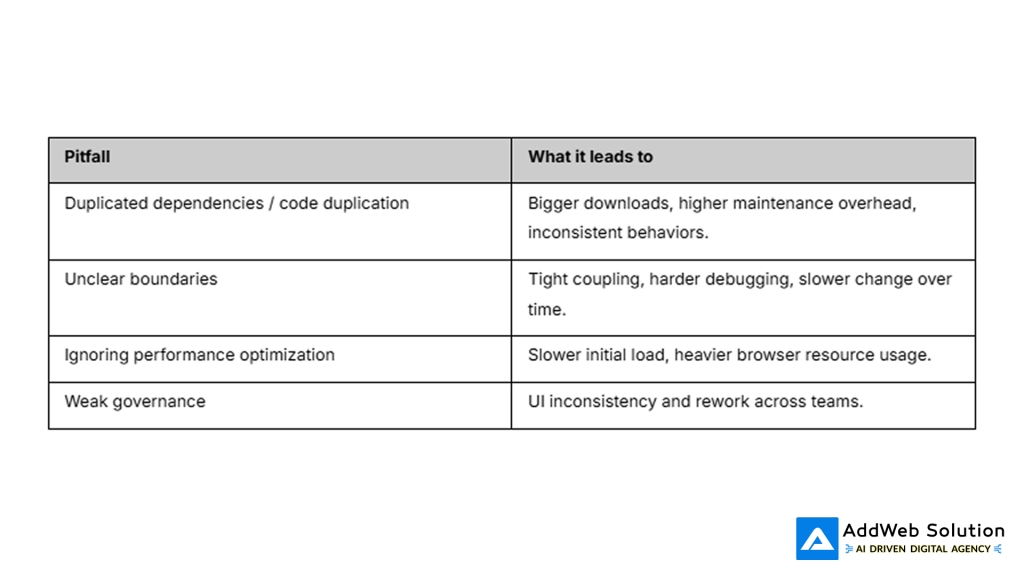
- Performance drag: multiple independently built parts can increase load time and browser overhead, especially if each ships its own similar libraries or heavy code.
- Duplication and drift: teams solve the same problem in different ways (state, utilities, UI widgets), creating bloat and inconsistent behavior.
- Boundary confusion: unclear module responsibilities lead to tangled dependencies and harder debugging.
“Micro-frontends made us slower” happens when…
- The product isn’t big enough to justify the coordination layer.
- Teams lack strong governance (shared standards, shared UX rules, shared release discipline).
- The architecture optimizes for independence but forgets the user experience must still feel unified.
Real-world signals (case studies)
Large organizations have used micro-frontends to enable many teams to work on one customer experience in parallel.
Zalando’s Mosaic (and later evolution) is often cited as a micro-frontend approach using “fragments” owned by different teams that are stitched into a single page experience.
Examples and writeups also commonly mention companies like IKEA, Spotify, and DAZN using micro-frontends to support modular ownership and frequent updates (with varying integration approaches).
A practical decision guide (non-technical)
Use this checklist to decide whether micro-frontends are a fit right now.
Good fit signals
- Many teams frequently ship to the same UI, and coordination is a bottleneck.
- Clear domain boundaries exist (Checkout vs. Account vs. Search) and won’t change weekly.
- Leadership is willing to invest in governance (standards, shared UX rules, observability).
Not-yet signals
- One or two teams can still ship quickly in a single codebase.
- The product is evolving so fast that boundaries are unclear and would constantly move.
- The organization wants “independent teams” but isn’t ready for the shared responsibility of consistency and performance budgets.
Tables you can include in the blog
Hype vs. reality table

Pitfalls and consequences
How to do it without regret (operating model first)
A consistent theme in real-world guidance is that micro-frontends need deliberate upfront design, a clear orchestration approach, and strong governance to define boundaries and ensure teams collaborate effectively.
If the organization can’t commit to those fundamentals, a simpler approach (modular monolith frontend, better code ownership rules, stronger shared component library) is often safer until scale forces the change.
If this should be tailored to your audience: is the blog aimed at startup founders/product leaders, engineering managers, or frontend developers on a growing team?
- https://martinfowler.com/articles/micro-frontends.html
- https://www.mckinsey.com/capabilities/tech-and-ai/our-insights/tech-forward/need-micro-frontend-benefits-at-scale-reimagine-the-operating-model
- https://www.peoplehum.com/blog/micro-frontends-a-complete-guide
- https://www.sitepoint.com/micro-frontend-architecture-pitfalls/
- https://www.geeksforgeeks.org/system-design/micro-frontends-anti-patterns/
