


The era of building around a monolithic CMS is long gone. Legacy systems that once powered digital operations now hold enterprises back, while competitors deliver faster, more personalized experiences.
Shifting from an old CMS to an enterprise experience architecture isn’t just a tech update – it’s a new way to create customer value. And Drupal, paired with composable architecture, is becoming the go-to blueprint for scalable digital growth.
The Real Cost of Staying Legacy: Why Migration Matters Now
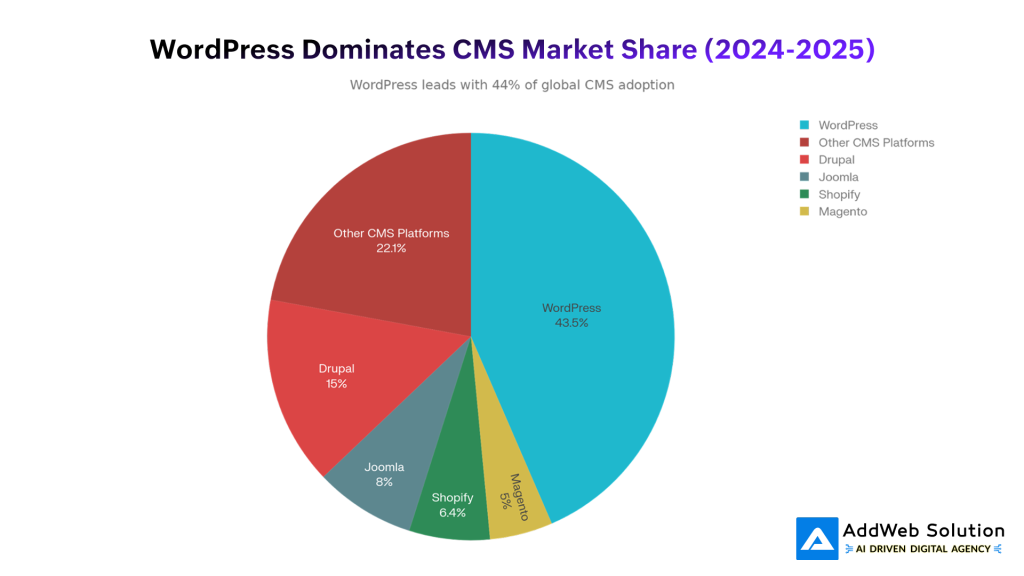
Legacy CMS platforms aren’t just outdated—they’re holding businesses back. The CMS market is growing fast, but that growth is going to organizations that modernized early, not those stuck on decade-old systems.
Why legacy CMS is becoming a liability:
- Hard to integrate: These systems were built for websites, not today’s world of apps, IoT, voice, and social. Teams end up duplicating content or paying for fragile custom integrations.
- Slow workflows: When you’re publishing across 10+ channels, a CMS that only thinks in “webpages” slows everything down. Many teams lose 20–30% of their productivity fighting technical limitations.
- Security gaps: Modern compliance needs—FedRAMP, HIPAA, CCPA—are tough to meet with legacy tech. That’s why platforms like Drupal power 56% of government sites in 150+ countries.
- No real personalization: In 2025, personalization is the expectation. But most legacy CMS platforms don’t have the APIs or data flexibility needed for real-time, AI-driven experiences.
It’s no surprise that 81% of organizations now use more than one CMS because their old platforms can’t support modern demands—creating silos, inefficiencies, and even compliance risks.
Modernizing isn’t a “nice to have” anymore. It’s how organizations stay competitive.
Understanding Enterprise Experience Architecture: Beyond Content Management
Before we get into migration frameworks, it’s important to understand what “enterprise experience architecture” really means—because it’s nothing like traditional CMS thinking.
Enterprise architecture connects business strategy to execution across four layers:
- Business: How the organization operates.
- Applications: The software supporting workflows.
- Data: How information moves and is shared.
- Technology: The infrastructure behind it all.
When you apply this to content, the question shifts from “Which CMS should we buy?” to “How do we build a content ecosystem that can evolve for the next decade?”

That’s where composable architecture and MACH principles come in—Microservices, API-first, Cloud-native, and Headless. They’re not a product; they’re a way of building systems that stay flexible.
- Microservices: Instead of one giant CMS, each function—content, search, personalization—runs as its own service.
- API-first: Everything connects cleanly, so teams can work independently and deliver faster.
- Cloud-native: The system scales automatically and cost-effectively.
- Headless: Content lives in one place, but can power websites, apps, and any future channel.
Traditional CMS platforms are tightly coupled and hard to change. Composable architecture works like a flexible ecosystem—you upgrade or swap pieces without ever doing a painful full-platform migration again.
The Drupal Advantage: Why Enterprises Choose It for Strategic Migrations
Drupal has become the top choice for enterprise migrations, especially in government, education, and large brands. It powers 56% of global government sites and thousands of universities – because it solves problems legacy CMS platforms can’t.
Why enterprises pick Drupal:
- Strong security: FedRAMP-ready, HIPAA-friendly, and backed by a dedicated security team.
- Built for composable/headless: JSON:API and GraphQL come built in.
- Modern for developers: Powered by Symfony 6 and modern PHP.
- Better for editors: Claro and CKEditor 5 offer a clean, accessible, collaborative experience.
- Future-proof: Starterkit theming and strong config tools make upgrades smoother.
In short: flexible, secure, scalable—and built for enterprise realities.

Drupal Migration ROI — What the numbers show
Enterprises that switch to Drupal see clear gains:
- Most organizations report major improvements after migrating.
- 79% say their biggest pain points were resolved.
- Over half found the new CMS easy to adopt.
Real cost wins make the case even stronger:
- Bentley University cut costs by 75%.
- Johnson & Johnson reduced build costs by 59%.
- Urban eliminated IT involvement in content updates entirely.
Typical Drupal migrations range from $15K–$85K (more for complex builds), and most organizations break even within 18–24 months thanks to lower maintenance costs, faster content delivery, and stronger security.
Building Your Migration Strategy: A Framework That Works
There’s no single “right way” to migrate from legacy CMS to enterprise architecture. Different organizations require different approaches. Understanding the four primary strategies helps you choose the path that fits your business reality.
Migration Strategy Comparison

Rehost (Lift & Shift)
Move the old system to the cloud without changing the code. Fast, low-risk—but not true modernization.
Best for: Stable systems that just need to get off aging servers.
Replatform
Make light upgrades (OS, database, runtime) before migrating. You get some modernization without rebuilding.
Best for: Teams with tight budgets who want practical improvements.
Refactor
Rewrite key parts to make the system cloud-native and future-ready. Takes more time and expertise but delivers long-term value.
Best for: Mission-critical systems and orgs planning major digital transformation.
Replace with SaaS
Retire the legacy system and switch to a modern SaaS tool. Simple and low-maintenance.
Best for: Basic content needs or teams that don’t want to manage infrastructure.
Most enterprises choose replatforming with modern Drupal—it keeps existing knowledge, avoids full rewrites, and unlocks modern capabilities.


The Five-Phase Migration Roadmap
Phase 1: Assessment
Audit what you have—content, integrations, performance, security issues, and team skills.
Takes 4–8 weeks and uncovers the technical debt that shapes the whole migration.
Phase 2: Strategy & Architecture
Decide your migration path (rehost, replatform, refactor, or replace), choose the new platform, design the architecture, map APIs, and plan rollout.
Usually 6–12 weeks with input from business, IT, and content teams.
Phase 3: Migration Execution
Move in waves, not a risky “big bang”:
- Wave 1: Non-critical content
- Wave 2: Core content with both systems running
- Wave 3: Full switch-over
Each wave takes 3–6 weeks depending on volume.
Phase 4: Validation & Testing
Check content accuracy, integrations, SEO, security, and compliance before going live.
Skipping this can cause major issues—like traffic drops.
Phase 5: Optimization & Handoff
Post-launch tuning: performance fixes, training, documentation, quick wins, and final security checks.
Takes another 4–8 weeks to fully stabilize.

The Business Case: Why Migration ROI Actually Stacks Up
Enterprises often hesitate on migration projects because the upfront cost feels substantial. Yet the financial case, when properly calculated, strongly favors modernization.
Tangible Cost Reductions
- Lower IT overhead: Modern platforms like Drupal cut routine maintenance and custom dev needs.
- Cheaper hosting: Cloud-native systems scale only when needed, reducing wasted infrastructure costs.
- Faster content creation: Removing CMS bottlenecks boosts editor productivity; over half of companies report time savings after migrating.
- Fewer tools to manage: Modern, API-first platforms replace multiple third-party systems, reducing licenses and integration spend.
Revenue Enablement
- Faster time-to-market: Modern CMS platforms help teams launch campaigns and experiences quicker—70% of enterprises see this benefit.
- Higher conversions: Personalization can lift conversion rates by ~8% and average order value by ~9%.
- Better retention: Even small performance upgrades cut churn and improve engagement.

Measuring ROI
Start with real baselines—current costs, performance, and production speed—then compare against expected gains.
Most companies break even in 18–24 months, with full ROI in 3–5 years.
Example:
A pharma company spending $245K/year on its legacy CMS migrated to Drupal for $65K and now spends $35K/year.
Outcome: Paid back in 3 months and saves over $200K annually—plus faster product launches that drive revenue.
Enterprise Experience Architecture in Practice: Real Implementation Patterns
Understanding frameworks is one thing; seeing how enterprises actually architect these systems is another. Here are patterns that work.
Pattern 1: Headless Drupal + React
Drupal handles content; React/Next.js handles the frontend through APIs.
Why it works:
- Devs get full UX freedom
- Editors publish without waiting on deployments
- One content source powers web, mobile, and more
- Easy A/B testing
Who uses it: Healthcare, e-commerce, media.
Pattern 2: Composable Stack with Best-of-Breed Services
Drupal for content, paired with tools like Algolia (search), Segment (personalization), Shopify API (commerce), Amplitude (analytics).
Why it works:
- Every piece is optimized
- Swap or upgrade services anytime
- Scale each function independently
- Future-proof architecture
Who uses it: Large retailers, global enterprises.
Pattern 3: SaaS for Simple Needs, Drupal for What Matters
Use Drupal for core experiences, SaaS for non-strategic systems (e.g., Salesforce, Workday, Notion).
Why it works:
- Focus engineering on competitive areas
- Reduce maintenance
- Faster rollouts
- Built-in compliance and reporting
Who uses it: Mid-market and large enterprises across industries.
Overcoming Migration Challenges: The Reality of Large-Scale Transitions
Migrating away from legacy systems is complex. Here are the challenges enterprises actually face and how to address them.
Challenge 1: User Adoption
Most migration issues come from people, not tech. Teams resist new workflows or fear losing control.
Fix:
- Train early
- Involve power users in decisions
- Create “CMS champions” in each team
- Expect a short dip in productivity, then strong gains
Challenge 2: Messy Data
Legacy content is full of inconsistencies—broken links, bad metadata, old assets.
Fix:
- Audit everything first
- Use automated tools to catch issues
- Plan for some manual cleanup
- Let content teams review their own sections
Challenge 3: Complex Integrations
Old systems often tie into many tools—some outdated, some lacking APIs.
Fix:
- Map all integrations early
- Work with vendors upfront
- Use API gateways to modernize connections
- Expect a few custom bridges
Challenge 4: Security During Transition
Running two systems at once can create temporary security gaps.
Fix:
- Use a clear, phased cutover plan
- Keep parallel systems minimal
- Use a “strangler pattern” to replace pieces gradually
- Have security validate each stage
Turn Drupal into a complete digital experience platform

Pooja Upadhyay
Director Of People Operations & Client Relations
Conclusion: The Time for Modernization Is Now
Moving from a legacy CMS to a modern, composable architecture isn’t just an upgrade – it’s a competitive advantage. Drupal gives enterprises the security, flexibility, and scalability old systems simply can’t match. Yes, migration takes planning, but the payoff is clear: lower costs, faster delivery, better personalization, and a digital foundation built for the future.
Teams that make this shift don’t just modernize their tech—they unlock new business value. This is how organizations stay agile, relevant, and ready for the next decade of digital growth.
Quick Facts to Remember

Source URLs
- https://www.mordorintelligence.com/industry-reports/cms-market
- https://github.com/machalliance/standards/blob/main/reference/architecture-explained.md
- https://www.contentful.com/blog/everything-about-mach-architecture/
- https://www.f5.com/company/blog/nginx/benefits-of-api-first-approach-to-building-microservices
- https://nitropack.io/blog/post/website-performance-metrics
- https://www.statista.com/statistics/1473607/worldwide-organizations-data-move-to-public-cloud/
- https://www.theecmconsultant.com/enterprise-content-management-challenges/
