


Integrating MERN with AR try-on unlocks a powerful growth engine for fashion startups by boosting conversion, reducing returns, and delivering immersive, social-friendly shopping experiences. Using MERN as the backbone for data, APIs, and UI while delegating real-time 3D/face tracking to WebAR SDKs such as Banuba, 8th Wall, or Zappar gives startups a practical, scalable path from MVP to production.
Why AR Try-On Matters in Fashion
AR try-on lets shoppers see how outfits, accessories, or makeup look on their body or face using just a camera, which directly tackles size anxiety and return risk in fashion e-commerce. Retail research shows that virtual fitting rooms and AR try-ons can cut returns by roughly a quarter while increasing buyer confidence and time spent on site.
Social platforms also prove the business impact: AR campaigns for fashion and beauty brands have driven tens of millions of try-ons and multi-million-dollar revenue spikes in days, highlighting how “try before you buy” in AR pushes users from curiosity to checkout. For early-stage brands, adding lightweight WebAR to a MERN storefront is often cheaper than opening physical stores or running heavy photo shoots for every variant.
MERN as the Engine Behind AR
MERN (MongoDB, Express, React, Node.js) follows a model–view–controller style architecture, where MongoDB handles data, Express and Node.js provide the API and business logic, and React powers a fast, component-based front end. This all-JavaScript stack is ideal for AR because the same language runs on the server, in the browser, and inside most WebAR SDKs, simplifying developer onboarding and speed.
For AR try-on, the MERN stack typically plays these roles:
· MongoDB: Stores products, 3D assets (paths/URLs), body/face fit metadata, sessions, and analytics.
· Express/Node: Secures APIs for product search, AR asset retrieval, and event logging (e.g., “tried item X in AR for 18 seconds”).
· React: Renders product pages and embeds the AR viewer (iframe, canvas, or WebXR overlay) as a reusable component.
· Integrations: Communicates with external AR SDKs and CDNs that host high-resolution 3D models and textures.
AR Try-On Architecture on MERN
A typical high-level architecture for MERN + AR try-on in a fashion startup looks like this:
· Client (React):
o Product listing and detail views.
o “Try in AR” button and AR modal/component.
o State management for selected size, color, and device permissions.
· AR Layer (WebAR SDK in browser):
o Face or body tracking (e.g., for glasses, jewelry, makeup, or clothing overlays).
o Rendering pipeline using WebGL/WebXR via frameworks like Three.js or A‑Frame.
o Real-time position/rotation updates to keep items aligned with the user.
· Backend (Node + Express):
o REST/GraphQL APIs for products, 3D asset manifests, and user profiles.
o Analytics endpoints to record AR interactions (e.g., number of try-ons per product).
· Database (MongoDB):
o Collections for Products, Assets, Users, Orders, and ArEvents (AR usage logs).
o Flexible schemas so new item attributes (e.g., “virtual lens tint” or “avatar type”) can be added quickly.
Sample Data Model for AR-Ready Fashion Catalog
For startups, the product model should be extended to include AR-specific fields, such as 3D model paths, scaling hints, and tracking type (face/body/room). A simple MongoDB-style representation could be structured like the table below.
Sample Product Fields for AR Try-On

This level of structure helps content teams and 3D artists work efficiently with developers, ensuring that each SKU has both visual assets and AR-ready data. It also makes it trivial to query “all AR-enabled products” on the backend and promote them in marketing campaigns.
Choosing the Right WebAR Toolkit
Fashion startups rarely build tracking and rendering from scratch; instead, they plug in dedicated WebAR SDKs that can run in a mobile browser without requiring a native app. Different providers specialize in specific use cases like facial overlays, full-body try-on, or product placement in a room.
Popular WebAR Options for Fashion Try-On

For early-stage teams, SDKs that offer out-of-the-box face filters and try-on templates reduce time-to-market dramatically compared with building full pipelines on top of raw WebGL. As traction grows, teams can progressively move heavier logic to custom Three.js/A‑Frame scenes while keeping MERN as a stable backend and content hub.
Example User Flow: From Feed to AR Try-On
A conversion-focused flow for a MERN + AR fashion startup might look like this:
1. User taps an Instagram or TikTok ad and lands on a React product page.
2. React fetches product and AR metadata via an Express API.
3. “Try in AR” button checks camera permissions and opens the AR component (Banuba/8th Wall scene).
4. WebAR layer detects face or body, loads the 3D asset, and overlays it in real time.
5. While the user interacts, events such as “AR_SESSION_START”, “MODEL_LOADED”, and “AR_TO_CART” are posted to a Node endpoint and logged in MongoDB.
6. If the user adds to cart after try-on, an “AR_ASSISTED_CONVERSION” flag is attached to the order for analytics.
This loop creates a measurable link between AR usage and revenue, which is critical for investor conversations and internal prioritization. Data also reveals which products perform best in AR, guiding future 3D asset investments.
Visualizing AR’s Business Impact
Industry research on fashion e-commerce shows that AR try-on tends to increase conversion rates and time on site while decreasing product returns. The illustrative chart below summarizes these directional shifts for a fashion startup adding WebAR to its MERN storefront.
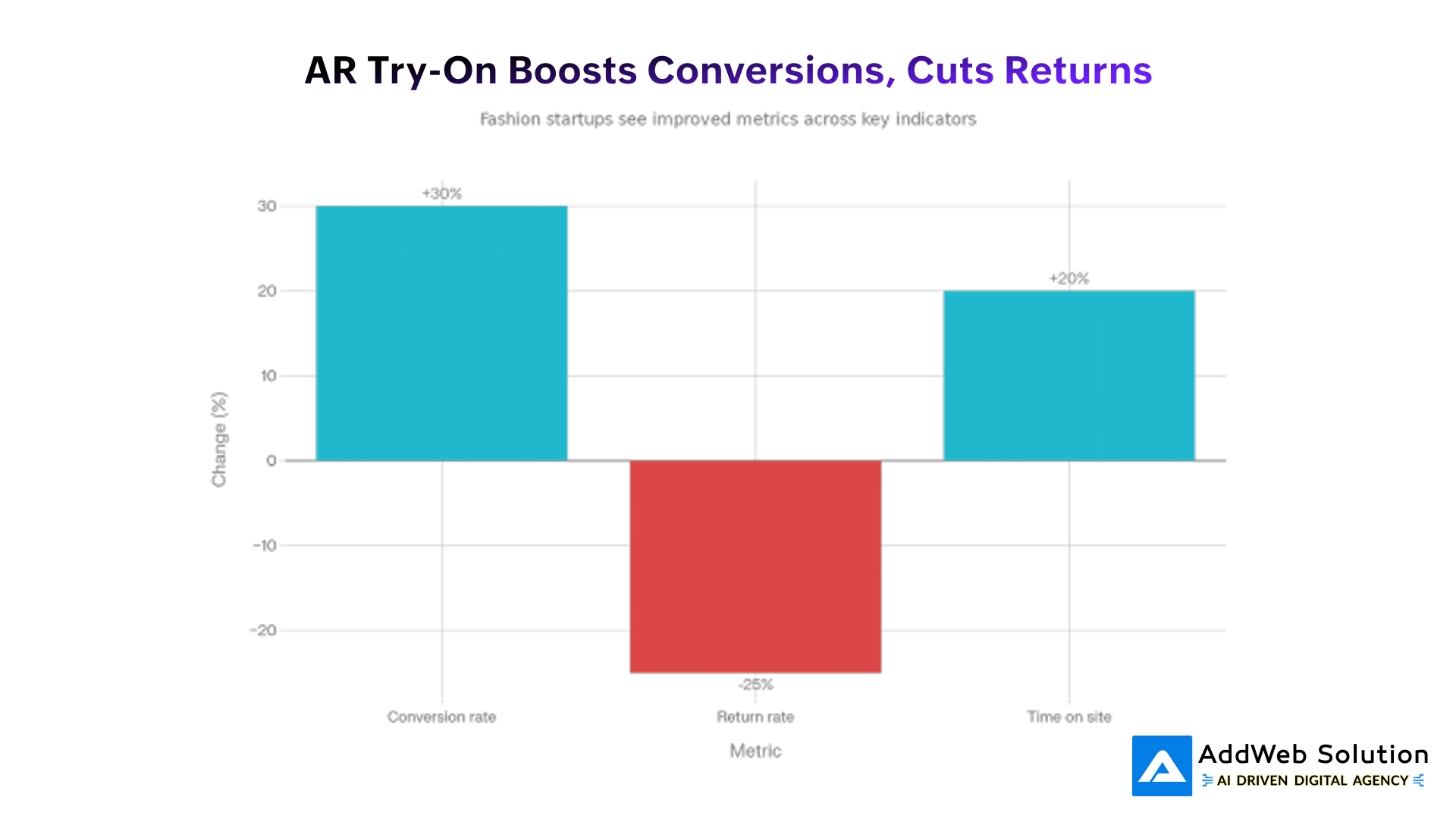
Impact of AR Try-On on Fashion E-Commerce Metrics
In many documented cases, AR campaigns have driven substantial lifts in engagement and purchase intent, with some beauty and fashion brands reporting double- or triple-digit increases in product page interactions. At the same time, improved fit visualization and more confident purchasing behavior contribute to measurable reductions in return rates.
Sample Metrics to Track in Your MERN App
To quantify AR performance, the MERN backend should expose endpoints that log every AR session and its outcome. Over time, this data becomes the foundation for growth experiments, personalized recommendations, and fundraising decks.
Key AR Try-On Metrics for Fashion Startups
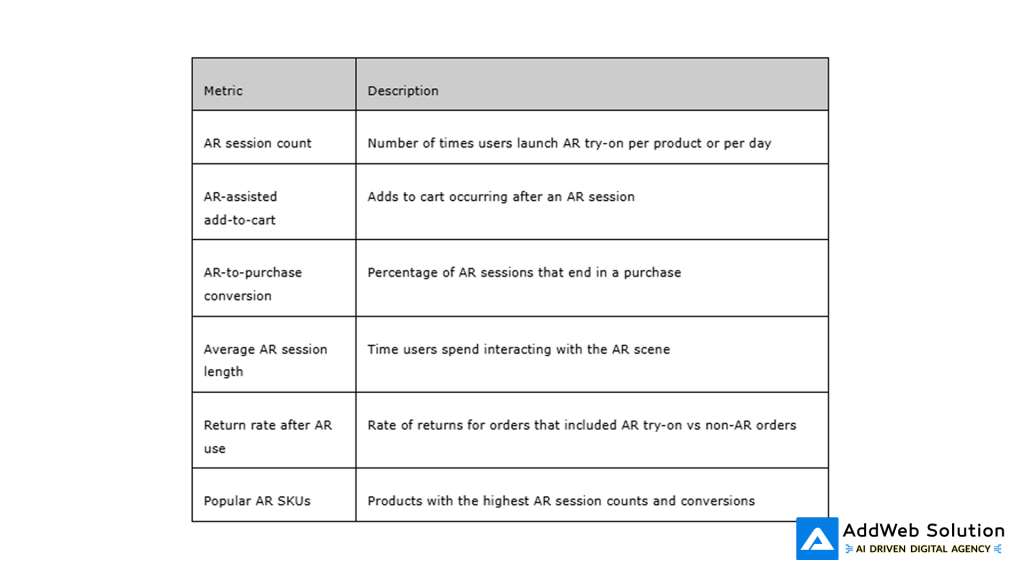
Tracking these metrics in MongoDB (e.g., in an ar_events collection) allows dashboards in React to show which campaigns or product lines are most AR-responsive. Even simple cohort comparisons (users who tried AR vs those who did not) can highlight ROI, guiding where to extend AR coverage next.


Front-End Implementation Patterns in React
From a React standpoint, AR modules should be built as isolated components that can be dropped into multiple product pages without code duplication. A common strategy is to create an <ArTryOn> component that receives product and AR configuration as props and internally handles SDK initialization, permission prompts, and error states.
Recommended React patterns for AR:
· Lazy-load AR scripts only when users click “Try in AR” to keep first paint and Core Web Vitals healthy.
· Use context or a lightweight store (e.g., React Context, Redux Toolkit, or Zustand) to share camera permission state and AR session flags across pages.
· Fall back gracefully to 3D viewers or additional lifestyle images on unsupported devices while still logging intent.
These techniques help avoid bloated bundles and ensure that users who are not interested in AR do not pay the performance cost for those who are. For fashion startups running paid acquisition, better page performance often translates into lower bounce rates and improved ad ROAS.
Backend and DevOps Considerations for Startups
On the server and infrastructure side, startups must balance AR responsiveness with cost. Since MERN handles requests, data, and analytics rather than heavy 3D rendering, most loads are API- and storage-oriented rather than GPU-heavy.
Practical backend decisions:
· Use CDN hosting for large 3D models, textures, and AR effect files to reduce latency for global shoppers.
· Implement rate limiting and authentication on analytics endpoints to prevent abuse, especially if public AR experiences go viral.
· Cache frequently requested product and AR metadata at the edge using reverse proxies or managed CDNs to speed up catalog browsing.
As traffic scales, Node.js services can be containerized and auto-scaled, while MongoDB Atlas or similar services offer managed clustering and global replication. This allows small teams to focus on AR UX and content rather than database ops and server maintenance.
Content and UX Best Practices for Fashion AR
AR try-on is not just a technical feature; it is also a content and storytelling tool. Brands that win with AR usually combine high-quality 3D assets with clear onboarding and social-friendly design.
Best practices for fashion content in AR:
· Provide short tooltips or a one-step tutorial (e.g., “Align your face in the frame” or “Step back to see full outfit”).
· Offer a quick screenshot or recording button so users can share looks on social platforms, feeding organic growth loops.
· Display clear CTAs once try-on is complete, such as “Add to cart”, “Save to wishlist”, or “Compare colors”.
In addition, maintaining consistent visual identity between standard product images, AR assets, and social creatives helps shoppers feel continuity as they move from feed to AR to checkout. This alignment is especially important for young fashion brands building trust for the first time.
Explore MERN + AR: Start Building Your Try-On Experience Today

Pooja Upadhyay
Director Of People Operations & Client Relations
Roadmap: From MVP to Advanced Features
After shipping a basic AR try-on MVP on MERN, startups can layer in more advanced capabilities over time. Typical roadmap steps include:
· Phase 1: Single-category AR try-on (e.g., glasses) with one SDK, basic analytics, and limited geography.
· Phase 2: Additional categories (jewelry, hats, makeup), deeper analytics dashboards in React, and A/B testing around AR CTAs.
· Phase 3: AI-driven personalization, such as recommending styles based on historical AR choices or face shape, powered by additional microservices.
· Phase 4: Cross-channel AR, including QR codes in pop-ups or packaging that open WebAR experiences backed by the same MERN backend.
Each step leans on the original MERN foundation, MongoDB schemas, Express APIs, and React UI, but adds new microservices or SDK capabilities at the edges. For founders, this staged approach limits upfront risk while steadily converting AR from a novelty into a core revenue engine.
If needed, the blog content above can be expanded with code snippets, detailed sequence diagrams, or additional charts tracking AR-assisted conversions over time.
Resources
1. https://www.brandxr.io/2025-augmented-reality-in-retail-e-commerce-research-report
3. https://herovired.com/home/learning-hub/blogs/mern-stack
5. https://www.banuba.com/webar-sdk
6. https://ijrpr.com/uploads/V6ISSUE11/IJRPR55556.pdf
7. https://bestcolorfulsocks.com/blogs/news/augmented-reality-fashion-statistics
8. https://ijcrt.org/papers/IJCRT2205949.pdf
10. https://www.brandxr.io/the-best-webar-experiences-you-must-try
