


This blog was originally published on August 12, 2025, and has been fully updated on Jun 26, 2026. All statistics, trends, technology references, and best practices have been revised to reflect the current landscape of custom software development.
The online space is rapidly changing, and companies that do not keep up will be left behind. AI chatbots are no longer a luxury item; they’re becoming necessary for sites that desire to remain relevant in 2026. With the international AI chatbot market set to boom from $15.6 billion in 2024 to an estimated $46.6 billion in 2029, it is obvious that intelligent businesses are already making the move.
But here’s the catch: just having a website is no longer good enough. Your customers expect instant answers, 24/7 help, and tailored experiences. When they don’t receive it, 82% will opt for a chatbot instead of waiting for human assistance. That is not merely a statistic, it’s your customers directly informing you exactly what they need.

Why Your Site Desperately Needs an AI Chatbot for WordPress
Let’s get past the marketing hype and speak about actual numbers. Companies that use AI chatbots are observing drastic gains in all the metrics that count:
The Financial Impact That’ll Make Your CFO Smile
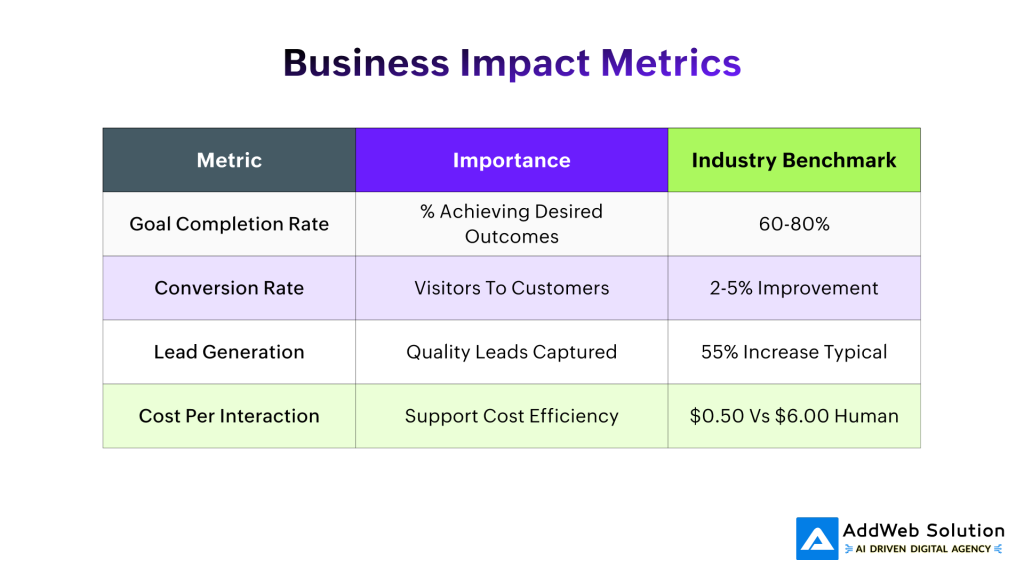
Cost savings are immediate and substantial. While a human support interaction costs around $6.00, a chatbot interaction costs just $0.50. That’s a 92% cost reduction that goes straight to your bottom line. Companies are saving up to 30% on customer service costs, which translates to approximately $8 billion in global savings in 2026 alone.
But the real magic happens with revenue generation. Businesses report 20% increases in average order value within just the first week of chatbot deployment. Some companies are seeing conversion rate improvements of 30% or more, with ROI ranging from 200% to an astounding 1000%.
The Engagement Revolution

Your website visitors aren’t just browsing, they’re shopping for experiences. AI chatbots deliver on multiple fronts:
- Instant gratification: Response times fall from minutes to seconds
- Round-the-clock availability: 64% of users cite 24/7 service as the leading chatbot advantage
- Personalized interactions: Chatbots can manage 80% of generic questions while offering customized recommendations
- Lead qualification: 55% of companies cite improved lead quality with chatbots taking on the heavy work


The Chatbot for the WordPress platform Landscape: Your Options Decoded
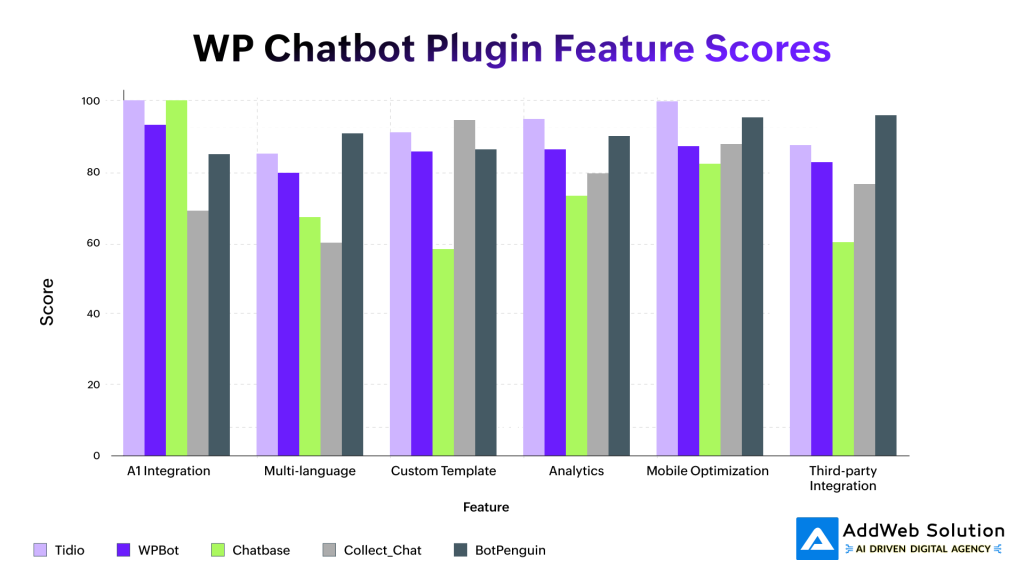
Not all chatbot plugins are created equal. After analyzing dozens of options, here are the standout performers for 2026:
Tidio: The All-Around Champion
Tidio is always the number one option for websites built on WordPress, and the reason for this is simple. It seamlessly integrates AI-powered automation with human handoffs. The site has:
- AI chatbot Lyro that learns from your content
- 35+ pre-built workflows for typical cases
- Multi-channel support (Facebook Messenger, WhatsApp, Instagram)
- WooCommerce integration for ecommerce websites
Pricing: Free plan available; paid plans start at $29/month
WPBot: The WordPress Native Solution
WPBot is WordPress-specific, providing deep integration with your site’s environment. Major features are:
- Managed native integration from your dashboard
- OpenAI ChatGPT support and DialogFlow compatibility
- Conversational forms for lead generation
- In-depth customization
Pricing: Lite version is free; Pro is $49/year
Chatbase: The AI-First Approach
Perfect for businesses wanting cutting-edge AI without complexity. Chatbase offers:
- Custom ChatGPT-like experiences trained on your data
- High accuracy AI responses
- Simple setup process
- Affordable pricing
Pricing: Plans from $40/month
Implementation Made Simple: Your Step-by-Step Guide
Getting your AI chatbot up and running doesn’t require a computer science degree. Here’s how to do it right:
Phase 1: Planning Your Chatbot Strategy
Define your primary goals:
- Customer support automation
- Lead generation and qualification
- Sales assistance and product recommendations
- Information gathering and feedback collection
Identify your most common queries by analyzing:
- Existing support tickets
- Frequently asked questions
- Contact form submissions
- Live chat transcripts
Phase 2: Technical Implementation
Step 1: Choose and Install Your Plugin
- Navigate to your WordPress admin panel
- Go to Plugins → Add New
- Search for your chosen chatbot plugin
- Install and activate
Step 2: Initial Configuration
- Connect to your chatbot service account
- Set up basic responses for common questions
- Configure the chat widget appearance
- Choose display locations (specific pages vs. site-wide)
Step 3: Content Training
- Upload your website content for AI training
- Create custom conversation flows
- Set up lead capture forms
- Configure escalation triggers for human handoff
Phase 3: Optimization and Testing
Before going live, thoroughly test your chatbot:
- Test common scenarios: Ask typical customer question
- Check complex queries: Ensure proper escalation to humans
- Verify integrations: Test CRM connections and data flow
- Mobile responsiveness: Ensure smooth mobile experience
Transform Your Site Today for WordPress

Pooja Upadhyay
Director Of People Operations & Client Relations
Measuring Success: The Metrics That Matter
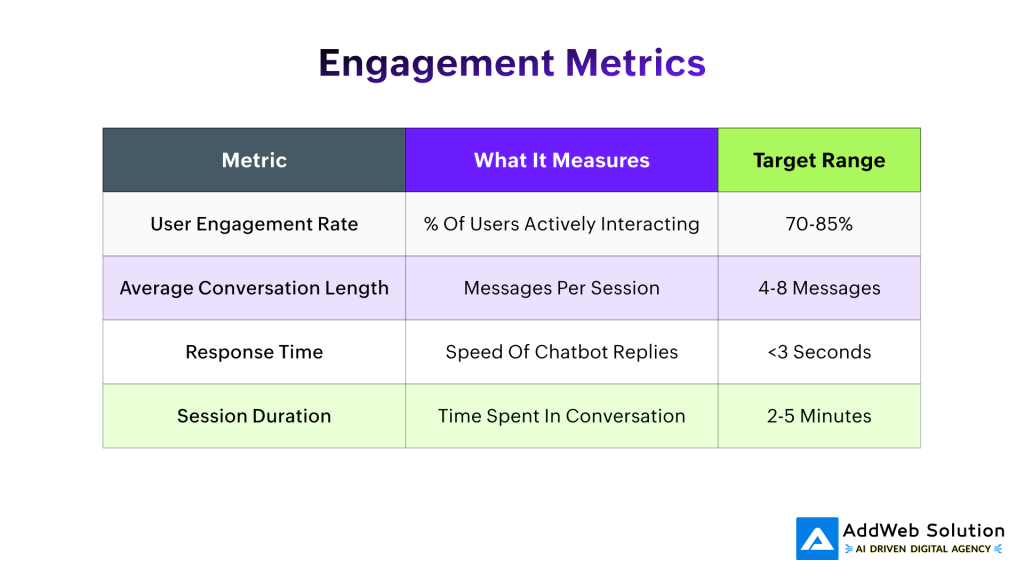
Your chatbot isn’t just a “set it and forget it” tool. Continuous optimization based on real data is crucial for maximizing ROI. Here’s what to track:
Engagement Metrics
Business Impact Metrics
Customer Satisfaction Indicators
- User Satisfaction Score: Post-chat ratings
- Fallback Rate: Messages the bot can’t handle
- Human Handoff Rate: Escalations to live agents
- Return User Rate: Customers coming back
Advanced Tactics for Maximum Reach
After your basic chatbot is up and running, these advanced strategies will set you apart from the competition:
Proactive Engagement Triggers
Don’t wait for visitors to make the first move. Implement smart triggers on:
- Time on page: Engage after 30-60 seconds
- Exit intent: Reach out to visitors before they exit
- Specific page visits: Engage high-value pages
- Cart abandonment: Re-engage abandoned buyers
Personalization at Scale
Contemporary AI chatbots can offer personalized experiences by:
- Analyzing user behavior: Previous visits, pages viewed, time spent
- Including CRM data: Customer history and preference
- Dynamic content delivery: Tailored product recommendations
- Contextual conversations: Responses based on current page content
Multi-Channel Orchestration
Extend your chatbot’s reach beyond your website:
- Social media integration: Facebook Messenger, WhatsApp, Instagram
- Email marketing sync: Chatbot leads to email campaigns
- CRM connectivity: Seamless data flow to sales teams
Mobile app integration: Consistent experience across platforms
Common Traps and Avoiding Them
Even the best chatbots can fail if not implemented correctly. Here are the mistakes that kill engagement and how to avoid them:
The “Too Smart” Trap
Problem: Complicating your chatbot with excessive functionality from the get-go.
Solution: Be simple with simple FAQ management and then add sophistication in steps as per user input and feedback.
The “Set and Forget” Mistake
Problem: Deploying a chatbot and never optimizing or updating it.
Solution: Plan for regular, monthly checks on chatbot performance and customer feedback. Regularly update the responses and implement new features based on actual usage behavior.
The “One-Size-Fits-All” Error
Problem: Deploying generic responses that lack your brand voice or customer requirements.
Solution: Tailor your chatbot’s personality, tone, and answers to match your brand. Your chatbot should be a natural fit for your team.
The Future is Now: What’s Coming Next
The AI chatbot revolution has just started. Here’s what’s coming in 2026 and beyond:
Advanced AI Capabilities
- GPT-4 integration: More natural, context-aware conversations
- Voice interactions: Audio chatbots for hands-free experiences
- Image recognition: Visual query processing and product identification
- Sentiment analysis: Real-time mood detection and response adaptation
Deeper integration with WordPress
- Block editor integration: Chatbots as native WordPress blocks
- WooCommerce enhancements: Advanced product recommendation engines
- SEO optimization: Chatbot conversations contributing to search rankings
- Performance improvements: Lighter, faster-loading chatbot widgets
Your Next Steps: From Reader to Implementer
The proof is clear: AI chatbots aren’t just enhancing companies-they’re revolutionizing them. Businesses that roll out chatbots today are setting themselves up for long-term competitive success.
Immediate Actions (This Week)
- Review your current customer interactions: Determine the most frequent questions and pain points
- Select your chatbot platform: Depending on your budget, technical expertise, and business objectives
- Define clear success metrics: Determine what “success” for your implementation looks like
Short-term Goals (Next 30 Days)
- Deploy and set up your chatbot: Begin with simple FAQ resolution
- Train your bot on your content: Upload key documents and website pages
- Begin monitoring performance: Track engagement and conversion metrics
- Gather initial user feedback: Understand how visitors are responding
Long-term Strategy (Next 90 Days)
- Optimize based on data: Refine responses and conversation flows
- Expand functionality: Add lead generation forms and product recommendations
- Integrate with existing tools: Connect to your CRM and email marketing
- Scale across channels: Extend to social media and mobile apps

The chatbot revolution isn’t approaching-it’s already here. The companies succeeding in 2026 won’t be those with the best products or lowest prices. They’ll be those that meet consumers where they’re at, with the instant, tailored, smart interactions offered by AI chatbots.
Your competition is already doing these. Your customers are already demanding them. The only question remaining is: Will you drive this change, or will you be compelled to play catch-up later?
The technology is ready. The market is demanding it. Your site powered by AI chatbots is possible today on WordPress. What are you waiting for?
Stay Ahead of Your Competitors
Pooja Upadhyay
Director Of People Operations & Client Relations
