


December 2, 2025. WordPress 6.9 dropped. And honestly? This release feels different. Not because it’s flashy or revolutionary. But because it quietly fixes things that have been annoying users for years.
The team behind WordPress could’ve coasted through this release. But instead, they went deeper. Better editor experience. New blocks that eliminate plugin bloat. Developer APIs that actually matter. And—here’s the thing nobody’s talking about enough—performance improvements that are genuinely shocking.
We’re talking 20-25% faster sites. Across the board. Not in edge cases. In normal, everyday sites hosted on WordPress.
Let’s break down what’s actually new, why it matters, and what you should care about moving into 2026.
WordPress 6.9: New Editor Features and Collaboration Tools
The Editor Finally Feels Like It’s Been Listening To Feedback
You know that moment when you’re editing a WordPress post and someone else wants to comment on a specific part? Old way: send them an email, reference “the third paragraph,” get confused about which version you’re talking about.
WordPress 6.9 introduces something called Notes. It’s basically comments attached directly to blocks. In the editor. Where everyone can see them.
Sounds simple. It’s actually huge for teams.
Your designer can add a note saying “heading needs to be bigger here.” Your editor can flag a block that’s not quite ready. Your client can request changes without leaving WordPress or starting a separate email thread.
Everything stays organized. Everything stays in context. No more hunting through email chains wondering which screenshot someone was referring to.
The Block Visibility Feature Changes How You Work
Here’s another one that solves a real problem: block visibility. You can now hide blocks on your live site while keeping them visible in the editor.
Why would you do this? A hundred reasons:
- Testing layout changes without affecting visitors
- Preparing content for future launch without publishing yet
- Keeping placeholder notes visible to your team
- Running A/B tests without actually publishing different versions
- Building next month’s content in the background
Before? You’d either have to save drafts, create duplicate pages, or install extra plugins. Now it’s built right in. One toggle.
Drag and Drop That Doesn’t Make You Want To Flip A Table
The block editor’s drag and drop used to require you to find this tiny little handle. If you weren’t precise, nothing moved. It was clunky.
WordPress 6.9 lets you drag blocks more naturally. Just grab a block anywhere and move it. The editor understands what you’re trying to do. It feels less like technical software and more like… actually using design software.
Small change. Massive quality-of-life improvement.
Command Palette Goes Everywhere
You know when you’re in the middle of editing and need to find some setting but you have no idea where it is? Command Palette (hit Ctrl+K or Cmd+K) opens a searchable interface to jump anywhere, do anything.
WordPress 6.9 extends this across the whole platform. Not just in posts. Everywhere. You’re never lost looking for a feature anymore.

WordPress 6.9 Feature Distribution: What’s Included in This Release
New Blocks: Say Goodbye To Plugin Bloat
WordPress keeps adding native blocks. And every time they do, a dozen plugins become unnecessary.
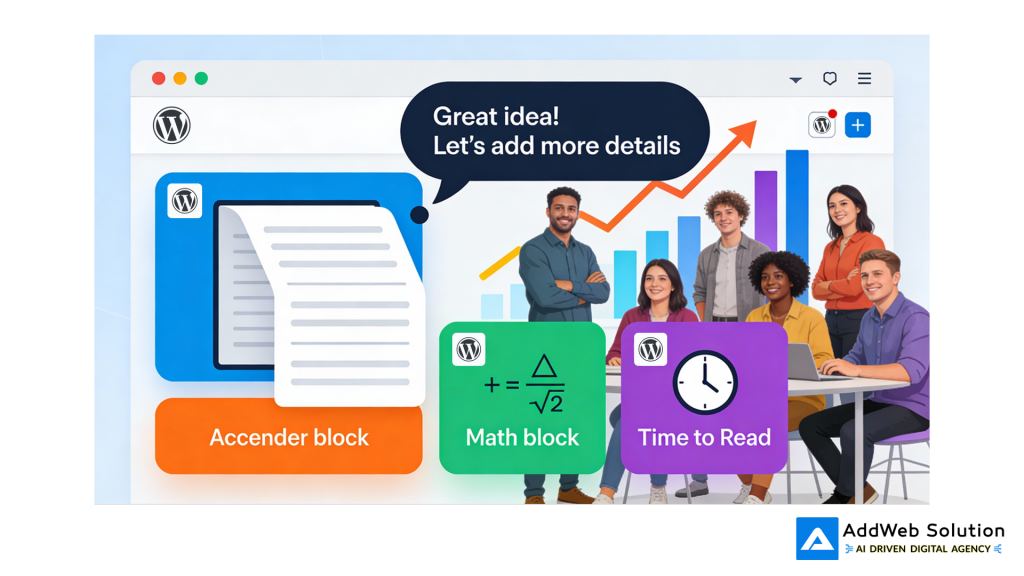
WordPress 6.9 adds five new blocks that fill actual gaps:
The Accordion Block
Finally. Native collapsible content. No plugin needed. Perfect for FAQs where you want visitors to see questions but expand answers on demand.
The cool part? It supports anchors. So you can create direct links to specific FAQ answers. SEO loves that. Visitors love that.
Math Block
Running an educational site? Technical blog? Now you can display equations natively using LaTeX or MathML standards. No more weird workarounds or screenshots of equations.
Terms Query Block
Display your categories or tags dynamically. Automatically updates as you add new content. Perfect for content-heavy sites where you want to showcase what topics you cover.
Time To Read Block
Small feature, real impact. Shows visitors how long an article will take to read. It turns out—people actually appreciate knowing this. “Reading time: 7 minutes” means some visitors who have 5 minutes skip past. But the person with 10 minutes knows they can finish it. Better reading experience. Less bounce rate.
Fit Text (For Headings & Paragraphs)
You know those responsive hero sections where the heading needs to be bold but look good on phone and desktop? Fit Text automatically scales your text to fill the container properly.
This is the kind of feature that seems small until you try it and realize “how did we not have this before?”
AI Integration: WordPress 6.9’s Abilities API Connects to AI Agents
Site Editor Gets Smarter (And Actually Easier To Use)
The Site Editor is where you build the entire structure of your website—headers, footers, templates, everything, if it uses WordPress. It used to be… a lot. Overwhelming for beginners.
WordPress 6.9 simplifies it. There’s now a streamlined mode for people who just want to edit content. But designers still get the full toolbox when they need it.
Template Management Actually Works Now
You can now:
- Create multiple templates for the same post type
- Save templates as drafts before publishing
- Separate theme templates from custom templates
- Switch themes without losing your custom templates
That last one? If you’ve ever switched a theme on your Site built on the WordPress platform, you know how painful it is. Everything reverts. You have to rebuild. This fixes it.


The Performance Improvements Are Not Subtle
Okay, this is where WordPress 6.9 gets serious.
The team spent massive effort on performance. Not “we did some optimization.” Real, measurable, 20-25% speed improvements.
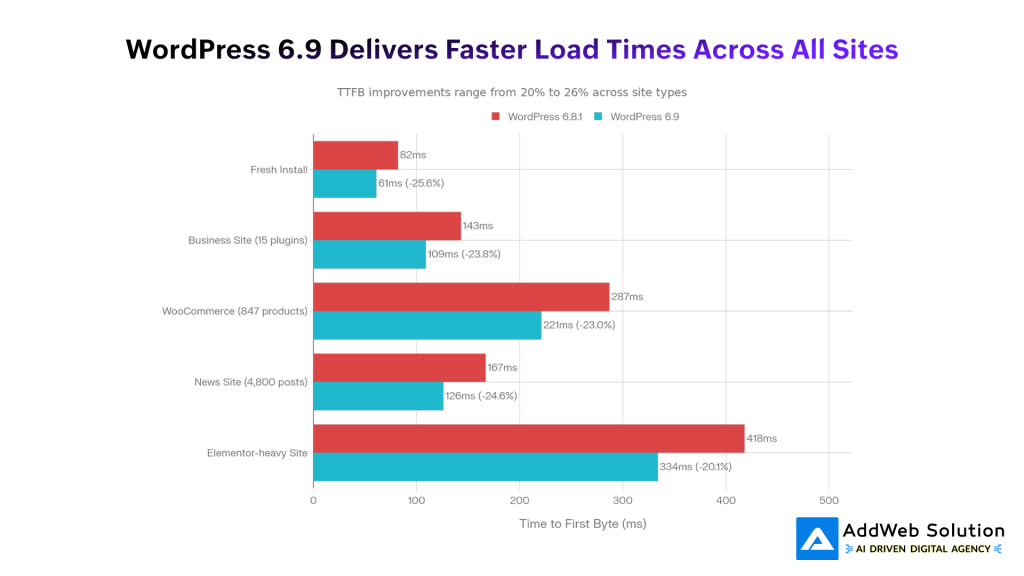
Real tests. Real sites. Real results:
Fresh Install: 82ms to 61ms response time. That’s a 26% improvement right out of the box.
Business Site (15 Plugins): 143ms down to 109ms. 24% faster.
WooCommerce Store (847 Products): 287ms to 221ms. That’s 23% faster. For a heavy e-commerce site.
News Site (4,800 Posts): 167ms to 126ms. 25% improvement on massive databases.
Even Elementor sites—notoriously bloated—saw 20% improvements.
WordPress 6.9 Performance Gains: TTFB Improvements Across Site Types
Why Is It So Much Faster?
Several things happening at once:
On-Demand CSS Loading — WordPress now only loads CSS for blocks you’re actually using. If your page uses Accordion and Heading blocks, you don’t download CSS for Math blocks or Terms Query. That’s dozens of kilobytes saved per page.
Better Caching — WordPress is smarter about what it caches. Queries that repeat get cached instead of running again.
Optimized Database Queries — Meta queries, taxonomy queries, term lookups—all got faster.
Reduced Unnecessary Code — Emoji scripts, non-essential functions moved to footer. The critical stuff renders first.
Smarter Cron Jobs — Background tasks run at shutdown instead of slowing down page loads.

Core Web Vitals Improvements: LCP and CLS Metrics in WordPress 6.9
What This Actually Means For Your Sites
E-commerce? WooCommerce product pages went from 31% passing Google’s Core Web Vitals to 68%. Category pages? 43% to 77%. That’s not just faster. That’s the difference between Google rewarding you or penalizing you.
Blog? LCP (the metric that determines “how long till the page looks ready”) improved by 18.7%. On mobile, people will see your content almost a full second faster.
Image-heavy pages? Layout shifts decreased by 27.6%. Your images load more predictably. Pages don’t jump around. Users don’t accidentally click the wrong thing.
Performance = Business Results
For every one-second improvement in page speed, e-commerce sites typically see 2-5% more conversions. A WooCommerce store doing $500K/year? That’s potentially $10-25K in extra revenue from a 1-second speedup. WordPress 6.9 is giving you 20-25%.
The Developer Stuff: Abilities API Is The Quiet Star
If you’re a developer, the Abilities API is what you should be excited about.
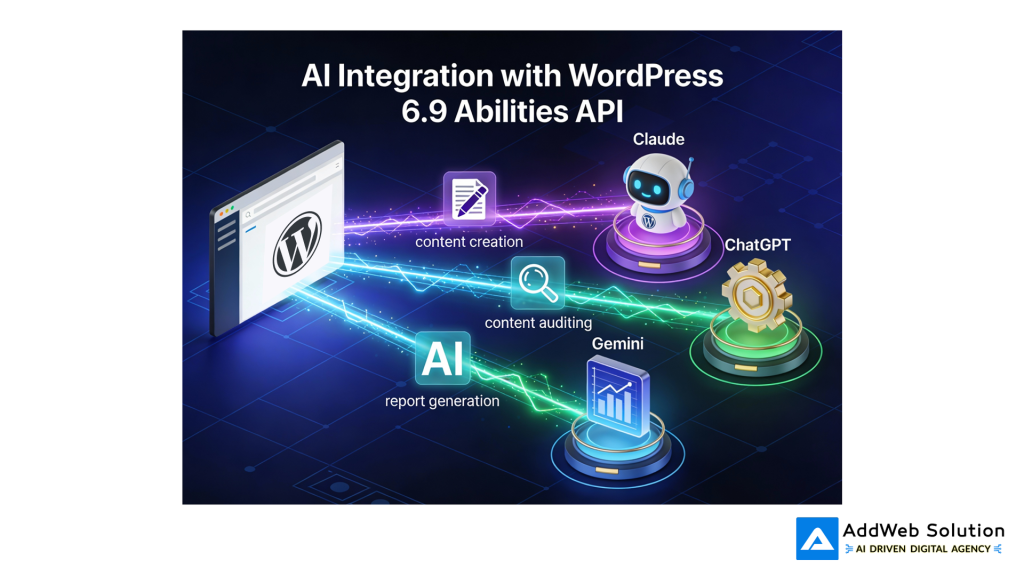
Here’s the problem it solves: AI systems (Claude, ChatGPT, Gemini, etc.They have no way to know what your website powered by the WordPress platform can do. What capabilities exist. What data they can access.
The Abilities API fixes this. You register your capabilities in a standardized format. AI systems can read that format. Suddenly, an AI assistant can understand the full potential of your website’s capabilities that use WordPress.
What does that enable?
AI Creates Content — You tell an AI: “Write a blog post about AI in WordPress and publish it.” The AI understands it can create posts, access your site structure, format content, publish it.
AI Audits Your Site — “Review all my product descriptions for SEO and suggest updates.” The AI has access to your SEO plugin data, can read your products, and suggests improvements.
AI Generates Reports — “Create a sales report from this month’s orders.” The AI can access order data, run calculations, generate formatted reports.
All of this without building custom integrations. The Abilities API is the bridge.
Interactivity API Gets Better For Interactive Features
If you build interactive components—filters, search, tabs, live updates—the Interactivity API is your tool.
WordPress 6.9 makes it faster:
- Client-side navigation reuses stylesheets instead of reloading everything
- Script modules load only when needed
- New TypeScript helpers reduce boilerplate
- Better state management between page transitions
Translation: your interactive features work faster. Smoother transitions. Less JavaScript overhead.
Block Bindings API: Connecting Blocks To Data
Your blocks can now pull data from anywhere: custom fields, post meta, external APIs, your database. Updates automatically. Perfect for dynamic content without custom code.
WordPress 6.9 Performance Gains: TTFB Improvements Across Site Types
Accessibility: 70+ Fixes Nobody’s Going To Talk About (But Should)
WordPress 6.9 includes 70+ accessibility improvements. Screen readers work better. Keyboard navigation is smoother. Assistive technology interactions are more reliable.
This isn’t flashy. But for the millions of people with disabilities who use the web, it’s significant.
What Changed For Everyday Users
Here’s the real-world impact of WordPress 6.9:
For Content Creators:
- Collaboration without external tools or email
- More powerful blocks = fewer plugins
- Better template management
- Faster sites (which impacts your traffic and rankings)
For Agencies/Developers:
- Client sites are 20-25% faster automatically
- Better developer tools (Abilities API, Block Bindings)
- Less plugin maintenance burden
- Preparation for AI-assisted workflows
For Business Owners:
- Your site just got faster without doing anything with WordPress.
- Better SEO rankings (speed is a ranking factor)
- Better conversions (faster = more sales)
- Better team collaboration
The Themes Nobody Got New
Quick note: WordPress 6.9 didn’t ship with a new default theme. The team decided to focus energy on editor and performance instead. Fine by us. Better to nail the fundamentals than chase themes.
Should You Update? Yes. But Here’s The Real Talk
Is WordPress 6.9 a must-update? Yes. The performance gains alone justify it. But:
- Test it on staging first
- Check your plugins are compatible (they probably are)
- Your theme should work fine
- The update process is smooth
That’s it. No drama. WordPress 6.9 is a solid, mature release.
Transform your website with WordPress 2026 updates

Pooja Upadhyay
Director Of People Operations & Client Relations
What This Means For 2026
WordPress 6.9 is preparing the ground for where WordPress is heading.
The Abilities API? That’s the bridge to AI. Not AI writing your posts automatically, but AI understanding your site and helping you do things more efficiently.
The Interactivity API? That’s the path toward “WordPress as a full app” without needing a decoupled front-end.
The performance gains? Those are table stakes going forward. Users expect fast sites. Google rewards fast sites. WordPress 6.9 raises the baseline.
The editor improvements? Those are maturity. WordPress is becoming genuinely pleasant to use. Not just functional. Pleasant.
Ready to upgrade your WordPress platform to version 6.9? AddWeb Solution has extensive experience with Version upgrades for the WordPress platform, theme compatibility checks, and performance optimization. We’ve tested WordPress 6.9 thoroughly and helped clients realize its full potential. Want to make sure your site gets the maximum benefit from the new features and performance gains? Let’s talk about what’s possible for your Implementation of the WordPress platform.
TL;DR – WordPress 6.9 At A Glance:
- Notes feature = team collaboration inside WordPress (no more email confusion)
- Block visibility = test layouts and prep future content without affecting live site
- Better drag-and-drop = editing feels more intuitive
- New blocks (Accordion, Math, Terms Query, Time to Read) = less plugin dependency
- 20-25% faster = real performance gains measured across real sites
- Abilities API = AI systems can understand and interact with your site hosted on WordPress
- Better Site Editor = cleaner, smarter template management
- 70+ accessibility fixes = better experience for everyone
- Release date: December 2, 2025 (already live)
- Update your site: Yes, safe and straightforward
Source URLs:
https://kinsta.com/blog/wordpress-6-9/
https://wordpress.com/blog/2025/12/03/wordpress-6-9-new-for-developers/
https://make.wordpress.org/core/2025/11/12/changes-to-the-interactivity-api-in-wordpress-6-9/
