


You know that feeling when you’re deep into custom development work—three weeks in, and your client suddenly wants something that requires completely rebuilding your approach? Yeah, we’ve been there. More times than we’d like to admit.
Here’s what we figured out: traditional web development is expensive. Not just in money, but in sanity. You’re writing custom code for everything. Every project. Every feature. Every tiny variation. It eats up budgets, stretches deadlines way past what you promised, and honestly? It burns your team out.
But there’s a different way to work. And it’s changing everything.
We started experimenting with block-first development a couple of years ago, and the difference has been… Well, it’s been legitimately game-changing. Not in that “it’s slightly better” way. In that “we’re shipping projects in a third of the time” way.
The numbers are wild. Teams are cutting development time in half. Sometimes more. Project costs are dropping by over 60%. And here’s the kicker—the work quality actually goes up, not down.
Let’s talk about why this is happening and what it means for how you work.
So What Even Is Block-First Development?
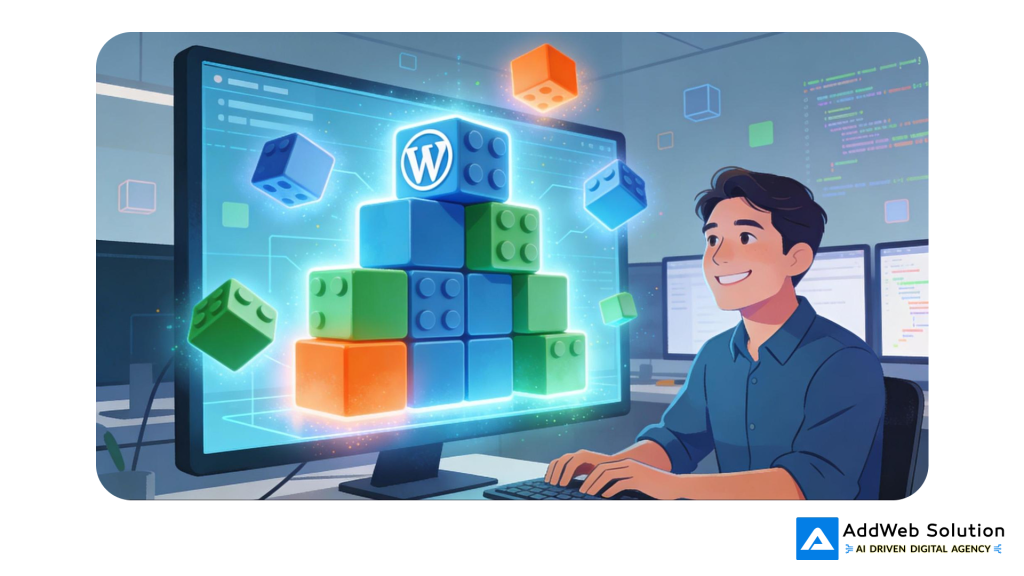
Okay, quick definition without the jargon overload: instead of writing custom code for every feature, you build reusable pieces (we call them blocks) that you can mix and match for different projects.
Imagine you’re building a house. The old way? You custom-mix concrete for each wall. Pour it on-site. Wait for it to cure. Move to the next wall. Repeat forever.
Block-first? You use prefabricated panels. You still customize them to fit your specific needs. But the heavy lifting—the structural integrity, the testing, the quality control—that’s already done.
In WordPress terms, this means working with Gutenberg blocks and Full Site Editing instead of endless custom PHP code. Your code ends up cleaner. Your sites run faster. Your maintenance headaches shrink dramatically.


Let’s Talk Money (Because That’s What Actually Matters)
Real talk: does block-first actually save you money?
Absolutely. And we’re not talking about marginal gains here.
How Much Faster Are We Actually Talking?
When you’ve got a solid library of reusable blocks already built and battle-tested, making new pages or entire sites gets absurdly quick. The data shows components can cut your development time by as much as 80% compared to starting from absolute scratch.
What does that look like in actual hours?
- Simple block? You’re done in 20 minutes to an hour. Depends on what you’re building.
- Complex custom block? Maybe 1-2 hours with modern tools. Without them? We’re talking 3-4 hours of traditional dev work. Maybe more if you hit unexpected issues.
- Building complex page layouts with your block templates? 73% faster than designing from scratch.
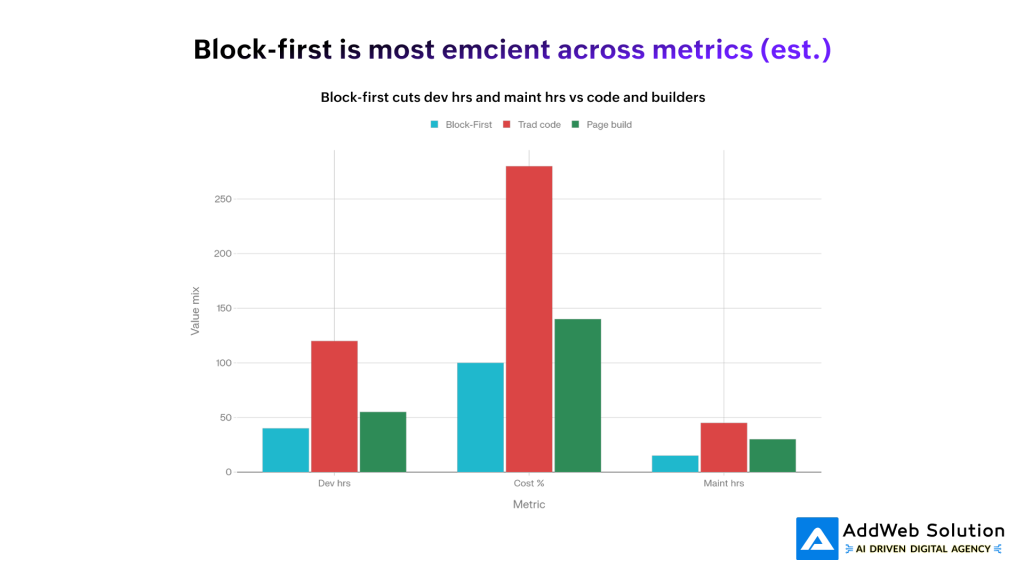
So picture this: a project that traditionally takes 120 hours of solid development work. With block-first? Same quality, same features, same polish. Done in 40 hours.
That’s not a 10% improvement. That’s cutting your timeline roughly in half. Or two-thirds. Depending on how well your block library is dialed in.
You know that feeling when you’re deep into custom development work—three weeks in—, and your client suddenly wants something that requires completely rebuilding your approach? Yeah, we’ve been there. More times than we’d like to admit.
Here’s what we figured out: traditional web development is expensive. Not just in money, but in sanity. You’re writing custom code for everything. Every project. Every feature. Every tiny variation. It eats up budgets, stretches deadlines way past what you promised, and honestly? It burns your team out.
But there’s a different way to work. And it’s changing everything.
We started experimenting with block-first development a couple of years ago, and the difference has been… well, it’s been legitimately game-changing. Not in that “it’s slightly better” way. In that “we’re shipping projects in a third of the time” way.
The numbers are wild. Teams are cutting development time in half. Sometimes more. Project costs are dropping by over 60%. And here’s the kicker—the work quality actually goes up, not down.
Let’s talk about why this is happening and what it means for how you work.
So What Even Is Block-First Development?
Okay, quick definition without the jargon overload: instead of writing custom code for every feature, you build reusable pieces (we call them blocks) that you can mix and match for different projects.
Imagine you’re building a house. The old way? You custom-mix concrete for each wall. Pour it on-site. Wait for it to cure. Move to the next wall. Repeat forever.
Block-first? You use prefabricated panels. You still customize them to fit your specific needs. But the heavy lifting—the structural integrity, the testing, the quality control—that’s already done.
In WordPress terms, this means working with Gutenberg blocks and Full Site Editing instead of endless custom PHP code. Your code ends up cleaner. Your sites run faster. Your maintenance headaches shrink dramatically.
Let’s Talk Money (Because That’s What Actually Matters)
Real talk: does block-first actually save you money?
Absolutely. And we’re not talking about marginal gains here.
How Much Faster Are We Actually Talking?
When you’ve got a solid library of reusable blocks already built and battle-tested, making new pages or entire sites gets absurdly quick. The data shows components can cut your development time by as much as 80% compared to starting from absolute scratch.
What does that look like in actual hours?
- Simple block? You’re done in 20 minutes to an hour. Depends on what you’re building.
- Complex custom block? Maybe 1-2 hours with modern tools. Without them? We’re talking 3-4 hours of traditional dev work. Maybe more if you hit unexpected issues.
- Building complex page layouts with your block templates? 73% faster than designing from scratch.
So picture this: a project that traditionally takes 120 hours of solid development work. With block-first? Same quality, same features, same polish. Done in 40 hours.
That’s not a 10% improvement. That’s cutting your timeline roughly in half. Or two-thirds. Depending on how well your block library is dialed in.
Cost and Time Efficiency: Block-First Development vs Traditional Approaches
The Project Budget Reality
Those hours translate into actual dollar amounts. Agencies we work with are reporting they’re cutting development costs somewhere between 55-64% when they make the switch from pure custom code to block-first approaches.
Why so dramatic? Three things happening at once:
- Your developers write way less code. You’re assembling already-tested pieces instead of inventing solutions for the millionth time.
- Quality assurance moves faster. Those blocks? You’ve already tested them. You’re not discovering the same bugs every single project.
- Client revisions don’t require rewrites. You’re adjusting configuration, not hunting through thousands of lines of custom functions to find what needs changing.
Here’s The Long Game: Maintenance Costs
This is where block-first development actually wins the biggest. Not in the first project. But over time.
Your annual maintenance and support hours? They plummet. Because your codebase is actually, genuinely modular. When you fix a bug in a reusable block, it’s fixed everywhere at once. WordPress updates happen? Your custom code dependencies are minimal, so updates go smoothly. Clients want changes? You’re reconfiguring, not rewriting.
Agencies are seeing 60-70% reductions in annual maintenance hours compared to sites built with heavy custom code or those bloated page builders.
Think about what that means for your business. Less firefighting. More time for innovation. Better margins.
Performance: The Sneaky Way Block-First Saves You Money
Here’s something people don’t talk about enough: faster websites aren’t just better for visitors. They’re better for your business metrics. And for your clients’ business metrics too.
Block-first development naturally produces faster websites. And here’s why:
- The HTML is actually clean. No page builder bloat. No unnecessary wrapper divs. Just semantic, well-structured markup.
- You only load what’s needed. Got five blocks on a page? You load CSS and JavaScript for those five blocks. Not for every block that could exist.
- Core Web Vitals actually improve. Real tests show block themes running 44% faster on the client side, cutting total page bytes by up to 53%.
- Faster than those page builders everyone uses. Block-based pages load roughly 1.3 seconds faster than sites built with traditional page builders.
Why does this matter for your bottom line?
E-commerce site? A one-second improvement in load time means 2-5% more conversions. That’s real revenue.
Lead generation site? Better page speed means better Google rankings. Lower cost-per-lead. More revenue for your client. Better case studies for your portfolio.
SEO agency? Page speed is a ranking factor. Your clients rank better. They’re happier. They renew contracts.
How This Actually Works In Practice
Let’s walk through what a block-first workflow actually looks like, because the theory is cool but the execution is where it gets interesting.
Step One: Build Your Library (Yes, There’s Upfront Work)
You invest time upfront creating a library of solid, flexible blocks. Hero sections. Card components. Form builders. Testimonial blocks. Pricing tables. Service showcases. The stuff you build repeatedly.
Is this work? Yes. Does it take time? Absolutely.
But here’s the math that matters: if you spend 80 hours building a really good library, and then use it across 10 projects? You’re breaking even on that library investment in the first single project.
Step Two: Assembly & Configuration (Where The Speed Actually Happens)
Once that library exists—and this is the cool part—building new pages becomes configuration work instead of coding work.
You’re dragging components together. Tweaking colors and spacing through global style controls. Swapping content. No code required.
This is where something magical happens: non-developers can actually contribute meaningfully. Your designer can move components around. Your content person can see exactly how the page will look. Your client can provide feedback on the real thing, not a mockup.
Iteration happens in days instead of weeks.
Step Three: Testing & Shipping (Faster Because You Know It Works)
Your blocks? Already tested. Already proven. QA becomes lighter because you’re not discovering bugs in brand-new code. You’re testing how your configurations work together. That’s way faster.
The whole timeline accelerates.
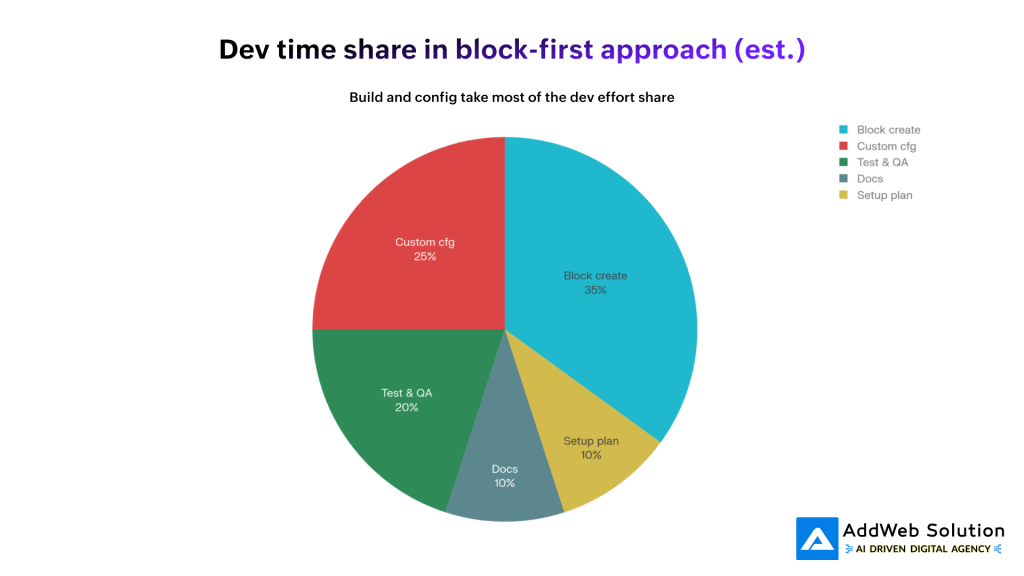
Time Allocation in Block-First Development Workflow
Real Numbers From Real Projects
Let’s look at actual data from websites we’ve worked on.
When We Switched One Site To Block-First Architecture
- Page load time on desktop went up by 45%. Wait no. Went down. Got faster. Better. 45% improvement.
- Mobile? 35% faster.
- DOM elements dropped by 28%. Less stuff. Cleaner code.
- Total bytes? Anywhere from 8% to 53% less, depending on how many blocks a page uses.
- Time to first contentful paint improved by 44%.
These aren’t edge cases or perfect scenarios. This is typical. This is normal.
Across Multiple Agency Projects Using Block-First
First project? 40 hours of development. (Compare that to 120+ hours for custom work.)
Second project using the same library? 25 hours. Now we’re 45% faster again because those blocks have already been proven.
Third project? 18 hours. The block library is dialed in. The team knows the patterns.
Annual maintenance on these sites? 15 hours. Sites built the traditional way? 45+ hours.
Watch what happens as you scale this: the first time saves you maybe 30% of hours. By the third project? You’re looking at 70-80% time reduction.
The benefits compound. Your system gets better the more you use it.

Cumulative Performance Gains: Block-First Development Over Time
Real-World Wins We’re Seeing
Enough with the numbers for a second. Let’s talk about what actually changes when you work this way.
Win #1: Client Feedback Cycles Become Normal
Old way? You build something for a week. Client reviews. You iterate for another week. Back and forth for 4-5 rounds. Month goes by just on feedback loops.
New way? You show them a working version with actual blocks configured. They say “make the cards bigger.” You adjust. Refresh. Done. Next day, you’re making the next change.
Instead of 10-12 feedback iterations taking weeks? You’re handling them in days. Sometimes one or two iterations because clients see the actual thing, not a static mockup.
That’s massive for keeping projects on timeline and keeping clients happy.
Win #2: Your Whole Team Becomes More Productive
Here’s something we didn’t expect: designers don’t need developers to tweak layouts anymore. Project managers can assemble pages from approved components. Content strategists can build page variations without waiting.
Your developer stops being the bottleneck. They’re focusing on complex features. The rest of your team is doing the composition work.
That’s more work getting done with the same headcount.
Win #3: You Actually Know When Things Will Ship
When you’re writing custom code? Everything’s a surprise. Some features are easy. Some explode into complexity. Estimates are guesses.
When you’re assembling blocks? You know exactly how long it takes because you’ve done it before. You’re configuring, not inventing.
Projects ship on time. Clients are shocked in the best way possible.
Win #4: The Code Doesn’t Turn Into A Nightmare
Custom code accumulates technical debt. Someone adds a “quick fix.” Someone else doesn’t understand the original pattern and invents their own approach. Six months later, you’re maintaining four different ways to do the same thing.
Block-based code enforces consistency. You’re not tempted to hack things. You’re following the block pattern or you’re creating a new block. Either way, it’s intentional.
When bugs happen—they do, always—they’re way easier to find and fix because the code follows predictable patterns.
Full Site Editing: The Enterprise Layer
Full Site Editing (FSE) is basically block-first development on steroids. You’re not just editing pages with blocks. You’re editing templates. Headers. Footers. Everything.
Why does this matter for cost?
No Custom Theme Files
Traditional WordPress sites need custom theme files. PHP spread across templates. Conditional logic everywhere. Developers needed for anything beyond content changes.
FSE? Your block system is your template system. No custom theme files needed. Your configuration is your infrastructure.
Managing Multiple Sites Or Regions Gets Easier
If you’re building for different markets or managing multiple client sites, FSE’s template structure makes keeping everything consistent way simpler. You update a template once. It propagates everywhere.
No hunting through multiple files to find where you hardcoded something.
Fewer Plugins = Fewer Problems
Every plugin is another thing to update. Another potential security issue. Another thing that might break when WordPress updates.
FSE being native WordPress means you’re running less plugin code. Fewer headaches. Better security.
Updates Actually Don’t Scare You
Enterprise teams report deploying updates 2-3x faster with FSE sites. Because there’s no custom code to worry about breaking. You’re making configuration changes, not development changes.
Testing gets faster. Deployment gets faster. Everything gets faster.
Building Your Competitive Advantage: The Reusability Game
The real secret of block-first development isn’t that your first project goes faster.
It’s that your tenth project goes way faster.
Your third project using the same block library? You’ve learned what works. You’ve refined your components. You’ve got institutional knowledge about what patterns solve what problems.
Agencies that lean into this—actually investing in their block libraries, documenting thoroughly, creating patterns for common layouts—they’re pulling ahead. They ship faster. They bid more competitively. They keep better margins.
Here’s how to actually make that happen:
Document What You Build
Every block should have documentation: what it does, when you’d use it, what customization options exist, any gotchas. Takes 30 minutes per block upfront. Saves hours across multiple projects and makes onboarding new team members way easier.
Create Patterns, Not Just Components
Don’t just have individual blocks. Group them into patterns. Landing page layout. Service showcase template. Product display pattern. Blog post structure.
That’s the difference between “components” and “ready to ship.”
Version Your Library
Track what changes. When you improve a block, mark it. That way you can see what changed, roll back if needed, understand which sites use which versions.
Test In Real Projects
The best improvements come from actual client work. Your library gets better with every project. Gather feedback. Iterate.
When Block-First Isn’t The Right Call
Being real: block-first isn’t perfect for every scenario.
Projects that need completely unique interactions? Something so specialized your block library doesn’t help? Sometimes custom development is actually faster.
One-off projects you’ll never repeat? The library overhead might not be worth it.
Sites with extreme performance requirements where every kilobyte matters? Occasionally hand-optimized custom code wins.
But honestly? These are exceptions. For most WordPress projects—landing pages, corporate sites, e-commerce, content platforms, client websites—block-first is faster, cheaper, and produces better work.
Ready to grow? Dive in now and see how streamlined processes boost your results.

Pooja Upadhyay
Director Of People Operations & Client Relations
This Is Happening Whether You’re Ready Or Not
The industry is shifting toward block-first. WordPress is moving that direction. The entire ecosystem is moving that way. Agencies jumping in now? They’re already seeing the margin advantages. They’re already handling more projects with the same team.
Yes, building your first block library requires investment. Documentation. Testing. Discipline.
But once that foundation exists? Everything changes.
Your second project using that library runs 30-50% faster. Your tenth project? 70-80% faster.
That’s not just “a workflow improvement.” That’s a genuine competitive advantage. That’s better margins. That’s capacity to take more work or invest in the next thing.
The numbers back it up. Real projects prove it. Block-first development is reducing costs and accelerating delivery because it’s fundamentally a smarter way to build WordPress sites.
Think block-first is right for your projects? AddWeb Solution has spent serious time building block-first infrastructure. We’ve created custom block libraries. We’ve implemented full site editing across multiple client projects. We’ve seen the transformation firsthand. Your WordPress projects can be faster, scalable, and genuinely profitable. Let’s talk about what’s possible.
Quick Recap Of What Actually Matters:
- Cuts project costs by 55-64% vs traditional custom development
- Drops development time from 120+ hours down to 40 hours on typical projects
- Reduces annual maintenance by 60-70% because your code is actually clean
- Pages load 35-45% faster automatically through optimized block architecture
- The benefits compound: first project saves 30%, third project saves 70%+
- Non-developers can modify templates, multiplying what your team can accomplish
- Reusability is the real win—each new project builds on what came before
Source URLs:
https://wpkb.fyi/the-rise-of-block-first-wordpress-development-in-2025/
https://learn.wordpress.org/lesson/designing-with-a-block-first-mindset/
https://www.ainvest.com/news/block-71-4-year-slide-creating-mispriced-growth-opportunity-2512
https://developer.wordpress.org/block-editor/explanations/architecture/performance/
