


If you are responsible for a new product, portal, or internal platform, the “build vs. buy” decision is one of the most expensive choices you will make. Globally, companies spend around 1.3 trillion dollars on software every year, and 73% of businesses say they regret at least one major software purchase within two years.
Get this wrong, and you lock your team into years of workarounds, unexpected licensing costs, and integration pain. Get it right, and your software quietly becomes an unfair advantage.
For teams working in the PHP ecosystem, Laravel sits right at the center of this decision. On one side, you have off‑the‑shelf SaaS and boxed products. On the other, a modern, battle‑tested framework that can turn your unique workflows into first‑class software.
This blog focuses on a very specific angle: when building with Laravel custom development beats buying an off‑the‑shelf solution.
Quick Snapshot: Build vs. Buy in a Laravel Context
Use this as a “cheat sheet” before going deeper.
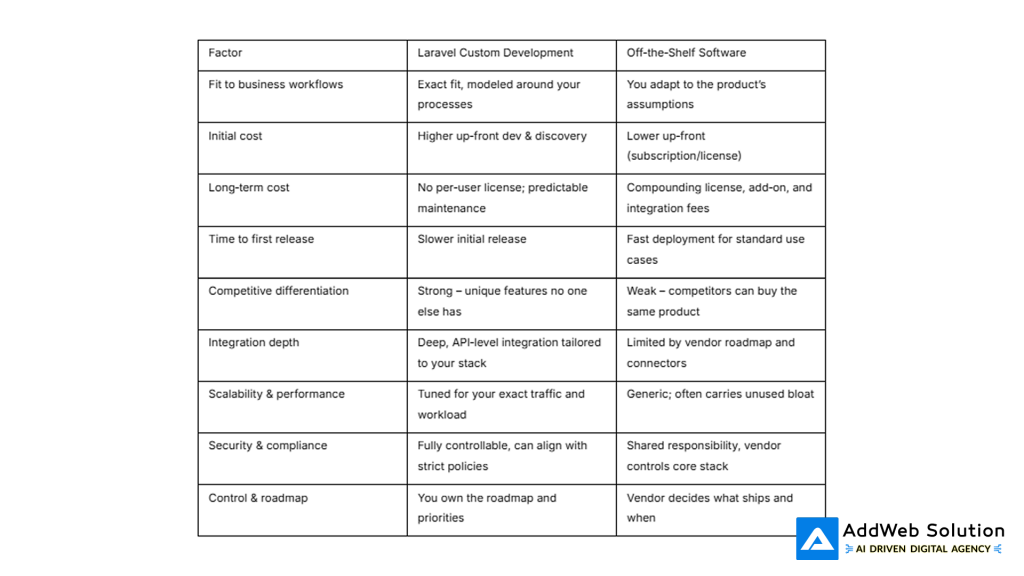
The Economics: Faster Now vs. Better Forever
A lot of build vs. buy discussions stay emotional. The economics help to ground it.
Research comparing custom software and off‑the‑shelf solutions shows some clear patterns:
- Off‑the‑shelf solutions tend to deploy up to ~60% faster for standard processes.
- Custom software can deliver up to 300% higher ROI for organizations with large user bases, once adoption and optimization kick in.
- Poor software decisions cost businesses an average of $15 million in wasted spend, delays, and rework.
- 85–90% of features in many generic software products go completely unused in real‑world deployments.
To visualize the trade‑off, think in terms of speed vs. payoff:
- Off‑the‑shelf: fast to ship, limited ceiling.
- Laravel custom: slower to start, much higher ceiling when software is core to your operations.
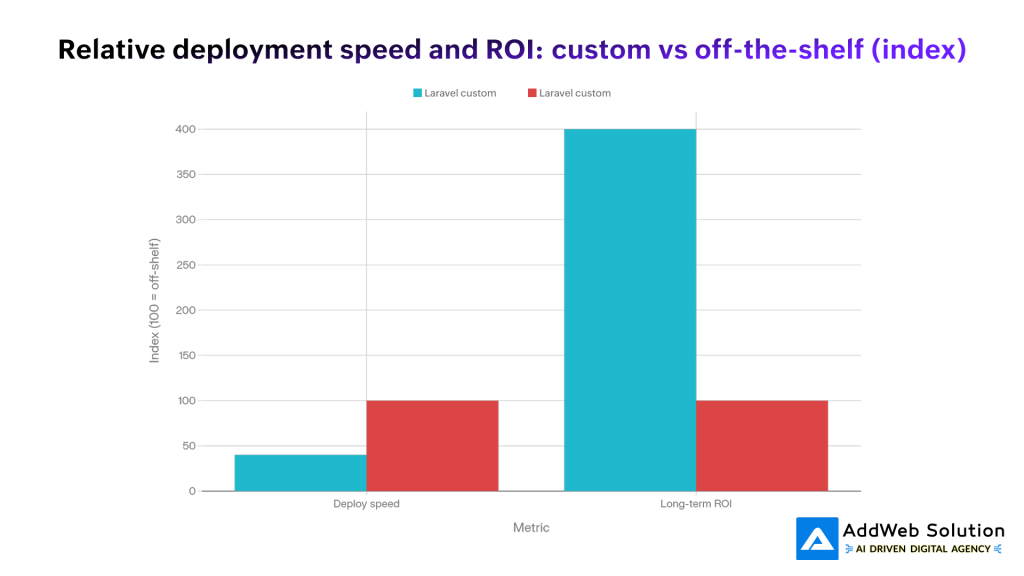
Interpretation: Off‑the‑shelf wins on time‑to‑deploy. Laravel custom wins on long‑term ROI when you have meaningful scale or complex workflows.
Where Off‑the‑Shelf Still Makes Sense
Before championing custom Laravel builds, it’s honest to acknowledge where buying is the smarter decision.
Buying off‑the‑shelf is usually the better choice when:
- Your need is a commodity function
HR systems, basic accounting, generic CRM, email marketing, internal chat – if your process looks like thousands of others, mature SaaS often fits well. - Time‑to‑market is truly critical
You are validating a new idea, or you have regulatory pressure and simply need something running this quarter. - Budget is constrained, and you lack an engineering partner
If you cannot commit to ongoing development and maintenance, a reputable vendor with SLAs might be safer. - Integration is already solved via your ecosystem
If you heavily live inside one vendor’s ecosystem (for example, everything is on Microsoft 365) and their product plays perfectly with the rest, buying can streamline your stack.
In these cases, Laravel often plays a supporting role – for integration layers, custom reports, or small “glue” services around the SaaS product.
Where Laravel Custom Development Outperforms Off‑the‑Shelf
Laravel shines when your software is not just a tool, but a strategic asset.
Below are scenarios where a custom Laravel build typically outperforms generic products.
1. Your Processes Are Genuinely Unique (and Hard to Bend)
If your workflows don’t match what’s in typical SaaS products, forcing them into a generic product creates friction and hidden costs:
- Teams maintain spreadsheets or side tools because the system does not “get” their reality.
- You keep paying for customizations, add‑ons, or consultants to bend the product.
- Every upgrade cycle risks breaking your fragile workarounds.
With Laravel, you flip that equation: the system adapts to your process, not the other way around. This is especially powerful for:
- Bespoke CRMs and partner portals
- Niche logistics and supply chain workflows
- Custom ERP and production planning tools
2. Deep, Clean Integration Matters More Than Standalone Features
Off‑the‑shelf tools often integrate “just enough” – but only in ways the vendor has prioritized.
Laravel lets you design your application as the integration hub, not the integration victim:
- Native integration with payment gateways, legacy systems, and third‑party APIs
- Centralized data model, instead of multiple disconnected silos
- Cleaner, more consistent user experience across modules and systems
If a large chunk of your current manual work is “moving data between systems,” Laravel custom development is often the more strategic choice.
3. You Need a Real Competitive Edge, Not Just Parity
Buying the same SaaS as your competitors might keep you from falling behind, but it will rarely pull you ahead.
Laravel custom development is the right bet when:
- Your digital product is the business (e.g., marketplace, platform, subscription app).
- You want to embed proprietary logic – scoring models, recommendation engines, pricing rules.
- You expect competitors to copy any surface‑level feature quickly.
Custom software markets are growing rapidly because organizations use bespoke systems to lock in their advantage and avoid feature commoditization.


4. Scale, Performance, and Control Are Non‑Negotiable
Generic software is designed to serve a huge range of customers, which means:
- Many features you will never use
- Complex configuration engines
- Heavier resource usage than your scenario actually needs
Reports indicate that downtime from software failures can cost enterprises more than $300,000 per hour. Custom applications are easier to harden for:
- High‑traffic use cases
- Heavy transactional systems
- Geo‑distributed workloads and caching strategies tailored to your usage
Laravel’s architecture, queue system, caching, and database tools give you granular control over performance and scaling.
5. You Operate in a Regulated, Security‑Sensitive Environment
SaaS vendors invest heavily in security, but you still operate under their shared model and release schedule. For industries like fintech, healthcare, and enterprise B2B, that can be limiting.
Laravel gives you:
- Control over data residency and storage
- Explicit handling of authentication, authorization, and audit trails
- Easier alignment with organization‑specific security policies and compliance workflows
If your legal or infosec teams often block SaaS tools on policy grounds, a custom Laravel build can be the pragmatic way forward.
Visual: The “Feature Bloat” Problem in Off‑the‑Shelf Tools
One of the biggest hidden costs in off‑the‑shelf products is bloat – features you are paying for but never use.
Industry analysis shows that around 85–90% of features in many off‑the‑shelf applications remain unused in most deployments. That means you are often funding complexity you do not benefit from.
The following pie chart illustrates this dynamic:
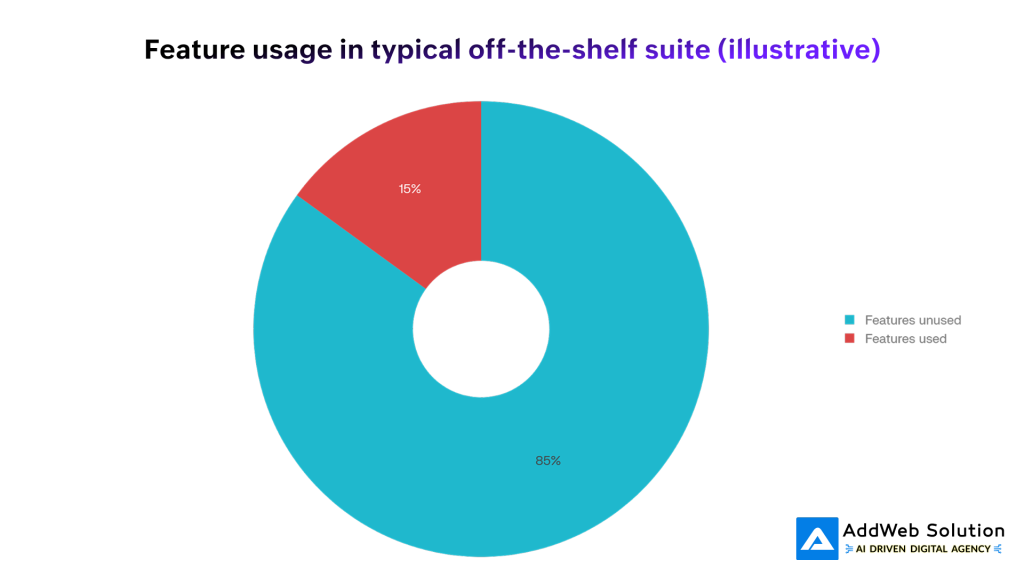
Interpretation: Only a small slice of capabilities in a generic product typically drives real value, while the majority adds cognitive load, UI clutter, and maintenance complexity. A Laravel custom build lets you deliberately design only what your users need.
Why Laravel Is a Strong “Build” Platform (Not Just Another Framework)
Laravel has become a default choice for PHP‑based custom applications for several practical reasons, not just developer hype.
1. High Development Velocity Without Sacrificing Quality
Laravel’s ecosystem (Artisan CLI, Eloquent ORM, Blade templating, built‑in authentication, queues, caching) dramatically cuts boilerplate work.
This means:
- Faster implementation of complex business rules
- Standardized patterns for routing, validation, and error handling
- Less time spent reinventing infrastructure basics
In practice, a skilled Laravel team can close much of the “time‑to‑market gap” between custom build and off‑the‑shelf deployment.
2. Excellent Fit for Business‑Heavy Applications
Typical Laravel use cases map directly to business‑critical systems:
- Custom ERP and inventory management
- Internal analytics and reporting portals
- Customer dashboards and self‑service portals
- Multi‑tenant SaaS products targeting specific niches
Laravel’s MVC structure keeps these large codebases maintainable as requirements evolve.
3. Integration‑Friendly by Design
Laravel’s HTTP client, event system, and middleware make it a natural integration hub:
- Clean wrappers around external APIs
- Background jobs for sync/import tasks
- Webhooks and event‑driven patterns
For organizations already invested in PHP, Laravel becomes a central “glue” layer that can ultimately replace brittle scripts and ad‑hoc tools.
4. Security and Maintainability as First‑Class Citizens
Laravel ships with sane defaults for:
- Protection against common web vulnerabilities (XSS, CSRF, SQL injection)
- Modern authentication flows (including token‑based approaches)
- Structured middleware for enforcing access control
Combined with a large ecosystem and frequent releases, this gives you a long‑lived foundation rather than a one‑off project.
Graph: Feature Fit vs. Economics – Laravel Custom vs. Off‑the‑Shelf
Putting numbers against intuition is helpful for stakeholders.
Below is a conceptual bar chart, indexed to make comparison easy:
- Off‑the‑shelf is rated at 100 for both deployment speed and long‑term ROI (baseline).
- Laravel custom scores lower on deployment speed (slower start) but much higher on long‑term ROI for larger, more complex deployments, reflecting findings that custom solutions can deliver several times higher ROI in the right context.
Interpretation: If your project is small, one‑off, or non‑strategic, the ROI gap may not justify custom build. As scope and strategic importance grow, Laravel custom applications become increasingly attractive.
A Practical Decision Framework for Laravel Build vs. Buy
Here is a structured way to decide, framed in language you can put in front of business stakeholders.
Step 1: Classify the Business Capability
Ask: Is this capability strategic, differentiating, or commodity?
- If commodity (e.g., payroll, email marketing): lean “buy”, and use Laravel to integrate or extend.
- If differentiating or strategic (e.g., core platform, unique customer experience): strongly consider “build with Laravel”.
Step 2: Score Your Requirements on These Dimensions
Rate each from 1–5 (low to high). Laravel custom becomes compelling when your total score is high.

Use this scoring conversation in discovery workshops; it quickly reveals when off‑the‑shelf is being forced into the wrong role.
Step 3: Model the 5‑Year Total Cost of Ownership
Include for each option:
- License/subscription fees
- Implementation & customization
- Integration work (initial + ongoing)
- Internal adoption and training
- Maintenance, upgrades, and vendor lock‑in costs
- Opportunity cost of not building differentiated features
Analyses show that while custom solutions demand higher up‑front investment (often in the six‑figure range), they tend to recover this over 2–3 years for larger organizations due to efficiency gains and elimination of recurring license bloat.
Making Laravel Custom Work in the Real World
For many teams, the right answer is not “build everything” or “buy everything”, but a hybrid strategy:
- Buy for commodity capabilities where vendors excel.
- Build with Laravel where your uniqueness, complexity, or scale truly matter.
- Use Laravel to integrate, orchestrate, and gradually replace brittle off‑the‑shelf dependencies over time.
To make Laravel custom development pay off:
- Invest in proper discovery and domain modeling, not just “start coding”.
- Architect for change – modular services, clear boundaries, automated tests.
- Align product and engineering roadmaps so the app keeps evolving with the business.
- Track ROI explicitly – time saved, errors reduced, revenue protected or created.
When these foundations are in place, Laravel stops being “just a framework” and becomes the backbone of your digital advantage.
How You Can Use This for Your Next Project
If you are preparing a proposal or internal business case, you can:
- Use the comparison table and scoring framework as slides in your decision deck.
- Recreate the pie chart to illustrate unused features in your current tools.
- Adapt the bar chart to model your own deployment vs. ROI expectations.
- Map your current tech stack and highlight where a Laravel‑based core platform could replace fragile, siloed tools.
The build vs. buy decision is not about ideology. It is about putting your money and engineering time where they produce the most leverage. In many critical, high‑impact cases, that means building with Laravel – and buying only what truly deserves to be generic.
Not sure if custom Laravel or the right offshore team is your best move? Talk to our experts now, 30-min strategy call, no pressure.

Pooja Upadhyay
Director Of People Operations & Client Relations
⁂
- https://www.acceldata.io/blog/build-vs-buy-choosing-the-right-software-approach
- https://www.appdirect.com/blog/build-vs-buy-factors-to-consider-when-making-a-software-decision
- https://www.tiny.cloud/blog/build-vs-buy-software-pros-and-cons/
- https://hatchworks.com/blog/software-development/build-vs-buy/
- https://survey.stackoverflow.co/2024/
- https://survey.stackoverflow.co/2024/technology
- https://blog.jetbrains.com/phpstorm/2024/09/laravel-trends-2024-the-latest-market-insights/
