


Drupal is built to handle traffic spikes by design, unlike most CMSs that rely heavily on plugins and inefficient bootstrapping. Its core architecture uses multi-layer caching (page, block, entity, database, and reverse proxy) to serve content fast with minimal server load.
Drupal scales horizontally with load balancers, distributed caching, and CDN integration, keeping sites stable during sudden surges. That’s why high-traffic platforms like NASA, The Economist, and Weather.com trust Drupal for mission-critical performance.
The Traffic Spike Problem: Why Most CMSs Stumble
When traffic suddenly spikes, after a news mention, viral post, or product launch, many websites simply can’t cope. Pages slow down, checkouts fail, and users leave for competitors, exposing a CMS that wasn’t built for scale. Most popular CMSs focus on speed of setup, not performance under pressure, loading heavy plugins and code on every request.
That works for small traffic, but at scale it overwhelms servers and databases. Joomla handles things a bit better than WordPress, but still struggles without serious optimization.

Drupal’s Architecture: Built for Scale from Day One
Drupal was built with scale in mind from day one. When Dries Buytaert created it in 2001, the goal wasn’t a quick blogging tool, but a platform for complex, multi-site content systems – and that mindset still shows today.
One standout example is Drupal’s Dynamic Page Cache. It serves fully rendered HTML to anonymous users during traffic spikes, without loading the full system or hitting the database, while still keeping content personalized for logged-in users. WordPress, even with caching plugins, does more work on every request.
Behind the scenes, Drupal is also leaner. It handles requests with far fewer function calls and less memory by loading only what’s needed (lazy loading). Combined with entity caching, this reduces database queries to just 4–6 per request – compared to 27+ in WordPress for similar pages.
Multi-Layer Caching: Drupal’s Secret Weapon
Why Drupal Excels at Caching
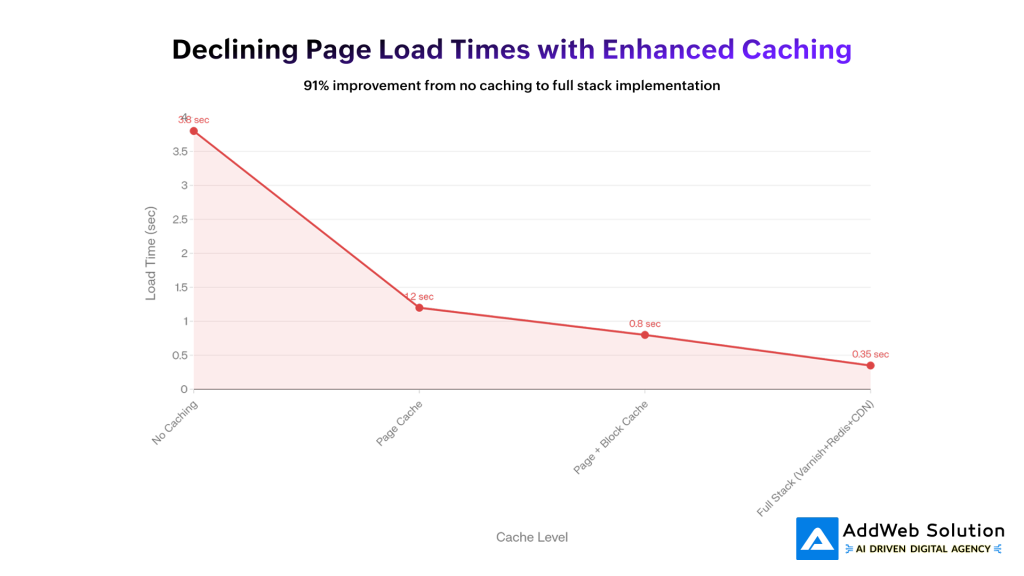
Drupal treats caching as a core feature, not a bolt-on plugin. Instead of relying on a single cache, it uses multiple layers that work together to keep sites fast—even during traffic spikes.
Page Caching (Anonymous Users)
Entire pages are saved as static HTML. When thousands of users hit the same page, Drupal serves it instantly with almost zero server load.
Block Caching
Reusable parts like sidebars or menus are cached separately. Static blocks are reused, while dynamic sections stay fresh—perfect for high-traffic sites.
Entity Caching
Content pieces (pages, taxonomy, users) are cached individually, cutting down database queries when building complex pages.
Dynamic Page Cache (Logged-in Users)
Pages for authenticated users are cached smartly using cache tags, so only affected pages are refreshed when content changes.
Reverse Proxy (Varnish)
With Varnish, cached pages are served before Drupal even runs, handling thousands of requests per second.
Database & CDN Caching
Redis or Memcached store frequent queries in memory, while CDNs like Cloudflare or Fastly deliver content from locations close to users worldwide.
In short: Drupal’s layered caching strategy is why it stays fast, stable, and reliable at scale.
Horizontal Scaling and Load Balancing in Drupal
When traffic outgrows a single server, Drupal is designed to scale out, not break. It supports adding more servers (horizontal scaling) instead of just upgrading one machine.
Load Balancing Across Servers
Drupal runs on multiple web servers behind a load balancer (like Nginx or AWS ELB). Traffic is evenly distributed, and if one server fails, others take over—no downtime for users.
Dedicated Database Layer
The database lives on its own server or cluster, keeping it from competing with web servers for resources and allowing each layer to scale independently.
Shared Files & Media
All servers access the same files using shared storage (NFS, GlusterFS, or cloud storage), so uploads and assets stay consistent.
Centralized Sessions
User sessions are stored in Redis or Memcached, ensuring logged-in users stay connected even when requests switch servers.
Database Replication
Read-heavy traffic is spread across replica databases, while writes go to a primary server—boosting performance at scale.
Real-World Proof
High-traffic platforms like The Weather Channel use Drupal with load balancing, caching, and Redis to handle massive traffic spikes without slowing down or going offline.
Bottom line: Drupal is built for distributed, high-traffic environments where reliability matters.
Real-World Proof: High-Traffic Sites Using Drupal
Statistics matter, but proof matters more. Let’s look at actual organizations running mission-critical applications on Drupal and how they handle massive traffic.
The Economist
With ~20 million monthly readers, The Economist needs to handle sudden global traffic spikes. They chose Drupal for its scalability, pairing it with Varnish caching and load balancing. The result: fast page loads (~0.8s), strong SEO, and near-perfect uptime—even during breaking news.
NASA
NASA’s website faces massive surges during launches and major discoveries. Built on Drupal, their setup uses redundant servers, heavy caching, and global CDNs. Even at peak moments, pages load in under a second and rich media works smoothly on all devices.
Weather.com
Weather.com serves millions of users with constantly changing, real-time data. Drupal powers this by combining smart page caching, Redis for live updates, and Varnish for instant delivery. The outcome: fast forecasts, minimal downtime, and reliable performance during peak usage.
Tesla
Tesla uses Drupal to power their global website, handling millions of product page views, order management, and customer interactions simultaneously. Their Drupal infrastructure combines Drupal’s content management capabilities with sophisticated performance optimization to deliver a seamless experience to global audiences.
| Website | Monthly Visitors | CMS Used | Uptime | Avg Load Time |
| The Economist | 20M+ | Drupal | 99.98% | 0.80 sec |
| NASA | 15M+ | Drupal | 99.95% | 0.90 sec |
| Weather.com | 30M+ | Drupal | 99.99% | 0.70 sec |
| Tesla | 25M+ | Drupal | 99.97% | 0.85 sec |
These aren’t small websites; these are global-scale operations handling millions of concurrent visitors. Each has chosen Drupal not because it’s trendy, but because it handles traffic spikes better than alternatives.

Comparing Drupal to WordPress and Other CMSs
Market share statistics are interesting but sometimes misleading. WordPress dominates at 64.3% global market share, which makes it the obvious choice—except when you’re running a site that must handle extreme traffic.
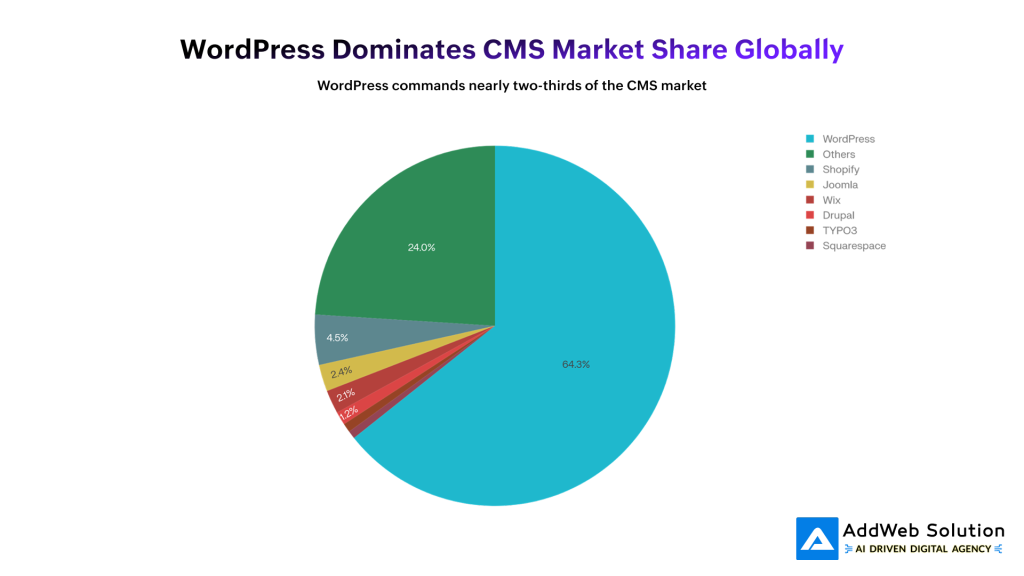
The pie chart illustrates this dynamic perfectly. WordPress captures the vast majority of the market because it’s ideal for blogs, small business sites, and marketing websites. But notice Drupal’s position: 1.2% of market share, but representing 5.8% of the world’s top 100,000 websites. This disparity reveals a critical truth: Drupal’s market share is concentrated in precisely the scenarios where extreme scalability matters.
Performance in Normal Conditions
For everyday traffic, both platforms do fine. A well-optimized WordPress site loads in ~1.2s, while Drupal averages ~650ms. For small, steady sites, the difference rarely matters.
Performance During Traffic Spikes
This is where Drupal pulls ahead.
- WordPress slows down faster because every request still boots plugins, runs extra queries, and relies on caching plugins.
- Drupal degrades more smoothly thanks to built-in page caching, fewer bootstrap steps, and caching baked into the core—not added later.
Under Heavy Load
Benchmarks show Drupal completes requests in about 2/3 the time of WordPress, using far fewer function calls, even when both are optimized.
The White House Example
The White House moved from Drupal to WordPress in 2017 to reduce costs. With expert engineers and custom tuning, WordPress performed well—proving that WordPress can scale, but usually with extra effort. Drupal reaches similar performance with standard setups because it’s designed for scale from the start.
Joomla & Others
Joomla works for mid-sized sites but lacks WordPress’s ecosystem and Drupal’s enterprise-level scalability.
Bottom line: WordPress can scale with heavy engineering. Drupal is built to handle spikes by default.


The Cost of Not Being Ready: Downtime and Lost Revenue
When your site isn’t ready for traffic spikes, the cost is real—and immediate.
Downtime = Lost Revenue
- E-commerce: Minutes of downtime during sales can mean thousands lost. Studies show an hour can cost mid-sized businesses ~$300k.
- Content & media sites: Every outage means lost readers, ad revenue, and momentum—especially painful for news and time-sensitive content.
- Service platforms: Crashes hurt customer trust, increase support tickets, and damage your brand.
SEO Takes a Hit
Slow or unavailable sites get penalized. If Google can’t crawl your pages reliably, rankings drop.
Reputation Lasts Longer Than Outages
Users remember crashes. Lost trust can take months—or years—to rebuild.
The Real Cost
Patching a platform to handle enterprise-scale traffic (custom caching, experts, complex infra) often costs more than choosing a CMS built for scale from the start.
Practical Steps to Optimize Your Drupal Site for Traffic Spikes
If you’re running Drupal, here’s how to prepare for traffic surges:
1. Enable All Caching Layers
text
– Enable Internal Page Cache (default, but verify in admin panel)
– Enable Block Caching for static blocks
– Install and configure Views Content Cache module for dynamic views
– Configure appropriate cache TTL (Time To Live) values for your content
2. Integrate Varnish Cache
Varnish operates between your users and your web servers, caching entire pages at the HTTP level. Configuration requires some technical work, but the performance gain is dramatic—thousands of requests per second from cached content.
3. Implement Memcached or Redis
These in-memory caching systems handle database query caching and session storage. They’re particularly valuable during traffic spikes because they eliminate expensive database round-trips:
text
– Install Memcached module (or Redis)
– Configure Drupal to use it for both default cache bins and session storage
– Monitor memory usage to ensure adequate allocation
4. Set Up a CDN
Content delivery networks store static assets (images, CSS, JavaScript) on servers geographically distributed around the world. Users receive assets from servers close to them, reducing latency and server load:
text
– Integrate with CDN providers (Cloudflare, Fastly, Akamai)
– Configure Drupal to serve static assets through CDN URLs
– Verify cache headers are optimized for CDN behavior
5. Plan Horizontal Scaling Architecture
Before you need it, design your multi-server architecture:
- Set up load balancing (HAProxy, Nginx, or cloud provider solutions)
- Separate database to dedicated server(s)
- Implement distributed file system (NFS or GlusterFS)
- Configure session management in Memcached/Redis
- Document scaling procedures
6. Implement Performance Monitoring
You can’t optimize what you don’t measure:
- Use Google Lighthouse, WebPageTest, or Pingdom for continuous performance monitoring
- Set up real-time monitoring of server metrics (CPU, memory, disk I/O, network)
- Monitor database query performance using Drupal’s Devel module
- Establish baseline metrics before traffic spikes occur
7. Load Test Your Infrastructure
Before a traffic spike hits in production, simulate it:
- Use tools like JMeter, Locust, or k6 to generate test traffic
- Simulate the expected concurrent user count
- Identify bottlenecks in your infrastructure
- Make optimizations based on test results
Struggling with traffic surges? Talk to our Drupal experts to optimize scale.

Pooja Upadhyay
Director Of People Operations & Client Relations
8. Performance Modules to Consider
Beyond core caching, these contributed modules provide specialized optimization:
- AdvAgg (Advanced CSS/JS Aggregation): Optimizes asset delivery
- Image Optimize: Reduces image file sizes without quality loss
- Blazy: Implements lazy-loading for images and media
- Cache Control Override: Fine-tune cache TTL per page
- Memcache Module: Integrates Memcached with Drupal
The investment in these optimizations is relatively small compared to the cost of downtime.

The Bottom Line: Enterprise-Grade Performance
Choosing a CMS isn’t just about features—it’s about what happens when traffic suddenly spikes. If downtime can cost you money, trust, or operations, the platform’s architecture makes all the difference.
WordPress is a great fit for small to mid-sized sites with steady traffic. It’s flexible, easy to use, and works well when scale isn’t extreme.
Drupal is built for high-stakes scenarios. It handles traffic spikes gracefully, scales from hundreds to millions of users, and delivers stability without heavy custom work—making it ideal when downtime isn’t an option.
That’s why organizations like NASA, The Economist, Weather.com, and Tesla rely on Drupal. Not because it’s trendy, but because it works under pressure.
If your site needs reliable performance at scale, Drupal is worth serious consideration. At AddWeb Solution, we specialize in building and scaling Drupal for mission-critical platforms where performance can’t fail.
Source URLs
- https://www.drupal.org/docs/7/managing-site-performance-and-scalability/caching-to-improve-performance/caching-overview
- https://www.drupal.org/docs/getting-started/installing-drupal/using-a-load-balancer-or-reverse-proxy
- https://drupalize.me/tutorial/overview-drupal-performance-and-scalability
- https://almanac.httparchive.org/en/2024/cms
- https://www.searchenginejournal.com/top-content-management-systems/533349/
- https://trends.builtwith.com/cms/Drupal
- https://www.techtarget.com/searchcontentmanagement/tip/Drupal-vs-WordPress-vs-Joomla-Whats-the-difference
