


Manual configuration worked when applications served a handful of similar customers, but it falls apart as soon as every client expects their own workflows, pricing rules, and integrations. Developers already spend a minority of their working hours on actual coding, with surveys showing only around 16–32% of their time is spent writing or improving code while the rest goes into maintenance, setup, and operational tasks. Smart, tenant‑aware Laravel architectures attack both problems by turning configuration from a manual, one‑off activity into an automated capability that adapts to each customer at runtime.
Why Manual Configuration Stops Scaling
Traditional configuration leans heavily on .env files, hard‑coded conditionals, and checklists that humans must follow for every new customer or environment. As you add more tenants, regions, and feature combinations, the number of configuration paths grows combinatorially, along with the risk of misconfiguration and inconsistent behavior.
Industry reports show how costly this is: one IDC study estimated that only about 16% of developers’ time in 2024 went into actual application development, with the majority consumed by CI/CD work, monitoring, security, and deployment‑related tasks. Other surveys find that less than one‑third of a typical week is spent writing or improving code, with the rest dominated by code maintenance, testing, and operational overhead.
The everyday pain of manual config
- Onboarding drag
New customers wait days while teams clone environments, toggle features, and “just tweak a few settings.” - Tribal knowledge everywhere
Critical config details live in wikis, Slack threads, or one senior engineer’s memory instead of a single source of truth. - Human error at scale
Copy–paste mistakes, forgotten flags, or mis‑typed keys lead to subtle bugs and occasionally full‑blown incidents. - Slow experimentation
Rolling out a new feature to “just 5 beta customers” means code changes or fragile, one‑off scripts.
What a “Smart Laravel App” Actually Is
When people talk about “smart” or “self‑configuring” Laravel apps, they are not talking about magic. They are talking about treating configuration as data, not as static files.
A smart Laravel application uses Laravel’s configuration repository, service container, middleware, and event system to compute configuration values at runtime based on tenant, user, environment, and context. The same codebase can then serve hundreds or thousands of customers with different data stores, feature sets, branding, and business rules—without manual intervention for each variation.
Core traits of a smart app
- Tenant‑aware from the first middleware
Every request is associated with a tenant or customer context as early as possible in the lifecycle. - Config as first‑class data
Customer‑specific settings live in databases or config stores, not in scattered if statements. - Feature‑flag driven behavior
Capabilities are toggled and targeted through feature flags rather than hard‑coded branches. - Self‑documenting
The configuration store becomes the documentation: what is in there is exactly what runs in production.
Laravel Building Blocks for Self‑Configuring Apps
Laravel already ships with much of the plumbing you need. Smart configuration architectures simply wire these pieces together in a disciplined way.
- Configuration repository (config())
Holds sensible defaults, which can be overridden per tenant or environment. - Service container and bindings
Allows swapping implementations (e.g., payment gateways, storage backends) at runtime based on configuration. - HTTP middleware
Resolves the current tenant from domain, path, headers, or tokens before business logic runs. - Events and listeners
React to events like TenantCreated, PlanUpdated, or IntegrationConnected to recompute configuration. - Caching
Caches resolved configuration per tenant so you avoid hitting the database or remote config service on every request.
Multi‑Tenancy: The Foundation of Per‑Customer Behavior
Multi‑tenancy is the backbone of any app that needs to behave differently per customer. In Laravel, a multi‑tenant architecture allows one application instance to serve many distinct tenants while isolating their data and configuration. The key questions are:
- How do you identify the current tenant for each request?
- How do you ensure all data and configuration are scoped to that tenant?
The Laravel ecosystem offers mature packages—such as spatie/laravel-multitenancy—that provide tenant discovery, tenant‑aware database connections, and hooks that run whenever the active tenant changes.
Common multi‑tenancy strategies in Laravel
| Strategy | Description | Best suited for |
| Database‑per‑tenant | Each tenant gets its own database; Laravel switches the active connection at runtime.[1][3] | Regulated, high‑volume, or isolation‑critical customers |
| Single DB with tenant_id | All tenants share tables; a tenant_id column plus global scopes filter data.[10][3] | Many small tenants where full isolation isn’t mandatory |
| Hybrid (shared + per‑tenant DB) | Shared “landlord” DB for metadata plus optional tenant‑specific databases.[1][5] | Large SaaS platforms with a mix of small and large tenants |
In a database‑per‑tenant model, Laravel dynamically swaps the database connection parameters as soon as a tenant is identified, driven by a Tenant model and configuration entries in config/database.php. In shared‑database models, global scopes or middleware ensure every query includes a tenant constraint, so you do not have to sprinkle where(‘tenant_id’, …) everywhere.
How Tenant‑Aware Configuration Works End‑to‑End
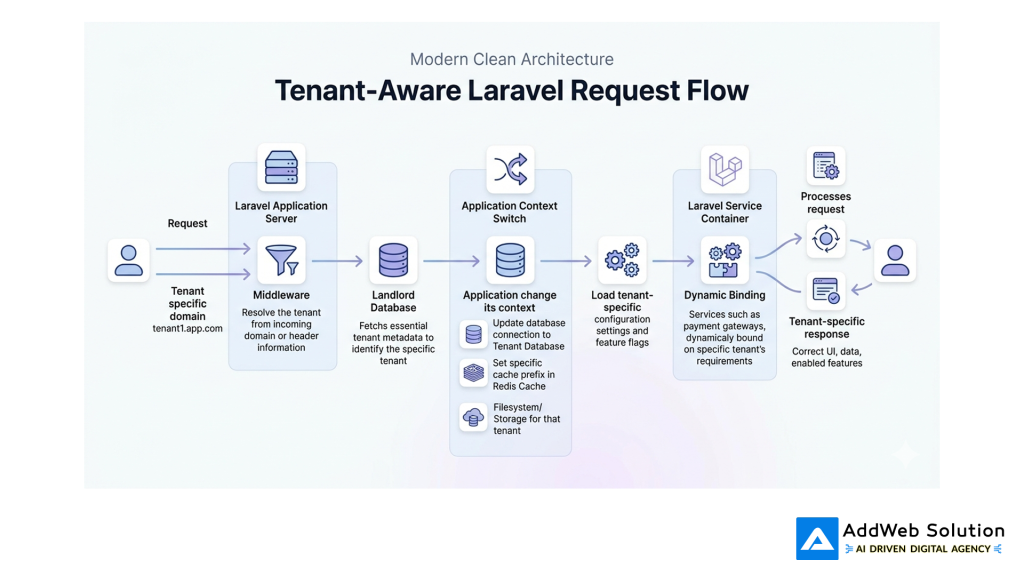
A tenant‑aware app generally stores tenant metadata in a central “landlord” database or configuration service: plan, enabled modules, branding, locales, integration credentials, and so on. On each request, a tenant finder component reads the domain (for example, tenant1.app.com), path, or headers, retrieves the corresponding tenant, and then runs a pipeline of “switch tenant” tasks.
These tasks adjust the database connection, cache prefixes, filesystem roots, and other environment‑sensitive settings so that the rest of the code operates in the correct context without additional conditionals.
Illustration placeholder:
Feature Flags: Turning Capabilities On and Off Per Customer
Knowing who a request belongs to is only part of the story. You also need to know what that tenant should see and be able to do right now.
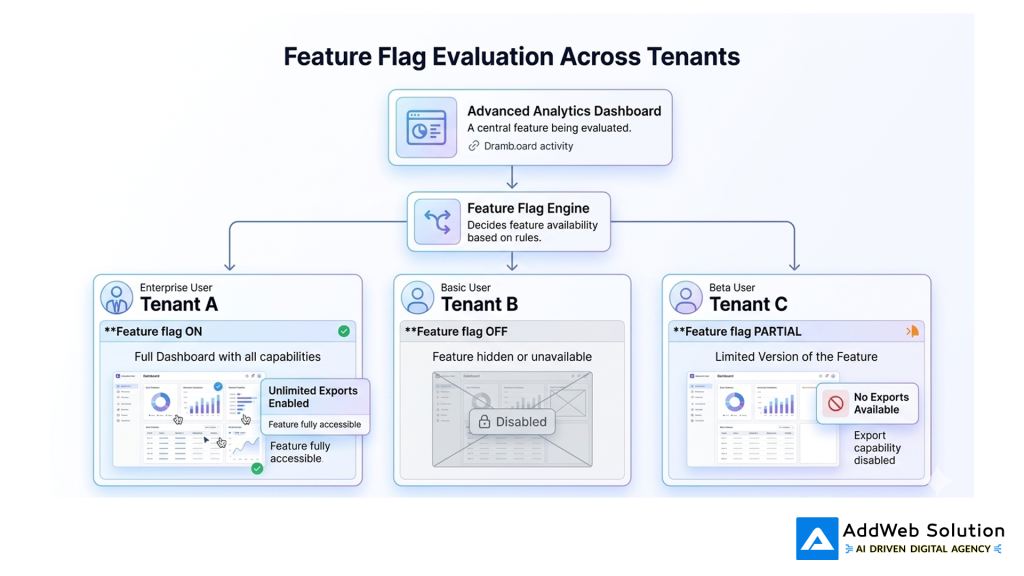
Feature flags give you that control layer. They let teams enable, disable, or gradually roll out behavior per tenant, per user segment, or per environment—with no redeploys required. Unsurprisingly, the feature‑flag tooling market is booming: estimates put the global feature‑flag management market around USD 1.2–1.4 billion in 2024, with forecasts up to roughly USD 5.8–6.7 billion by 2033 at 18–19% CAGR.
How feature flags plug into Laravel
- Config store
A table or external service holds flag definitions and targeting rules. - Evaluation layer
A Laravel service decides whether a flag is “on” for the current tenant, user, or cohort. - Usage in code
Controllers, middleware, and views call into that service instead of hard‑coding behavior. - Operational controls
Product and operations teams toggle behavior via an interface rather than waiting for a deployment.
Illustration placeholder:
Visual: Where Manual Configuration Wastes Developer Time
Real‑world survey data makes the cost of manual configuration and environment work concrete. One study found that developers spend about 32% of their time writing or improving code, 35% on code maintenance and testing, and 23% on meetings and operational tasks such as managing environments and dependencies.
Here is an illustrative pie chart using those categories:
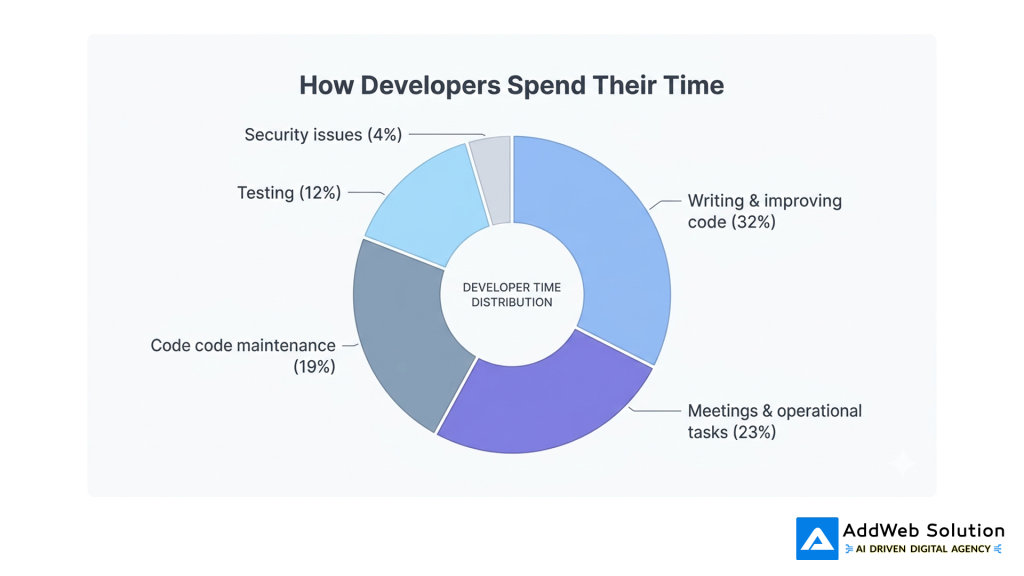
These slices mirror the reported categories; they do not sum to a perfect 100% because not all survey buckets are shown, but they clearly highlight how much time disappears into non‑coding work that better automation and smarter configuration can reduce.
Visual: Feature‑Flag Tooling Is Exploding
The way teams think about configuration is also changing, driven by the adoption of feature‑flag platforms. Market research indicates that feature‑flag management was already a multi‑billion‑dollar opportunity in the making by 2024, with estimates around USD 1.2–1.4 billion in 2024 and projections up to roughly USD 5.8–6.7 billion by 2033.You can visualize this as a simple bar chart:
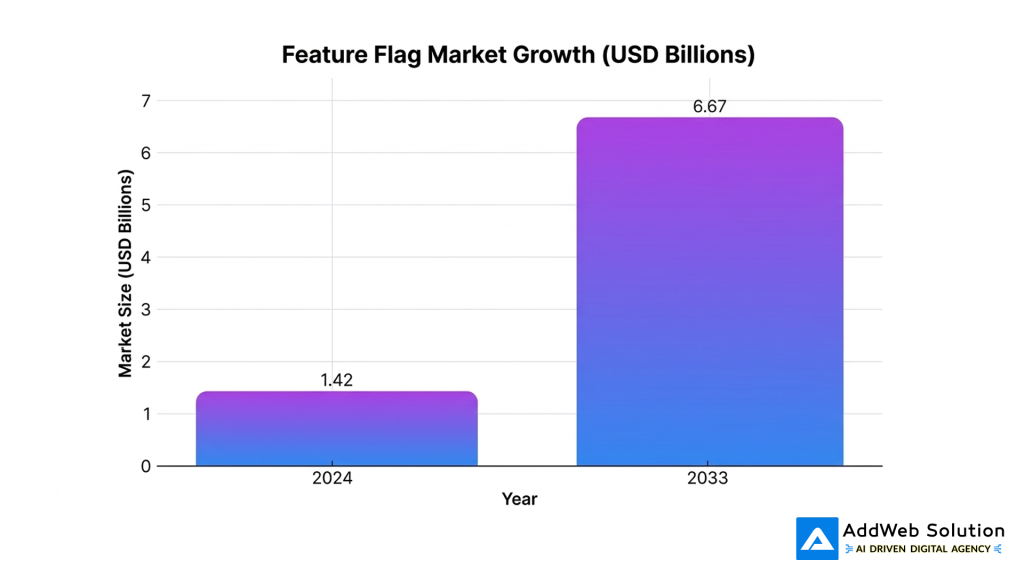
The exact numbers vary slightly by analyst, but the signal is clear: feature‑flag–driven configuration is becoming a standard part of modern software delivery.
From Static Config Files to a Runtime Configuration Graph
In the old world, configuration was essentially a pile of static files loaded once when the application booted, and then mostly forgotten until the next deploy. In a smart Laravel app, configuration looks more like a graph that is resolved at runtime based on inputs such as tenant identity, user role, subscription plan, and environment.
That graph may pull from multiple sources: tenant metadata tables, centralized configuration services, feature‑flag platforms, and secrets managers.
Typical runtime configuration flow
- Identify context
Early middleware determines tenant, user, locale, and environment. - Load tenant metadata
A Tenant model or client fetches settings like plan, limits, branding, and integrations. - Evaluate feature flags
The flag engine decides which features are active for this tenant and user. - Bind services
Service providers bind concrete implementations (for example, which payment gateway) based on the resolved configuration. - Cache the result
The computed configuration is cached per tenant (and sometimes per user) to keep the overhead low.
Example: Configuration Dimensions That Can Vary Per Customer
Once configuration is treated as data, you can safely vary a lot more per customer without creating chaos. Here are some common dimensions a Laravel SaaS might adjust automatically per tenant.
| Dimension | Examples of per‑tenant variation |
| Data storage | Separate database vs shared schemas, data residency region |
| Authentication | Local accounts vs SSO/SAML/OIDC providers |
| Authorization | Role definitions, granular permissions, approval chains |
| Features & modules | Enabled modules, beta features, experimental flags |
| Limits & quotas | API call limits, export sizes, concurrent background jobs |
| Branding & theming | Logo, colors, email templates, PDF layouts |
| Integrations | CRM, payment gateway, analytics platform, storage backends |
All of these can be driven from tenant config records and flags rather than from per‑customer forks or hand‑edited config files.
Key Implementation Patterns in Laravel
To make this maintainable, configuration logic needs clear homes in your Laravel app. A few patterns show up again and again.
1. Tenant finders and context middleware
Tenant finders translate an incoming request (domain, path, headers) into a Tenant model and store it in the service container. Context middleware can then:
- Assert that a tenant exists for protected routes.
- Inject tenant‑aware dependencies.
- Enforce high‑level policies (e.g., plan restrictions).
This keeps tenant resolution and validation in one place instead of scattered across controllers.
2. Tenant‑aware service providers
Service providers can register bindings that depend on the current tenant or configuration graph. For example, a PaymentServiceProvider might:
- Look up the tenant’s region and contracted payment provider.
- Bind a specific gateway client implementation into the container.
Because that logic lives in a single provider, adding a new gateway or rerouting a subset of tenants does not require mass edits in your controllers.
3. Config caching and invalidation
Laravel’s config cache plus Redis (or similar) can store “resolved configuration snapshots” per tenant, dramatically reducing runtime overhead. The tricky part is invalidation:
- Config needs to refresh when a tenant’s plan changes, a flag is updated, or a new integration is connected.
- Events like TenantUpdated or FeatureFlagUpdated can bump a version key or clear relevant cache entries.
Done well, this gives you dynamic behavior with a static‑config performance profile.
Manual Configuration vs Smart Configuration (At a Glance)
It helps to see the contrast side by side:
| Aspect | Manual configuration | Smart Laravel configuration |
| Onboarding a new customer | Hours or days of checklists, scripts, and environment edits | Mostly automated: create tenant record, assign plan and features |
| Consistency across tenants | Depends on discipline and documentation | Enforced by schemas, validation, and shared configuration services |
| Rolling out a new feature | Code changes, migrations, manual environment toggling | Define flag and targeting rules; rollout via configuration only |
| Experimentation and A/B tests | Rare, risky, and slow | Built‑in via percentage rollouts and tenant/user segmentation |
| Risk of misconfiguration | High, especially under time pressure | Lower, with fewer manual steps and better guardrails |
| Documentation | Often separate from runtime behavior | Configuration store is the source of truth |
Guardrails: Avoiding Configuration Sprawl
Smart configuration can become its own problem if left unchecked. As you add more tenants, flags, and dimensions, the configuration surface can balloon. The solution is to treat configuration with the same discipline you apply to code.
Practical guardrails:
- Flag lifecycle management
Define creation, rollout, and cleanup stages for each flag. Remove stale flags quickly. - Schema‑driven configuration
Treat config as structured data with explicit types, defaults, and validation. - Versioning and audit trails
Track who changed what, when, and be able to roll back misconfigurations. - Observability with config context
Attach tenant and flag metadata to logs and traces so you can correlate production behavior with configuration state.
A Pragmatic Migration Path (Without a Big‑Bang Rewrite)
If you already have a Laravel app in production, you do not need to rewrite everything to reap the benefits of smart configuration. A gradual approach works better in practice.
A realistic sequence:
- Centralize tenant metadata
Introduce a Tenant model and store core per‑customer settings in one place. - Add basic multi‑tenancy
Use subdomains or paths to identify tenants and either switch connections or apply global scopes. - Introduce a feature‑flag service
Start with a few high‑impact flags (for example, major UI changes, beta features) instead of environment variables. - Refactor service bindings
Move integration choice and policy selection into service providers that read from tenant configuration. - Instrument and observe
Track how configuration changes affect error rates, performance, and customer outcomes—and feed that back into your configuration design.

Empower Your Digital Transformation With Our Laravel Development Services!

Pooja Upadhyay
Director Of People Operations & Client Relations
Closing Thoughts
Manual, spreadsheet‑driven configuration simply cannot keep up with SaaS products that serve dozens or hundreds of customers, each expecting a tailored experience. By combining Laravel’s multi‑tenancy capabilities, feature‑flag–driven rollouts, and runtime configuration patterns, teams can let the application adapt itself to each customer automatically while reducing operational toil and misconfiguration risk.
The goal is not to make configuration “disappear”, but to move it out of human hands during day‑to‑day operations. When your Laravel app can resolve the right behavior for each tenant on its own, your developers spend more time designing capabilities—and much less time wiring them up, environment by environment and customer by customer.
If you’d like, I can now help you:
- Tailor this blog to a specific audience (e.g., CTOs vs Laravel devs).
- Add concrete Laravel code snippets that match your current stack.
- Turn this into a shorter LinkedIn carousel or Twitter/X thread for promotion
⁂
- https://www.sonarsource.com/blog/how-much-time-do-developers-spend-actually-writing-code/
- https://www.infoworld.com/article/3831759/developers-spend-most-of-their-time-not-coding-idc-report.html
- https://spatie.be/docs/laravel-multitenancy/v4/introduction
- https://docs.mixpanel.com/docs/featureflags
- https://laravel.com/blog/building-a-multi-tenant-architecture-platform-to-scale-the-emmys
- https://stackoverflow.com/questions/58934967/multi-tenancy-and-custom-features-per-tenant
- https://www.statsig.com/perspectives/implementing-feature-flags-at-scale
- https://www.reddit.com/r/learnprogramming/comments/v9w3wc/does_anyone_feel_setting_up_dev_environments_is/
