


Here’s a scenario that might sound familiar: Your small business is growing, customers are reaching out through email, WhatsApp, social media, and your website contact form all at once. Your two-person team is drowning in messages, response times are slipping, and the idea of hiring a dedicated IT department or expensive tech consultants feels like a distant dream.
You’re not alone. According to recent research, 42% of employees cannot efficiently resolve customer issues due to disconnected systems and broken processes. And with customer service representatives in the US commanding salaries averaging $39,680 annually plus benefits, building an in-house support infrastructure can easily cost small businesses over $100,000 per year when you factor in training, technology, and overhead.
But here’s the thing: you don’t need a tech army to deliver exceptional customer support. Zoho Desk was built precisely for businesses like yours. It’s the kind of tool that lets a three-person team punch way above its weight class.
The Customer Support Challenge for Growing Businesses
Let’s be honest about what’s happening in customer service right now. The help desk software market hit $14.3 billion in 2025 and is projected to reach $35 billion by 2035, growing at a CAGR of 9.4%. That’s not just industry growth it’s a signal that businesses everywhere are scrambling to get their support systems in order.

Help Desk Software Market Projected Growth (2024-2035) Source: Future Market Insights, Data Insights Market
The pressure is real. 87% of customers value personalized service interactions based on their history with a company. Meanwhile, 46% of customers expect a response in less than 4 hours. Miss that window, and 52% of them will stop buying from you entirely.
And the channel fragmentation? It’s intense. Customers aren’t just calling anymore. They’re messaging on WhatsApp at midnight, tweeting complaints, sending emails, filling out forms, and expecting the same seamless experience across all of them.
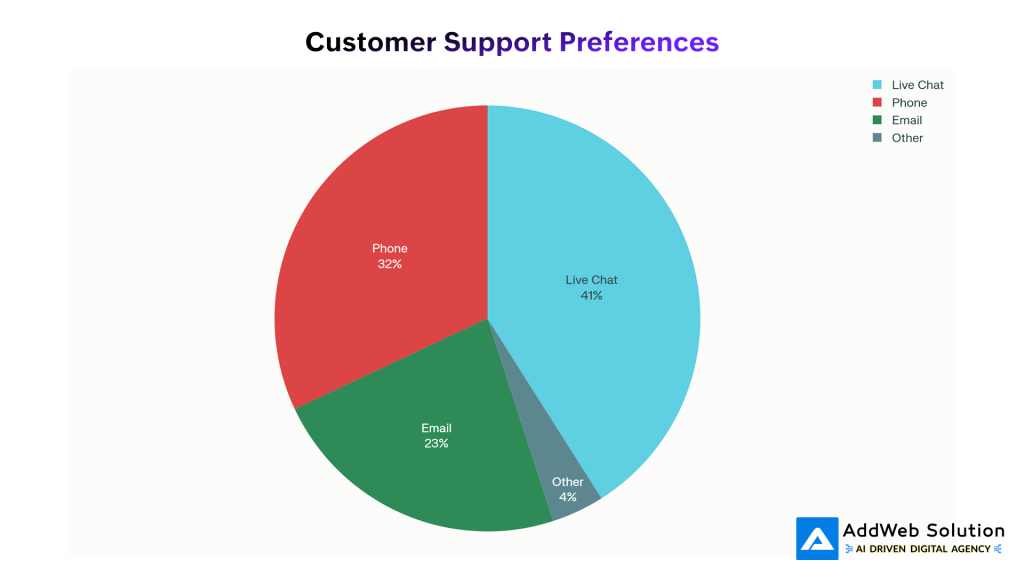
Preferred Customer Support Channels Distribution (2024) Source: Kayako Research
Here’s where it gets interesting. Live chat has emerged as the preferred support channel for 41% of consumers, beating phone (32%) and email (23%). The satisfaction gap is even more telling that live chat delivers an 87% satisfaction rate compared to just 44% for phone support.
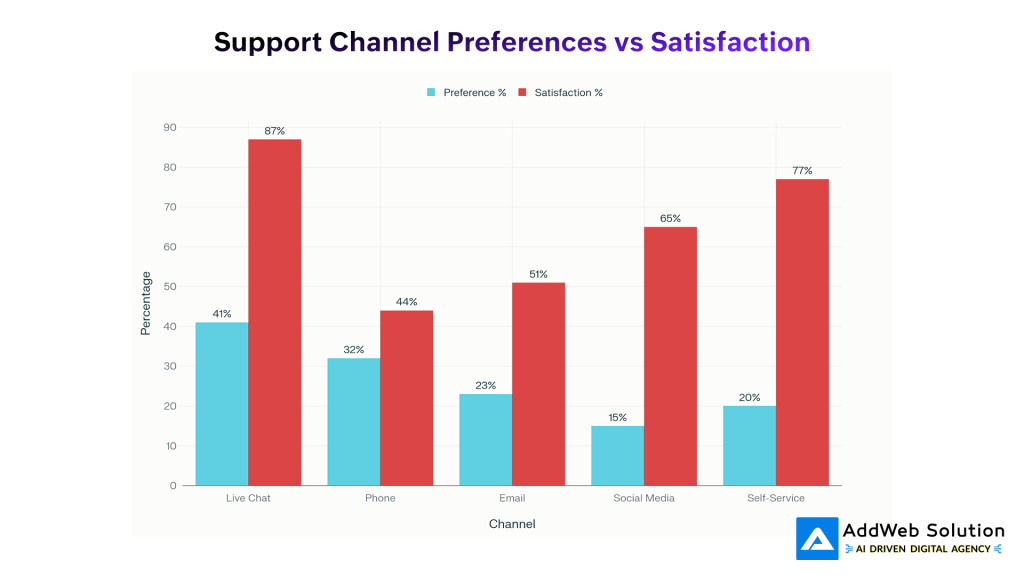
Customer Support Channel Preferences vs Satisfaction Rates (2024)
What Makes Zoho Desk Different
I’ve seen plenty of help desk tools that promise simplicity but require a computer science degree to set up. Zoho Desk isn’t that.
Zoho Desk operates on a philosophy that Kushagra Sahni, Chief of Staff at a company using the platform, summarized well: “The simplicity of Zoho Desk’s UI has really helped my digital transformation team reduce the number of hours spent, from 5 to only 2.5 or 3 hours, in training and onboarding new agents.”
The platform manages 10+ communication channels from a single interface: email, phone, instant messaging (WhatsApp, Telegram, Facebook Messenger, WeChat, Line), social media, live chat, and web forms. Everything flows into one unified ticket queue.

Modern customer support team managing inquiries across multiple channels
Omnichannel Without the Headache
The omnichannel approach isn’t just a buzzword here. When a customer tweets at you, then follows up via email, then calls your support line, Zoho Desk keeps that entire conversation thread intact. Your agent sees the complete history without asking the customer to repeat themselves, something that frustrates 56% of customers when channels are disconnected.
Core Features That Replace Your Need for Tech Teams
Workflow Automation (No Coding Required)
This is where Zoho Desk really shines for non-technical teams. The workflow automation is designed to be “extremely flexible while being simple to implement”.
You can set up rules like:
- Automatically assign any ticket with “billing” in the subject line to your finance specialist
- Escalate tickets that remain unassigned for more than 2 hours to supervisors
- Send automatic notifications when response deadlines approach
- Tag and categorize tickets based on keywords or customer type
All of this happens through a visual drag-and-drop interface. No scripts. No developers. Just logical conditions and actions.
Round-Robin Ticket Assignment
When tickets pile up, fair distribution matters. Zoho Desk offers three assignment methods:
| Assignment Type | How It Works | Best For |
| Load-Based | Assigns tickets based on current agent workload | Even distribution during high-volume periods |
| Sequential | Rotates tickets equally in order | Balanced workload across equal-skill agents |
| Skill-Based | Routes to agents based on expertise tags | Technical queries, language requirements |
Blueprint: Visual Process Builder
Blueprint is Zoho Desk’s secret weapon for process standardization. It’s a visual workflow builder that ensures every ticket follows the same path from initial response to resolution to follow-up.
Think of it as creating a flowchart for your support process. When a ticket enters a specific stage, Blueprint guides agents through the required actions, collects the right information, and prevents skipping steps.
The AI Advantage: Meet Zia
Here’s where things get genuinely interesting. Zoho Desk’s AI assistant, Zia, isn’t some tacked-on feature. It’s integrated throughout the platform and does the heavy lifting that would otherwise require specialized technical staff.
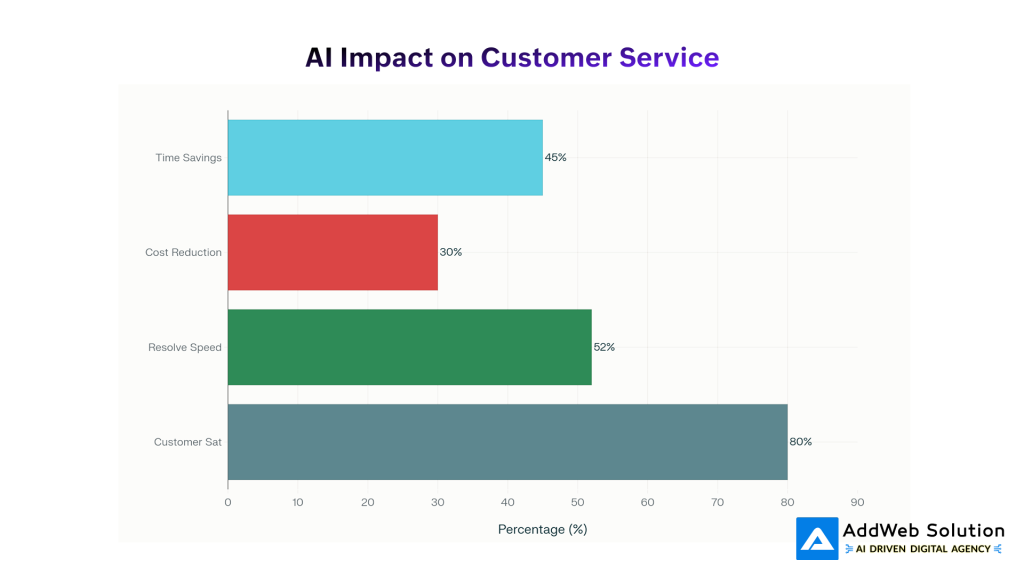
AI’s Impact on Customer Service Key Metrics (2024-2025)
What Zia Actually Does
Answer Bot for Customers: Zia analyzes incoming questions, searches your knowledge base, and provides instant responses across your website and messaging channels. When enhanced with generative AI capabilities, these responses become remarkably human-like.
Reply Assistant for Agents: When agents receive complex tickets, Zia analyzes the content, summarizes long conversation threads, identifies customer sentiment, and suggests responses pulled directly from your knowledge base.
Auto-Tagging and Field Prediction: Zia automatically categorizes tickets, predicts priority levels, and fills in relevant fields reducing the manual data entry that eats up agent time.
Sentiment Analysis: The system reads between the lines, detecting whether a customer is frustrated, satisfied, or confused, allowing agents to adjust their tone accordingly.
Knowledge Base Generation: Perhaps most impressive, Zia can convert resolved ticket conversations into knowledge base articles automatically, keeping your self-service resources fresh without requiring dedicated content writers.


The AI Impact in Numbers
The industry data on AI-powered customer service is compelling:
- 45% reduction in call handling time
- 52% faster resolution times through automation
- 37% reduction in first response times
- 80% of customers report positive experiences with AI-powered support
Real Numbers: Cost Comparison and ROI
Let’s talk about money, because this is where the decision often gets made.
The True Cost of In-House Support
Building an in-house customer service team in the US involves:

A team of four in-house representatives can easily cost $168,000 to $300,000 annually when you factor in everything.
Zoho Desk Pricing: The Comparison
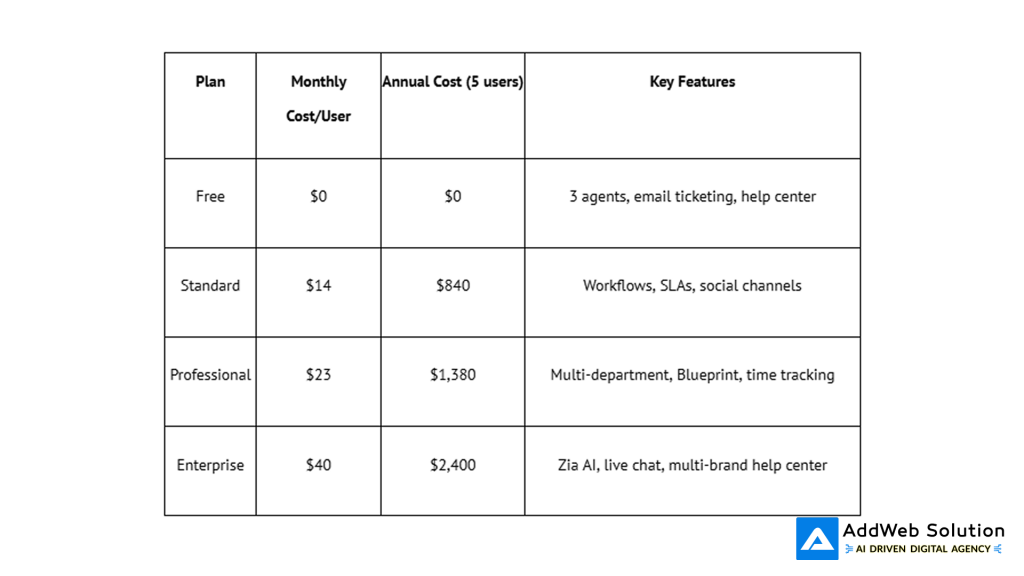
Even at the Enterprise tier with all the AI bells and whistles, you’re looking at $2,400 per year for a 5-person team. Compare that to hiring even one additional full-time employee at $35,000+ annually.
Interesting Facts Box
$75 billion — The amount US companies lose annually due to poor customer service
2-3 minutes — LambdaTest reduced their SLA response time from a 15-minute target to just 2-3 minutes after implementing Zoho Desk
70% of cloud-based help desk solutions now dominate the market, preferred for their scalability and remote accessibility
95% of customer interactions are projected to be AI-powered by 2025
Success Stories from the Field
LambdaTest: From 15 Minutes to 2 Minutes
The San Francisco-based software testing company set an ambitious SLA target of 15 minutes. After implementing Zoho Desk integrated with Zoho CRM, they crushed their own expectations and response times dropped to 2-3 minutes.
The secret? They weren’t just using the tool for ticketing. They combined Zoho Desk’s automation with Jira integration for technical support, creating a seamless workflow that moved tickets through their system without manual handoffs.
Lakeside CNC Group: From Spreadsheets to Scalability
This repair and maintenance company started as a two-person shop using spreadsheets to track customer requests. As they scaled, they needed something that could grow with them. Zoho Desk replaced their disconnected systems and gave stakeholders visibility into repair status without requiring constant email updates.
The key win? They could do most of the customization themselves, avoiding ongoing consulting fees and maintaining control over their support process.
AMTI Philippines: Transforming Feedback Management
For four years, AMTI struggled with their client rating system. Some clients resisted feedback integration, and their admin team was stretched thin between technical tasks and support. Zoho Desk’s customizable features let them build a tailored feedback system that finally gave them comprehensive, actionable insights.
Getting Started Without Technical Expertise
Here’s the practical path to getting Zoho Desk up and running without hiring anyone:
Week 1: Foundation
- Sign up for the 15-day free trial at the Enterprise level to explore all features
- Connect your primary email inbox tickets start flowing immediately
- Add your team members and set basic permissions
Week 2: Channels
- Connect social media accounts (Facebook, Instagram, Twitter)
- Set up web forms on your website
- Configure instant messaging channels your customers actually use
Week 3: Automation
- Create your first direct assignment rule (route billing questions to your billing person)
- Set up SLA targets for response times
- Build a simple workflow for ticket escalation
Week 4: Self-Service
- Create 10-15 knowledge base articles for common questions
- Enable Answer Bot to surface these articles automatically
- Customize your help center branding
The entire setup can happen without writing a single line of code. And if you need help, Zoho’s implementation support is included for paid plans.
Quote Section
“You’ll never have a product or price advantage again. They can be easily duplicated, but a strong customer service culture can’t be copied.”
— Jerry Fritz, Director of Management Institute, University of Wisconsin
“Self-service options can reduce costs while providing immediate solutions to users. Customers have answers at their fingertips, and agents can respond faster, so everyone is happier and more productive.”
— David Schroeder, Senior Manager of Services Support at Unity
Ready to Streamline Your Business with Zoho?

Pooja Upadhyay
Director Of People Operations & Client Relations
The Bottom Line
The customer support landscape has shifted. Customers expect instant, personalized, omnichannel experiences. But meeting those expectations doesn’t require building an IT department or hiring expensive consultants.
Zoho Desk democratizes professional customer support. A small team with the right tool can deliver the same quality of service sometimes better than larger competitors with bloated support infrastructure.
The platform deploys 50% faster than competitors. The pricing is transparent with no hidden costs. The automation replaces manual work without requiring technical expertise. And the AI features that once required data scientists are now available in a point-and-click interface.
For growing businesses wrestling with support complexity, the question isn’t whether you can afford Zoho Desk. It’s whether you can afford to keep operating without it.
