


]I’ll be honest I’ve watched teams implode from the inside not because of lack of talent, but because nobody knew what the hell everyone was working on.
That chaos usually starts innocuously. A client asks for “one small tweak.” Three weeks later, your original scope is unrecognizable. Or worse, you’ve got five people doing the same task because communication fell through the cracks. The deadline creeps up. Your best people start looking for exits. And suddenly, what should’ve been a six-week project becomes a three-month nightmare that nobody remembers fondly.
This isn’t a character flaw. It’s the default state of teams without proper structure.
According to recent data, a staggering 66% of employees hit burnout levels in 2025 and the culprits are usually the same: unclear priorities, mismanaged workloads, and the death-by-a-thousand-cuts feeling of scope creep.
Meanwhile, only 38% of organizations actually complete projects on time, and a measly 16% deliver projects on budget and on schedule. These aren’t small problems; they’re systemic failures that drain profitability and talent.
The good news? It doesn’t have to be this way. Project management tools like Zoho Projects have become the difference between teams that operate smoothly and teams that operate in chaos. But here’s the thing, it’s not about the software features themselves. It’s about what happens when you finally give people clarity, visibility, and accountability.
Why Projects Fail (And Why Your Team Feels the Stress)
Let me frame this differently. When a project goes sideways, it’s not usually because your team lacks skills. It’s because information isn’t flowing where it needs to go.
Research published in 2024-2025 identified the main culprits behind project failure
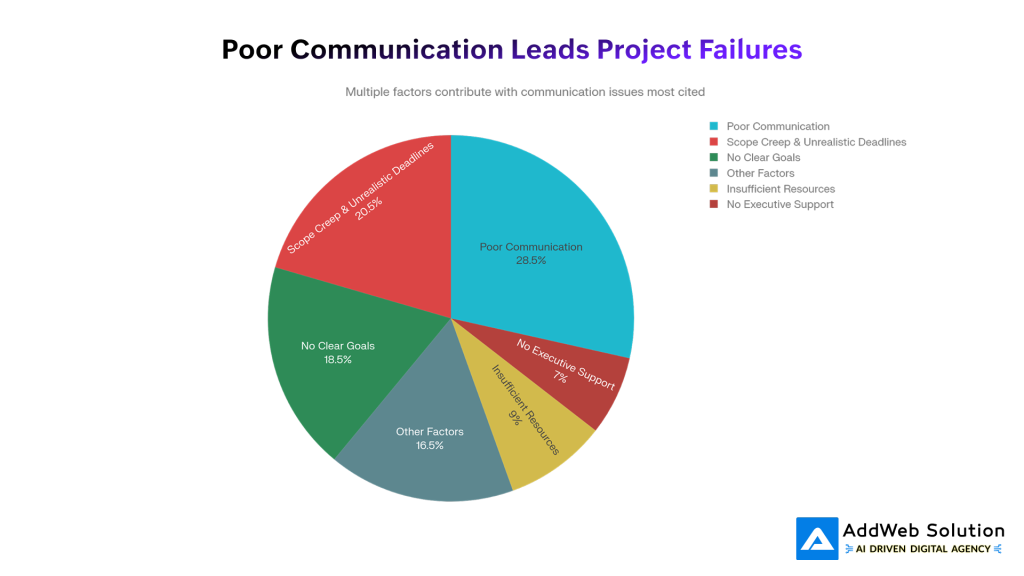
Why Projects Fail: Understanding the Root Causes
The data is uncomfortable to stare at because it’s so preventable. Scope creep affects 41% of projects annually. That’s not a fringe problem that’s nearly half of all projects losing their way. When scope expands without proper visibility, everything else deteriorates: budgets balloon (52.7% of software projects exceed budgets by 189% on average), timelines slip, and your team gets buried under unrealistic expectations.
But here’s what really matters: scope creep isn’t the disease. It’s a symptom. The disease is the absence of a single source of truth about what your project actually includes, who’s responsible for what, and what the timeline realistically allows.
When your team doesn’t have a clear view of the project, they can’t prioritize effectively. And when they can’t prioritize, they overcommit. When they overcommit, burnout follows.
The numbers bear this out. In 2025, 80% of knowledge workers reported feeling overworked or close to burnout. Meanwhile, 44% are actively considering leaving their jobs due to persistent stress. The culprit? Most cite unmanageable workloads (51%), staff shortages (42%), and difficulty balancing work and life (41%) as the top stressors.
Here’s the kicker: Poor communication alone costs organizations roughly $70,000 per employee annually in lost productivity. When 70% of professionals report that communication issues lead to wasted time, that’s not a minor inconvenience, that’s a revenue leak you can actually quantify.


The Hidden Cost of Poor Project Visibility
Let me put numbers to this in a way that should make any leader uncomfortable.
A 100 person company loses an estimated $2.5 million annually to unproductive meetings alone. Workers spend 31 hours per month in meetings that don’t add value. Now add in the time spent on manual reporting (42% of teams spend one or more days per month collating reports), the rework (80% of organizations dedicate at least half their time to revisiting and correcting projects), and the context switching tax (employees face 275 interruptions daily).
But here’s the real gut-punch: without proper project tracking, teams don’t know where the bottlenecks are.

The Performance Gap: Where Teams Want to Be vs Reality
Look at those gaps. The distance between where teams want to be (75% on-time, 75% within budget, 70% delivering full benefits) and where they actually are (38%, 41%, 39%) isn’t random. It’s the direct result of poor visibility into what’s actually happening across projects.
When you don’t have real-time clarity into:
- Who’s overloaded (and who’s waiting for blocked tasks)
- Whether you’re tracking to budget and timeline
- Which tasks are actually blocking other tasks
- Where communication breakdowns are happening
…you can’t make course corrections. You just react. And reactive management is expensive.
How Zoho Projects Brings Clarity to Chaos
Here’s what changes when a team gets proper visibility.
I worked with a manufacturing company last year that was struggling with product development timelines. Multiple teams (design, engineering, procurement, testing) were working in isolation. The project manager had visibility into what they were doing, but nobody saw the complete picture until things were already overdue.
They implemented Zoho Projects and did something deceptively simple: they mapped out every dependency between tasks. Suddenly, engineers could see that they were waiting on procurement. Procurement could see the deadline that testing needed to hit. And the project manager could see the whole chain at once.
The result? A 50% reduction in product development cycle time.
This isn’t magic. It’s what happens when information stops being fragmented and starts flowing. Zoho Projects achieves this through what they call “Phases” (formerly milestones), Gantt charts with visual task dependencies, real-time updates, and automated notifications that ensure nobody’s working in the dark.

The Critical Advantage of Project Management Tools
Notice that gap? Companies using structured project management tools complete 61% of projects on time, compared to just 41% without. That’s not a marginal improvement. That’s the difference between teams that succeed consistently and teams that struggle.
Ready to grow? Dive in now and see how streamlined processes boost your results.

Pooja Upadhyay
Director Of People Operations & Client Relations
Breaking Down the Key Features That Actually Matter
Not every feature in a project management tool matters equally. Some are noisy. Others are transformative. Here are the ones that actually move the needle:
1. Gantt Charts with Task Dependencies
A Gantt chart visualizes your project as a timeline with individual tasks shown as bars. But the real power comes from dependencies on the relationships between tasks.
When task B can’t start until task A finishes, that’s a finish-to-start dependency. Gantt charts let you visualize these relationships, which means you can immediately spot:
- The critical path (the sequence of tasks that directly determines your project end date)
- Where bottlenecks will form
- Which delays actually matter (vs. tasks with slack time)
A marketing agency using Zoho Projects mapped out their campaign workflow this way. They discovered that their approval process was serialized (one person approving at a time), which created an artificial bottleneck. By restructuring approvals to run in parallel where possible, they reduced campaign turnaround time by 25%.
2. Real-Time Workload Visibility
Remember those burnout stats? One core driver is people not knowing if they’re overloaded because nobody’s looking at the whole picture.
Zoho Projects shows you, at a glance, who has what on their plate. If someone’s got five tasks in their queue while another person has one, you can rebalance instantly. No guessing. No “I think Sarah’s busy.” Just data.
This is critical because when managers can see workload imbalances, they make better decisions about resource allocation. Teams feel less overwhelmed because the load is actually distributed fairly.
3. Automated Notifications and Updates
Imagine if your team never had to ask for a status update because they got one automatically when milestones changed.
Zoho Projects sends notifications when:
- A task is assigned
- A deadline is approaching
- A task is blocked and waiting on something else
- A milestone is completed
This eliminates the “did you see my email?” communication tax. Information flows automatically, which means your team spends less time hunting for updates and more time doing actual work.
4. Budget and Time Tracking
You can’t manage what you don’t measure. Zoho Projects lets you track:
- Hours logged against tasks (actual vs. planned)
- Budget spent vs. remaining
- Which clients or projects are profitable (crucial if you’re a services firm)
One engineering consultancy was shocked to discover they were spending 60% more time on certain project types than their estimates suggested. Once they saw this in Zoho Projects, they could adjust their pricing and planning accordingly. Simple visibility. Massive impact.
5. Real-Time Reporting (Without the Manual Collation)
Remember that $2.5M cost of manual reporting? Zoho Projects generates reports automatically. Your stakeholders see project health in real time, which means:
- No more Friday afternoon report collation
- Decisions are based on current data, not last week’s guesses
- Stakeholders stay informed without asking
Real Results: Teams That Got It Right
Numbers are abstract until they’re not. Here’s what happened when real teams implemented structure:
| Organization | Challenge | Zoho Projects Solution | Result |
| Marketing Agency | Campaign chaos, unclear priorities | Task management, Kanban boards, custom fields for segmentation | 25% faster campaign turnaround, improved ROI |
| Tech Services Firm | Project delays, poor visibility | Gantt charts, task dependencies, real-time notifications | 40% reduction in project delays, higher client satisfaction |
| Engineering Consultancy | Managing 50+ simultaneous projects | Portfolio view, centralized tracking, dependency management | Improved communication, better vendor/client coordination |
| Manufacturing Firm | Siloed teams, long product cycles | Phased milestones, cross-team visibility, automated workflows | 50% reduction in product development cycle |
| Software Development | Missed deadlines, over-budget projects | Workload tracking, burndown charts, velocity metrics | On-time, on-budget delivery, reduced team stress |
These aren’t anomalies. They’re the natural outcome of what happens when teams have visibility.
One of my favorite case studies involved a 30-person marketing team at a growing SaaS company. They were drowning. Campaigns were slipping, quality was suffering, and the team was visibly burned out. The founder implemented Zoho Projects and did three things simultaneously:
- Mapped every campaign as a project with dependencies (design > copywriting > review > launch)
- Made workload visible to every team member
- Automated status updates so the CEO could see project health without asking
Within 90 days, campaign on-time delivery went from 58% to 87%. The team was still doing the same amount of work, but they had clarity and control. Burnout decreased. Retention improved.
Making the Transition: What to Expect
Here’s the thing about switching to structured project management the first two weeks usually feel like extra work.
Your team has to learn the tool. They have to actually document what they’re doing (which they might not have been doing before). They have to start thinking in terms of tasks, dependencies, and milestones instead of ad-hoc chaos.
But then something shifts around week 3 or 4. People stop emailing asking “what’s the status?” because they just look in Zoho. Managers stop holding status meetings because the data’s already there. Teams stop having scope creep conversations because changes are visible and traceable.
The transition typically looks like this:
Week 1-2: “This feels like more work”
- You’re learning the interface
- You’re establishing naming conventions
- You’re documenting what was previously undocumented
Week 3-4: “Wait, people aren’t asking me for updates”
- Automated notifications are doing the communication work
- Real-time updates replace status emails
- People are seeing constraints before they become crises
Month 2+: “Why didn’t we do this sooner?”
- Course corrections happen faster because visibility is real-time
- Resource allocation decisions are data-driven instead of guessed
- The team feels less frantic because they have control
One last thing, Zoho Projects is particularly well-suited for this transition because:
- It’s affordable. You’re not betting the company. The cost-per-user is low enough that you can actually justify implementation across teams.
- It integrates with tools you’re already using. If you’re using Zoho CRM, Zoho Books, or other Zoho products, the integration is seamless. If you’re not, it still plays nicely with Slack, Gmail, and other common platforms.
- It’s not overcomplicated. Some project management tools are feature-heavy to the point of paralysis. Zoho Projects has the features you actually need without the unnecessary complexity.
- The latest updates (2025) show real momentum. They’ve added AI-powered task generation, Power BI integration for advanced analytics, and accessibility improvements that show they’re listening to what teams actually struggle with.
The Bottom Line
Here’s what I know from watching dozens of teams: the difference between a stressed, chaotic team and a functioning team is almost never talent. It’s almost always structured.
When people know what they’re supposed to be doing, when they can see how their work fits into the bigger picture, when bottlenecks are visible so they can be managed, and when workload is distributed fairly, burnout decreases and performance increases.
That’s not a feature. That’s a fundamental shift in how work feels.
Zoho Projects isn’t a silver bullet. Bad leadership, unclear strategy, and unrealistic timelines will still torpedo projects. But it removes one massive source of unnecessary pain: the chaos of invisible work.
In 2025, when 66% of employees are experiencing burnout and 80% feel overworked, the teams that are winning aren’t the ones with superhuman people. They’re the ones with clarity.
If your team doesn’t have that yet, it’s worth investigating what that could look like.
