


Switching from traditional coding to visual tools like Webflow has completely changed how we build websites. In one project, we moved 25+ pages and 600+ CMS items in two weeks—showing that speed, efficiency, and client control are now must-haves. This piece breaks down the key lessons and insights from scaling Webflow for enterprise teams across fintech, SaaS, and e-commerce.
The Visual Development Revolution: Why It Matters Now
Web development changed massively in 2024. Gartner predicted that 70% of new enterprise apps would use no-code or low-code by 2025, and many industries are already surpassing that. Webflow’s CMS share also grew from 0.9% in 2022 to 1.2% in 2025—about 10% yearly growth. But the real story goes far beyond the numbers.

Webflow’s steady CMS market share growth demonstrates a 10% compound annual growth rate from 2022 to 2025
What’s driving this growth? Companies are realizing they don’t have to choose between speed and quality because they can finally have both. Webflow’s revenue jumped 66 percent to 212.5 million dollars in 2024, proving the market has moved from testing no-code to fully adopting it. Today, more than 15,000 updates go live on Webflow every hour, and designers apply over 142,000 CSS styles in the same time, showing how fast teams are working.
The old workflow where marketing waited weeks for developer time has shifted. With the right training, marketing teams can now make updates themselves while developers focus on complex work.
No-code has also matured at the enterprise level. Fortune 500 companies reached 38 percent adoption back in 2021, and usage has only grown since. The numbers are clear: no-code and low-code development is now 4.6 times faster, cheaper, and easier than traditional methods, giving small and medium businesses the power to compete with larger players.
Real Numbers from Real Projects: Performance That Speaks

Visual builders like Webflow can reduce development time by 58-70% compared to traditional custom coding approaches
Real results speak louder than theory. When we moved a large enterprise site from WordPress to Webflow, page load time dropped from 3.5 to 1.4 seconds – a 60 percent boost that improved both SEO and user experience. Conversions rose from 1.5 percent to 2.4 percent, adding around 450 qualified leads a month. With a 10 percent close rate and a 15,000-dollar deal value, that meant roughly 675,000 dollars in new monthly revenue – paying back the project instantly.
Organic traffic grew 63 percent in the first quarter, and companies like Rakuten’s Viber have seen similar lifts after switching to Webflow.
When Visual Logic Beats Custom Code (And When It Doesn’t)
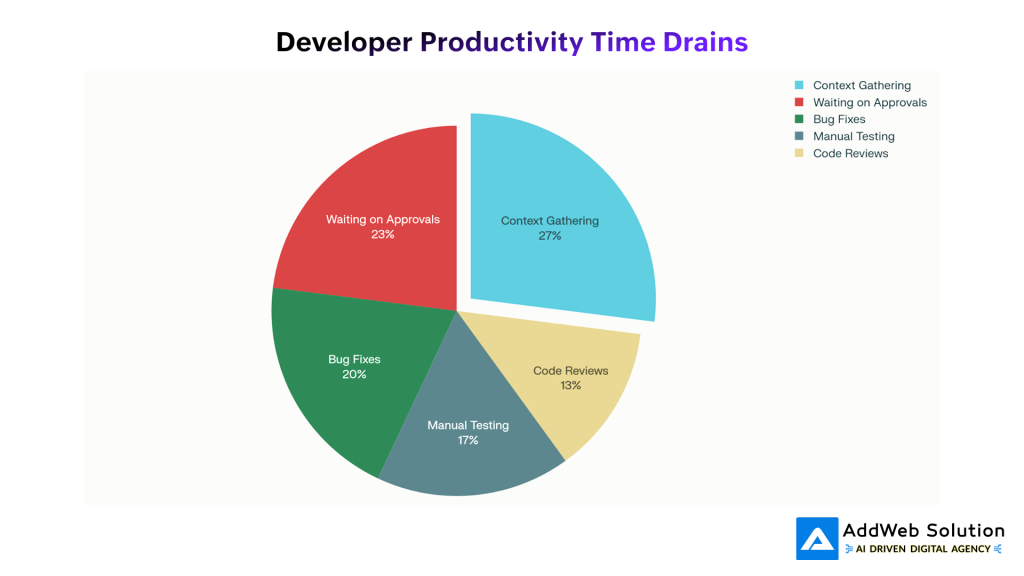
Context gathering and waiting on approvals account for 50% of developer productivity losses, highlighting the need for visual development platforms
The choice between visual builders and custom code isn’t black and white—it depends on the project. Webflow is great when you want speed and easy updates, while custom development is better when you need full technical freedom.
Webflow’s Sweet Spot:
Webflow works best for marketing sites, landing pages, content-heavy pages, and even simple e-commerce setups where quick changes matter. One client reduced updates from 4–5 hours of developer time to just 20 minutes done by the marketing team—huge time and cost savings.
When Custom Code Remains Superior:
Custom development wins when you need complex backend logic, large user systems, deep integrations, or total control over performance and functionality.
The Hybrid Approach: Best of Both Worlds
Most smart teams use both. Webflow handles about 80% of the work—pages, content, and design—so things move fast, and developers only focus on the remaining 20% that needs custom features. This gives speed where it counts and flexibility where it’s needed.
Five Critical Lessons from 100+ Webflow Builds
After delivering dozens of enterprise Webflow projects, some clear patterns show up. These aren’t theories—they come from real migrations, complex builds, and large-scale rollouts.
Lesson 1: System Architecture Beats Ad-Hoc Building Every Time
If you skip proper naming conventions, reusable components, and a clear structure, the site quickly becomes a mess. What feels like “extra work” on a 10-page site becomes absolutely essential on a 50-page one.
One team migrated 25+ pages and 600+ CMS items in just two weeks because they built a scalable system upfront. Without that structure, the same project would’ve taken 8–10 weeks and still felt fragile.
Lesson 2: Content Planning Can’t Be an Afterthought
If you plan content late, everything slows down. Designing the CMS structure during wireframes saves huge time later and avoids those “the design doesn’t fit the real content” moments.
Teams that plan content early cut development revisions by almost 40%.
Lesson 3: Cross-Functional Collaboration Prevents Silos
When designers, developers, and marketers don’t align, the whole project suffers—branding slips, SEO is missed, workflows break.
Projects run smoother when all stakeholders sync weekly. This also helps marketers learn the system early so they’re confident at launch, not overwhelmed.
Lesson 4: Performance Optimization Is Ongoing
Launching fast is easy—staying fast isn’t. Even with Webflow’s built-in optimizations, large sites need regular audits and performance checks.
Teams that monitor Core Web Vitals and review performance quarterly consistently maintain sub-1.5s load times.
Lesson 5: Client Training Makes or Breaks Long-Term Success
A great site fails if clients don’t know how to use it. Just 4–6 hours of proper training plus simple documentation makes clients confident and reduces support issues.
Trained clients publish 3x more content in the first three months—boosting SEO and overall engagement.


Developer Productivity: The Untold Story
People often talk about visual development tools as if they’re only for non-developers, but the real impact is actually on developer productivity and happiness.
Research shows developers don’t spend most of their time writing code. They lose time gathering context, waiting for approvals, fixing bugs, and doing repetitive tasks. Visual development tools help by removing a lot of this back-and-forth and reducing the need for developers to jump between projects just to build simple marketing pages.
Another big win: these platforms avoid the “rework tax” that comes with AI-generated code. Many developers found that AI assistants saved time writing code but added extra debugging, which sometimes made the process slower. Visual development tools avoid this by preventing common front-end bugs altogether—leading teams to ship updates faster and more reliably.
There’s also a major morale boost. When developers aren’t stuck fixing CSS issues or translating designs, they get to focus on real engineering problems. Studies show this increases satisfaction and reduces burnout. Teams using these platforms often report both higher productivity and happier developers—which traditional ROI metrics rarely capture
Client Success Stories: Measurable Impact
Real results matter more than abstract metrics. Here are a few simple examples of what companies achieved with visual development tools:
SaaS Company: Faster Releases
A B2B SaaS brand moved from a custom React site to Webflow. Their landing page releases dropped from 12 weeks to just 2–3 days.
Key wins:
- Marketing handled 80% of updates themselves
- Dev time spent on the site dropped by 92%
- A/B tests went from quarterly to bi-weekly
- Conversions increased 41%
- Engineering got 320 hours back
This speed helped them unlock $1.8M in extra pipeline.
E-commerce Brand: Global Launch in Record Time
A company planning a multi-language rollout cut their timeline from 18 months to 4 months using Webflow.
Results:
- 78% faster time to market
- Saved $280K in dev costs
- Consistent brand experience across countries
- Local teams manage their own content
- 1.3s average load time globally
Launching early helped generate an extra $4.2M in revenue.
Financial Services Firm: Compliance Made Simple
A fintech company switched to Webflow after realizing it met their enterprise security needs.
Impact:
- Security audits dropped from 8 weeks to 2 weeks
- Design system consistency improved from 73% → 96%
- Approvals went from 5 days to 8 hours
- Annual cost of ownership reduced by 68%
They now save ~200 hours per year on compliance alone.
Future-Proofing Your Web Strategy
The future is clear: visual development platforms will keep growing fast as they add more features and more enterprises adopt them. Any organization planning ahead should think not just about what these tools can do today, but what they’ll be able to do in the next 3–5 years.
AI Integration: The Next Big Shift
Webflow and similar platforms are adding AI for content, design, and optimization. Early results already show around 30% higher productivity, and this will quickly become the norm. Companies that organize their content and design systems well today will get the most value as these AI features mature.
Composable & Headless Future
Visual platforms are moving toward a “composable” setup—Webflow for design and content, connected to best-in-class tools for commerce, personalization, analytics, and more. This gives you the speed of Webflow with the flexibility of custom development.
Teams that build with integrations in mind now will be ready for this hybrid future.
The Rise of Non-Developer Creators
More and more tasks that once needed a developer can now be done by trained marketing or ops teams. Gartner even predicts that by 2025, half of all no-code/low-code buyers will be outside the IT department.
Companies that invest in training their teams today will grow faster because they can instantly use new platform features—without waiting on developer bandwidth.
Start your Webflow project today — schedule a free 15-minute discovery call.

Pooja Upadhyay
Director Of People Operations & Client Relations
Conclusion
After building dozens of Webflow projects, one thing is obvious: you no longer have to choose between speed and quality. Webflow lets teams move fast, make quick updates, and still deliver great experiences – especially for marketing and content-driven sites.
The smartest approach is a mix: use Webflow for speed and ease, and use custom code only when you need complex logic or advanced features. At AddWeb Solution, this hybrid model helps us deliver projects 60–75% faster while keeping quality high.
The shift from traditional coding to visual development is already happening. The winning strategy is using the right tool at the right time. If you want a scalable, fast, and future-ready web setup, AddWeb Solution can help you get there.
Source URLs
- https://webflow.com/blog/scaling-with-confidence
- https://webflow.com/blog/scaling-webflow-projects
- https://webflow.com/customers
- https://www.ey.com/en_us/alliances/low-code-no-code-platforms-and-a-culture-of-innovation
- https://www.mckinsey.com/industries/technology-media-and-telecommunications/our-insights/yes-you-can-measure-software-developer-productivity
- https://github.blog/news-insights/research/research-quantifying-github-copilots-impact-on-developer-productivity-and-happiness/
- https://survey.stackoverflow.co/2025/
