


“The future of AI isn’t human vs. AI—it’s human with AI.”
— Kipp Bodnar, CMO HubSpot
The Quiet Revolution Nobody Expected
In late 2024 and early 2025, web design didn’t change overnight. There was no big AI “moment.” Instead, designers slowly changed how they work.
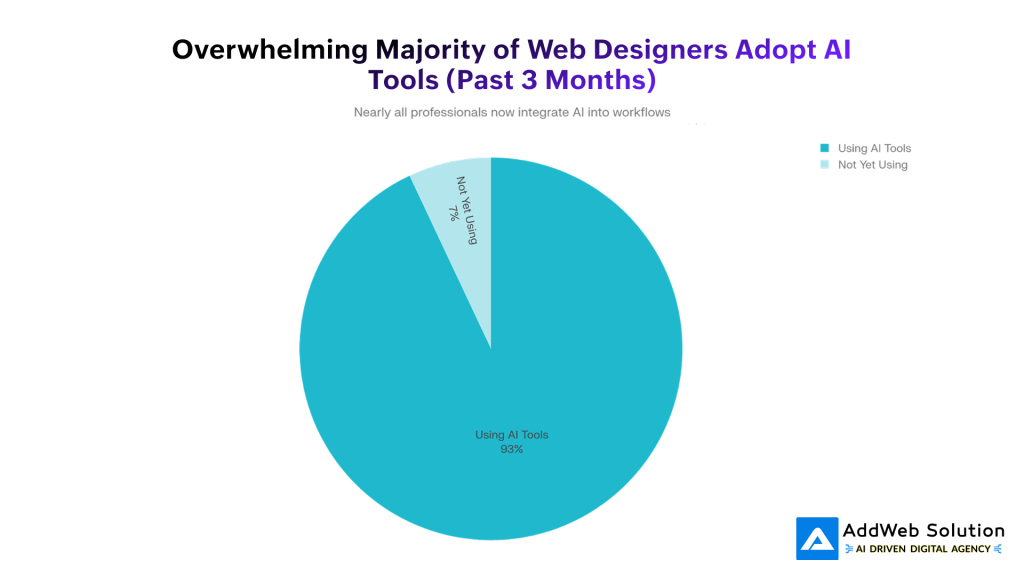
Today, AI is everywhere—used by about 93% of web designers. Not to replace creativity, but to remove the boring parts. Designers are using AI to move faster, explore more ideas, and focus on what actually matters. It’s less about AI taking jobs and more about designers who use AI pulling ahead.
You can see this shift clearly in Webflow. What began as a visual builder has turned into an AI-powered workspace—where automation handles the repetitive work, and humans stay in charge of strategy and design.
Let’s talk about what’s actually changed—and what it means for 2026.
What’s Actually Happening Inside Webflow’s AI Stack
Webflow’s AI integration isn’t a single “magic button.” It’s a system of interconnected capabilities that fundamentally reshape how websites get built.
AI Site Builder: From Idea to Live Site—Fast
Webflow’s AI Site Builder (beta, 2025) lets you describe your business in plain English and instantly generates a full homepage—layout, colors, fonts, and copy included.
This isn’t picking a template. It’s real generation.
People are launching solid, production-ready sites in under 30 minutes, not weeks.
You get:
- Smart hero sections with clear headlines and CTAs
- Feature sections tailored to your business type
- Built-in social proof layouts
- Clean navigation that follows industry norms
- Responsive design from day one
Beginners use it to launch fast.
Designers use it as a polished starting point instead of building from scratch.
AI Assistant: A Co-Designer Inside Webflow
Webflow’s AI Assistant works right inside the editor, like a quiet teammate that speeds everything up.
It helps with:
- Writing copy (headlines, CTAs, blogs, sections)
- Tweaking layouts without breaking the design system
- Generating CMS content at scale
- Finding answers from Webflow docs instantly
- Creating production-ready code (beta)
The big win?
It understands your site’s design system, tone, and structure—so what it generates actually fits, not feels pasted in.

Webflow Optimize: Smart Personalization Without the Busywork
Webflow Optimize brings testing and personalization into one place:
- A/B testing for clear experiments
- Rules-based personalization for audience segments
- AI optimization that learns what converts best for each visitor
The difference? You don’t set endless rules.
The AI spots patterns on its own, tests multiple variations at once, and shifts traffic to what’s working—automatically.
The payoff is real:
- 15–30% higher conversion rates
- Code42 saw a 15% lift
- Impact Dog Crates doubled sales
That’s not tweaking. That’s revenue growth.
Real-Time Personalization: Every Visitor, A Better Fit
Personalization isn’t just about swapping text anymore. Webflow adapts:
- Layouts
- Images
- Navigation
- CTAs
Based on things like location, device, traffic source, and behavior.
So a banker might see finance case studies, while a healthcare leader sees healthcare ones—on the same site, without extra landing pages.
The result?
A website that quietly reshapes itself for every visitor—and converts better because of it.
The Numbers Don’t Lie: Market Adoption & Growth
The transformation we’re witnessing isn’t confined to Webflow. It’s industry-wide. The market data is emphatic about where this is heading.
The no-code AI space is exploding—from $4.28B in 2024 to $44.15B by 2033. That’s not slow growth. That’s a full shift in how websites get built. Even the broader low-code/no-code market is racing ahead, heading toward $264B by 2032.
Webflow is riding this wave fast:
- 1.2% CMS market share (up from 0.9% in 2022)
- 493K+ live sites, up sharply in under a year
- Massive e-commerce growth since 2020
- $213M revenue in 2024, up from $128M
- 3.5M+ designers using it worldwide
So why the sudden acceleration?
Because client expectations jumped overnight.
In 2025, AI features aren’t “nice to have”—they’re expected. Budgets are up 20–40%, not for more hours, but for smarter, personalized, higher-converting sites.
Webflow’s answer is simple:
Let AI handle the repetitive work, so humans can focus on strategy—and ship better websites, faster.
How Webflow AI Features Are Redefining Design Workflows
Understanding Webflow’s AI is one thing. Seeing how it changes day-to-day work is where it really clicks.
Before AI: Weeks to Launch
The old flow looked like this:
- Design in Figma
- Handoff to developers
- QA, fixes, client revisions
- Finally… launch
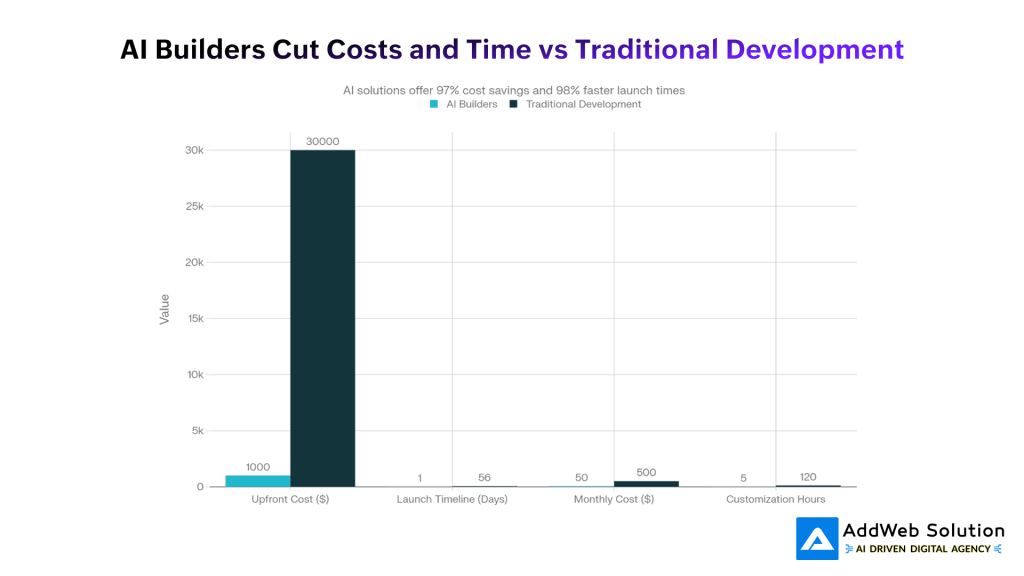
Best case? 4–6 weeks for a single site.
After AI: Idea to Live Site—Fast
With Webflow AI:
- Generate a site in 30 minutes
- Customize with AI in a few hours
- Responsive design, SEO, and optimization handled automatically
- No developer handoff
- Client reviews a real site the same day
Total time: 1–2 days.
That’s not a small speed boost.
It’s nearly a 95% cut in launch time.
What This Means for Designers
The impact is real:
- Many designers report big productivity gains
- Freelancers are seeing AI directly affect revenue
But here’s the honest part:
Some saw short-term pressure on pricing.
Others are already winning—by shipping more sites, faster, with better positioning.
The shift isn’t fewer projects at higher prices anymore.
It’s smarter workflows that scale.
Real-World Impact: From Theory to Actual Results
Theory is nice. Results are what matter.
The Numbers That Actually Matter
- Higher conversions: AI-powered personalization boosts conversions by 15–30%. For a SaaS site, that can mean hundreds of extra leads every month, without more traffic.
- Faster revenue: AI sites go live in days, not weeks, so businesses start earning sooner.
- Faster content: AI speeds up copy creation by ~70%, helping teams publish and convert faster.
- Brand consistency, automatically: Designs stay on-brand without manual tweaks—spacing, fonts, and colors just work.
Quick Stats Worth Noting
- 67% of business owners now prefer AI website builders
- +15% conversions for Code42 with Webflow Optimize
- 2× sales for Impact Dog Crates using AI personalization
- 3.5M+ designers actively using Webflow—and growing fast


The 2026 Forecast: What’s Coming Next
The trajectory is clear. But where does it point?
Short Term (2026): AI Becomes Normal
By mid-2026, AI won’t feel special anymore—just expected.
Like mobile responsiveness today, it’ll fade into the background.
What becomes standard:
- Built-in AI assistants across major platforms
- Automatic SEO by default
- Real-time personalization on most sites
- Easier accessibility checks, powered by AI
Mid Term (Late 2026): Agencies Feel the Squeeze
Mid-tier agencies will feel pressure from both sides:
- Low-cost, AI-driven teams shipping fast
- High-end strategists using AI to move even faster
Agencies that avoid AI will struggle on margins.
Those that adopt it will shift roles—from builders to strategists—and charge more for smarter work.
Long Term (2027+): AI Runs the Workflow
Next comes AI agents that can:
- Understand client needs through conversation
- Design UX and systems
- Build, launch, and optimize sites
- Spot issues before they happen
Humans set the direction.
AI handles the execution.
Getting Started: Your Practical Roadmap
If you’re a designer, agency, or business owner wondering how to navigate this shift, here’s a practical starting point:

For Individual Designers
- Test Webflow’s AI Site Builder with a small project
- Learn to write effective prompts (bad prompts = generic results)
- Understand design systems (AI respects them, but you have to set them up)
- Combine AI output with human refinement (this is where quality happens)
- Position yourself as a strategist, not a builder (your value is guiding AI, not replacing it)
For Agencies
- Audit your current timeline—where does repetition waste time?
- Implement Webflow AI for internal projects first (learn before selling)
- Retrain teams on AI co-creation (it’s a workflow shift, not a replacement)
- Restructure project scopes and pricing (you’re delivering faster, value differently now)
- Invest in personalization expertise (AI generates sites; humans make them convert)
For In-House Marketing/Product Teams
- Switch to Webflow if you’re not already (or equivalent platform with native AI)
- Set up design system and variables (AI uses these to maintain consistency)
- Start with a simple personalization experiment (one layout variant, let AI learn)
- Measure conversion impact (data justifies continued investment)
- Scale personalization to high-traffic pages (where ROI is clearest)
The Bottom Line
AI in Webflow isn’t coming—it’s already here.
93% of designers are using AI tools. The real question is whether you’re using them well—or letting competitors pull ahead.
This isn’t about replacing designers. It’s about what you do with the time AI gives back. The teams that win in 2026 won’t just build websites faster—they’ll think bigger, act more strategically, and deliver results sooner.
Webflow’s AI tools—Site Builder, Optimize, and deeper integrations—make that shift possible. They’re not magic. They still need human direction. But the edge they create in speed, consistency, and personalization is hard to ignore.
For businesses: faster launches, better conversions, healthier margins.
For designers: more projects, stronger positioning, less grunt work.
For agencies that don’t adapt: real pressure ahead.
The future of web design isn’t AI vs humans.
It’s humans who know how to use AI—versus everyone else.
Unlock the Power of Webflow Today

Pooja Upadhyay
Director Of People Operations & Client Relations
Source URLs
- https://webflow.com/feature/ai
- https://webflow.com/updates/ai-site-builder
- https://webflow.com/feature/optimize
- https://webflow.com/blog/webflow-awards-2025
- https://webflow.com/resources/report/2026-state-of-the-website
- https://www.grandviewresearch.com/industry-analysis/no-code-ai-platform-market-report
- https://enricher.io/blog/webflow-market-share-statistics
