


The web design landscape has been completely transformed by platforms that bridge the gap between creative vision and technical execution. Webflow stands at the forefront of this revolution, offering features that fundamentally change how we approach website creation, management, and optimization.
From eliminating the need for complex coding to enabling real-time collaboration across teams, Webflow has evolved from a simple visual builder into a comprehensive website experience platform. These seven game-changing features are reshaping the industry and empowering designers, marketers, and developers to create exceptional digital experiences.

Webflow Features Adoption Rates Among Users
1. Visual Development Without Code Limitations
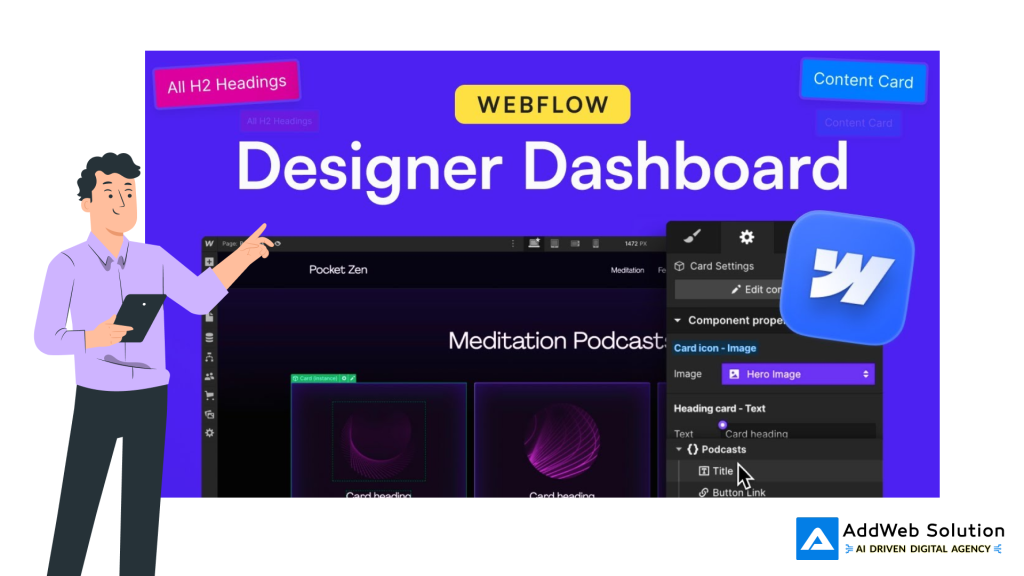
The Visual Canvas Revolution
Traditional web development demanded extensive coding knowledge, creating barriers between creative ideas and their execution. Webflow’s visual development interface changes this entirely by providing a WYSIWYG (What You See Is What You Get) experience that generates clean, production-ready code automatically.
The platform’s drag-and-drop approach doesn’t sacrifice the precision that developers crave. Instead of wrestling with HTML, CSS, or JavaScript, designers can position elements on a canvas and click through settings. This visual development system feels familiar to anyone who has worked with design tools like Sketch, Figma, or Adobe XD but with the added power of real-time changes.


Key Benefits:
- Complete creative control without technical barriers
- Real-time visual feedback during design process
- Professional-grade code generation automatically
- Seamless transition from design to development
The impact is profound: 95% of Webflow users actively utilize visual development features, making it the most adopted capability on the platform.
webflow_comparison_data.csv
Generated File
This eliminates the traditional handoff friction between designers and developers, allowing for faster iteration and more precise implementations.
2. Advanced CMS That Scales with Content
Webflow CMS interface showing connected apps and app marketplace for extended functionality
Beyond Traditional Content Management
Unlike traditional CMSs that separate content management from design, Webflow’s visual-first CMS integrates directly with the design canvas. This allows marketers to create, edit, and publish CMS content without writing any code while maintaining complete design control.
Revolutionary CMS Features:
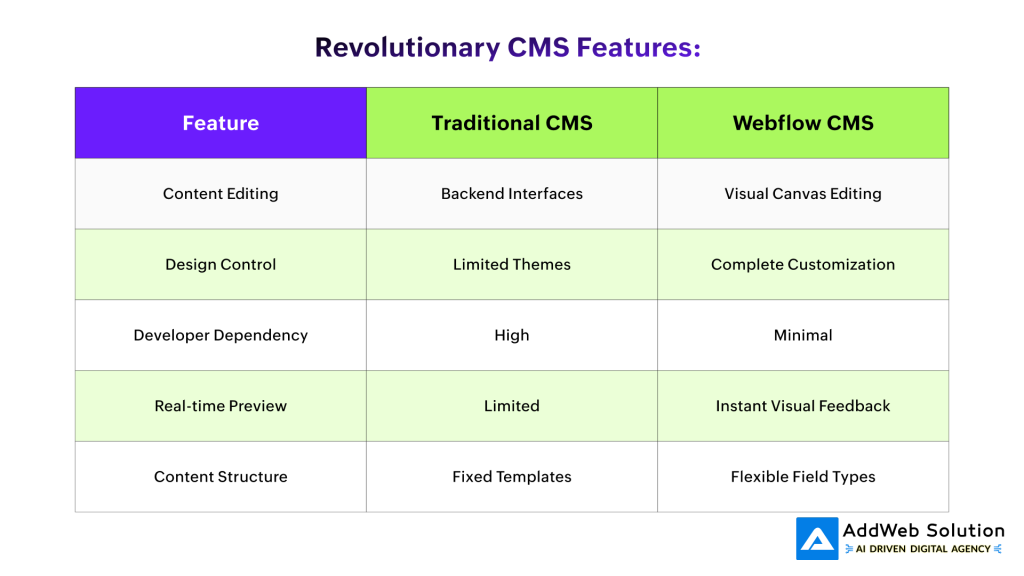
The CMS supports 11 different field types including Plain Text, Rich Text, Image, Video, and Reference fields. This flexibility allows you to create your content management system from scratch, based on your actual content needs.
Webflow handles content at scale, supporting extensive Collections for blogs, product catalogs, and other content-heavy applications. Enterprise plans accommodate hundreds of thousands of CMS items with bulk import capabilities via CSV files and programmatic access through CMS APIs.
3. Interactions & Animations Powered by GSAP
Webflow’s animation timeline interface showing interaction controls and keyframe settings for a webpage animation project
Professional-Grade Animations Made Accessible
Webflow’s interaction system, now powered by GSAP (the web’s favorite animation library), brings professional-level animations within reach of non-developers. The platform enables creation of complex sequential interactions using an intuitive horizontal timeline with granular control over every detail.
Animation Capabilities Include:
- Scroll-triggered animations with ScrollTrigger integration
- Multi-step interactions for engaging user experiences
- Parallax effects and dynamic content reveals
- Time-based interactions for automated sequences
- Form validation animations with user feedback
The visual animation builder allows you to create everything from subtle micro-interactions to complex sequential animations. Popular interaction types include hover effects that reveal hidden content, click-triggered dropdown menus, and animated page transitions.
Performance optimization is built-in, with GSAP ensuring smooth, reliable performance on every browser. This professional-grade foundation means your animations maintain quality even under high traffic conditions.
4. Component System with Slots
Boardash web dashboard interface showcasing meeting management features with user profiles and meeting status
Scalable Design Systems Made Simple
Webflow’s enhanced component system with component slots revolutionizes how design systems are built and maintained. Component slots are flexible placeholders within components that allow for customization while maintaining the overall structure and design framework.
Traditional vs. Slot-Based Components:
- Before: Separate components for each variation (news card, product card, testimonial card)
- After: One universal card component with customizable slots for different content types
Key Advantages:
- Modular composability for flexible design systems
- Enhanced component reusability across projects
- Fewer one-off components needed
- Reduced dependency on unlinking components
This approach drastically cleans up design systems, enabling teams to achieve more with fewer components. As noted by industry professionals, slots enable experienced content designers to create rich web pages without touching HTML structure or CSS styling.
The system supports dynamic, reusable design pieces where global updates can be applied throughout entire projects, making it ideal for agencies and teams building across multiple pages and brand systems.
5. Enterprise-Grade Hosting & Performance
Zero-Maintenance, High-Performance Infrastructure
Webflow’s hosting infrastructure processes tens of billions of page views monthly and automatically scales with traffic demands. Built on Amazon Web Services (AWS) infrastructure with Cloudflare’s global CDN, the platform delivers 99.99% uptime for Enterprise customers.
Performance Features:

Unlike traditional hosting where you manage updates, security patches, and server configurations, Webflow provides a zero-maintenance solution. This includes automatic backups, vulnerability scanning, and traffic-surge readiness without manual intervention.
Major companies like Monday.com, IDEO, and The New York Times trust Webflow to handle their high-traffic demands. The platform’s 5x faster loading speeds compared to typical shared hosting solutions directly impact Core Web Vitals, bounce rates, and conversion metrics.
6. Real-Time Collaboration Features
Webflow interface showcasing responsive design breakpoints for mobile, tablet, and desktop with visual editing tools
Seamless Team Workflows
Webflow’s real-time collaboration capabilities enable multiple team members to work on the same project simultaneously, with changes visible instantly. This eliminates the traditional back-and-forth of file transfers and version conflicts that plague design teams.
Collaboration Tools:
- Real-time editing with multi-user access
- Built-in commenting system for direct feedback on designs
- Version control with detailed change history
- Role-based permissions for different team members
- Page branching for safe experimentation
The integrated commenting feature allows team members to provide feedback directly on specific elements or sections of a design. This promotes open and iterative collaboration while keeping all project discussions centralized within the platform.
Project management integration includes task creation, deadline assignment, and progress tracking. Combined with external tool integrations like Slack and Trello, teams can maintain their preferred workflows while leveraging Webflow’s collaborative strengths.
Webflow vs Traditional Builders vs Custom Development Comparison
7. AI-Powered Optimization & SEO
Intelligent Content and Performance Enhancement
Webflow’s AI integration transforms content creation, design optimization, and SEO management. The Webflow AI Assistant enables one-click content creation, design suggestions, and code generation, while advanced SEO tools ensure maximum visibility.
AI-Powered Features:
- Automated content generation with context-aware suggestions
- Design layout optimization based on best practices
- SEO metadata automation through tools like FluidSEO
- Performance optimization recommendations
- A/B testing automation with AI Optimize
Native SEO capabilities include comprehensive page audits, bulk content updates, and schema markup automation. The platform’s built-in SEO tools enable fine-tuned control over meta titles, descriptions, alt text, and URL structures.
Webflow Analyze consolidates analytics data directly into the platform, offering real-time insights into user engagement, SEO recommendations, and accessibility reports. This eliminates the need for external tools like Google Analytics for basic performance monitoring.
The combination of AI-driven personalization and native A/B testing through Webflow Optimize helps create tailored experiences for each visitor, improving conversion rates and customer satisfaction.
See the Webflow features that change everything

Pooja Upadhyay
Director Of People Operations & Client Relations
The Performance Impact
The data speaks for itself: 88% of users actively leverage Webflow’s CMS capabilities, while 92% utilize responsive design features.
webflow_features_data.csv
Generated File
These adoption rates reflect the platform’s ability to address real-world web development challenges.
Webflow’s comprehensive approach – combining visual development, advanced CMS, professional animations, scalable components, enterprise hosting, team collaboration, and AI optimization – creates a ecosystem where creative vision meets technical execution without compromise.
Companies switching to Webflow report significant improvements in development speed, design quality, and team productivity. The platform’s zero-maintenance hosting and automatic optimizations allow teams to focus on creating exceptional user experiences rather than managing technical infrastructure.
These seven features don’t just make Webflow another website builder – they represent a fundamental shift in how we approach web development, making professional-grade websites accessible to anyone with creative vision, regardless of technical background.
Whether you’re a solo designer, marketing team, or enterprise organization, Webflow’s feature ecosystem provides the tools needed to create, manage, and optimize websites that compete at the highest level. The platform continues evolving, with regular feature updates and community-driven improvements ensuring it stays ahead of industry trends.
The future of web development isn’t about choosing between design and functionality – it’s about platforms like Webflow that eliminate those compromises entirely.
Source URLs:
1) https://www.w3.org/standards/
2) https://aws.amazon.com/what-is-cloud-computing/
3) https://www.cloudflare.com/learning/cdn/what-is-a-cdn/
4) https://gsap.com/docs/
5) https://www.statista.com/statistics/1174650/worldwide-cms-market-share/
6) https://www.mckinsey.com/business-functions/mckinsey-digital/our-insights/the-state-of-ai-in-20 25
7) https://hbr.org/2020/04/a-guide-to-managing-your-newly-remote-workers
