



Most websites are built like filing cabinets: neat folders, tidy pages, zero guidance on what to do next.
But your buyers don’t think in pages — they think in problems, options, and risks.
Rebuilding your site around buyer journeys instead of a static sitemap is one of the fastest ways to shorten sales cycles, increase demo requests, and make your marketing actually feel helpful instead of noisy.
1. What “designing for buyer journeys” actually means
Modern B2B buying is now digital‑first and heavily self-serve.
Research compiled in 2026 shows that 68% of B2B buyers begin their journey by independently researching online before contacting any vendor, and 74% use search engines as their primary discovery channel.
Gartner data (via Fronetics) finds that buyers spend only about 17% of their total buying time meeting with potential suppliers and 27% researching independently online — the rest is internal discussions and stakeholder alignment.
On top of this, surveys cited by Forrester and others indicate that well over two‑thirds of B2B buyers now prefer self‑service or low‑touch digital research over talking to a sales rep early in the process.
That means, for most of the journey, your website is the sales experience — not a brochure your reps “walk through” later.
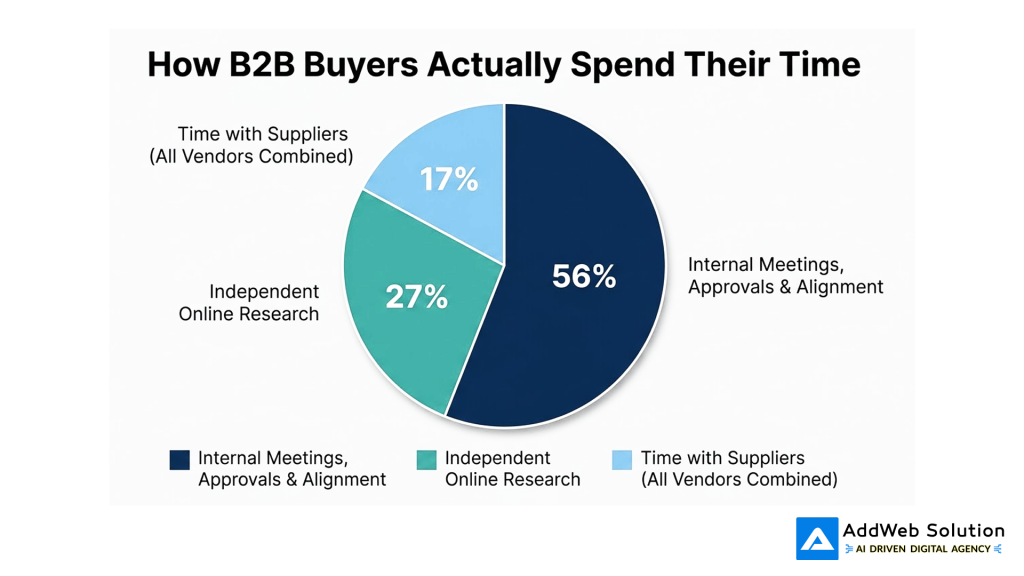
Designing for journeys means you structure your site so that:
- A CFO in awareness finds a clear “Is this worth looking at?” path.
- A technical lead in consideration sees proof, architecture clarity, and integration answers.
- A champion in decision has ROI calculators, case studies, and stakeholder‑ready decks.
Instead of “Home → Services → About → Contact”, you think “Problem → Fit → Proof → Commitment”.
The URL changes, but more importantly, so does the intent behind each click.
2. Page-based vs journey-based sites (with comparison table)
To make this concrete, let’s compare a traditional sitemap with a buyer‑journey‑aligned architecture.
How this plays out on a real site
Here are three practical patterns we see work well across SaaS, services, and eCommerce clients:
- Stage‑mapped navigation, not just sections
For example: “Problems We Solve”, “How It Works”, “Customer Stories”, “Pricing & ROI”, “Resources for Your Role”.
This mirrors how buyers research, compare, and validate, rather than how your org chart looks. - Content clusters for each journey stage
Instead of a single “Solutions” page, you create clusters such as:- Awareness: “Signs you’ve outgrown spreadsheets”, “Why X is failing in 2025”
- Consideration: “Checklist for evaluating [solution type]”, “X vs Y: comparison guide”
- Decision: “Implementation timeline”, “ROI for CFOs”, “Security FAQ for IT”
Studies show buyers typically consume double‑digit pieces of content before engaging sales — some analyses put it at around 14–20 content interactions in the consideration phase alone.
If your content cluster doesn’t exist, they’ll assemble it from competitors instead.
- Stage‑aware CTAs
A cold visitor who just realized they have a problem probably won’t “Book a 60‑minute demo”.
They’re far more likely to download a checklist, try an interactive ROI calculator, or get a short, no‑form product tour.
When we design buyer‑journey sites at AddWeb, we often start with a very non‑technical exercise: we map three or four “hero journeys” (e.g., CFO in a mid‑market SaaS company, operations leader in manufacturing) and only then do we touch the sitemap.


3. Graph: More touchpoints, more self‑service, more pressure on your site
Here’s the uncomfortable truth: your website has to do more work every year.
Several analyses of B2B journeys show that:
- In 2020, a typical B2B decision involved around 17 touchpoints.
- Recent work referenced by Sellers Commerce and others suggests this has exploded to 60+ interactions, with high‑value deals easily crossing 100 touchpoints.
- LinkedIn impressions and touchpoint data shared by HockeyStack indicate a jump from 222 touchpoints to close a deal in 2023 to about 266 touchpoints in 2024 (roughly a 20% increase).
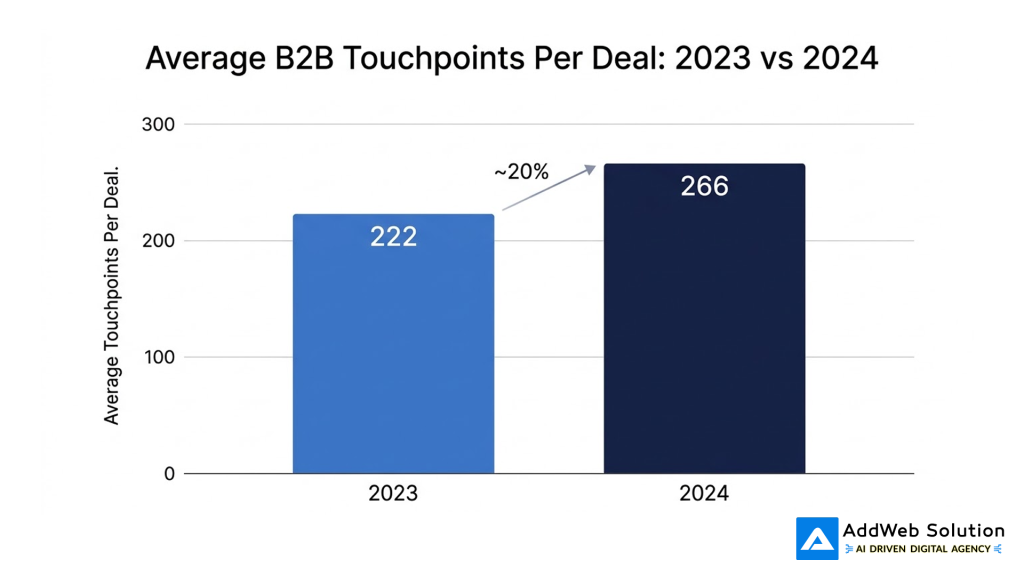
At the same time, aggregated research shows:
- Around 77% of B2B journeys are now digital‑first.
- Over half of buyers say they are more than halfway through their journey before they ever talk to a salesperson.
- Millennials now make up the majority of B2B buyers and nearly half of final decision‑makers, and they strongly prefer self‑service digital research.
What does that mean for your website architecture?
- You can’t assume a linear path.
Most journeys are non‑linear, with buyers revisiting earlier stages and content multiple times; some studies suggest roughly three‑quarters of journeys behave this way.
Your site needs “choose your own adventure” paths that still feel guided. - Every high‑intent touchpoint should live somewhere on your site.
If your CRM shows repeated questions about security, integrations, ROI, or change management, those are journey pages waiting to be created — not just questions for sales to handle on calls. - Measurement must shift from “pageviews” to “stage progression.”
Tools that let you track how anonymous and known visitors move from awareness content to comparison resources to conversion actions will give you a truer view of what’s working.
4. Interesting Fact Box: Fast stats for your next internal deck
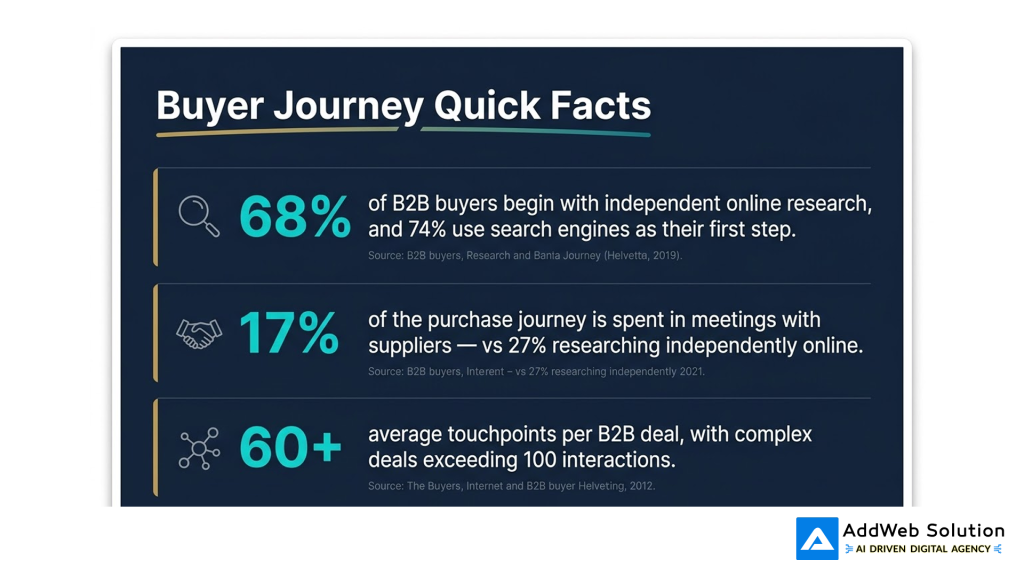
Use this box as a slide in your next website‑redesign pitch — it quickly reframes the conversation from “we need a new design” to “our buying experience is out of sync with how people actually buy.”
Turn your website into a high-converting journey, optimize your structure today.

Pooja Upadhyay
Director Of People Operations & Client Relations
5. How to start redesigning around buyer journeys
Let’s close with a practical, workshop‑friendly approach you can run with your own team or with a partner like AddWeb.
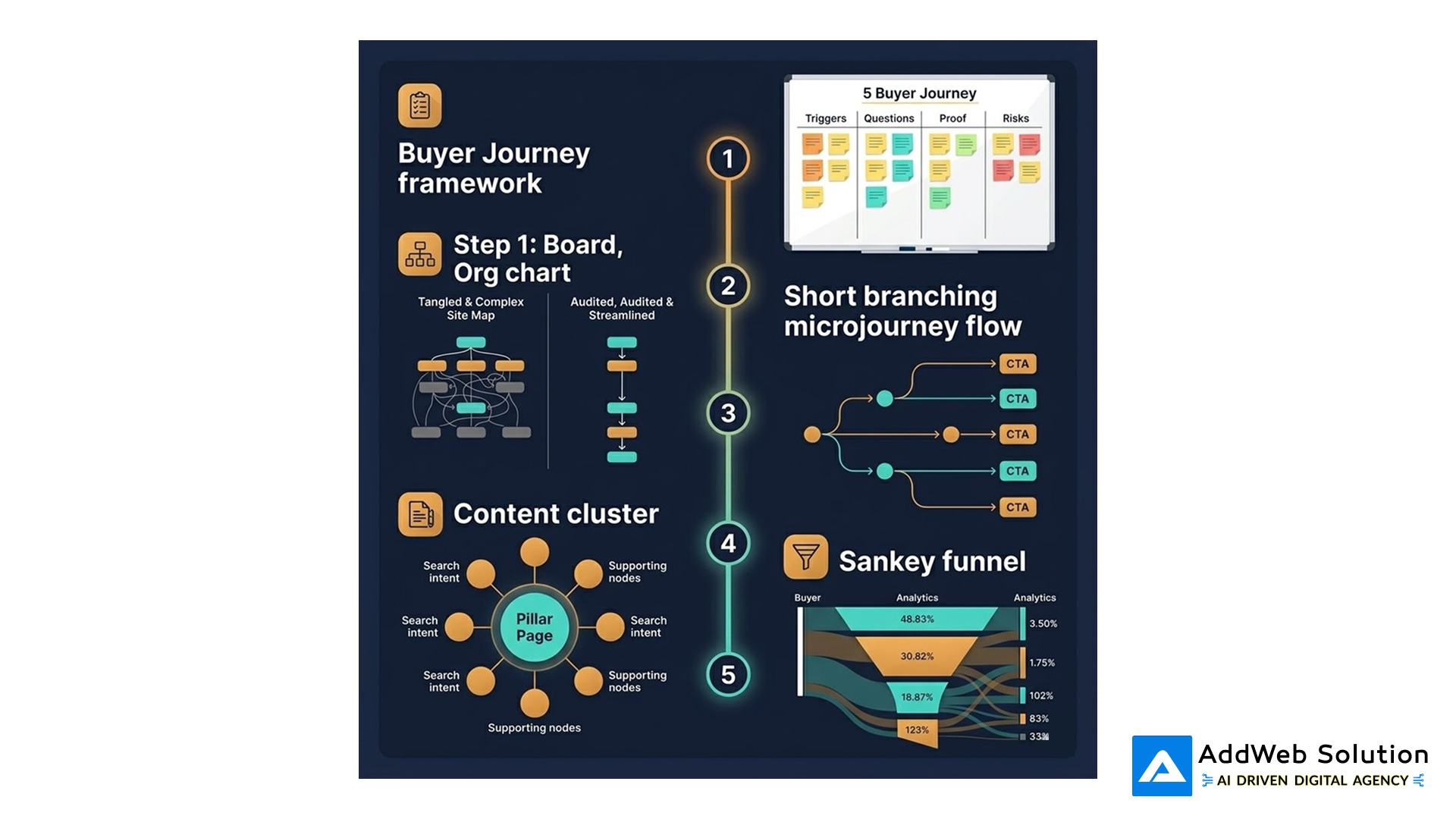
Step 1: Map 3–4 real buyer journeys
Don’t start in Figma; start in a doc or a whiteboard.
For each primary segment (e.g., “IT Director, mid‑market manufacturing” or “Founder, seed‑stage SaaS”), map:
- Triggers: What makes them start searching?
- Questions: What do they worry about at each stage?
- Proof: What would make them confident enough to move forward?
- Risks: What could kill the deal internally?
Then map these to awareness → consideration → decision → post‑purchase stages.
This becomes your master “journey canvas”.
Step 2: Audit your current site against that canvas
For each stage and question, ask:
- Do we have a page or asset that answers this clearly?
- Is it easy to reach from other relevant pages without hunting through menus?
- Is there a next step that feels natural for that stage (not just “Talk to sales”)?
You’ll quickly see three buckets:
- Journey blockers – unanswered questions or dead ends that stall buyers.
- Hidden gems – great content buried three clicks deep.
- Obvious gaps – assets sales keeps custom‑creating in decks and emails.
Step 3: Rebuild your sitemap around “micro‑journeys”
Instead of thinking “we need a better Services page”, think in short micro‑journeys:
- For a new visitor:
“Problem page → How-it-works page → Social proof page → Low‑friction CTA” - For a late‑stage evaluator:
“Technical FAQ → Integration details → Security & compliance → Proof of ROI → ‘Talk to an expert’”
Each of these micro‑journeys is 3–5 steps long and ends with a context‑appropriate CTA.
You can express these in simple flow diagrams and then translate them into navigation, breadcrumbs, and on‑page “next step” modules.
Step 4: Layer SEO and content strategy onto the journeys
The good news: buyer‑journey architecture and SEO usually want the same thing — clear, topic‑based clusters.
- Map high‑intent keywords to journey stages (e.g., “what is X?” → awareness, “X vs Y” → consideration, “X pricing” → decision).
- Build topic clusters where a pillar page answers the big question, and 3–6 supporting pages go narrower (checklists, comparisons, ROI, integrations).
- Internally link those clusters in the order buyers actually read them.
Search data then becomes a reality check: if you see heavy search volume on “X implementation risks” but you don’t have that page, you’ve just found a journey gap.
Step 5: Measure progression, not just traffic
Once the new structure is live, change what “success” means:
- Track how many visitors move from awareness content to comparison and proof pages.
- Look at how often your “hero micro‑journeys” are actually followed.
- Correlate buyer‑journey engagement with pipeline quality and deal velocity.
Many of the tools you already use — analytics, marketing automation, CRM — can be reconfigured to show journey funnels instead of isolated page stats.
You don’t need to buy a new platform before you redesign your thinking.
Light AddWeb note: where we typically help
At AddWeb Solution, a lot of our most successful website projects don’t start with “We need a redesign,” but with “Our buyers are getting stuck somewhere and we don’t know where.”
We come in to:
- Map real buyer journeys and align stakeholders.
- Translate those journeys into information architecture, UX flows, and content plans.
- Implement the structure in WordPress, headless, or custom stacks — and wire it to your analytics and CRM so you can see stage progression, not just traffic.
Whether you’re rebuilding a marketing site, a customer portal, or a product experience, the same principle holds: design for journeys, not pages, and your website finally starts to feel like part of the revenue engine instead of an online brochure.
Source URLs
- https://gitnux.org/b2b-buyer-journey-statistics/
- https://gitnux.org/b2b-statistics/
- https://www.fronetics.com/infographic-b2b-buyers-journey/
- https://hockeystack.com/lab-blog-posts/b2b-customer-journey-touchpoints
- https://www.digitalcommerce360.com/2025/04/28/why-millennials-continue-to-reshape-b2b-ecommerce/
- https://www.emailtooltester.com/en/blog/how-many-touchpoints-before-a-sale/
- https://e-cens.com/blog/identify-b2b-customer-journey-touchpoints/
