


For years, AI in WordPress meant installing yet another plugin to generate blog posts, meta descriptions, or chatbot replies. That’s changing as WordPress.com ships native MCP support and Jetpack AI tools directly inside the block editor, turning AI into a first‑class capability rather than a sidecar.
This evolution is driven by two forces:
- WordPress still powers over 40% of the web, making it the natural testing ground for practical AI tools for publishers and SMBs.
- AI assistants (Claude, ChatGPT, Cursor, VS Code) increasingly support MCP, so they can talk to your WordPress site as easily as they talk to a codebase or CRM using a standard protocol.
The current WordPress AI landscape
Today’s WordPress AI ecosystem spans three layers: native editor experiences, plugin‑level AI, and external AI agents connected via MCP.
Here’s a practical overview:
| Layer | What it does | Representative examples |
| Editor‑native AI | Drafts, rewrites, translations, feedback, images, video clips directly inside the block editor UI. | Jetpack AI Assistant block, Jetpack AI sidebar features (titles, excerpts, alt text, featured images, Feature Clip). |
| Plugin‑level AI | Adds AI to specific jobs: SEO, design, product content, chatbots, workflows. | Rank Math AI SEO, Yoast AI SEO, Elementor AI, Divi AI, AI Engine, Woo AI, AI Product Tools, Tidio Lyro. |
| AI agents & MCP | Lets external AI tools discover and call WordPress “Abilities” and resources via MCP with OAuth 2.1. | WordPress.com MCP server, WordPress MCP Adapter, MCP‑enabled clients like Claude Desktop, Cursor, VS Code. |
This layered model is the key to thinking about “native” AI: when AI sits in the editor, the REST API, or MCP, it can see your real content, settings, and plugins, not just a prompt box.
Native AI inside the WordPress editor
The clearest example of AI becoming native is Jetpack AI’s deep integration into the block editor. Instead of a separate tool, AI shows up as blocks, sidebar tools, and inline actions that behave like any other part of the editor.
Some of the most useful native features include:
- Draft generation and transformation
- Generate full drafts from a short brief, rewrite sections, change tone (formal, casual), and translate content without leaving the editor.
- Structural feedback before publishing
- Jetpack AI can review headings, links, images, and overall structure, then surface suggestions in a sidebar pop‑up.
- Titles, excerpts, and alt text
- AI suggests optimized titles, auto‑generates excerpts with control over length and language, and writes alt text/captions based on both image and post context.
- Native image and logo generation
- “Generate with AI” appears directly in Image and Gallery blocks, and Jetpack AI can create featured images and even site logos from your content.
This isn’t just convenience. It subtly changes content workflows: writers stay in one interface, reviewers get structured AI feedback, and design‑lite teams can still ship visually rich posts without hopping across tools.
AI for media, video, and visual structure
Native AI in WordPress is not limited to text. Jetpack AI adds video and layout‑adjacent capabilities as well.
Key examples:
- Feature Clip (short video from a post)
- Jetpack AI can turn a post into an 8‑second cinematic clip, saved to your media library for reuse in social or as a hero visual.
- Featured images from content
- AI generates images directly from the post content or a short description, then stores them in the Media Library and sets them as featured.
- Alt text and captions at scale
- Automatically generates alt text and captions for images based on context, reducing accessibility and SEO overhead for large blogs.
- Tables from lists
- AI can transform List blocks into structured tables, making it easier to present comparables, feature sets, or pricing.
For a content team, this means you can turn a longform post into a full asset kit: body copy, images, short video, SEO elements, without leaving WordPress.
Plugin ecosystem: AI jobs rather than generic “magic”
Around this native core, the plugin ecosystem has matured into job‑specific AI rather than generic “write everything” tools.
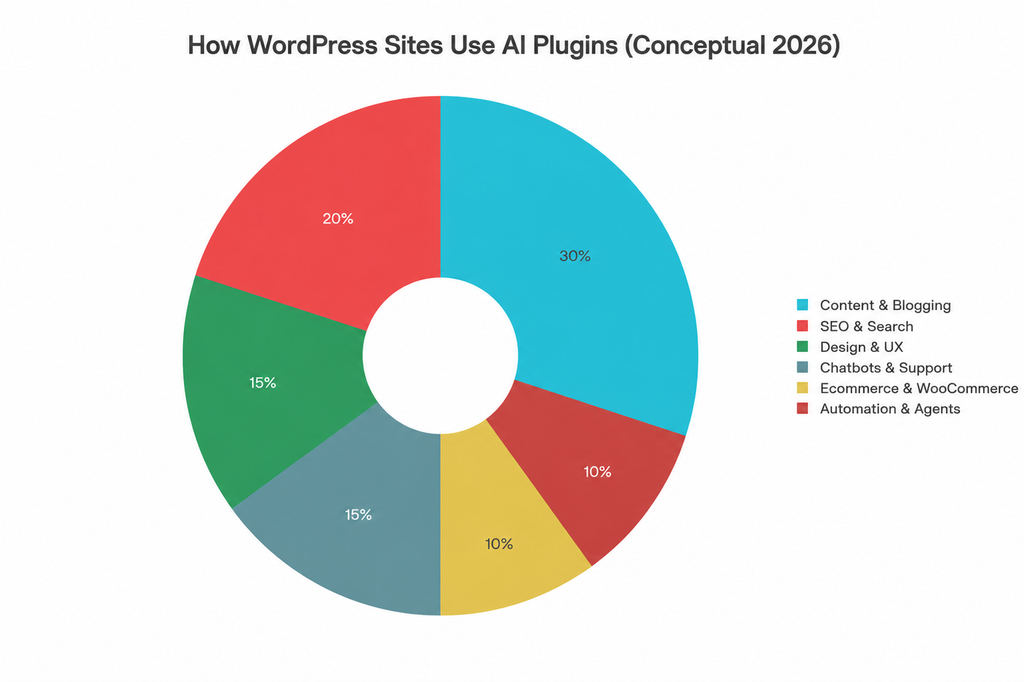
The practical categories look like this:
| AI job | What it automates | Example plugins |
| Content & blogging | Drafts, product descriptions, landing copy, email drafts. | AI Engine, Jetpack AI, Bertha AI, GetGenie. |
| SEO & search | Keywords, meta, schema, content scoring, internal linking. | Rank Math AI SEO, Yoast AI SEO, Rank Math Content AI. |
| Design & UX | Layout suggestions, section copy, CSS/HTML generation, image fill. | Elementor AI, Divi AI, Angie by Elementor. |
| Chatbots & support | FAQ bots, lead capture, product recommendations, ticket triage. | Tidio Lyro, PurioChat, AI ChatBot plugins. |
| WooCommerce content | Bulk product descriptions, tags, FAQs, category content. | Woo AI, AI Product Tools, Woo AI/AI for WooCommerce. |
| Automation & agents | AI workflows, AI agents that trigger actions across apps. | Easy MCP AI, Bit Flows, Uncanny Automator + AI tools. |
Notice how many of these plugins assume AI is a normal part of daily work: content scoring in Rank Math, semantic keywords in Rank Math Content AI, and MCP‑based automation in Easy MCP AI, not just “spin me a blog post.”
AI agents and MCP: WordPress as a first‑class data source
The most “native” part of WordPress’s AI story is MCP support: it turns your sites into structured resources AI agents can query and act upon.
There are two major pieces:
- WordPress.com MCP server
- WordPress.com exposes an MCP server URL that MCP‑enabled clients (Claude Desktop, ChatGPT, Cursor, VS Code, etc.) can connect to using OAuth 2.1.
- Once authorized, AI tools get read‑only access to posts, metadata, site statistics, and settings; write access is planned next.
- WordPress MCP Adapter + Abilities API
- The MCP Adapter converts “Abilities” registered in WordPress (discrete actions or capabilities) into MCP tools and resources.
- AI agents can discover and call those Abilities as MCP tools: search posts, read analytics, or perform plugin‑level actions over standardized primitives.
In practice, this means scenarios like:
- Asking Claude Desktop, “Show me posts published last month with lower than average traffic” and getting answers directly from WordPress.com analytics.
- Using Cursor or VS Code to search WordPress content and settings as easily as files in a repo.
- Building internal AI tools that understand your WordPress site via MCP, with OAuth handling auth instead of manual API keys.
This is the real platform shift: WordPress becomes an AI‑readable environment where content, analytics, and capabilities are standardized and discoverable.

Practical use cases for teams and agencies
For a content‑heavy WordPress site, “native” AI isn’t a buzzword, it’s how you reduce friction and add structure to messy workflows.
A few concrete patterns:
- Editorial teams
- Use Jetpack AI to generate multilingual drafts, run structural feedback before publishing, and auto‑create titles, excerpts, alt text, and featured images for every post.
- Combine Rank Math AI SEO with Jetpack’s feedback to ensure each article hits target keyword coverage and metadata standards without manual spreadsheet checking.
- Agencies and developers
- Deploy Elementor AI or Divi AI for fast iteration on landing pages, while using MCP to give AI agents safe, read‑only access to client sites for reporting and audits.
- Register custom Abilities that let AI tools surface internal dashboards, content gaps, or “broken experiences” based on site data.
- WooCommerce stores
- Use Woo AI/AI Product Tools to bulk‑generate product descriptions, tags, FAQs, and category copy, then let Jetpack AI handle alt text and promotional Feature Clips.
- Connect an MCP‑enabled agent that can answer “Which categories have products with missing descriptions?” or “Show products with low CTR but high impressions” based on existing analytics.
Because many of these solutions are native or semi‑native, teams spend more time deciding “what should we do?” instead of “which tool should we copy‑paste between?”


Implementation roadmap: bringing native AI into a WordPress stack
If you’re planning this for an enterprise site or an agency portfolio, a phased approach keeps things sane and measurable.
Phase 1: Editorial and SEO foundations
- Enable Jetpack AI for your primary sites to bring drafting, feedback, titles, excerpts, and image generation inside the editor.
- Standardize on one SEO plugin with AI capabilities (Rank Math AI or Yoast AI SEO) and define what “AI‑approved” content means in your org (score thresholds, schema, internal linking).
- Document guardrails: which content types can rely on AI drafts, how much human review is required, and how you handle translations and alt text.
Phase 2: Design, WooCommerce, and automation
- Roll out Elementor AI or Divi AI for design teams, with clear guidelines on where AI‑generated layouts are acceptable vs where bespoke design is mandatory.
- For WooCommerce, deploy Woo AI/AI Product Tools on large catalogs and define quality benchmarks for product descriptions and FAQs.
- Experiment with workflow‑oriented tools like Bit Flows or Easy MCP AI to automate repetitive publishing, tagging, and routing tasks.
Phase 3: MCP and AI agents
- Enable MCP access on your WordPress.com account and connect one MCP‑enabled AI client (Claude Desktop, Cursor, or VS Code) using the official URL and OAuth flow.
- Install and configure the WordPress MCP Adapter on selected sites so AI agents can discover Abilities and read resources via MCP, not ad‑hoc scripts.
- Define at least three “AI‑augmented” internal workflows, such as:
- Monthly content performance review from an AI assistant using your real analytics.
- Automated identification of content with poor alt text or outdated schema.
- Internal Q&A about site settings, plugin versions, and taxonomy structure.
Governance, privacy, and “human in the loop”
As AI becomes native, the governance question moves from “should we try AI?” to “how do we control what AI can see and do?”
A few non‑negotiables:
- Authentication and permissions
- Rely on OAuth 2.1 and WordPress.com’s MCP permission model rather than sharing passwords or long‑lived API keys with AI tools.
- Keep write tools disabled by default and only enable them once you’ve tested behavior thoroughly with read‑only access.
- Data boundaries
- Audit which plugins send data to third‑party AI services (SEO, content, chatbots) and ensure that matches your compliance requirements.
- Separate internal‑only content (intranets, restricted docs) from public content when wiring up MCP tools and agents.
- Editorial ownership
- Treat AI drafts, images, and clips as starting points, not final outputs; maintain human review for anything customer‑facing or legally sensitive.
- Use AI feedback as a second opinion, not the single arbiter of quality or strategy.
Handled well, native AI turns WordPress into a more opinionated, “assistive” platform, one that speeds you up but still leaves strategic decisions and final wording in human hands.
Make Your WordPress Website AI-Ready

Pooja Upadhyay
Director Of People Operations & Client Relations
Source URLs:
1. https://developer.wordpress.com/docs/mcp/
2. https://jetpack.com/support/create-better-content-with-jetpack-ai/
3. https://wordpress.com/blog/2026/01/22/connect-ai-agents-to-wordpress-oauth-2-1/
5. https://wordpress.com/blog/2025/10/07/mcp/
6. https://wordpress.com/support/wordpress-editor/jetpack-ai/
