



Listen, we’re living in an instant-everything world. Your morning coffee takes 30 seconds, your food delivery arrives in 20 minutes, and if your website takes longer than 3 seconds to load, your visitors are already hitting the back button and checking out your competitor’s site. That’s not an exaggeration—it’s cold, hard data.
Here’s the brutal truth: 53% of mobile users abandon websites that take longer than 3 seconds to load. And it gets worse. By the time your site hits 5 seconds, you’ve lost 90% of your potential visitors. That’s not just traffic—that’s lost revenue, missed conversions, and damaged brand reputation.
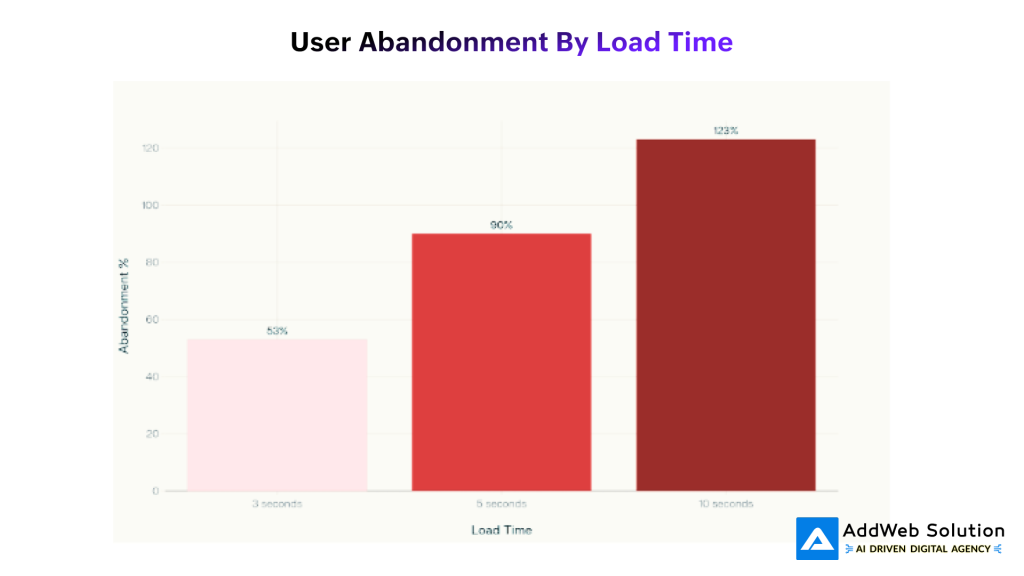
User Abandonment Rates by Page Load Time – The 3-Second Rule in Action
But here’s where it gets interesting for us Drupal folks. While WordPress users are struggling with plugin bloat and performance bottlenecks, we’ve got something they don’t: a robust, enterprise-grade platform that can be optimized to outperform almost anything on the web. The catch? You need to know the right tricks.


The Science Behind the 3-Second Rule
Before we dive into the hacks, let’s understand why speed matters so much. Google’s research shows that when a site loads in 1-3 seconds, the probability of bounce increases by 32%. Hit 5 seconds? That jumps to 90%. But here’s what most people miss—it’s not just about user patience.
Psychology is fascinating: our brains are wired for instant gratification. When a page doesn’t load immediately, stress hormones kick in. Users who experienced slow loading on a 2MB connection had to concentrate 50% more and showed measurably higher stress levels compared to those on faster connections.
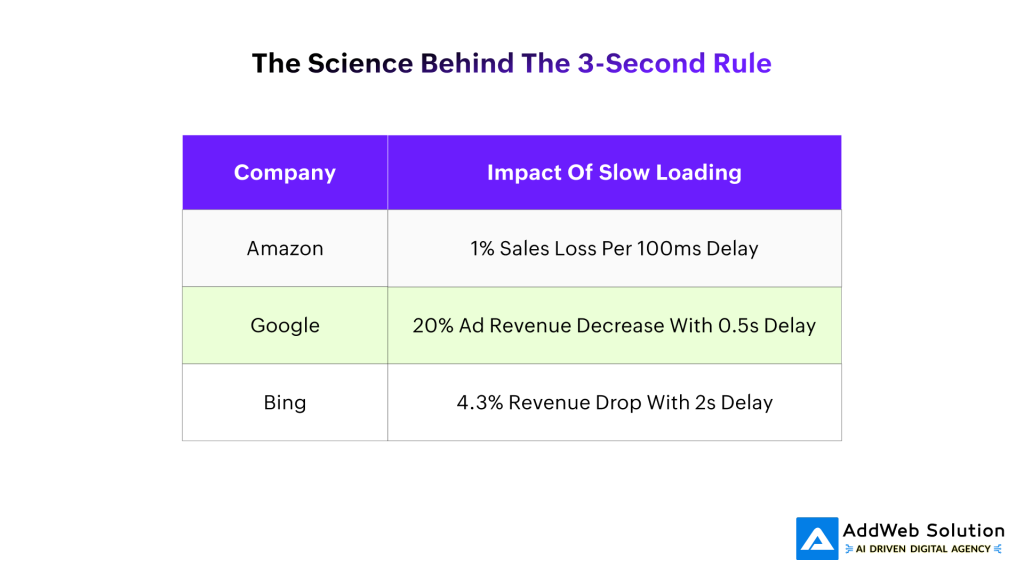
Amazon discovered they lose 1% of sales for every 100ms increase in page load time. Google saw a 20% decrease in ad revenue with just a half-second delay. These aren’t small businesses we’re talking about—these are tech giants with unlimited resources, and they’re still fighting for every millisecond.
The Drupal Performance Advantage (When Done Right)
Here’s something most people don’t realize: Drupal, when properly optimized, can actually outperform simpler CMS platforms. A recent performance comparison showed that both Drupal and WordPress scored perfect 100s on Lighthouse performance reports. But here’s the kicker- Drupal achieved this with far fewer function calls and database queries than WordPress.
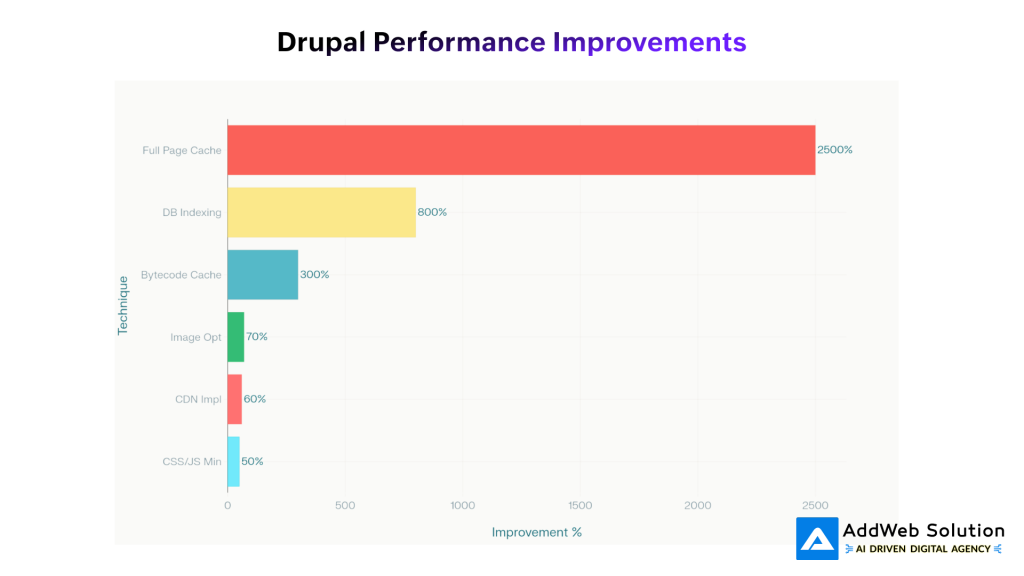
Drupal Performance Optimization Techniques and Their Impact
Without caching, Drupal completed requests in less than two-thirds the time of WordPress, with only 25% of the function calls. This isn’t magic—it’s smart architecture. Drupal’s multi-layered caching system and efficient entity management give us a performance foundation that most platforms can only dream of.
Speed Hack #1: Master the Art of Caching (Your 2500% Performance Boost)
Let’s start with the big gun: caching. This isn’t just about enabling a checkbox in your admin panel—it’s about understanding the layers and optimizing each one.
Page-Level Caching: For anonymous users, this is your bread and butter. When properly configured, Drupal’s page cache can deliver entire HTML pages without touching PHP or the database. The result? A 2500% performance improvement in some cases.
Dynamic Page Cache: This is where Drupal really shines. While your competitors’ CMS platforms struggle with authenticated users, Drupal’s dynamic page cache optimizes performance for logged-in users by caching most of the page and regenerating only the dynamic sections.
Entity and Render Caching: Drupal caches individual components—blocks, entities, views—so they don’t need to be rebuilt on every request. This multi-layered approach means even complex, dynamic sites can achieve impressive speed gains.
Pro Tip: Cache Configuration That Actually Works
Navigate to /admin/config/development/performance and don’t just check the boxes—understand what you’re doing:
- Set page cache lifetime to 15 minutes minimum for high-traffic sites. If you can push it to an hour, do it.
- Enable both “Internal Page Cache” and “Internal Dynamic Page Cache”.
- Use Redis or Memcached for object caching. This can boost response times by 50% or more.
Speed Hack #2: Database Optimization (The 800% Speed Boost)
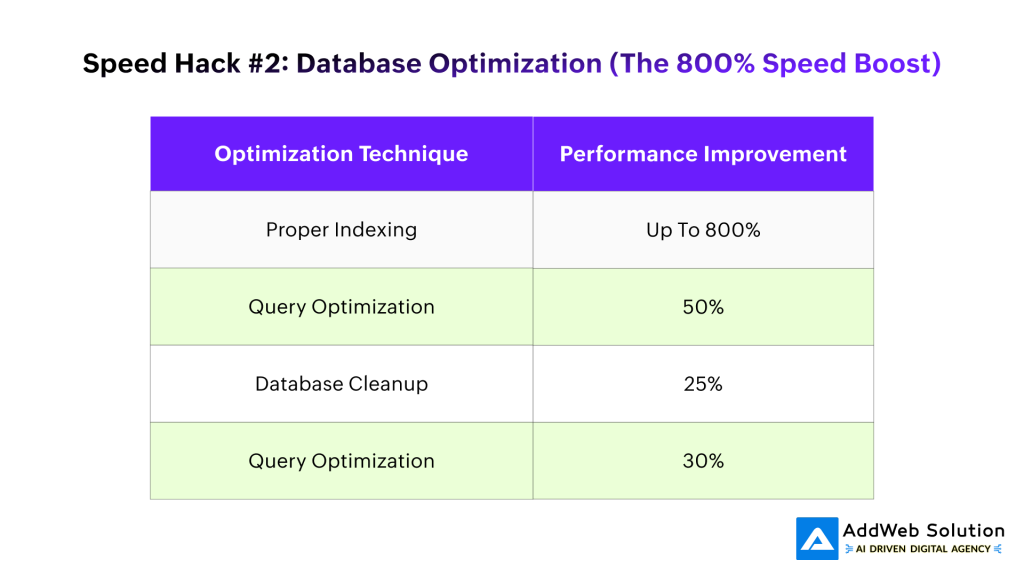
Your database is either your best friend or your worst enemy. Get this wrong, and no amount of caching will save you. Get it right, and you’ll see performance improvements of up to 800%.
Index Everything That Matters: Adding indexes to frequently queried columns can increase query speeds by up to 800%. But here’s what most developers miss—you need to index the right fields. Focus on columns used in WHERE clauses, JOIN conditions, and ORDER BY statements.
Optimize Your Queries: Stop using SELECT *. I can’t emphasize this enough. Every time you select all fields when you only need a few, you’re wasting precious milliseconds. Instead of:
sql
SELECT * FROM users;
Use:
sql
SELECT uid, name, mail FROM users WHERE status = 1;
This simple change can improve performance by 50%.
Use LIMIT Wisely: When dealing with large datasets, always use LIMIT clauses. There’s no point retrieving 10,000 records when you only need 20.
Database Maintenance That Actually Matters
- Regular cleanup: Remove orphaned data and archive old records. This alone can enhance performance by 25%.
- Optimize table structure: Use appropriate data types—if a column stores dates, use DATE format, not VARCHAR.
- Monitor slow queries: Use tools like MySQL’s slow query log to identify bottlenecks.
Speed Hack #3: Image Optimization (The Silent Performance Killer)
Images are usually the biggest performance bottleneck on modern websites, but they’re also the easiest to fix. Here’s how to do it right in Drupal.
Use Drupal’s Image Styles: Never, ever display original uploaded images. Always use Drupal’s image styles to generate optimized versions. This automatically converts images to JPEG format (which significantly reduces file size), removes metadata, and creates appropriately sized versions.
Implement Responsive Images: Drupal’s responsive image module serves different image variants based on screen size. Your desktop hero image can be gorgeous and detailed, while mobile users get a smaller, faster-loading version—all automatically.
Lazy Loading is Now Core: Since Drupal 9.1, lazy loading is built right into the platform. Images load only when they come into view, dramatically improving initial page load times.
Use Image Optimization Modules: The ImageAPI Optimize module can provide up to 70% compression without compromising quality. Combined with services like reSmush.it or local utilities like JpegTran, you can achieve significant size reductions.
Speed Hack #4: CSS and JavaScript Aggregation (The 50% Boost)
This might seem basic, but doing it right makes a huge difference. When you aggregate CSS and JavaScript files, you reduce the number of HTTP requests—and that directly translates to faster load times.
Enable Aggregation Properly: Go to /admin/config/development/performance and enable both “Aggregate and compress CSS files” and “Aggregate JavaScript files”. But don’t stop there.
Use Advanced CSS/JS Aggregation Module: This module goes beyond basic aggregation, offering:
- YUI Compressor for better CSS compression
- Smart bundling to avoid the IE 4095 selector limit
- External minification support for even better optimization
Minification is Now Built-in: Drupal 10.1 includes JavaScript minification in core, providing substantial file size reductions without additional modules. For CSS, you can choose between Core minifier or YUI Compressor.
Speed Hack #5: CDN Implementation (Your Global Speed Network)
A Content Delivery Network isn’t just for enterprise sites anymore. Modern CDNs like Cloudflare offer free tiers that can reduce load times by 20-60% for users across different geographical locations.
How CDNs Work: Instead of every visitor hitting your origin server, static files (images, CSS, JavaScript) are served from servers closer to the user’s location. The result is dramatically faster load times, especially for international visitors.
CDN Benefits for Drupal:
- Reduced server load during traffic spikes
- Faster content delivery worldwide
- Better handling of static assets
- Improved mobile performance
Speed Hack #6: Server-Level Optimizations
Your hosting environment is the foundation everything else builds on. Get this wrong, and no amount of code optimization will save you.
Use PHP 8.x: Always use the latest stable PHP version. The performance improvements between versions can be dramatic.
Configure PHP-FPM: PHP-FPM separates PHP execution from the web server, allowing for better resource management and improved site performance.
Tune Your Database: Increase buffer sizes, optimize connection limits, and configure memory allocation based on your specific needs. Proper database configuration can enhance throughput by up to 50%.
Enable OpCode Caching: Bytecode caching alone can result in over 300% speed improvement. Use OPcache (built into PHP) or APCu for single-server setups.
Unlock faster Drupal performance today

Pooja Upadhyay
Director Of People Operations & Client Relations
Monitoring Your Success: Tools That Matter
You can’t optimize what you don’t measure. Here are the tools that actually provide actionable insights:
Google PageSpeed Insights & Lighthouse: Free, comprehensive analysis with specific recommendations.
New Relic APM: Deep application performance monitoring that shows exactly where bottlenecks occur.
WebPageTest: Detailed waterfall charts showing exactly how your page loads.
Blackfire.io: PHP-specific profiler that identifies performance bottlenecks at the code level.
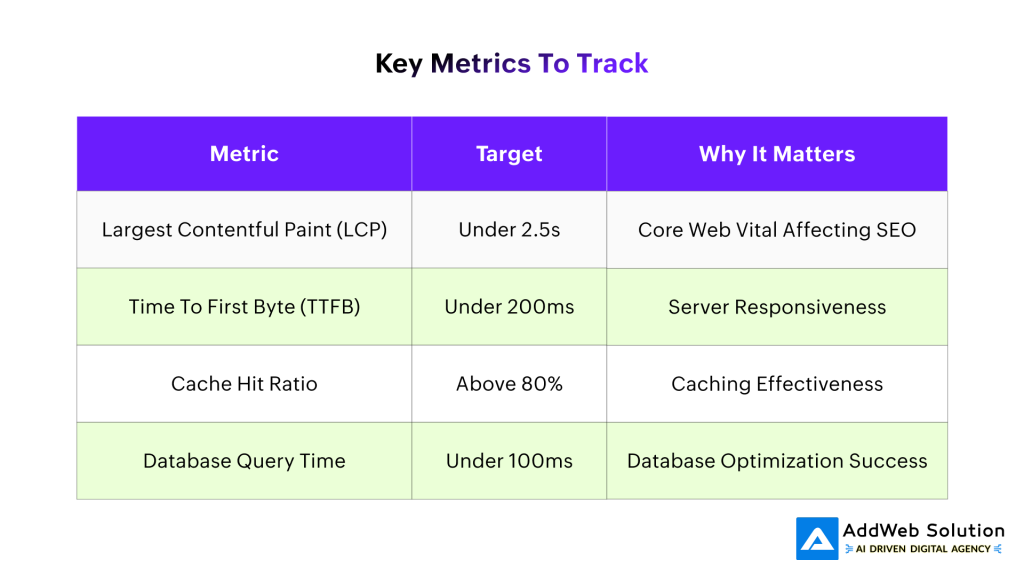
Key Metrics to Track
The Reality Check: Common Mistakes That Kill Performance
Mistake #1: Over-modularization: Just because Drupal is modular doesn’t mean you should install every module you find. Each active module adds overhead.
Mistake #2: Ignoring Mobile: 47% of consumers shop via phones, but only 1 in 5 complete transactions on mobile due to poor performance.
Mistake #3: Caching Misconceptions: Enabling caching without understanding cache invalidation leads to stale content and frustrated users.
Mistake #4: Database Neglect: Running SELECT * queries and avoiding database maintenance is like driving a Ferrari with sugar in the gas tank.
Making It Happen: Your 30-Day Performance Sprint
Week 1: Audit your current performance using Google PageSpeed Insights and establish baselines.
Week 2: Implement caching (page cache, dynamic cache, Redis/Memcached).
Week 3: Optimize database queries and implement proper indexing.
Week 4: Set up image optimization, CSS/JS aggregation, and CDN.
The beautiful thing about Drupal is that once you implement these optimizations correctly, they work automatically. Your site gets faster, your users are happier, your search rankings improve, and your conversion rates increase.
Remember, in a world where attention spans are measured in seconds and patience is measured in milliseconds, speed isn’t just nice to have—it’s the difference between success and failure. Your users won’t wait more than 3 seconds, and frankly, they shouldn’t have to.
The tools are all there. The techniques are proven. The only question is: are you ready to leave your slow-loading competition in the dust?
Source URLs
- https://www.liquidweb.com/white-papers/site-speed-every-second-counts-research-study/
- https://scientiamobile.com/53-of-mobile-site-visitors-abandon-if-it-takes-more-than-3-seconds-to-load-page/
- https://www.thinkwithgoogle.com/consumer-insights/consumer-trends/mobile-site-load-time-statistics/
- https://www.uptrends.com/blog/the-psychology-of-web-performance
- https://www.seltech.io/blog/mastering-drupal-caching-best-practices-and-troubleshooting
- https://www.scalahosting.com/blog/monitoring-and-optimizing-the-database-performance-for-drupal-hosting/
- https://moldstud.com/articles/p-top-database-query-optimization-strategies-for-enhanced-drupal-performance
