


You know what’s funny? I’ve been in the web development game for years, and I keep seeing the same mistake over and over again. Business owners think that cramming their website full of plugins is like supercharging a car – more power, better performance, right?
Wrong. Dead wrong.
Here’s what actually happens: Your site becomes a digital hoarder’s paradise, and your customers? They’re clicking away faster than you can say “loading screen.”
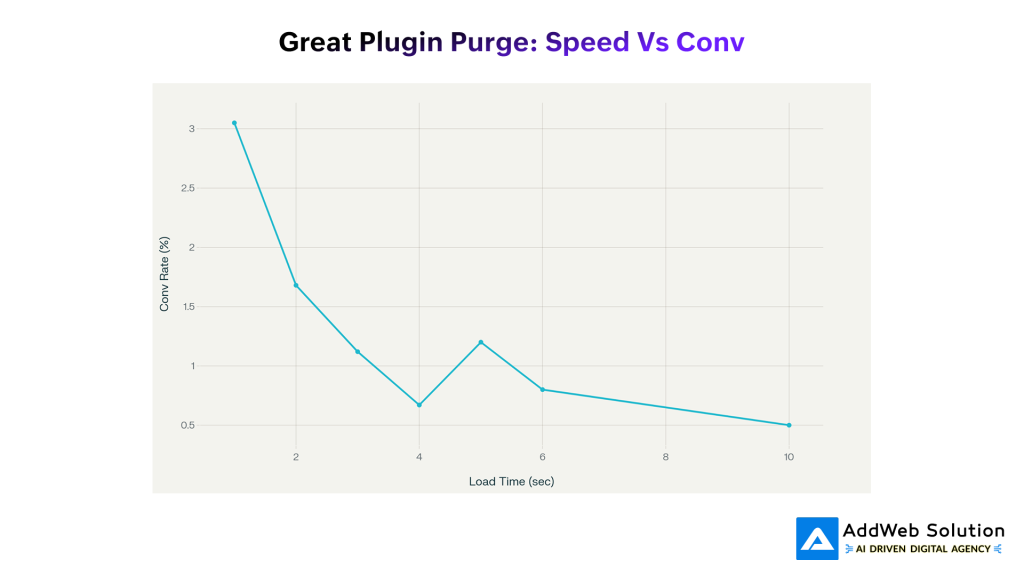
Website load time dramatically impacts conversion rates – sites loading in 1 second convert 6x better than those taking 10 seconds
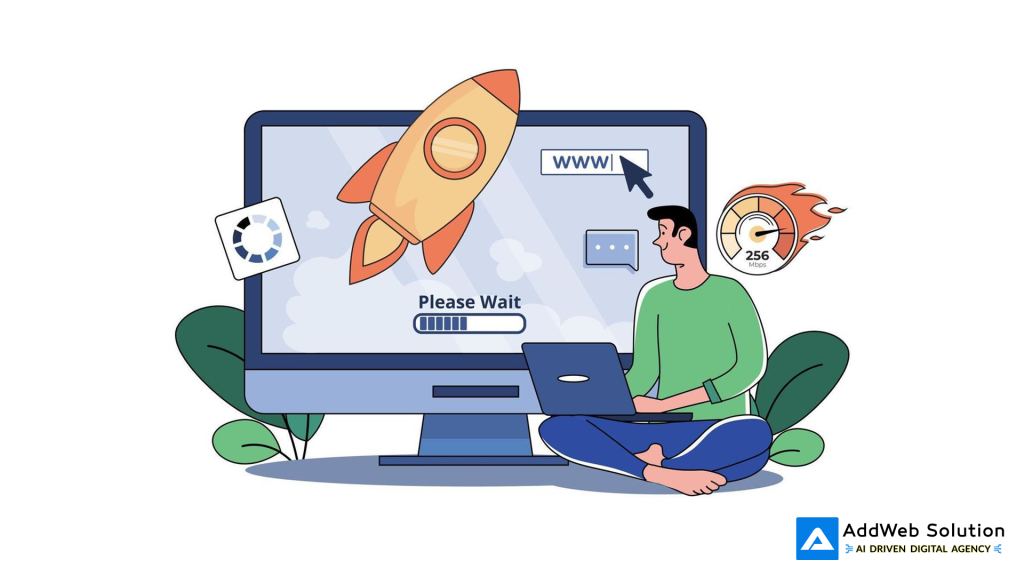
Illustration of fast website performance with a rocket launch, a loading bar, and speed indicators
I recently analyzed data from a client who swore they needed 47 different plugins to run their online store. Want to guess what happened when we trimmed that down to 18? Their sales jumped by 50%. Not kidding.
But let me back up and tell you why this whole “more plugins = better website” mentality is killing your bottom line.
The Plugin Trap (And Why We All Fall Into It)
Let’s be honest – we’ve all been there. You’re browsing the directory of plugins at 2 AM, convinced that this ONE plugin will solve all your problems. Social media integration? There’s a plugin for that. Contact forms? Plugin. Analytics? Another plugin. Before you know it, your site is running slower than a Windows 95 computer trying to load YouTube.
The thing is, plugin developers aren’t exactly incentivized to keep things lightweight. They’re competing in a marketplace where “feature-rich” sells better than “lightning-fast.” So what do they do? They stuff their plugins with every bell and whistle imaginable, turning what should be a simple tool into a digital Swiss Army knife that nobody asked for.
Here’s The Real Kicker
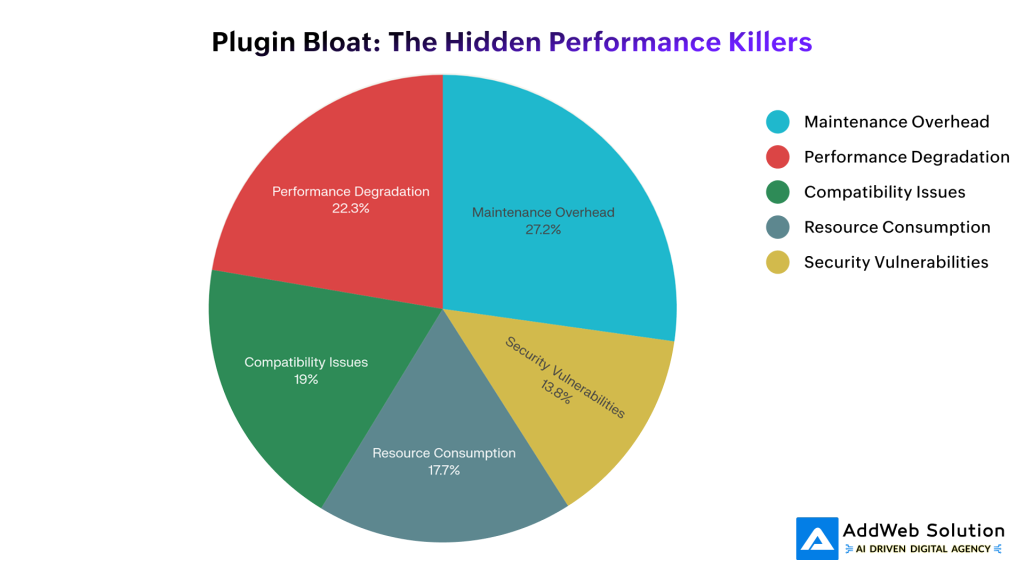
89% of websites struggle with plugin maintenance overhead, while 73% experience performance degradation from plugin bloat
According to recent studies, 73% of websites are suffering from performance issues because of plugin bloat. That’s not just a minor inconvenience – it’s a business killer. And get this: 89% of site owners say they’re drowning in plugin maintenance. Updates breaking things, conflicts causing crashes, security vulnerabilities popping up left and right.
It’s like maintaining a collection of vintage cars when all you really need is one reliable vehicle to get to work.


The Money Talk Nobody Wants to Have
Let’s talk numbers, because that’s what really matters, right?
Minimalistic vector illustration representing website speed with a browser window and a speedometer icon.
Picture this: You’ve got 1,000 people hitting your website, ready to buy your $50 product. If your site loads in one second, you’re looking at about $1,525 in revenue. But if it takes four seconds? You’re down to $335. That’s a difference of $1,190 – gone, just because your site couldn’t get its act together fast enough.
And here’s the kicker – 47% of people expect your site to load in 2 seconds or less. Miss that window, and 53% of your visitors are already moving on to your competitors. It’s brutal, but that’s the reality we’re working with.
Why Do We Keep Adding More Plugins? (The Psychology Behind the Madness)
I’ll be straight with you – part of this is our own fault. We get seduced by features we’ll probably never use. It’s like buying a car because it has heated cup holders when you live in Florida.
Plugin developers know this. They’re in a constant arms race, adding more features to justify their price tags. The result? “Frankenstein plugins” that try to do everything and end up doing nothing particularly well.
I once worked with a client who had five different SEO plugins running simultaneously. Five! They thought more was better, but their site was crawling along like a wounded animal.
The “Free Plugin” Trap
Don’t even get me started on the “free plugin” mentality. Sure, it saves money upfront, but those “free” plugins often come with hidden costs that’ll make your wallet cry. Poor optimization, sketchy updates, zero support when things go sideways. I’ve seen businesses spend thousands fixing problems that could’ve been avoided with one quality paid plugin.
Free plugins are like free puppies – the initial cost is just the beginning.
The Plugin Audit That Actually Works

Plugin audit and removal delivers the highest speed improvement (40%) among all optimization techniques
Alright, enough doom and gloom. Let’s talk solutions. I’ve developed a system that’s helped dozens of clients transform their sluggish websites into conversion machines. It’s not rocket science, but it does require some discipline.

Minimalist website design featuring a hand squeezing blackberries on a soft pink background with clean typography.
Step 1: The Great Plugin Census
First, you need to know what you’re dealing with. Document every single plugin – even the ones you “temporarily” disabled six months ago. You’d be surprised how many ghost plugins are still lurking in your database, slowing things down.
Step 2: Performance Sherlock Holmes
This is where you put on your detective hat. Use tools like GTmetrix or Google PageSpeed Insights to figure out which plugins are the biggest troublemakers. Some plugins look innocent but are secretly database query monsters.
Step 3: Security Audit (Because Nobody Wants to Get Hacked)
Check for outdated plugins, abandoned projects, and known security issues. About 45% of websites hosted on WordPress have security vulnerabilities due to poorly maintained plugins. Don’t be part of that statistic.
Step 4: The Redundancy Police
This is my favorite part. Hunt down plugins that do similar things. Multiple caching plugins? Pick one. Three different contact form plugins? Come on. You get the idea.
Step 5: The Business Value Test
Here’s the tough love moment: Does this plugin actually help your business? If you can’t point to a specific way it improves user experience or increases conversions, it’s probably dead weight.
Step 6: Compatibility Check
Make sure your remaining plugins play nice together. Plugin conflicts are like having roommates who can’t stand each other – eventually, something’s going to break.
Step 7: Keep Watching
Set up monitoring so you catch problems before your customers do. This isn’t a “set it and forget it” kind of deal.
Learn how a plugin purge increases website performance and revenue

Pooja Upadhyay
Director Of People Operations & Client Relations
What Actually Works (From the Trenches)
I’ve tested pretty much every optimization technique out there, and here’s what moves the needle: Plugin auditing gives you the biggest bang for your buck – we’re talking 40% average speed improvements. That’s better than any other single optimization technique.
But here’s the secret sauce – don’t just remove plugins, replace them strategically. Instead of five different plugins handling related functions, get one well-coded solution that does it all. Companies like AddWeb Solution specialize in creating these kinds of streamlined, custom solutions that eliminate plugin dependency without sacrificing functionality.
Real Stories From Real Businesses
Let me tell you about Sarah, who runs a boutique fashion store online. She came to me pulling her hair out because her conversion rates were in the toilet. Her site was loaded with 47 plugins – everything from social sharing widgets to seven different analytics trackers.
We spent a weekend doing surgery on her site. Cut the plugin count down to 18 carefully chosen tools. The result? Her page load time went from 5 seconds to 1.5 seconds. But here’s the crazy part – her conversion rate jumped by 50%, and cart abandonment dropped by 30%. She made an extra $50,000 in the first quarter after the optimization.
Then there’s Mike, who runs a B2B software company. His lead forms were converting about as well as a vegetarian trying to sell steaks at a BBQ competition. Turns out, 23 of his 41 plugins were either doing nothing or actively making things worse.
After our plugin purge:
- Page load time: 6.2 seconds down to 2.2 seconds (65% improvement)
- Lead form completions: up 180%
- Bounce rate: down 40%
- Annual revenue increase: $127,000
Not bad for a weekend’s work, right?
The AddWeb Solution Difference

Simple WordPress plugin interface with a clean, minimalist design emphasizing usability and clarity.
Look, I’m not just name-dropping here. AddWeb Solution has this approach that actually makes sense. Instead of throwing more plugins at problems, they create custom solutions that do exactly what you need – nothing more, nothing less.
Their developers don’t just build stuff and walk away. They optimize from the ground up, focusing on speed and performance from day one. I’ve seen their custom plugin development work replace multiple bloated plugins while actually adding functionality. It’s like getting a sports car that also gets great gas mileage.
Plus, they stick around for the long haul. Plugin optimization isn’t a one-and-done deal – it’s an ongoing process. AddWeb Solution provides the kind of maintenance and monitoring that keeps sites running smoothly as they grow and evolve.
Your Step-by-Step Plugin Detox Plan
Week 1: The Assessment
Get brutal. Document everything, measure your current performance, and identify the obvious deadweight. Use GTmetrix, Google PageSpeed Insights, whatever tools you prefer. Just get those baseline numbers so you can track your progress.
Weeks 2-3: The Purge
Start cutting. Remove (don’t just deactivate) the plugins that aren’t pulling their weight. Test everything as you go – you don’t want to break your site in the name of optimization.
Weeks 4-6: The Rebuild
This is where things get interesting. Replace your remaining inefficient plugins with better alternatives. Sometimes that means custom development, sometimes it just means finding better tools.
Ongoing: The Vigilance
Keep monitoring. Track your load times, conversion rates, user engagement – all the metrics that actually matter to your business.

Illustration of website speed testing and performance optimization with a loading bar, speed gauge, clock, and rocket concept for fast loading.
How to Measure Success (Beyond Just Speed)
Sure, faster load times are great, but what really matters is business impact. Here’s what to watch:
The Technical Stuff:
- Load times (aim for under 2 seconds)
- Server response times
- Mobile performance
- Resource usage
The Business Stuff:
- Conversion rates (expect 10-20% improvements)
- Revenue per visitor
- Time on site
- Search rankings
Keeping Your Site Lean Long-Term
The key is developing good habits. Before installing any new plugin, ask yourself:
- Who made this and do they keep it updated?
- How will this affect my site’s performance?
- Does this integrate well with my existing setup?
- Can I measure the business value this provides?
Make plugin audits a quarterly thing, not a once-in-a-blue-moon emergency. Partner with developers who understand that less can be more.
The Bottom Line
Look, I get it. It feels counterintuitive to remove features when you’re trying to improve your website. But the data doesn’t lie – strategic plugin reduction leads to better performance, happier users, and higher conversion rates.
In today’s attention-deficit digital world, every second counts. Your customers won’t wait around for your over-plugged website to get its act together. They’ll bounce to your competitors faster than you can refresh your analytics dashboard.
The most successful online businesses aren’t the ones with the most plugins – they’re the ones with the right plugins, optimized for performance and focused on results.
So here’s my challenge to you: Do the plugin purge. Be ruthless. Your website – and your bank account – will thank you.
The great plugin purge isn’t about limiting your website’s potential. It’s about unleashing it. When you stop trying to do everything and start focusing on doing the important things really well, that’s when the magic happens.
And trust me, there’s nothing magical about a 10-second load time. Unless your magic trick is making customers disappear.
Source URL
https://www.portent.com/blog/analytics/research-site-speed-hurting-everyones-revenue.htm
https://www.cloudflare.com/learning/performance/more/website-performance-conversion-rates/
https://gtmetrix.com
https://developers.google.com/speed/pagespeed/insights/
https://elementor.com/blog/many-wordpress-plugins/
