


This blog was originally published on August 19, 2025, and has been fully updated on Jun 26, 2026. All statistics, trends, technology references, and best practices have been revised to reflect the current landscape of custom software development.
An illustration showing how green data centers operate through renewable energy sources, eco-friendly homes, and community benefits
Making your website on WordPress environmentally friendly isn’t just about doing good for the planet – it’s about creating a faster, more efficient, and ultimately more profitable online presence. In 2025, with digital technologies consuming 2% of global electricity (equivalent to Sweden’s entire energy usage) and the internet accounting for 3.7% of global greenhouse gas emissions, every website owner has both an opportunity and responsibility to reduce their digital carbon footprint.
The good news? An eco-friendly website is also a high-performing website. When you optimize for the environment, you’re simultaneously boosting your site speed, improving SEO rankings, and enhancing user experience. Let’s dive into practical, actionable steps that anyone can implement – no technical expertise required!


Understanding Your Website’s Environmental Impact

The internet’s large energy use is due to manufacturing, shipping of hardware, and powering and cooling devices with various energy sources
Before we jump into solutions, let’s understand what we’re dealing with. Every time someone visits your website, it generates an average of 1.76 grams of CO2. That might not sound like much, but for a website with 10,000 monthly visitors, that adds up to 211 kilograms of CO2 per year – equivalent to the amount absorbed by 105 trees annually.
The Shocking Reality of Web Energy Consumption
Here are some eye-opening statistics that highlight why this matters:

Step 1: Choose Green Web Hosting

Your web host is the foundation of your eco-friendly journey. Traditional hosting can be a major carbon contributor, but switching to green hosting is often the single most impactful change you can make.
Top Green Hosting Providers for 2026
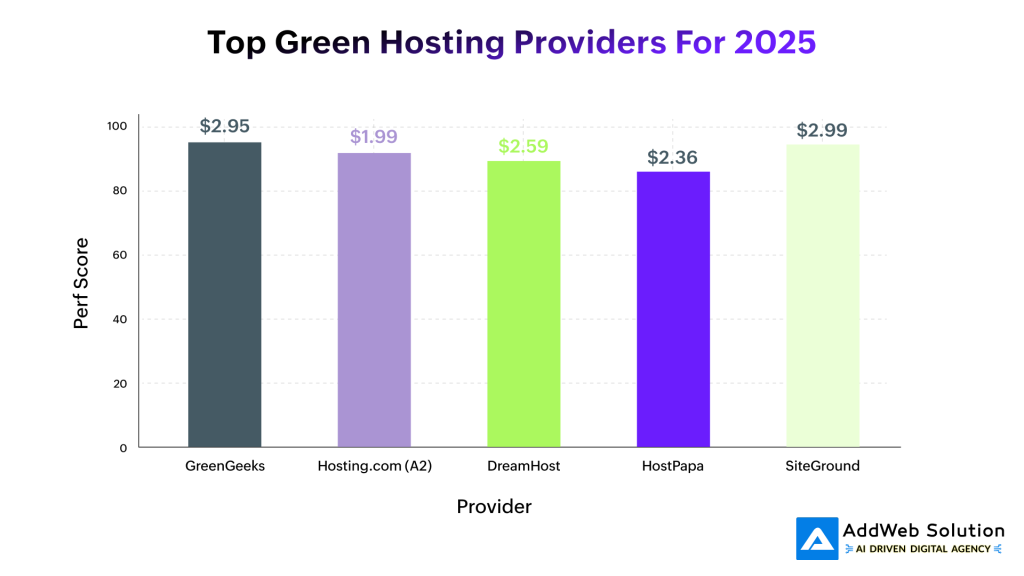
GreenGeeks leads the pack with a 95% performance score and truly impressive environmental credentials:
- 300% renewable energy match – they put back 3x the energy they consume
- Partners with Bonneville Environmental Foundation for wind energy
- Plants a tree for every hosting account
- Uses advanced cooling systems that reduce temperatures by 25 degrees
Budget-Friendly Options:
- Hosting.com (formerly A2 Hosting) at $1.99/month offers excellent value with carbon neutralization programs
- DreamHost ($2.59/month) operates carbon-neutral with LEED-certified offices
- SiteGround ($2.99/month) leverages Google Cloud’s renewable energy infrastructure
How to Check if Your Current Host is Green
Visit the Green Web Foundation website and enter your domain. This free tool instantly tells you whether your site runs on renewable energy. If not, it’s time for a switch – and the performance benefits alone often justify the move.
Step 2: Optimize Your Images Like a Pro
Images typically account for 45% of your website’s total weight, making image optimization your biggest opportunity for carbon reduction.
The Image Optimization Game Plan
Choose the Right Format:
- WebP for photographs (60-80% smaller than JPEG)
- AVIF for even better compression (but check browser support)
- SVG for icons and simple graphics
- PNG only when you need transparency
Compression Without Compromise:
- Use tools like ShortPixel or TinyPNG for automated compression
- Smush plugin offers excellent integration with lazy loading for your WordPress-based site
- Imagify provides AI-powered optimization that learns your preferences
Smart Loading Strategies:
- Lazy loading delays image loading until needed (35% CO2 reduction potential)
- Responsive images serve appropriate sizes for different devices
- Progressive JPEG loads images in layers for perceived speed
WordPress Image Optimization Plugins

Step 3: Implement Smart Caching Strategies
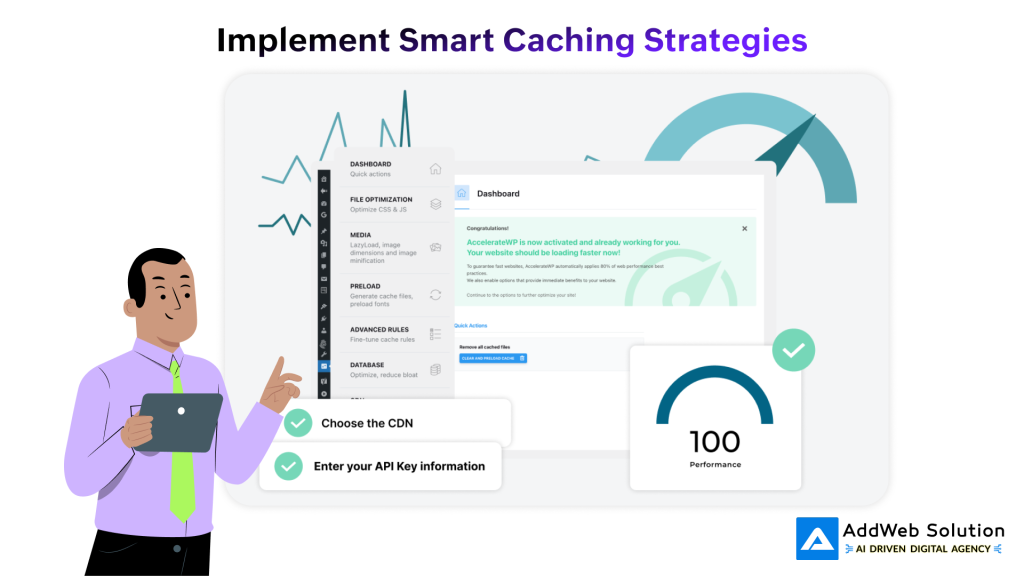
WordPress performance dashboard showing AccelerateWP plugin interface with a perfect 100 performance score and optimization options like file and media optimization
Caching can reduce your server load by up to 60%, dramatically cutting energy consumption while making your site lightning-fast.
Top Caching Solutions for 2026
WP Rocket remains the gold standard for ease of use:
- One-click activation with automatic optimization
- Built-in lazy loading and database cleanup
- CSS/JavaScript minification included
- Starting at $59/year
Budget-Friendly Alternatives:
- WP Super Cache (Free) – Created by Automattic, reliable and tested
- LiteSpeed Cache (Free) – Perfect for LiteSpeed servers
- WP Fastest Cache (Free) – Simple setup with essential features
Caching Best Practices
- Enable browser caching to store static files locally
- Use object caching for database queries
- Implement page caching for faster content delivery
- Enable Gzip compression to reduce file sizes by up to 70%
Make your WordPress-powered website more environmentally friendly

Pooja Upadhyay
Director Of People Operations & Client Relations
Step 4: Select a Lightweight, Fast-Loading Theme

Your theme choice can make or break your eco-friendly goals. Heavy themes with bloated code waste energy and frustrate users.
The Fastest Themes for WordPress in 2026
Our testing reveals the clear winners:
Top Performers:
- Neve – 563ms load time, 397KB page size
- Kadence – 589ms load time, excellent customization options
- GeneratePress – 639ms load time, developer-friendly
- Astra – 719ms load time, massive template library
What Makes a Theme Eco-Friendly?
Clean Code: Well-written themes use fewer server resources
Minimal HTTP Requests: Fewer files mean less energy consumption
Mobile Optimization: Responsive design reduces data transfer
No Bloat: Avoid themes packed with unused features
Pro Tip: The default Twenty Twenty-Four theme actually performs exceptionally well, loading in just 2.03 seconds despite being feature-rich.
Step 5: Master Plugin Management
Every plugin adds weight to your site. The key is strategic selection and regular auditing.
Essential Eco-Friendly Plugins
Performance Monitoring:
- Carbon Meter – Tracks your site’s real-time CO2 emissions
- GreenMetrics – Comprehensive sustainability dashboard
- Website Carbon – Monitor emissions with actionable recommendations
Optimization Tools:
- WP-Optimize – Database cleaning and image optimization
- Asset CleanUp – Remove unused CSS/JavaScript
- Plugin Organizer – Load plugins only where needed
Plugin Audit Checklist
Deactivate unused plugins – They consume resources even when inactive
Regularly update plugins – New versions often include performance improvements
Choose multi-functional plugins – One plugin that does three jobs is better than three separate plugins
Monitor plugin impact – Use Query Monitor to identify resource-heavy plugins
Step 6: Leverage Content Delivery Networks (CDNs)
CDNs can reduce your carbon footprint by up to 50% by serving content from servers closer to your users.
How CDNs Help the Environment
Reduced Data Travel Distance: Content loads from nearby servers, using less energy
Efficient Resource Distribution: Popular content is cached globally
Optimized Delivery: Modern CDNs automatically compress and optimize content
Recommended CDN Services
Cloudflare (Free tier available):
- Global network with renewable energy commitment
- Automatic image optimization
- Built-in security features
MaxCDN (StackPath):
- Fast global network
- Real-time analytics
- plugin for easy setup of WordPress
Amazon CloudFront:
- Integrates with AWS renewable energy initiatives
- Pay-per-use pricing model
- Advanced caching controls
Step 7: Database Optimization and Maintenance
A bloated database forces your server to work harder, consuming more energy. Regular maintenance is crucial for sustainability.
Database Cleanup Essentials
Remove Digital Clutter:
- Delete spam comments and old revisions
- Clean up unused tags and categories
- Remove deactivated plugin data
- Optimize database tables regularly
Recommended Tools:
- WP-Optimize – All-in-one database cleaning
- Advanced Database Cleaner – Granular control options
- WP-Sweep – Removes unnecessary data safely
Pro Tip: Schedule automatic cleanups monthly to maintain optimal performance without manual intervention.
Step 8: Implement Sustainable Design Practices

Minimalist and sustainable website design example featuring clean energy solutions with eco-friendly imagery and a clear layout
Sustainable design isn’t just about performance – it’s about mindful choices that reduce resource consumption.
Design for Efficiency
Color Strategy:
- Dark themes can reduce energy consumption on OLED screens by up to 60%
- Limit color palette to reduce file complexity
- Use web-safe fonts to avoid loading custom font files
Content Strategy:
- Question every element – Does it serve a purpose?
- Optimize text-to-image ratio – Text uses far less energy than images
- Implement progressive disclosure – Show essential information first
Sustainable UX Principles
- Minimize user journey length – Fewer page loads mean less energy
- Implement search functionality – Help users find content quickly
- Use system fonts when possible – No additional downloads required
- Optimize forms – Reduce steps and validation trips to the server
Step 9: Monitor and Measure Your Impact
You can’t improve what you don’t measure. Regular monitoring helps you track progress and identify new optimization opportunities.
Essential Monitoring Tools
Website Carbon Calculator (websitecarbon.com):
- Free carbon footprint assessment
- Provides actionable recommendations
- Benchmark against other sites
Google PageSpeed Insights:
- Core Web Vitals assessment
- Mobile and desktop performance scores
- Specific optimization suggestions
GTmetrix:
- Detailed performance analysis
- Historical tracking
- Waterfall charts for debugging
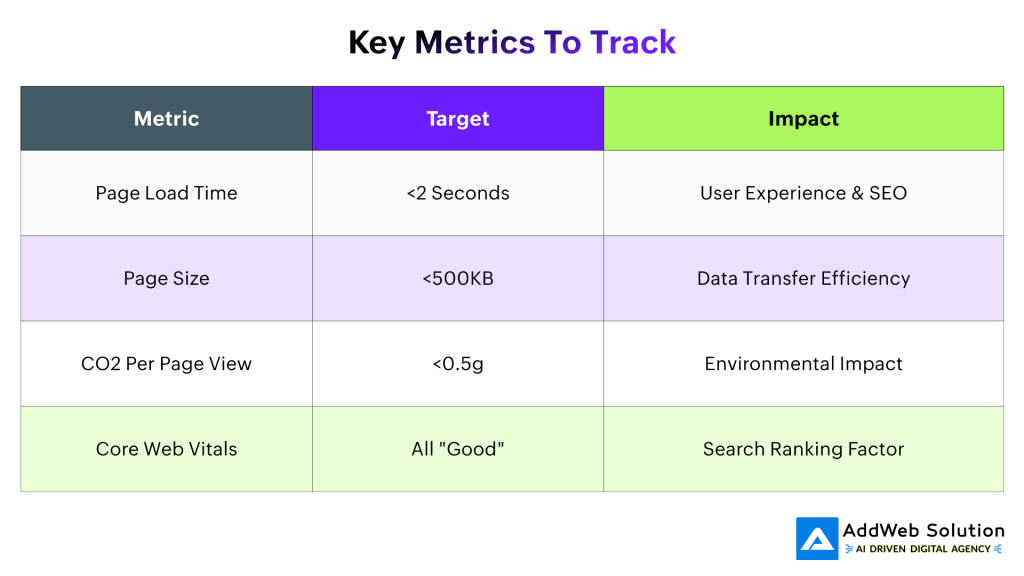
Key Metrics to Track
The Business Case for Eco-Friendly Websites
Going green isn’t just about environmental responsibility – it’s smart business:
Performance Benefits
- 53% of users abandon sites that take longer than 3 seconds to load
- Fast sites rank higher in Google search results
- Better Core Web Vitals directly impact SEO performance
Cost Savings
- Reduced hosting costs through efficiency
- Lower CDN bills with optimized content
- Decreased bounce rates mean better conversion
Brand Value
- 72% of consumers prefer sustainable brands
- Gen Z and Millennials actively seek eco-conscious businesses
- Green credentials differentiate you from competitors
Quick Win Checklist: Start Today!
Here’s your action plan for immediate impact:
Week 1: Foundation
□ Test your current site on Website Carbon Calculator
□ Switch to green hosting if needed
□ Install a caching plugin (WP Rocket or WP Super Cache)
□ Optimize your largest images
Week 2: Optimization
□ Audit and deactivate unused plugins
□ Implement lazy loading for images
□ Enable Gzip compression
□ Clean up your database
Week 3: Advanced
□ Set up a CDN
□ Optimize your theme choice
□ Implement performance monitoring
□ Create a maintenance schedule
Week 4: Monitoring
□ Establish baseline metrics
□ Set up automated monitoring
□ Plan monthly optimization reviews
□ Document your progress
Looking Ahead: The Future of Sustainable Web Design
The web sustainability movement is just getting started. Here’s what to expect:
Emerging Technologies:
- AI-powered optimization will automatically adjust site performance
- Edge computing will reduce data center loads
- Green algorithms will prioritize sustainable coding practices
Industry Trends:
- Sustainability reporting will become standard practice
- Green hosting will become the default choice
- Carbon-neutral websites will be a competitive advantage
Regulatory Changes:
- Digital carbon taxes may be introduced
- Environmental disclosure requirements for websites
- Green certification programs for web professionals
Your Sustainable WordPress Journey Starts Now
Making your website on WordPress eco-friendly in 2026 isn’t just possible – it’s essential. Every optimization you implement serves a dual purpose: reducing environmental impact while improving user experience and business performance.
Remember: You don’t need to implement everything at once. Start with the changes that offer the biggest impact for your specific situation. Even small steps make a difference when multiplied across millions of websites worldwide.
The planet – and your users – will thank you for creating a faster, cleaner, more sustainable web presence. Your eco-friendly website transformation begins with a single click. Which optimization will you tackle first?
Ready to measure your current impact? Visit the Website Carbon Calculator today and see where you stand. Then come back to this guide and start checking off those optimization boxes. The future of the web is green – and it starts with websites built on WordPress for your site
Source URLs:
https://clearcutderby.uk/sustainable-wordpress-websites-7-eco-friendly-standards/
https://kanoppi.co/8-steps-to-create-an-eco-friendly-wordpress-website/
https://make.wordpress.org/sustainability/
https://europe.wordcamp.org/2025/session/how-to-make-your-website-more-sustainable/
Reduce the carbon footprint of your website with a WordPress-powered solution
Pooja Upadhyay
Director Of People Operations & Client Relations
