


Artificial Intelligence (AI) is disrupting web development in a major way. Rather than rendering developers obsolete, technologies such as Webflow’s AI Assist are reinventing their processes-automating the drudge work and turbocharging creativity and pace. Here’s a colorful glimpse at if AI will replace or enable developers, with engaging charts, bullet points, and images for that human touch.
Webflow AI Assist: Revolution or Replacement?
AI such as Webflow‘s Assistant streamlines repetitive tasks and speeds up content production, but not to the extent of supplanting developers’ creative or strategic work.


What Webflow AI Assist Can Do
- Automates Layouts: Creates webpage layouts and design pieces immediately from your input, eliminating hours of setup time.
- Smart Content Creation: Generates and refines contextual copy, so website text is consistently on-brand and compelling.
- Instant Edits: Enables fast changes-change tone, length, or style in one click.
- Keep It Consistent: Analyze your design system for perfect alignment with your brand.
AI’s Impact on Developer Tasks (2025)
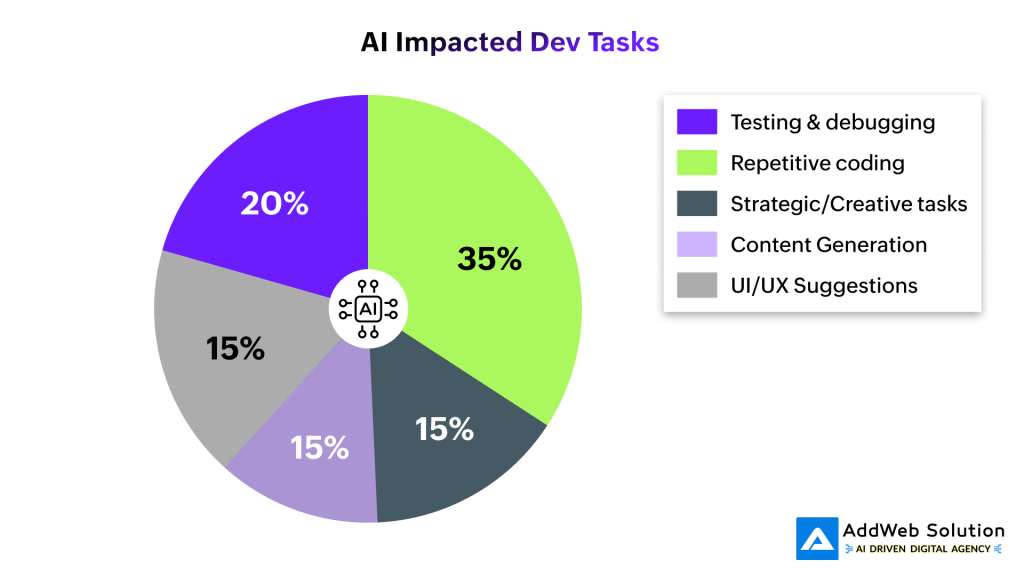
Pie Chart: AI’s Impact on Developer Tasks (2025)
Key Webflow AI Capabilities:
- Instant Site Generation: Turn ideas into production-quality sites in minutes, not weeks
- Smart Layout Suggestions: AI considers your objectives and provides best-fit page layouts
- Content Creation: Create copy versions with context-aware knowledge of your brand
- Design System Integration: Enforce brand coherence while speeding up development
- Real-time Optimization: AI proposes enhancements for accessibility, SEO, and user experience
Human Creativity: Still Essential
Even with these advances, AI enables but does not replace developers:
- Problem-solving, tailored features, and UX continue to require human creativity and intuition.
- Developers translate business requirements and resolve new issues AI isn’t expecting.
- Agencies and designers can work with more customers-faster-but the magic ingredient is human intelligence.
Visually Comparing: Where Does AI Save Time?

How AI Empowers Developers
- Decreases Boredom: Automates mundane tasks (boilerplate code, batch testing, etc.), making time for innovation.
- Fills the Skill Gap: Fresh designers are able to launch pro-level sites instantly without extensive coding knowledge.
- Enhances Collaboration: Agencies demo live prototypes faster-clients see their vision instantly.
- SEO & Content: Suggests optimized metadata and bulk content-one less worry for site owners.
- Continuous Learning: Integrated help and onboarding resources accelerate developer growth.
AI Tasks vs. Human-Only Skills
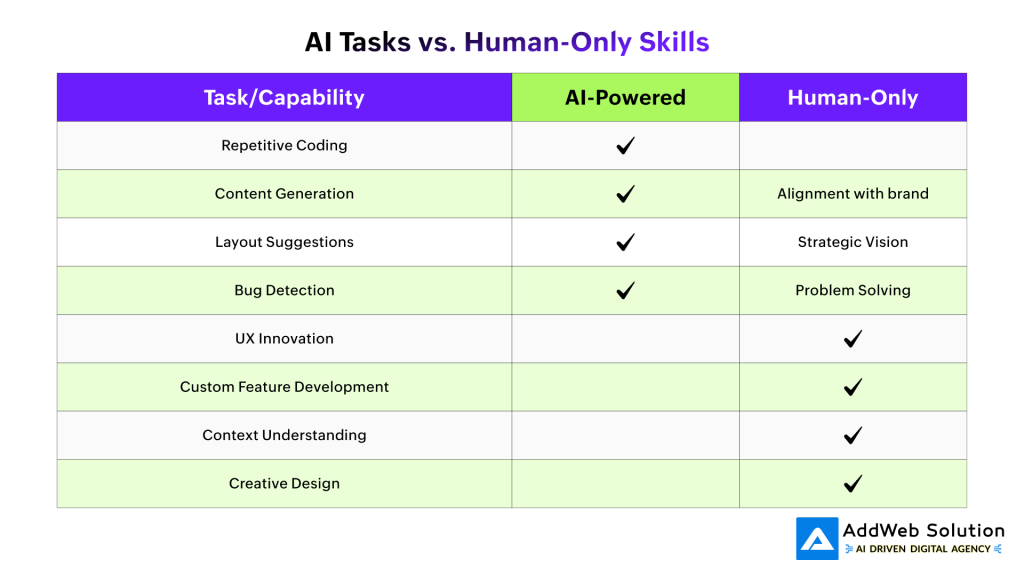
Can AI Replace Developers Completely?
- Short answer: No-at least not soon.
- Nearly 30% of surveyed developers worry about AI replacement, but most experts agree that creative, contextual tasks remain human turf-for now.
- AI is best at accelerating workflow-not at imagining complex solutions from scratch.
Empowering Developers with Webflow AI Assist

Pooja Upadhyay
Director Of People Operations & Client Relations
The Productivity Revolution: Numbers Don’t Lie
The data reveals AI’s true impact on developer productivity, and it’s more nuanced than many expected.

AI Impact on Developer Productivity Metrics
The Positive Impact:
- 75% job satisfaction increase among developers using AI tools
- 55% reduction in lead time for project completion
- 10+ hours per week saved through task automation
- 50% faster code merging for teams using AI assistants
The Challenges:
- 41% increase in bugs in AI-generated code requiring human oversight
- 19% longer completion time in some complex tasks due to debugging AI output
- Trust gap: Only 3% of developers report “high trust” in AI accuracy
Where AI Thrives vs. Where Humans Remain Essential
Not all development tasks are created equal when it comes to AI adoption:

AI-Friendly Tasks:
- Searching and answering questions (54% adoption rate)
- Content generation and documentation (36% adoption)
- Learning new concepts (33% adoption)
- Boilerplate code generation
Human-Critical Tasks:
- Deployment and monitoring (76% resistance rate)
- Project planning and architecture (69% resistance)
- Complex problem-solving and debugging
- Creative innovation and system design
The Future: Collaboration, Not Competition
Looking ahead, the most successful developers will be those who master AI-human collaboration:
The New Developer Skillset:
- AI Prompting: Effectively communicating with AI tools to get optimal results
- Code Review: Quickly identifying and fixing AI-generated code issues
- System Integration: Understanding how AI-generated components fit into larger architectures
- Quality Control: Implementing robust testing for AI-assisted development
Emerging Roles:
- AI-First Software Engineers: Experts who coordinate AI systems for sophisticated tasks
- AI Tool Architects: Professionals who create and deploy AI-augmented development processes
- Human-AI Interface Designers: Developing smooth collaboration experiences
Industry Impact Summary
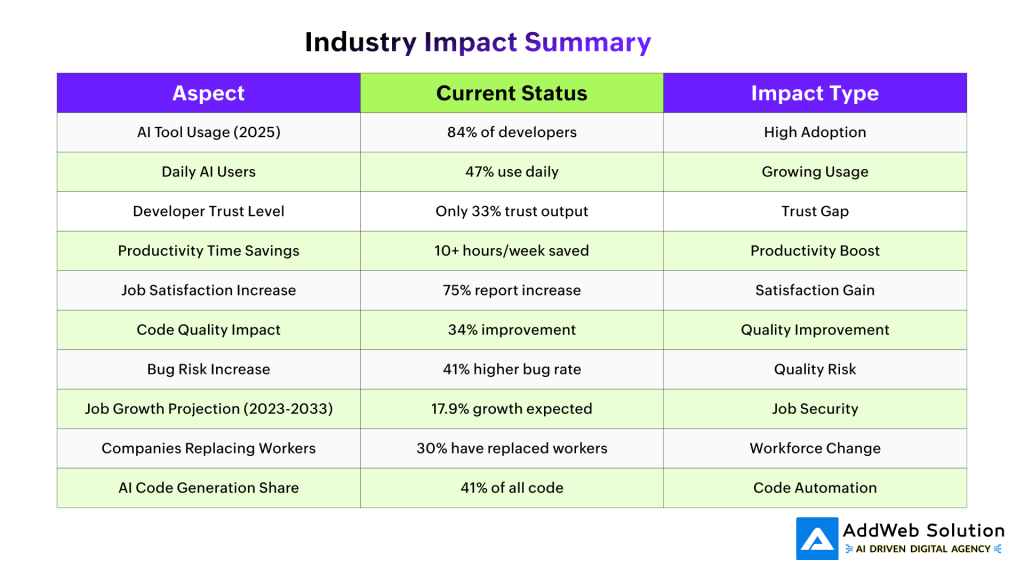
Conclusion
AI is the ultimate facilitator for web developers. Although certain things are left to machines, the human heart, wisdom, and imagination cannot be replaced. The future? A balance of AI velocity and human imagination.
Source URLs
https://webflow.com/updates/webflow-ai-assistant
https://webflow.com/ai
https://webflow.com/ai-site-builder
https://www.shadowdigital.cc/resources/webflow-ai-everything-you-need-to-know
https://www.nixar.io/blog-posts/2025-webflow-ai-features-you-cant-afford-to-ignore
https://www.thealien.design/insights/webflow-ai
https://www.digidop.com/blog/where-is-webflow-going-with-a
https://flowtrix.co/blogs/integrating-ai-with-webflow-a-complete-guide-for-smart-web-development-in-2025
Uncover Webflow AI’s Role in Development
Pooja Upadhyay
Director Of People Operations & Client Relations
