


Overview
However, in today’s world, most organizations are left with a huge amount of PDFs, email conversations, chat conversations, and video content that current search technology is only scratching the surface of. It’s estimated that 80-90% of enterprise data is unstructured, and it’s growing at a rate two to three times that of structured data. It’s no surprise that over 90% of organizations view unstructured data as a problem.
Natural language processing in Python is finally giving organizations a new outlook, making documents, inboxes, and videos fully searchable and full of insights. This article will tell you what’s happening and how Python NLP can make unstructured data searchable without having to be a data scientist.
The rise of unstructured data
Unstructured data is all the information that doesn’t reside in tidy rows and columns: documents, slides, emails, chat conversations, PDFs, images, audio, and video. Studies by Gartner, IDC, and others have shown that this type of data now comprises 80-90% of all new information entering the enterprise.
The datasphere is expected to contain 175-180 zettabytes of data by 2025, and this will be comprised mostly of unstructured data. Yet only a small percentage of this information is actually analyzed, which means that most companies are making decisions based on a small fraction of what they already know.
Structured vs unstructured at a glance
This imbalance explains why so many AI and analytics initiatives stall: models are starved of context because most of the relevant information is trapped in formats classic tools cannot parse.
Pie chart: Structured vs unstructured data share
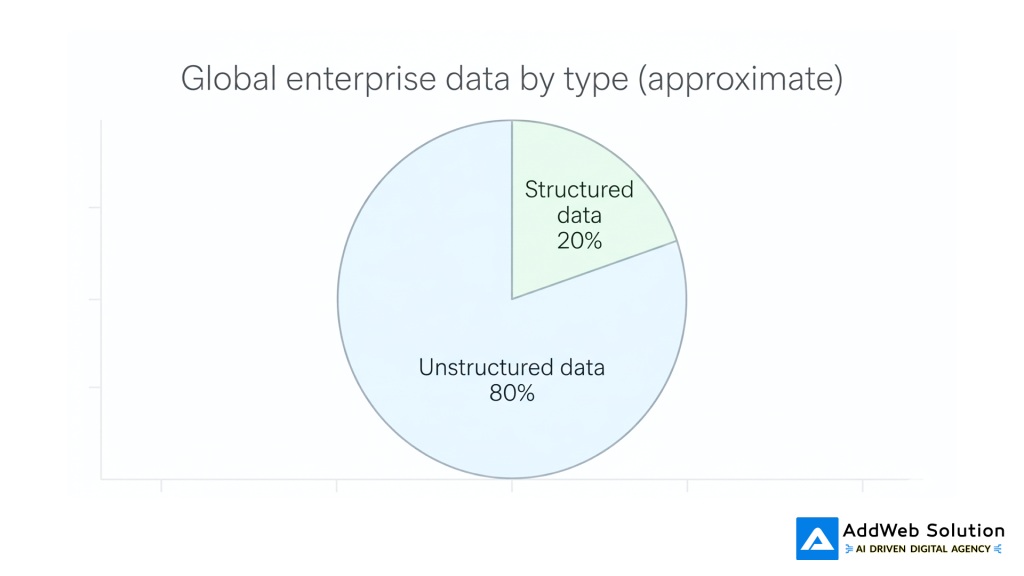
Multiple independent analyses converge on roughly 80% unstructured and 20% structured enterprise data, with some industries skewing even further towards unstructured.
Why PDFs, emails, and videos are so hard to search
Search is very efficient on web pages and databases because the data is already in a text format, indexed, and structured. However, enterprise-class PDFs, email archives, and videos introduce a whole host of problems to the table:
- PDFs often contain text, images, tables, and scanned-in pages; some are little more than pictures of documents with absolutely no text that can be read by computers.
- Emails and messages are replete with confusing language, responses, signatures, and attachments, making it difficult to separate the signal from the noise.
- Audio and video content are not searchable until the audio is transcribed into text, which has traditionally required expensive and dubious technology.
The problem is all too familiar: knowledge workers waste a significant portion of their week simply searching for documents, past decisions, or the “one email” that tells them what to do next. Several studies have shown that employees can waste between 15% and 30% of their time searching for information instead of using it.
Bar chart: Time lost searching for information
You can visualise this using a simple bar chart comparing studies:
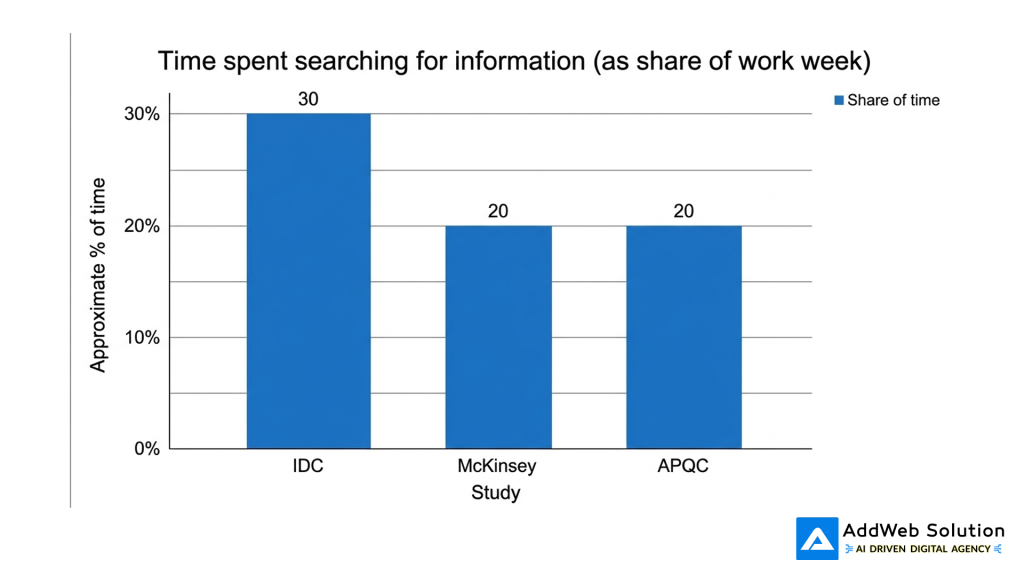
- IDC has found that knowledge workers spend about 30% of their time searching for information.
- Other studies have placed the waste of time at about one-fifth of the work week.
Even if these figures are not accurate, it is obvious that the trend is the same: lack of access to unstructured information is a significant waste of time.
Python NLP: turning raw content into searchable insight
Python has emerged as the new standard language for NLP because of its extensive set of open-source libraries and examples. At a high level, Python NLP assists with three tasks:
- Text extraction from PDFs, emails, and media files.
- Language understanding, using techniques like tokenization, part-of-speech tagging, entity recognition, and embeddings.
- Indexing the understanding to enable users to search for a keyword, concept, or question.
There are already projects that use Python to scrape large PDF datasets, clean and split the text into sentences, embed the sentences using BERT models, and then return the most relevant text passages for a user query. Other projects include audio and video transcription, exporting the text to PDF, and even generating descriptive titles using large language models.
Making PDFs searchable with Python
PDFs are a natural first choice because they contain contracts, reports, research papers, and technical documents.
Python does the following two important things:
- Text extraction from the PDF
- For “digital-born” PDFs (those exported from Word, Google Docs, and so on), text extraction libraries such as pdfplumber can be used to extract the text page by page.
- For scanned PDFs, software combines PDF-to-image conversion with Optical Character Recognition (OCR) libraries, often powered by Tesseract via wrappers such as pdf2image and so on.
- Text cleaning, enrichment, and indexing with NLP
- NLP libraries such as NLTK and spaCy assist in tokenization, normalization (converting to lowercase, lemmatization), and stop-word filtering to ensure that indexes are meaningful and not noisy.
- More sophisticated pipelines are able to put each sentence or paragraph into a vector space so that semantic search is possible, not just exact keyword searches.
Even Python projects exist for building a semantic search engine on a folder full of PDFs based on OpenAI models or transformer models answering natural language questions about the PDFs.
Table: Python tools for PDFs
| Need | What it solves | Typical Python tools |
| Extract text from text-based PDFs | Pulls raw text from pages | pdfplumber, other PDF parsers |
| Turn scanned PDFs into text | Converts images of pages into machine-readable text | pdf2image + Tesseract OCR wrappers |
| Clean and normalise language | Removes noise, standardises words | NLTK, spaCy |
| Enable semantic PDF search | Finds similar passages, not just exact words | Custom pipelines using embeddings (e.g. BERT-based) |
Integrating email and chat with enterprise search
Email and chat are the ultimate example of “useful but messy” unstructured data. Emails contain greetings, signatures, forwards, and attachments, but they also contain a lot of customer data and decision-making history.
Python NLP would handle these data sources in the following manner:
- Message processing and cleaning: removing signatures, boilerplate disclaimers, and quoted replies to extract the relevant part for indexing.
- Entity and intent extraction: using NLP techniques to extract people, organizations, products, and topics of interest for routing and analysis.
- Tagging and categorization: using tags such as “billing issue” or “feature request” to facilitate easier filtering and reporting on millions of messages.
Once the data is indexed, typically in a search engine or a vector database, employees can search across communication channels (“I want to view all conversations about contract renewal for Client X”) instead of trying to remember which mailbox or shared drive the answer might lie in.


Unlocking video and audio with transcription
The reality is that hours of call recordings, webinars, and training videos were until recently barely searchable, with people having to search through timelines to find just one answer. But the advent of speech-to-text technology has been a game-changer in this area, and Python is at the heart of most of these applications.
There are a number of open-source and tutorial-based projects that show how to:
- Transcribe an audio or video file into an appropriate format and then use Python speech recognition libraries (which are often cloud-based) to transcribe speech into text.
- Use models such as OpenAI Whisper, which are then implemented using Python libraries, to transcribe speech-based video files into clean text.
- Then export the text transcript into PDFs or plain text for further NLP analysis or search indexing.
Once the text transcript has been created, the same NLP analysis that is done on PDFs and emails—such as entity extraction, summarization, topic assignment, and semantic search—can be reused.
Table: Python tools for media
| Need | What it solves | Typical Python tools |
| Transcribe audio files | Converts speech to text | SpeechRecognition library, cloud speech APIs |
| Transcribe long videos | Handles full video-to-text pipelines with robust models | Whisper-based tools like vid2cleantxt |
| Export searchable transcripts | Saves transcripts into PDF or text formats | Projects such as Scribe that output PDFs with transcribed text |
A basic search pipeline powered by Python
While there are differences in implementation, a typical Python-based NLP search framework for unstructured data looks like this:
- Ingest
- Monitor folders, email inboxes, or storage for new PDFs, emails, and media.
- Extract and normalize
- Utilize specialized libraries to extract text (PDF, OCR, speech-to-text) and perform light cleaning.
- Enrich with NLP
- Utilize NLP models to identify entities, topics, sentiment, and learn embeddings.
- Index for search
- Store files in a search engine or vector database so users can search by keyword or semantic meaning.
- Expose Via UX
- Offer a simple search form, chat interface, or API that masks the complexity from end-users.
Flowchart: End-to-end unstructured data search

Suggested architecture image
In a production blog layout, this flowchart can be reinforced with a clean pipeline illustration:
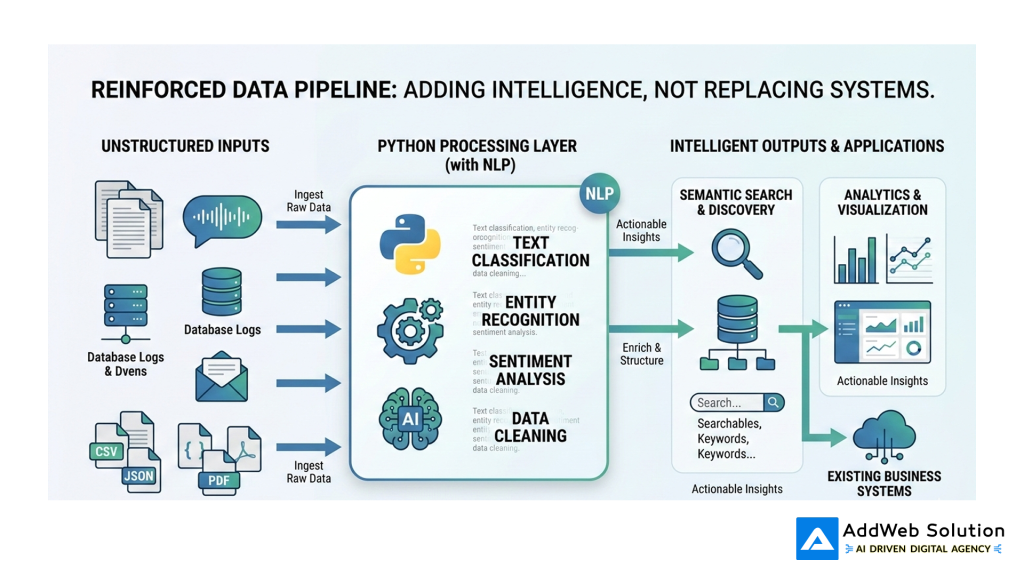
This kind of visual helps non-technical stakeholders see that you are adding an intelligent layer on top of existing systems, not replacing every application.
Use cases you can implement quickly
You don’t have to boil the ocean to find the value in Python NLP for unstructured data. Some of the most common, high-impact applications to start with include:
- Research library search
Take a disorganized directory of PDFs (industry standards, white papers, internal reports) and build a semantic search interface that points to the correct paragraph, not just the correct document. - Customer support insights
Index support tickets, emails, and chats to identify patterns of problems, new product issues, and missing self-service content. - Compliance and risk analysis
Search contracts, policies, and emails for particular clauses, sensitive information, or language that could give rise to regulatory issues. - Meeting and training recall
Record important meetings and webinars, and allow employees to search “What did we agree on regarding pricing for Region Y?” instead of watching the video again.
Table: Use cases and quick wins
| Use case | Primary data sources | Quick business win |
| Research library search | PDFs, presentations, reports | Faster proposal writing and decision support |
| Support intelligence | Tickets, emails, chat logs | Reduced repeat contacts, better self-service content |
| Compliance scanning | Contracts, policies, emails | Earlier detection of risky language and data exposure |
| Meeting recall | Recordings, webinar videos | Less time rewatching calls, clearer accountability |
Because most of the heavy lifting is now done by mature open-source tools and models, the main work is in wiring components together and aligning them with concrete business questions.
Getting started without drowning in the tech
For teams that are not deeply versed in machine learning, the concept of “NLP over unstructured data” may at first seem daunting. But the reality is that the best way to get started is to keep things small and practical:
- Start with one type of content
For instance, start with PDFs from a particular department before moving on to email and video content. - Leverage existing Python code
Many open-source projects already demonstrate how to implement PDF search engines or video transcription pipelines; these can be repurposed rather than rebuilt from scratch. - Measure success, not model performance
Focus on measuring the time saved searching, the speed of response, or the improvement in compliance coverage rather than getting bogged down in model tweaking. - Address governance early
As unstructured data becomes searchable, access controls, logging, and retention requirements must evolve to avoid introducing new risks.
Unstructured data is no longer an unsolvable problem or a “future AI” problem. With Python NLP, organisations can start making their PDFs, emails, and videos as searchable as their databases—and unlock the value of the other 80% of their information.
Future-Proof Your AI Stack with Python’s Powerhouses

Pooja Upadhyay
Director Of People Operations & Client Relations
Resources:
https://github.com/moj-analytical-services/airflow-pdf2embeddings
https://github.com/pszemraj/vid2cleantxt
https://ploomber.io/blog/pdf-ocr
https://mitsloan.mit.edu/ideas-made-to-matter/tapping-power-unstructured-data
https://www.networkworld.com/article/966746/idc-expect-175-zettabytes-of-data-worldwide-by-2025.html
https://www.seagate.com/files/www-content/our-story/trends/files/idc-seagate-dataage-whitepaper.pdf
https://realpython.com/python-speech-recognition
https://www.reddit.com/r/learnpython/comments/1jqs919/creating_a_searchable_pdf_library/
