


If you’ve been on Salesforce for a few years, you’ve probably felt it: the invoices keep climbing, admins are drowning in complexity, and half the team still lives in spreadsheets. Then someone says, “What if we move to Zoho CRM?”
Instant silence.
Everyone knows a horror story where a CRM migration wrecked reporting, confused sales, and burned a quarter’s worth of pipeline. The good news: moving from Salesforce to Zoho CRM can be smooth, but only if you treat it like a business transformation—not a giant CSV export.
This guide walks through how to plan and execute a Salesforce → Zoho CRM migration in a way that keeps deals flowing, reps sane, and leadership confident.
Why Teams Are Leaving Salesforce for Zoho
Salesforce still dominates, but cost and complexity hurt
Salesforce is still the CRM king. IDC and Salesforce’s own reports show it sitting around 20–21% global CRM market share, more than any other vendor, and leading the category by revenue year after year. Salesforce’s revenue hit about 34.9 billion USD for fiscal 2024, up 11% from the previous year.
At the same time, that success comes with a familiar pattern:
- Expensive licenses and add-ons
- Heavy customizations that are hard to unwind
- Multiple third-party tools glued on top just to fill everyday gaps
For many mid-market companies, the question isn’t “Is Salesforce powerful?” it’s “Is this level of overhead still worth it for how we work?”
Zoho CRM is the “lean but serious” alternative
On the other side, Zoho CRM has quietly built serious momentum. In 2024, more than 250,000 businesses were actively using Zoho CRM, a roughly 30% year-on-year increase, and Zoho’s global revenues reached about 1.4 billion USD. Broader ecosystem numbers talk about 100M+ users across 55+ apps and well over 180K Zoho CRM customers, with strong migration growth from competitors.
In practice, companies move from Salesforce to Zoho because they want:
- Lower total cost of ownership
- A simpler, more opinionated stack
- A tightly integrated suite (CRM + finance + support + projects + HR + analytics)
- A platform that feels designed for SMB and mid-market realities, not just enterprises
They’re not “downgrading a tool”; they’re rebalancing what they get for the money.
Visual: CRM landscape snapshot
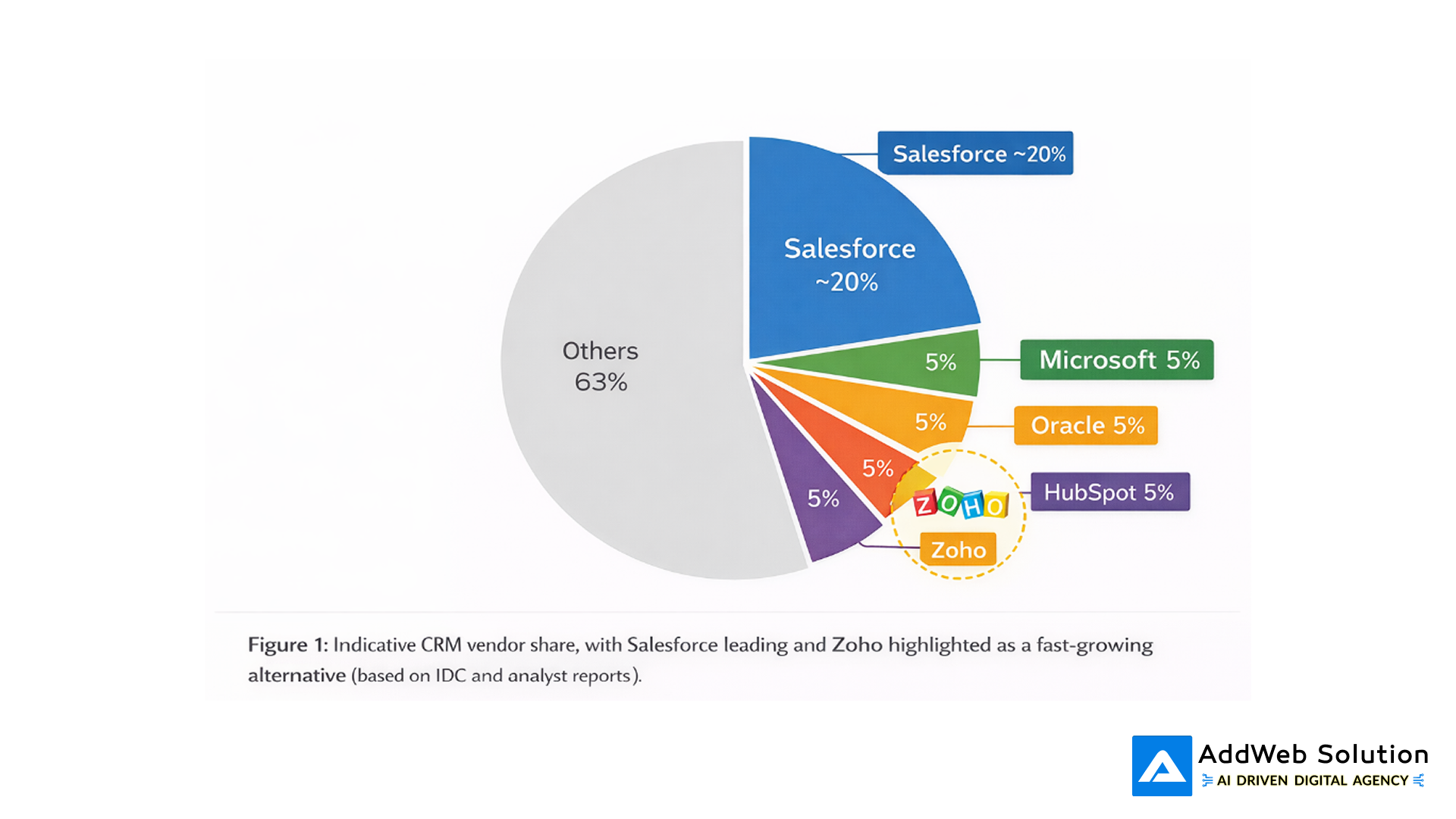
Pie chart showing Salesforce as the largest CRM vendor by share, with Zoho highlighted among other vendors.
Table: Salesforce vs Zoho CRM at a glance
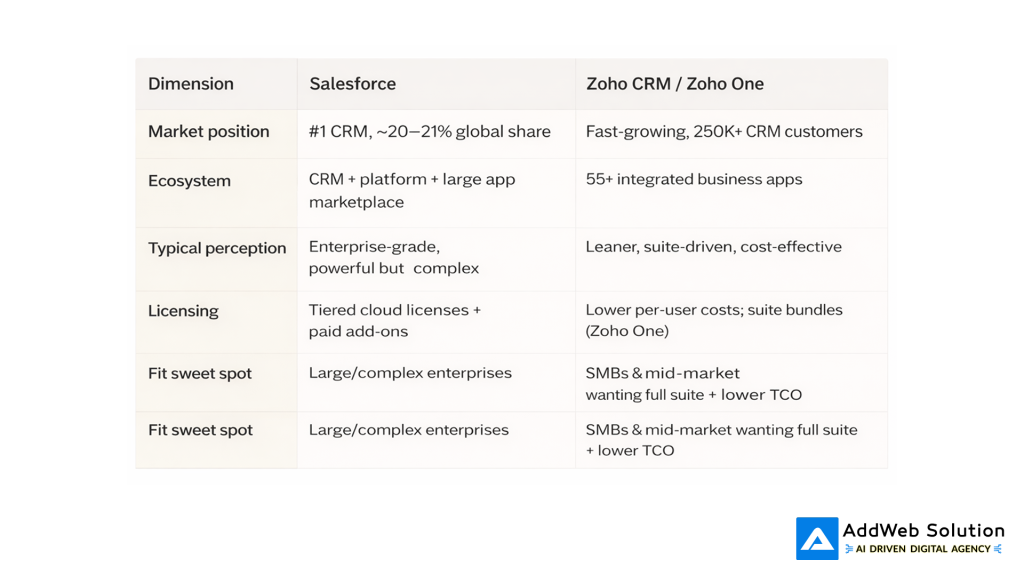
High-level contrast that usually triggers “Should we move from Salesforce to Zoho?” conversations.
The Hidden Danger: Data, Not Platforms
If CRM migrations had a villain, it would not be Salesforce or Zoho. It would be the data you’re dragging along for the ride.
Why so many CRM migrations struggle
Multiple industry studies put CRM failure rates somewhere between 30% and 70% depending on the definition. One widely cited synthesis estimates that 55% of CRM implementations fail to achieve their planned objectives even if they technically go live. Another 2026 article notes that roughly 60% of CRM implementations fail to meet objectives and pinpoints bad data quality as a primary cause.
Academic research into CRM data mapping backs this up: around 40% of post-implementation CRM failures are tied directly to flawed data mapping and migration practices.
In plain terms:
- You move duplicates, blanks, and junk into a shiny new system
- Reports break, automations misfire, and trust in the data collapses
- Everyone blames the new platform; the real issue is the data that came along
Visual: Why CRM migrations really fail

Illustration of a CRM migration where messy data in the middle, not the platforms, is shown as the main source of risk.
Table: What actually breaks CRM migrations

Across studies, dirty data and mapping issues consistently outrank “bad platform choice” as reasons for CRM failure.
Step-by-Step Salesforce → Zoho Migration Playbook
What follows is the high-level approach AddWeb teams actually use when we move a client from Salesforce to Zoho CRM. You can adapt the steps to your own context, but skipping them usually shows up later as expensive rework.
Step 1: Get honest about why you’re moving
Before you export a single lead, you need a crisp answer to: “Why Zoho, and why now?”
Typical reasons we hear:
- “We’re paying enterprise-grade money for features we don’t use.”
- “Our Salesforce org is a hairball of fields, flows, and legacy integrations.”
- “We want CRM + finance + support + projects in one ecosystem.”
- “Our sales team finds Zoho’s UI less intimidating and more usable after testing.”
Write your reasons down and turn them into measurable outcomes: license savings, improved adoption, better forecasting accuracy, reduced quote-to-cash time, etc. Those will shape what you migrate and how you design Zoho.
Step 2: Audit your real Salesforce landscape
Most orgs are surprised by what’s actually inside their Salesforce instance.
A practical audit usually covers:
- Users & access: Who’s active, who’s not, what profiles/permission sets are in play.
- Objects & fields: Which custom fields are populated and used in any report, automation, or integration.
- Automation: Workflows, Process Builder flows, Flows, Apex triggers touching Leads, Opportunities, Accounts, Cases.
- Integrations: Connected marketing tools, telephony, CPQ, finance/ERP, custom apps.
The goal here isn’t to document everything to death. It’s to separate:
- What we must keep
- What we can simplify
- What we should finally retire
Step 3: Design the Zoho CRM architecture (don’t just “replicate”)
Now the interesting part: deciding how your world should look inside Zoho.
This usually involves:
- Modules & fields: Mapping Salesforce objects (Lead, Contact, Account, Opportunity, Case, custom) to Zoho modules and building only the fields that matter.
- Other Zoho apps: Deciding where support should live (Zoho Desk), which finance stack to use (Zoho Books/Finance Plus), what to use for marketing (Zoho Campaigns /Marketing Automation), and analytics (Zoho Analytics).
- Security & roles: Profiles and roles that reflect today’s reality, not the org chart from 2019.
- Reports & dashboards: Designing key dashboards first so you model data properly from day one.
A good migration treats this as an opportunity to simplify. The hardest design decisions are often about what not to carry forward from Salesforce.
Step 4: Plan data migration like a project of its own
This is where many Salesforce → Zoho migrations get into trouble.
Drawing from CRM failure and data-mapping research, there are a few non-negotiables:
- Profile your data
- How many duplicates exist?
- How complete are key fields (email, phone, region, segment, industry)?
- How many “lead source” values exist after years of free text?
- Clean before you move
- Deduplicate high-value objects (Leads, Contacts, Accounts).
- Normalize picklists (countries, industries, lead sources).
- Decide which historical activities you really need (e.g., last 24–36 months, not all time).
- Map carefully
- Field-by-field mapping from Salesforce to Zoho CRM, including relationships.
- Special treatment for picklists, multi-select, owner fields, and status/stage values.
- Pilot, then cut over
- Do a small pilot migration for one region or segment.
- Let real users test, then fix mapping issues.
- Only then execute the full migration.
Analyst commentary on CRM data mapping shows that hybrid approaches combining automated transfers with targeted manual checks can reduce mapping errors by roughly one-third versus automation alone, with some reports citing residual data risk below 3% when hybrid methods are used.
Step 5: Rebuild the workflows, not the mess
The goal is not to rebuild your old Salesforce chaos in a new skin.
Typical “rebuild and improve” moves:
- Lead routing: Redesign routing in Zoho CRM with cleaner rules and better territory logic.
- Sales process: Translate your real sales stages into Zoho blueprints so critical steps are enforced, not optional text fields.
- Support: Move case handling to Zoho Desk and expose the right information in CRM instead of faking it all inside one system.
- Marketing: Recreate nurture journeys in Zoho Campaigns/Marketing Automation with better consent and segmentation.
The migration window is your chance to fix old process debt, not just tech debt.


Step 6: Launch with adoption in mind
High CRM failure rates are strongly correlated with poor adoption and weak training, not the brand on the login page.
Strong launches usually include:
- Role-based training: Sales, support, finance, and leadership each get short, focused sessions with their actual screens not generic demos.
- Embedded guides & SOPs: Playbooks (“How we create a deal”, “How we log a support ticket”) live inside Zoho, not buried in a PDF.
- Hypercare period: A few weeks where feedback is collected centrally, small fixes are shipped quickly, and no one is shamed for raising friction.
The litmus test: if your top reps and managers quietly switch back to spreadsheets after go-live, the migration is not done even if IT says it is.
Performance & ROI: What Actually Improves
You’re not migrating for fun. You’re migrating because you want better economics and better execution.
Industry-wide CRM research suggests that when CRM is properly implemented, ROI can be impressive; one study shows an average CRM failure rate of 55%, but also points out that successful programs deliver strong productivity and revenue gains. Another analysis highlights that a large share of migration pain is tied to data, not the platform choice itself.
In real Salesforce → Zoho projects, teams usually target improvements like:
- Lower annual CRM + adjacent tool costs
- Faster quote creation and approvals
- Shorter lead response times
- Better reporting cadence (from “end of month scramble” to “daily dashboard”)
- Higher active-user percentage (logins, activity capture, pipeline hygiene)
Visual: Before vs after (illustrative metrics)
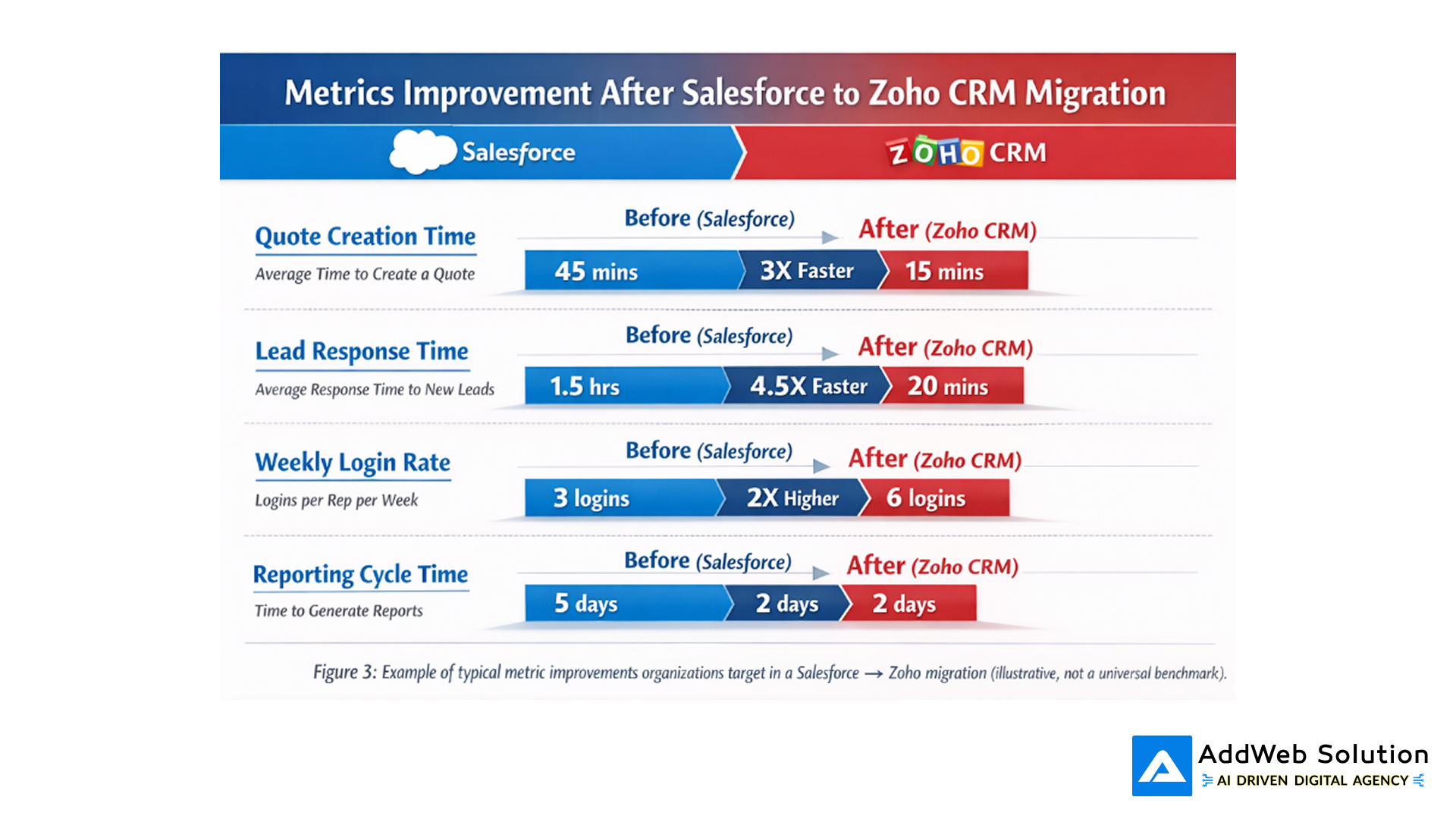
chart illustrating reduced cycle times and improved usage metrics after moving from Salesforce to Zoho CRM in a hypothetical scenario.
Interesting Fact Box
- Salesforce is still the CRM heavyweight
Salesforce has been ranked the #1 CRM provider worldwide for more than a decade, with around 20.7% global market share in 2024 and 21.7% in 2023.
Source: Salesforce / IDC CRM market share reports – https://www.salesforce.com/news/stories/idc-crm-market-share-ranking-2025
- Zoho CRM is scaling fast
In 2024, more than 250,000 businesses were actively using Zoho CRM, a roughly 30% year-on-year growth, with Zoho’s revenues hitting about 1.4 billion USD. Ecosystem-highlight stats point to 100M+ users across 55+ apps and strong migration growth from competitor CRMs.
Source: Zoho CRM statistics – https://electroiq.com/stats/zoho-crm-statistics/
- CRM projects fail more often than people admit
One synthesis of analyst research pegs the CRM implementation failure rate at about 55% when “failure” means not achieving planned objectives. Separate analyses suggest around 60% of CRM implementations fall short largely due to poor data quality.
Sources: CRM failure research – https://johnnygrow.com/crm/the-crm-failure-rate-is-55-percent/ And https://utmost.agency/knowledge-base/why-your-crm-migration-failed-and-how-bad-data-sabotaged-it/
Quote Section
“Your CRM migration didn’t fail because you picked the wrong platform. It failed because you moved seven years of dirty, duplicate data into a shiny new system and expected it to magically behave.”
“Hybrid migration methods that combine automated transfers with targeted manual checks can cut CRM data-mapping errors by roughly a third, bringing residual risk down to low single digits in complex migrations.”
These aren’t marketing slogans they’re patterns you see again and again when you look at failed vs successful CRM moves.
Is It Time for You to Move?
Signs it might be time to seriously consider Salesforce → Zoho:
- Finance keeps asking, “Why are we paying this much for CRM?”
- Admins are afraid to touch old workflows because no one remembers why they exist.
- Your team only uses a small fraction of Salesforce but still struggles with UI complexity.
- You’re already paying for tools (support, finance, projects, analytics) that Zoho could replace under one integrated umbrella.
- Reporting is a monthly fire drill instead of a dashboard you trust daily.
If that sounds familiar, migrating to Zoho CRM isn’t just a cost-saving move—it’s a chance to reset your processes, clean your data, and give your teams a system they actually want to use.
Handled with a clear plan, proper data work, and the right certified Zoho consulting partner, the move can feel less like a heart transplant and more like finally getting your sales engine tuned for the way you work today.
Ready to grow? Dive in now and see how streamlined processes boost your results.

Pooja Upadhyay
Director Of People Operations & Client Relations
