



Why Speed Isn’t Just About Rankings Anymore – It’s About Revenue
The internet has become impatient. Really impatient.
If you’re managing a website on WordPress – whether that’s an e-commerce store, a corporate blog, or a client project – you’ve definitely heard the whispers about ‘Core Web Vitals’ and ‘page speed optimization’ by now. Google keeps tweaking what matters. Hosting providers keep promising faster speeds. Plugin developers keep claiming their solution is the one that’ll finally make everything lightning-quick.
Here’s the honest truth though: in 2026, performance isn’t just about making things “faster.” The conversation has evolved significantly. It’s now directly connected to your bottom line – conversions, rankings, user satisfaction. And if you’re not tracking the right metrics, you’re basically flying blind.
I used to think this metrics stuff was overthinking it. People just want their site to load, right? I was wrong. After digging into actual data – conversion numbers, bounce patterns, engagement stats – the evidence became impossible to ignore. There’s a huge difference between “the site loads” and “the site works well,” and that difference is costing business owners real money every single day.
Let’s Talk Numbers: Why 2026 Changed Everything
Remember when five seconds was considered acceptable for a page to load? Those days are gone, buried in the past. We’re now operating in a completely different performance landscape, and the figures are genuinely sobering.
Start with conversions, because that’s what actually matters to business owners.
A B2B site that loads in one second converts roughly three times better than one taking five seconds. For e-commerce, the gap is even wider: a one-second load generates 2.5 times more conversions than a five-second load.
This isn’t theoretical. Real companies are experiencing this firsthand. Rakuten 24 optimized their Core Web Vitals and saw revenue per visitor jump 53.37%. An e-commerce business cut their load time from 3.5 seconds down to 1.8 seconds and watched conversions spike by 26% – that’s $100,000 in additional annual revenue from one optimization.
Most owners of sites built with WordPress get stuck because they’re tracking the wrong metrics or obsessing over things that don’t actually move the dial.
Understanding Core Web Vitals: What Actually Matters in 2026

Core Web Vitals Passing Rates: Desktop vs Mobile – Mobile devices consistently underperform on all Core Web Vitals metrics, with a 13-15% gap in passing rates. This highlights the critical need for mobile-specific optimization strategies.
Before you start optimizing, you need to understand what Google and your actual users are measuring.
Largest Contentful Paint (LCP): Making Your First Impression Count
LCP tells you how fast the main content shows up on the screen. Think about what happens when someone lands on your page. They’re looking for one thing: proof they’re in the right place. That usually means seeing a hero image, product photo, or main headline. If that takes forever, they bounce.
Target: under 2.5 seconds (though the sites winning the speed game are pushing toward 2.0 seconds).
Why does this matter? Google found that when sites hit LCP targets, users abandon pages 24% less often.
What typically tanks LCP on websites built on WordPress platforms:
- Massive images. A 5MB hero image will wreck your LCP no matter what else you do.
- Third-party code that blocks rendering. Chat widgets, analytics, ads – anything that loads synchronously stops the page from rendering.
- Hosting that’s just too slow. You can’t optimize your way around a server responding in 1.2 seconds. It’s impossible.
Interaction to Next Paint (INP): Why Your Site Feels Sluggish
INP took over from First Input Delay, and it’s way more thorough. It measures what happens between the moment someone clicks a button, fills out a form, or taps a menu – and when they see something change on screen.
Target: under 200 milliseconds.
This is where many websites, built on WordPress platforms, fall flat. The page loads fast, sure. But then someone interacts and… radio silence for half a second. That’s bad INP.
What causes it? JavaScript, almost every time. Page builders like Elementor, plugin overload, and poorly configured defer scripts will absolutely kill your INP. I’ve seen sites with INP over 500ms – clicking anything feels like moving through molasses.
Here’s the bright side: WordPress 6.8 added “Speculative Loading,” which grabs resources before people interact. Flip it to prerender mode instead of prefetch, and you can see meaningful INP improvements without writing any code.
Cumulative Layout Shift (CLS): Stop Your Page From Jumping Around
CLS is about unwanted movement. The page loads, text shifts, images pop in late, layout rearranges. It’s the thing where you’re reading and suddenly everything jumps down because something loaded above.
Target: under 0.1.
People hate this. It’s annoying. And it tanks conversions. Imagine someone about to click “Buy Now” and the button suddenly moves down.
Sites built on WordPress usually have CLS problems from ads and embeds that don’t have set dimensions, images that lazy-load without aspect ratio containers, and plugins that inject content after page load.
The Real Picture: Core Web Vitals Passing Rates in 2026

Here’s the uncomfortable reality: roughly half of websites built on WordPress don’t actually pass Core Web Vitals. And here’s something worse: mobile performance lags desktop significantly.
Seventy-five percent of sites hit LCP targets on desktop. Mobile? Sixty-two percent. Mobile now drives 68% of all web traffic.
That gap is telling you something critical: you can’t ignore mobile anymore. It’s not optional. It’s the foundation.
What’s Actually Slowing Down Sites That Use WordPress

Images dominate. On a typical WordPress page, they’re 56% of the total page weight. JavaScript adds another 18%. Everything else – CSS, HTML, fonts, other stuff – makes up the rest.
The takeaway is simple: if you want speed, get serious about images and JavaScript. Those two things account for 74% of page weight. Optimizing everything else combined won’t have nearly as much impact.
The Speed-Conversion Relationship: Where Business Gets Real

Look at this graph. See that cliff?
E-commerce sites loading in 1-2 seconds hit around 3% conversion rates. At three seconds, it drops to 1.8%. Four seconds? You’re looking at 0.67%. Five seconds and you’ve basically lost the visitor.
Between 3.05% and 0.67% conversion rate is an 78% revenue drop from the same traffic. That’s not a minor thing – that’s the difference between a thriving business and one that’s struggling.
For every 0.1 seconds you trim off load time, e-commerce conversions bump up 8.4%. That’s something you can measure. That’s real money.
Bounce Rate: The Silent Revenue Thief
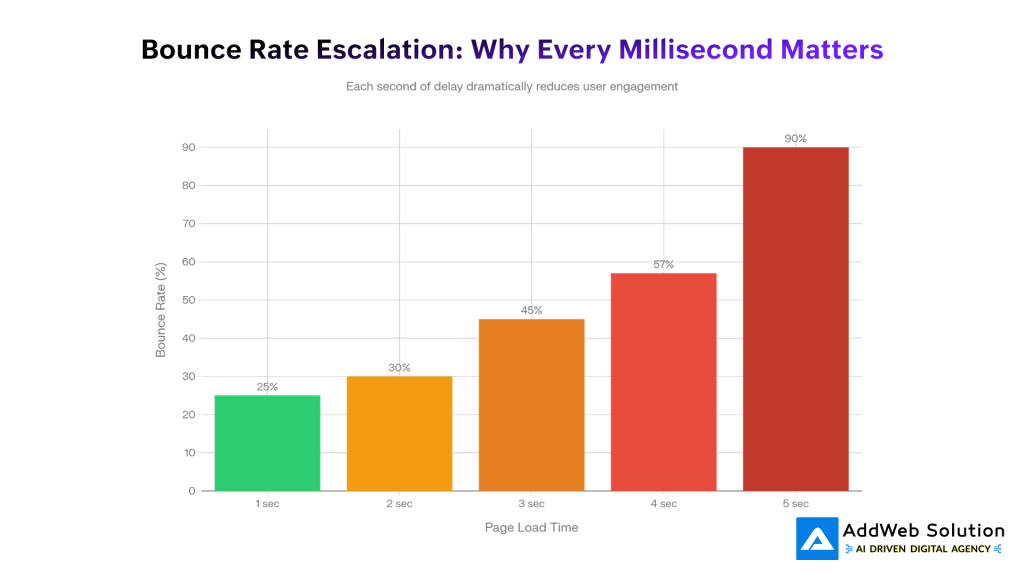
Watch the numbers between three and four seconds. Bounce rate goes from 45% to 57%. That’s a cliff, not a gradual increase. Jump to five seconds and you’re looking at 90% of people leaving without even seeing your content.
What creates these kinds of load times on WordPress? Usually some combination of:
- Massive product images (e-commerce sites often have 50+ large images per page)
- Too many plugins (many sites have 50+ installed, with tons redundant)
- Heavy themes (page builders add 200-600KB of code each)
- No caching in place
- Cheap hosting
You don’t need fancy coding to fix this. You need smarter decisions about hosting, plugins, and images.
Engagement Metrics: What Happens Once The Page Actually Loads
Your page loads fast. Great. But does anyone stick around? Are they reading? Engaging? Buying?
This is where engagement metrics step in.
Scroll Depth: Is Your Content Actually Being Consumed?
Scroll depth tells you what percentage of your page people actually scroll through. It’s basically a measure of whether your content is interesting enough to read.
Here’s how to interpret it:
| Scroll Depth | What It Means |
| 50%+ | People are reading most of it. Your layout works. |
| 25% | They’re looking but not diving deep. Content might not be relevant. |
| 75%+ | Amazing engagement. This is what you want. |
Had a client with a long product guide. Scroll depth was stuck at 35% for the first 1000 words. We restructured everything: moved the comparison table up, broke up the text every 400 words, added product images at the 25% and 50% marks. Scroll depth jumped to 68%.
Lesson: fast pages mean nothing if the content doesn’t grab people.
Complete Engagement Story: Bounce Rate + Time Spent + Scroll Depth
Here’s where it gets interesting. Bounce rate alone is misleading. Someone who leaves after six minutes reading your article is actually engaged – they just didn’t click through to another page.
If you track adjusted bounce rate (which ignores people who hit a time threshold, like 2+ minutes on page) plus time-on-page plus scroll depth, you get a real engagement picture.
For example:
- High scroll depth + high bounce rate = people are reading deeply but not clicking around. Content is useful but not driving navigation. That’s fine for content marketing.
- Low scroll depth + high bounce rate = content isn’t clicking. Relevance problem.
- Low scroll depth + low bounce rate = people are jumping around the site without reading. Navigation works but content isn’t compelling.
The Desktop-Mobile Gap Nobody’s Talking About

Take a hard look at this data: mobile performance is worse than desktop across every Core Web Vitals metric.
LCP: 75% of sites pass on desktop, 62% on mobile. That’s a 13-point spread. INP and CLS show the same pattern.
Mobile devices have less CPU, less RAM, and users often have slower connections. A page that’s instant on desktop might take three seconds on mobile – same hosting, same code, different reality.
This matters because 68% of traffic is mobile. You’re optimizing for less than a third of visitors while potentially ruining experience for most.
Mobile optimization that actually works:
- Responsive images with srcset. Serve smaller images on small screens. A 2000-pixel desktop image becomes 600 pixels on mobile.
- Aggressive code splitting. Reduce the JavaScript on first load for mobile.
- Network-aware loading. Serve lower-quality media to 3G users.
- Touch target sizing. Make buttons and interactive elements big enough for fingers.
TTFB: The Server Speed You Can’t Cheat Around
Time to First Byte is how long your server takes to respond to a request. It’s the very first part of any page load.
You could have perfect code optimization, but if your server takes 1.2 seconds to respond, everything else suffers. TTFB accounts for 40% of LCP and impacts four of six key metrics.
Good TTFB: under 200ms for cloud/VPS, under 600ms for shared hosting.
Here’s the truth: no amount of plugin tweaking fixes slow hosting. I’ve worked with sites that had beautiful optimization but were on cheap shared hosting with 1.2-second TTFB. All that work? Wasted because the server was the bottleneck.
Hosting Performance: The Infrastructure Reality
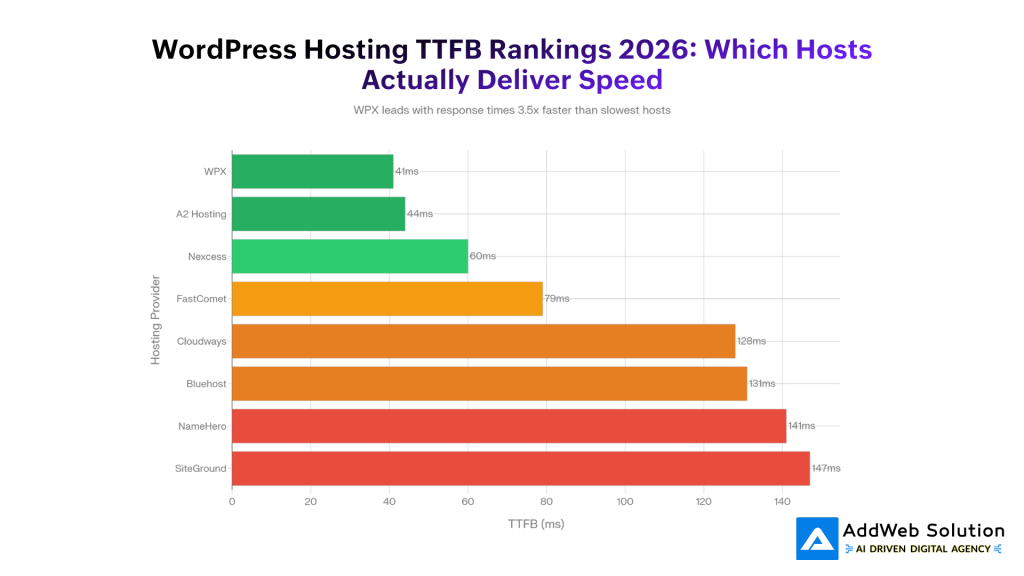
WPX delivers 41ms TTFB. SiteGround delivers 147ms. Same WordPress. Same code. Just different hosting.
That’s a 3.6x difference.
The speed leaders (WPX, A2 Hosting, Nexcess) consistently get under 100ms TTFB. Global CDN providers (Rocket.net at 177ms, Templ at 264ms) show what infrastructure at scale looks like.
Hosting isn’t a minor factor. It’s probably the single biggest thing determining whether your site can be fast.
Real User Monitoring: Why Lab Tests Aren’t Reality

Something shifted in 2026: Real User Monitoring became mainstream.
Lab tests like Google PageSpeed run on fast connections from Google’s servers. They’re useful for figuring out what’s wrong. But they’re also fiction.
Your real users don’t visit from Google’s data centers on perfect fiber. They visit from coffee shops on 4G. Buses on 3G. Old devices with minimal RAM.
Real User Monitoring captures actual performance data from actual visitors – real devices, real networks, real places. The gap from lab data can shock you. I’ve audited sites scoring 92 on PageSpeed with real-world LCP of 3.2 seconds, because actual people are on slower networks.


What Actually Changed: 2026 Shift In Expectations
The metrics didn’t change. What changed is:
1. Speed got harder. Users expect faster pages than ever. Google tightened thresholds too (LCP effectively needs under 2.0 seconds to compete).
2. Mobile became everything. Desktop is minimum requirement. Mobile is where business happens.
3. Real beats synthetic. A 98 PageSpeed score looks good. Real user experience drives sales.
4. Page experience is holistic now. Core Web Vitals matter, but they’re part of a bigger signal including responsiveness, accessibility, and no intrusive popups.
5. Engagement metrics matter more. Time spent, scroll depth, actual interaction – these proxy for content quality.
The Actual Optimization Playbook: What Really Works
Forget “install this plugin and you’re done.” WordPress speed requires systematic thinking. If you’re starting from scratch, here’s what moves the needle:
Step 1: Get Better Hosting (This Accounts For 80% of the Gains)
Your hosting provider sets your TTFB ceiling. Nothing else overrides slow hosting. Look for:
- LiteSpeed support (way faster than regular Apache)
- Servers in your geographic region
- Redis or Memcached built-in
- PHP 8.2+ support
Quality hosting versus budget shared hosting? 2-3x speed difference.
Step 2: Fix Your Images (Fastest Win You Can Get)
Images are 56% of page weight. Optimizing them is fast, measurable, and requires no coding:
- Switch to WebP or AVIF (25-35% smaller than JPG/PNG)
- Resize to actual display size
- Lazy-load below-the-fold images
- Use responsive images with srcset
One site cut load time from 5.2 to 1.9 seconds just by fixing images.
Step 3: Cut Plugin Bloat
Most websites built on WordPress run 50+ plugins, many pointless. Be honest:
- Does this add real value?
- Is there a lighter alternative?
- Do I actually use this?
Page builders (Elementor, Divi) add 200-600KB each. If you’re not building with them, Gutenberg (WordPress’s native editor) is much lighter.
Step 4: Set Up Caching
Caching stores page copies so the server doesn’t rebuild them each time. It’s the second biggest optimization after hosting:
- Page cache: Cuts TTFB by 60-80%
- Browser cache: Lets visitor browsers reuse assets
- CDN cache: Distributes content from closer servers globally
WP Rocket is easiest paid option. LiteSpeed Cache works great with LiteSpeed hosting.
Step 5: Mobile Gets Special Attention
Mobile is 68% of traffic and gets ignored most:
- Test on actual mobile devices, not resized desktop browsers
- Load visible content first
- Reduce JavaScript aggressively on mobile
- Make buttons and interactive elements finger-friendly (minimum 48×48 pixels)
Tools Worth Using
These change constantly, but they’re solid right now:
| What You Need | Tool | Why It Works |
| Quick Testing | Google PageSpeed Insights | Free, fast baseline |
| WebPageTest | Real device testing | |
| GTmetrix | Track changes over time | |
| Real Visitor Data | Core Web Vitals RUM Plugin | Local, no privacy issues (free) |
| Jetpack Boost | RUM plus automatic fixes | |
| New Relic / Datadog | Enterprise-level | |
| Speed Work | WP Rocket | Simplest setup (paid) |
| LiteSpeed Cache | Works with LiteSpeed (free) | |
| ShortPixel | Image optimization (freemium) | |
| Understanding Users | Hotjar | Watch what people do |
| Google Analytics 4 | Free engagement stats |
Here’s The Bottom Line
The performance of a site on WordPress isn’t a technical checkbox. It’s a business metric. Period.
A one-second improvement equals measurable revenue. A 26% conversion bump. An extra $100,000 a year. A 53% revenue-per-visitor increase. These are real numbers.
What actually matters:
- Real user data (not lab scores)
- Core Web Vitals (LCP <2.5s, INP <200ms, CLS <0.1)
- Engagement metrics (scroll depth, time on page, bounce rate patterns)
- Conversion rates (the real metric)
You don’t need perfect everything. You need pages that load fast enough to keep people engaged, respond fast enough to feel smooth, and deliver content people care about.
Start with hosting. Move to images. Strip out unnecessary plugins. Add caching. Check real user data. Improvements compound. Unlike marketing tactics that need constant investment with uncertain returns, performance improvements pay dividends forever – every visitor, every single day.
The real question isn’t ‘Should I optimize my site with WordPress?”
It’s “How much money am I losing while I’m not doing it?”
Source URLs:
https://developers.google.com/search/docs/appearance/page-experience
https://wordpress.org/plugins/core-web-vitals-real-user-monitoring-rum/
https://www.youtube.com/watch?v=cfmUe528jg8
https://wordpress.com/support/check-your-sites-performance
Personalize user journeys with AI in WordPress

Pooja Upadhyay
Director Of People Operations & Client Relations
