


A practical operating framework for merchants and dev teams shipping fast on Shopify without breaking checkout, themes, or revenue.
Shopify no longer ships changes in tidy, once-a-year updates. Between biannual Editions, quarterly API versions, monthly Hydrogen releases, and a near-daily changelog, the platform beneath every store is constantly evolving, and most of that movement is genuinely good for merchants.
The problem isn’t the pace of innovation. It’s that stores carrying custom themes, apps, and checkout logic sit directly in the path of that change, and nobody warns them when something they depend on is about to move.
This piece is a working reference, not a highlight reel. It covers where continuous releases actually break Shopify stores, what that instability costs in dollars and trust, and the operating model, staging, monitoring, checklists, and rollback that lets a fast-moving store stay fast without becoming fragile.
A few figures set the scale of the problem: a single Shopify Edition now bundles 150 or more features; changelog entries land across APIs, apps, and checkout on a near-daily basis; average storefront downtime costs roughly $5,600 in lost revenue per minute; and industry-wide cart abandonment already runs near 70% before any release-related friction is added.
Why Release Velocity Is Now a Stability Problem
Shopify’s release model has genuinely changed. Editions, the twice-yearly showcase releases, now bundle anywhere from 100 to well over 200 updates apiece, spanning AI, checkout, payments, retail, and developer tooling.
Beneath the Editions sit quarterly Admin and Storefront API versions, a monthly Hydrogen release cycle for headless storefronts, and a stream of commerce and checkout features that ship continuously, without a fixed calendar.
Layer installed apps and theme updates on top, and a typical store is absorbing change from four or five independent release cycles at once.
None of those cycles are coordinated with each other, and none are aligned with your store’s roadmap.
A checkout customization built two years ago can be functioning perfectly one week and silently non-functional the next, not because anyone touched your store, but because the surface it depended on was deprecated on someone else’s schedule.
Four Layers, Four Speeds
The practical starting point is recognizing that “a Shopify update” is not one thing. Each layer below moves at a different speed and demands a different kind of attention.
| Release layer | Typical cadence | What it touches | What it demands from you |
|---|---|---|---|
| Editions | Twice yearly (biannual) | Strategic feature bundles across the whole platform | A structured review each cycle, not a skim of the highlights |
| Admin & Storefront API versions | Quarterly (e.g., 2026-04, 2026-07) | Custom code, private apps, integrations | A version audit every quarter before the old version ages out |
| Hydrogen | Monthly, first week of the month | Headless storefronts | Changelog tracking if you run headless |
| Commerce & checkout features, installed apps | Continuous, effectively daily | Checkout, theme rendering, installed app behavior | Ongoing monitoring, this is where most incidents originate |
Where Continuous Releases Actually Break Stores
Instability rarely announces itself. It shows up as a discount that quietly stops applying, a shipping rule that stops firing, or a pixel that stops reporting, small failures that are easy to miss until they’ve been live for weeks. Four patterns account for most of it.
Theme and Liquid Conflicts
Custom themes, especially heavily modified ones, are the most exposed surface on the platform. A theme update or a new default section can collide with a hand-edited template, and the failure is often cosmetic at first, a broken layout on one device size, before it becomes functional.
App and Script Collisions
The average store runs a stack of third-party apps that each inject their own scripts, tags, or blocks. Two apps rarely test against each other, so a release that changes how one app renders can silently break another that assumed the old behavior.
These collisions are the single largest source of post-release incidents in practice.
Checkout Extensibility Gaps
Checkout is the highest-stakes surface of all because Shopify has been deliberately retiring the legacy ways of customizing it.
Legacy Shopify Scripts stopped executing entirely on June 30, 2026, which means any discount, shipping, or payment-method logic still running through the old Script Editor silently stopped working on July 1.
Stores that hadn’t migrated that logic into Shopify Functions didn’t get an error message; they got a checkout that quietly stopped enforcing rules customers and finance teams were still relying on.
API Version Drift
Custom integrations pinned to an old Admin or Storefront API version keep working right up until that version ages out of its support window. Because the breakage is scheduled rather than sudden, it’s the easiest of the four to prevent, and, because it’s easy to postpone, the one most often caught late.

Deadline in focus: the Shopify Scripts sunset
Shopify’s Script Editor reached a hard operational cliff in 2026: merchants lost the ability to edit or publish new Scripts on April 15, 2026, and existing Scripts stopped executing altogether on June 30, 2026.
Any discount, shipping, or payment-gating logic still running on Scripts needs to be rebuilt in Shopify Functions; there is no extension and no fallback.
The Cost of Getting This Wrong
Checkout and storefront instability doesn’t read as an engineering line item; it reads as a revenue event. Every minute a store’s checkout is degraded or unavailable is a minute of orders that simply don’t happen, and the scale of the loss tracks directly with store size.
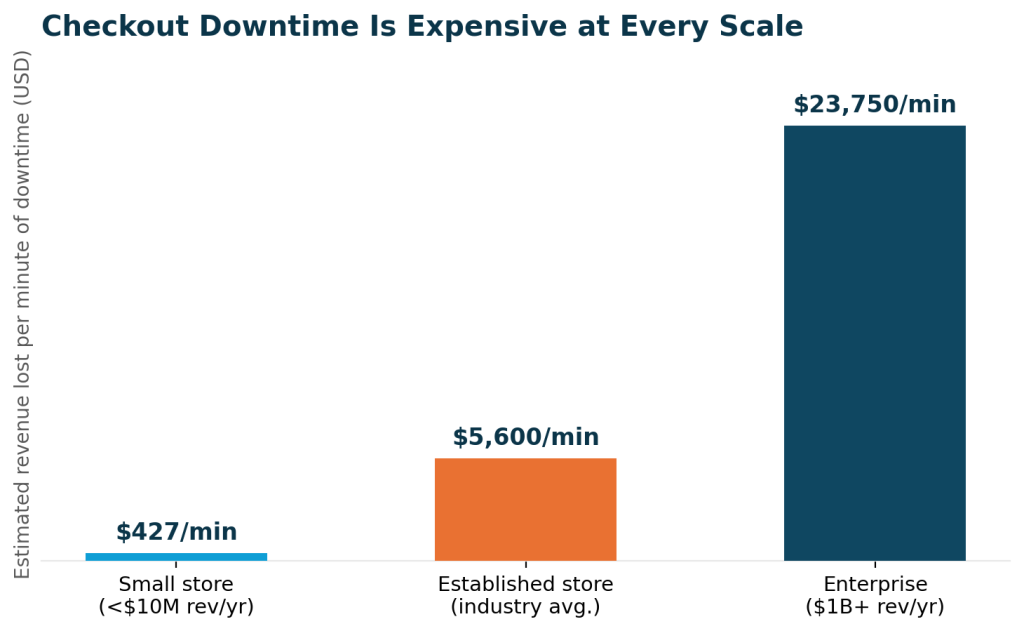
The direct revenue figure is only the visible part of the cost. Industry research consistently points to three additional layers that outlast the incident itself:
- Recovery labor – a routine outage commonly requires several hours of combined engineering time across diagnosis, the fix itself, and a post-incident review.
- Customer trust – a meaningful share of shoppers who hit a broken checkout will not return to complete that purchase, and some will post about the experience publicly.
- Compounding risk – stores with frequent, unmanaged incidents report disproportionately higher downtime costs than stores with the same traffic but a disciplined release process, because each incident takes longer to detect and resolve than the last.


A Stability Framework for Continuous Releases
None of this argues for slowing down. Stores that treat every Shopify release as a threat end up under-investing in the features that would actually grow the business. The more useful goal is a lightweight operating model that absorbs routine platform change without needing a fire drill for each one.
1. Maintain a Dedicated Staging Environment
A development or staging store, cloned theme, cloned app configuration, and test payment gateway are the single highest-leverage investments a store can make.
It turns “did this release break something?” from a question you answer in production, in front of customers, into a question you answer before anyone outside the team ever sees it.
2. Lock and Monitor Dependencies
Pin your Admin and Storefront API versions deliberately rather than by default, track every installed app’s own changelog, and review Shopify’s developer changelog on a fixed schedule rather than reactively. Version drift is entirely preventable; it only becomes a crisis when nobody is watching the calendar.
3. Build a Release Readiness Checklist
A short, repeatable checklist run before and after every meaningful release catches the majority of regressions before customers do. It doesn’t need to be elaborate; it needs to be run every time, by whoever owns the release.
| Check | When | Owner |
|---|---|---|
| Checkout completes end-to-end on desktop and mobile | Pre- and post-release | QA / release owner |
| Discounts, shipping rules, and Functions fire correctly | Pre- and post-release | Dev lead |
| Installed apps render without console errors | Post-release | Dev lead |
| Analytics and pixels report events correctly | Post-release | Marketing/analytics owner |
| Theme renders correctly across breakpoints | Pre- and post-release | Frontend/theme owner |
| Rollback path confirmed and accessible | Pre-release | Release owner |
4. Automate Regression Testing
Manual click-throughs don’t scale once a store is absorbing weekly or daily platform changes. A lightweight automated suite covering the checkout path, core discount logic, and critical app integrations turns a multi-hour manual QA pass into a check that runs in minutes, every time something changes.
5. Define Rollback Protocols
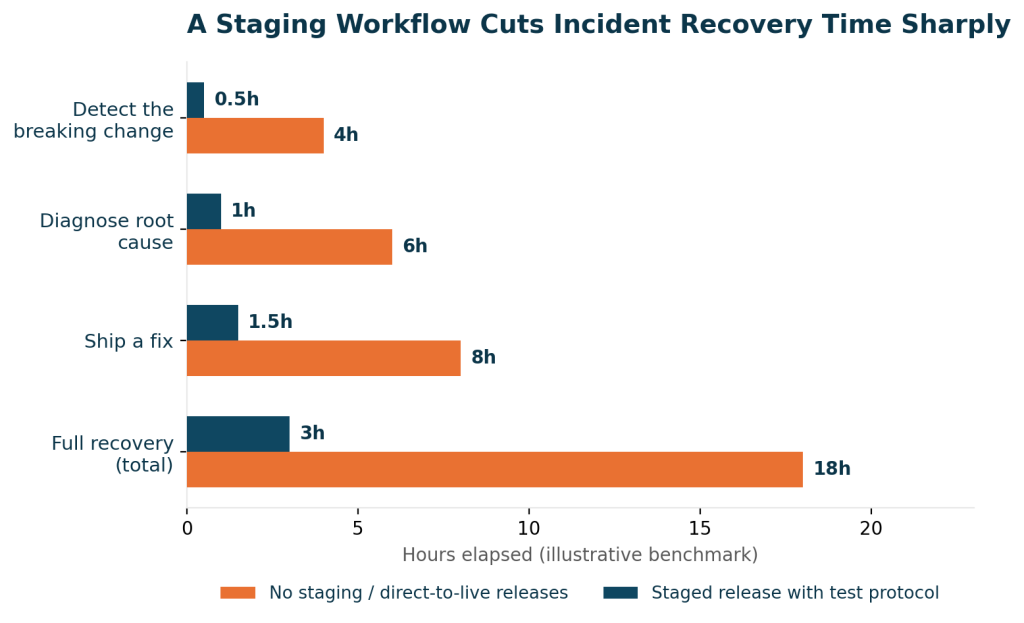
Every release needs a pre-agreed way back: a theme duplicate to fall back on, a documented app-disable order, and a named owner who can execute it without waiting for a meeting. The value of a rollback plan isn’t that you’ll use it constantly; it’s that recovery time collapses when you do need it.
Governance: Who Owns Stability
A framework only works if specific people own specific parts of it. In stores where stability holds up over time, the roles below are usually named explicitly rather than assumed to be “whoever notices first.”
| Role | Responsibility | Cadence |
|---|---|---|
| Release owner | Reviews the changelog, flags breaking changes, and runs the readiness checklist | Weekly, plus every release |
| QA / test owner | Runs the regression suite before and after each release | Every release |
| Merchandising/ops lead | Validates checkout, promotions, and discount behavior from a buyer’s perspective | Every release |
| On-call engineer | Executes the rollback protocol when an incident is confirmed | As needed |
Metrics That Prove Stability
“Stable” should be measurable, not a feeling. A small set of tracked metrics tells you whether the framework above is actually working, or just feels like it is.
| Metric | Healthy target | Why it matters |
|---|---|---|
| Checkout conversion rate | Stable week over week, no unexplained dips | The earliest signal that a release broke something in the buying path |
| Time to detect an incident | Under 15 minutes | Determines how much revenue is lost before anyone responds |
| Time to roll back or fix | Under 30-60 minutes | Directly caps the cost of any single incident |
| Post-release incident count | Trending down release over release | Shows whether the checklist and testing are actually catching issues |
| API version compliance | 100% migrated before the sunset date | Converts a scheduled breakage into a non-event |
A 90-Day Action Plan
Teams starting from scratch don’t need to build the entire framework at once. A staged rollout gets the highest-value protections in place first.
| Timeframe | Focus | Key actions |
|---|---|---|
| Days 1–30 | Visibility | Stand up a staging store, subscribe to the Shopify developer changelog, and audit which apps and custom code touch checkout |
| Days 31–60 | Process | Write the release readiness checklist, assign the governance roles above, and document a rollback protocol for your theme and top apps |
| Days 61–90 | Automation | Build an automated regression suite for checkout and core discount logic, and start tracking the stability metrics on a shared dashboard |
Conclusion
Continuous releases are, on balance, good for Shopify merchants; they mean the platform underneath the store keeps getting faster, safer, and more capable without waiting for a once-a-year upgrade.
The stores that benefit most from that pace are the ones that stopped treating stability as a side effect of caution and started treating it as a process with owners, checklists, and a clock on every incident.
In short: most stability incidents trace back to four preventable patterns: theme conflicts, app collisions, checkout extensibility gaps, and API version drift.
Downtime cost scales with store size, but no store is too small for it to matter. A staging environment, a release checklist, and a named rollback owner close most of the gap between reactive firefighting and routine, boring stability.
Partner with our Shopify experts to proactively manage releases, prevent downtime, and ensure seamless shopping experiences.

Pooja Upadhyay
Director Of People Operations & Client Relations
https://changelog.shopify.com/posts/the-spring-26-edition-is-live
https://www.atlassian.com/incident-management/kpis/cost-of-downtime
https://gatling.io/blog/the-cost-of-downtime
https://queue-it.com/blog/cost-of-downtime
https://blog.shift4shop.com/cost-of-downtime-ecommerce
https://www.ukscrubsupply.com/blogs/news/latest-shopify-features-202
