


Search is changing fast. People still use Google, but they also ask ChatGPT, Perplexity, Gemini, and other AI tools for direct answers, which means a WordPress website now needs to be easy to rank, easy to crawl, and easy for AI systems to understand and cite.
The good news is that this is not a completely new game. Most of the work overlaps with strong SEO basics: clear structure, schema, fast pages, internal links, trust signals, and content that answers questions without wandering around first.
Why AI visibility matters
Traditional search usually sends users to a list of pages, but AI search often gives users a synthesized answer before they ever click. In that environment, your article may be surfaced because one section explains a topic clearly enough to be quoted, summarized, or cited.
That changes the way blog content should be written. A page stuffed with keywords and added with generic introductions is less useful than one that answers quickly, uses strong headings, and gives context in a format machines can extract easily.
SEO and AI search are not the same thing
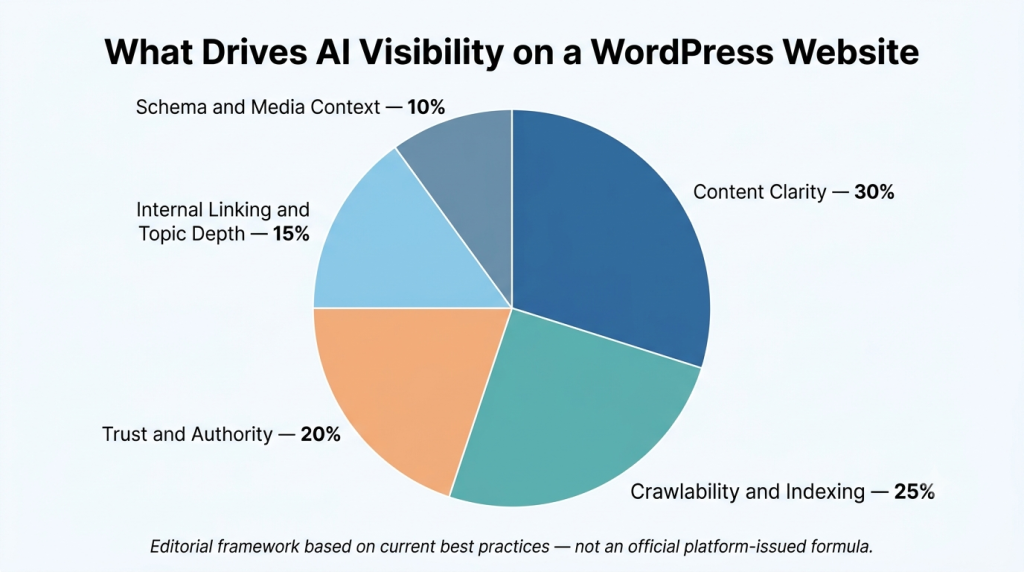
SEO helps your pages get discovered in search results. AI visibility goes a step further by helping systems retrieve the right part of your content, understand what it means, and decide whether it is trustworthy enough to use in an answer.
That is why structure matters so much. AI tools may not care about your full 2,000-word article in one piece; they may care about one paragraph, one table, one list, or one FAQ block that directly answers the user’s question.
| Traditional SEO | AI Search Visibility |
| Focuses on page rankings in search results. | Focuses on retrieval, understanding, and possible citation in AI-generated answers. |
| Whole-page optimization is central. | Section-level usefulness matters because content may be extracted in chunks. |
| Click-through is the main path to traffic. | Brand visibility can happen even before the click, inside the answer itself. |
What makes a WordPress site visible in AI search
A WordPress site becomes more visible in AI search when it does three things well: it publishes answer-ready content, it stays technically accessible, and it gives off strong trust signals. When one of these three areas is weak, visibility usually suffers.
Think of it this way: if an AI system cannot reach your content, interpret your structure, or trust your source, it has very little reason to use you. Visibility is not only about saying the right thing; it is about saying it in the clearest possible format.
1. Publish answer-first content
This is one of the clearest recommendations in current WordPress AI search guidance. Important sections should begin with the answer, not with a scene-setting paragraph that takes too long to get to the point.
For example, if the heading is “What is WordPress schema markup?”, the first sentence should define schema markup directly. That makes the page easier to skim for humans and easier to extract for AI systems.
Use these habits in every major article:
- Start each section with a direct answer.
- Keep paragraphs short and readable.
- Use headings that match real search questions.
- Add bullet lists and compact summaries where useful.
- Build FAQ sections for common follow-up questions.
Image placement: Insert a screenshot or illustration here
Suggested visual: a “before vs after” layout showing a weak intro-first section beside a sharp answer-first section.
2. Build topic depth, not isolated posts
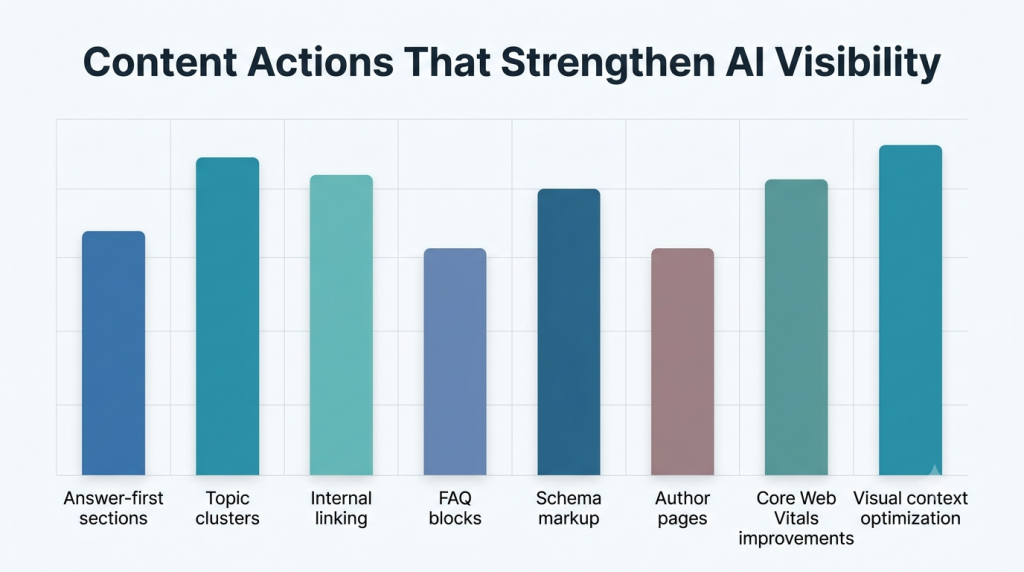
One blog post rarely proves expertise. WordPress.com’s guidance recommends building topic clusters and category structures so related pages reinforce each other and help AI systems understand your subject depth.
If a website publishes one post on WordPress speed and nothing else around caching, Core Web Vitals, image optimization, hosting, or audits, it looks thin. A cluster of connected resources sends a much stronger signal.
3. Add schema markup
Schema markup helps explain the meaning of your page in a machine-readable format. It does not guarantee a citation, but it helps AI systems understand whether a page is an article, FAQ, product, organization page, review, or author profile.
That extra context matters because AI systems are trying to interpret entities and relationships, not just strings of text. On WordPress, common schema support can be added through plugins such as Yoast SEO, Rank Math, AIOSEO, and Schema & Structured Data for WP.
| Schema type | Best for |
| Article | Blog posts and editorial content. |
| FAQ | Short questions and direct answers. |
| Product | WooCommerce and product pages. |
| Organization | Company identity and trust signals. |
| Person | Author pages and expertise. |
| LocalBusines | Local service websites. |


4. Make your site crawlable and indexable
This part is less exciting, but it is essential. If your content is blocked in robots.txt, hidden behind no index settings, missing from your XML sitemap, or buried in weak site architecture, AI systems will struggle to discover and use it.
For WordPress, the practical checks are simple: make sure indexing is enabled, keep your sitemap active, review robots rules, use HTTPS, and keep important pages accessible in standard HTML where possible.
Use this quick checklist:
- Check Settings > Reading so search engines are not discouraged from indexing the site.
- Make sure an XML sitemap is active.
- Review robots.txt for accidental blocks.
- Avoid orphan pages by linking key content internally.
- Keep essential information visible without relying too heavily on JavaScript-only rendering.
5. Improve page speed and technical health
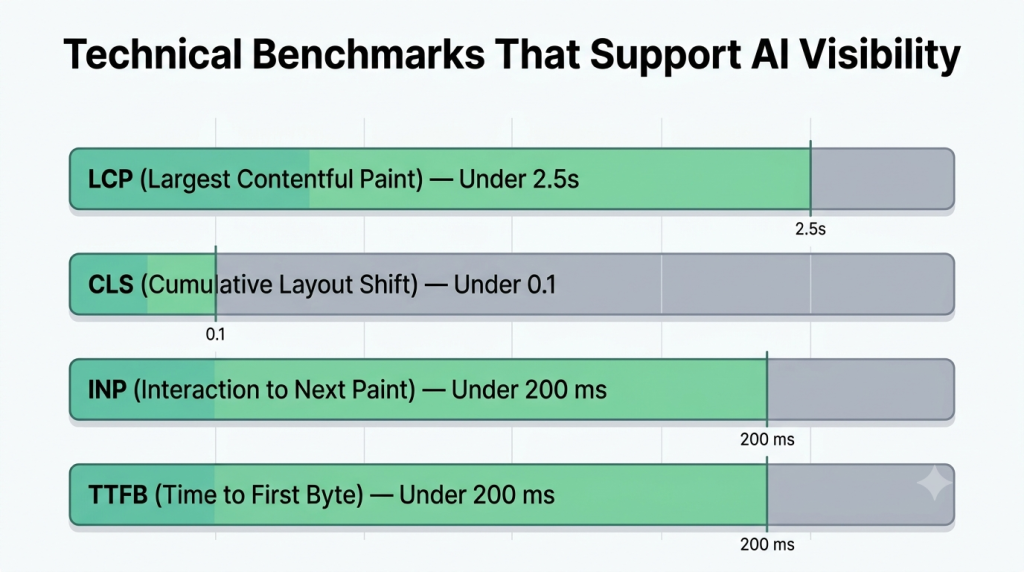
Performance is not a shortcut to AI citations, but it improves crawl efficiency and user experience. WP Rocket’s guide highlights key technical thresholds such as LCP under 2.5 seconds, CLS under 0.1, INP under 200 milliseconds, and ideally TTFB under 200 milliseconds.
That matters because fast, stable pages are easier to access and process. If two sources explain the same thing equally well, the cleaner technical experience gives your page an advantage.
6. Strengthen internal linking
Internal links help crawlers discover more pages, but they also show how your ideas connect. WP Rocket specifically recommends internal linking as a way to reinforce topical relevance and help systems understand the relationship between related pages.
That means vague anchor text is a wasted opportunity. “Click here” says very little, while “read the full WordPress image optimization guide” gives both people and machines much better context.
7. Make authorship and trust visible
AI search is not kind to generic, faceless content. WordPress.com advises using author bios, expert information, original insight, and current information to strengthen trust signals and E-E-A-T style credibility.
This is where many websites lose ground. They publish polished-looking content, but there is no visible author, no experience, no About page, no proof, and no signal that the content came from someone who actually knows the topic.
Add these trust elements wherever relevant:
- Named authors with real bios.
- An About page and Contact page.
- Case studies, examples, or firsthand observations.
- Updated publication or revision dates where relevant.
- Supporting visuals, screenshots, and original commentary.
Content formats that work well in AI search
Some content formats are naturally easier for AI tools to use. The strongest performers usually explain one thing clearly, organize it neatly, and remove unnecessary filler.
Useful formats include:
- Step-by-step guides.
- FAQ sections.
- Comparison posts.
- Definition-based explainers.
- Checklists and audit templates.
- Case-study backed pages with examples.
That does not mean every article should sound robotic or stripped down. It means each section should be easy to quote, easy to verify, and easy to understand without extra fluff.
Common mistakes that hurt AI visibility
The biggest mistakes are usually simple ones. Sites often fail not because the topic is weak, but because the presentation is unclear or the technical foundation is shaky.
Avoid these common issues:
- Long introductions before the answer appears.
- Thin content with no original insight.
- No schema or poor semantic structure.
- Weak author and business trust signals.
- Broken internal linking or orphan pages.
- Slow performance and unstable layout behavior.
- Important content hidden behind complex JavaScript elements.
A simple WordPress workflow to follow
A practical workflow is easier to apply than a theory-heavy strategy. For most WordPress websites, a solid process is to audit crawlability, improve site structure, update key content into answer-first sections, add schema, strengthen authorship signals, and then refresh internal links across important pages.
That approach is realistic, especially for agencies, bloggers, SaaS websites, and service businesses that already have content but need to make it easier for AI search systems to interpret and trust.
Prepare your website for the next generation of search with AI-focused optimization, structured data, and high-performance WordPress development.

Pooja Upadhyay
Director Of People Operations & Client Relations
Source URLS:
https://wordpress.com/blog/2026/02/16/ai-search-engine-optimization-wordpress
