


WordPress has entered a new phase, and this time the update feels bigger than the usual round of interface tweaks and backend refinements. With WordPress 7.0, the platform is moving more clearly toward AI-supported workflows, stronger collaboration foundations, and a more connected site-management experience, which makes this release especially important for businesses that rely on WordPress as more than just a publishing tool.
For agencies, eCommerce brands, publishers, and growing businesses, this is the kind of update that creates a gap between early movers and late adopters. Some websites will simply update the version number and carry on as usual, while others will use WordPress 7.0 as a chance to streamline operations, reduce tool sprawl, and prepare for a smarter content workflow.
Why this update feels different
A lot of WordPress releases improve what already exists. WordPress 7.0 feels different because it pushes the platform further into infrastructure territory, especially with official AI architecture such as the AI Client, connector-based provider setup, and a more standardized way for plugins and systems to expose capabilities.
That shift matters because modern websites are no longer maintained by one person logging in once a week. They are managed by teams, marketers, editors, SEO specialists, developers, store managers, and in some cases AI-powered systems working together, so WordPress itself has to become more operational, more connected, and easier to scale.
What WordPress 7.0 is really bringing
The headlines around WordPress 7.0 usually mention AI, collaboration, and speed, and that framing works because it captures the broad direction of the release. But what matters more is how those themes show up in day-to-day website management.
1. AI is becoming part of the WordPress foundation
WordPress 7.0 introduces shared AI infrastructure rather than treating AI as a scattered add-on idea. Official WordPress materials describe a model where plugins can use common connectors, interact through a shared AI client layer, and work with defined abilities rather than each building separate provider integrations from scratch.
That may sound technical, but the business meaning is simple: less duplication, cleaner tooling, and more room for practical use cases such as content assistance, metadata generation, summaries, automation, image support, and editorial enhancement workflows. For website teams, that means the future of AI in WordPress looks less chaotic and more standardized.
2. Collaboration is no longer a side conversation
WordPress has long been powerful for publishing, but true team collaboration inside the platform has often lagged behind the expectations of modern content operations. The 7.0 release includes collaboration-related classes, sync components, and workflow-oriented additions in core files, which signals a continued move toward multi-user editorial coordination rather than isolated publishing.
If your current workflow still jumps between Google Docs, chat threads, approval emails, screenshots, SEO notes, and the WordPress editor, this matters. It suggests WordPress is moving closer to becoming the place where work happens, not just the place where content gets pasted at the end.
3. Speed now includes workflow speed, not just page speed
When people hear “speed,” they usually think of performance scores. That still matters, but WordPress 7.0’s bigger opportunity may be operational speed: faster content handling, fewer disconnected settings, reduced duplication across plugins, and more native control over tasks that used to require separate tools.
In other words, a website can feel faster even when the real improvement is not a homepage loading 0.3 seconds quicker, but a team publishing better content with fewer steps and fewer handoffs. For many businesses, that kind of speed improvement creates more value than a purely technical metric.
Why businesses should care now
This release is important because waiting has a cost. Not always an immediate cost, but a slow one: more plugin overlap, more editorial friction, more disconnected tools, and more time spent maintaining workflows that no longer match where WordPress is going.
The businesses that gain the most from WordPress 7.0 will not necessarily be the ones with the largest websites. They will be the ones with the clearest systems, the cleanest plugin stack, and the willingness to rethink how their team uses WordPress across content, design, governance, and automation.
What changes most for website teams
Here is a practical way to frame the release for decision-makers. This is not an official weighting from WordPress; it is an editorial visualization of the impact themes described in the release materials.
“Rather than treating WordPress 7.0 as a single-feature update, it helps to view it as a shift across five impact areas. The visualization below is an editorial interpretation of the release themes, designed to show where website teams are most likely to feel the change first.”
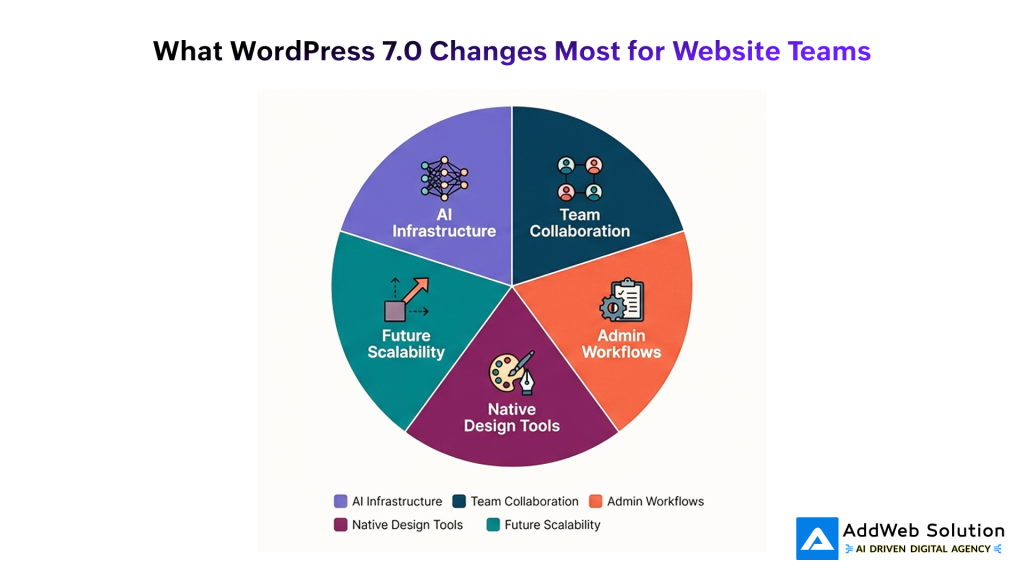
The biggest slice should be AI infrastructure, not because WordPress suddenly becomes fully automated overnight, but because the official direction of the release shows that AI is now being built into the platform’s architecture rather than left entirely to third-party improvisation. Collaboration and workflow modernization should follow closely, since those changes affect how real teams actually operate inside WordPress.
The real question: is your website ready?
This is where the blog becomes useful instead of just interesting. Most websites are not unprepared because they are old; they are unprepared because the systems around them are messy.
A site may look modern on the front end and still be badly positioned for WordPress 7.0 if the backend experience depends on plugin clutter, inconsistent editing habits, weak governance, or a content workflow that lives outside the CMS. That is why readiness matters more than excitement.
Common signs your site may not be ready
- Your team uses too many plugins for small functions that overlap.
- Your editors still create, review, and approve content outside WordPress.
- No one has clear ownership over updates, permissions, or workflow governance.
- Your site depends heavily on older habits that do not align with modern block-based workflows.
- You want to use AI tools, but there is no internal policy for quality, approval, or provider access.
These readiness risks matter because WordPress 7.0 is built around more connected systems, and disconnected teams will feel that tension first.


Website readiness priorities
Readers usually need a clear action framework at this point. This is the best place to move from “What changed?” to “What should I do next?”
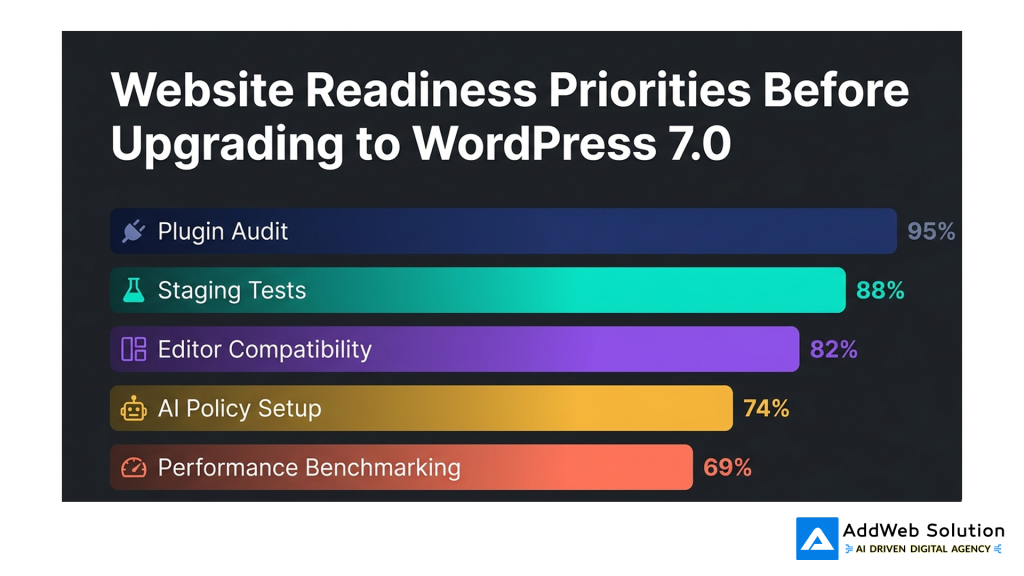
“Before upgrading, most businesses do not need to do everything at once. They need to handle the right things in the right order. The chart below is a practical planning visual, not an official research dataset, showing the areas most teams should review before moving fully into WordPress 7.0.”
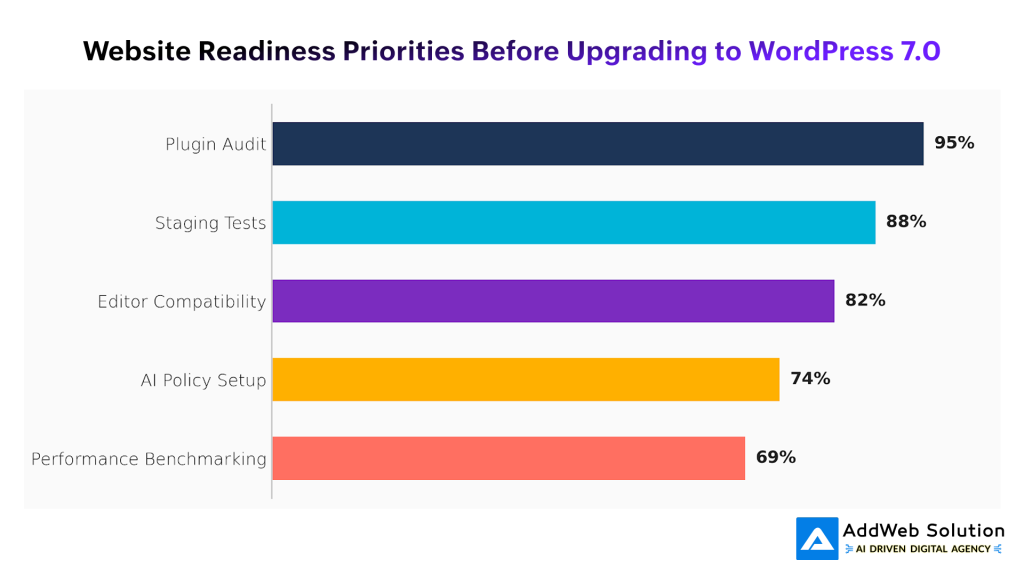
In most cases, plugin audit should appear as the highest priority because plugin sprawl creates friction across performance, compatibility, editor experience, and long-term maintenance. Staging tests and editor compatibility should come next, followed by AI policy setup and performance benchmarking, since governance and testing become more important when a platform starts supporting more connected workflows.
A practical readiness checklist
Now that readers understand the priority order, give them a checklist that feels grounded and usable.
Audit your plugin stack
Start by identifying plugins that duplicate functionality or exist only because WordPress lacked certain native capabilities in the past. With 7.0 adding more built-in structure around connectors, workflows, and block-related capabilities, this is a good time to simplify.
Test on staging before touching production
This should be non-negotiable. A major update tied to changing workflows, admin features, and plugin-level compatibility deserves a safe environment where you can test templates, custom code, third-party integrations, and editorial behavior before rolling out live.
Review editor compatibility
If your team works heavily with custom blocks, page builders, structured patterns, or editorial plugins, test the experience carefully. Readiness is not only about whether the site loads, but whether your team can still work efficiently after the update.
Create an AI usage policy
This is where many companies will fall behind. The arrival of shared AI infrastructure does not mean every AI feature should be switched on without rules. Teams need standards for quality control, approval layers, privacy, provider access, and where human review remains essential.
Benchmark performance and admin experience
Measure more than frontend speed. Check publishing flow, editor responsiveness, plugin dashboard load, media handling, and task completion friction. WordPress 7.0 should be judged partly by how smoothly teams can work inside it.
WordPress is evolving beyond a traditional CMS
One of the most interesting things about WordPress 7.0 is what it suggests about the future. The platform is not only trying to publish content better; it is moving toward becoming a more intelligent operating layer for content, design, workflows, and system-to-system coordination.
That does not mean every site suddenly becomes advanced overnight. It does mean the direction is clearer now, and businesses that understand that direction will make better decisions about tooling, process design, and long-term website strategy.
“The path of WordPress is easier to understand when seen as a maturity curve rather than a list of isolated features. The visual below is a conceptual view of that evolution, based on the direction reflected in official 7.0 materials.”
The line should rise gradually from traditional publishing to connected automation, showing that WordPress has been building toward this moment over several phases. Block editing maturity created the base, collaboration is expanding the teamwork layer, and AI infrastructure now points toward a more connected ecosystem where actions, tools, and workflows can work together more intelligently.
Final takeaway
WordPress 7.0 is not just another update for your maintenance checklist. It is a signal that the platform is becoming more connected, more workflow-aware, and more prepared for AI-assisted site operations than many businesses realize.
If your website is still running on a cluttered plugin stack, an outdated editing process, or a disconnected content workflow, this is the right moment to pause and reassess. The companies that prepare early will not just have updated websites; they will have better systems behind them.
Prepare your site for AI-powered workflows, better collaboration, and enhanced performance with AddWeb Solution.

Pooja Upadhyay
Director Of People Operations & Client Relations
