


The main focus of most year-long activities organized by ecommerce teams revolves around generating traffic via paid media, SEO, email marketing, partnerships, and related strategies.
The checkout stage can be defined as the stage where all these activities will either convert into conversions or will fail to do so. From an analysis of the fifty publicly available reports generated by the authors, the average cart abandonment rate documented comes out to be 70.22%.
Checkout Extensibility is the solution proposed. This has led to a restructuring of checkout.liquid and Shopify Scripts as app building blocks consisting of UI Extensions, Shopify Functions, Branding API, and Web Pixels.
All prior deadlines of these technologies have passed, with the latest deadline being set for August 26, 2026. The pertinent issue here is not whether to upgrade, but which way to upgrade.
This guide aims to explain the components included in the Checkout framework, who can access what components, where the leakage of revenue takes place at the time of checkout, and how some customizations are linked with conversion rate, order values, and processes.
All the information extracted from Shopify documentation has been taken from vendor reporting.
What Is Shopify Checkout Extensibility?
According to Shopify, Checkout Extensibility is a suite of features that allow customization of the checkout process to be app-based, upgradeable, high-performing, and Shop Pay enabled.
In the previous approach, the checkout process could be customized using a custom checkout flow developed using a file called checkout.liquid. This method was available until January 2020, when it was deprecated by Shopify.
During this time, there were no direct APIs provided by Shopify for the customization of checkout; hence, there was a lack of user experience and performance problems, and the method was not upgradeable. The latest update to the checkout.liquid file was done in January 2020.
The current implementation customizes checkout processes using extensions and automatically launches updates on the checkout process.
This means that for businesses, there is a move towards maintenance, where merchants lose control of their own customized checkout process but configure functionalities within the offered framework.
The Five Building Blocks
The documentation for Shopify developers classifies checkout personalization based on various technologies. The choice of the technology is usually made based on the feature that needs to be customized: the buyer’s experience, backend policies, page design, or metrics.

Source: Shopify developer documentation.
| Technology | What it does | Common uses | Availability |
|---|---|---|---|
| Checkout UI extensions | Add custom UI or content to checkout and the Order status page | Pre-purchase product offers, extra input fields, banners, surveys, referral codes | Shopify Plus for checkout steps. Thank you and Order status on all plans except Starter. Market overrides on Advanced |
| Post-purchase extensions | Add content between payment and the confirmation page | Post-purchase product offers, extra information capture | All plans except Starter. In beta; live stores must request access |
| Branding (GraphQL Admin API) | Change the look and feel of checkout | Colors, corner radius on form fields, header and footer styling | Shopify Plus |
| Shopify Functions | Extend or replace backend logic with custom code | New discount types, renaming, reordering or hiding payment and delivery options, checkout validation, bundles, pickup points | All plans except Starter. Some APIs are in feature preview |
| Web pixel extensions | Track customer behavior | Campaign measurement and conversion funnel data | All plans except Starter |
Table 1. Checkout customization technologies and who can use them. Source: Shopify developer documentation, “Technologies for customizing Shopify checkout.”
Who Can Use What
On Shopify Plus
All features can be utilized with Shopify Plus. The UI extensions are available for the pages Information, Shipping, Payment, Thank you, and Order status. The branding components can be accessed through the Admin API. The platform offers Functions, pixels, and market overrides.
On Basic, Shopify, and Advanced
The UI extensions can be applied only to the Thank you and Order status pages in these accounts. The functions and web pixels are available on all the plans, except Starter. The Advanced plan offers market overrides.
Practically speaking, the post-purchase stage appears as the only available option to apply custom UI (such as a survey, referral code, or any other component) if there is no use of the Plus plan.
Why Timing Matters: Every Deadline Has Passed
Shopify retired the legacy tools in stages over two years. If any part of your store still depends on them, you are already past each date below.

Sources: Shopify Help Center, Shopify developer changelog.
| Date | What happened | Who was affected |
|---|---|---|
| Aug 13, 2024 | Checkout.liquid deprecated for the Information, Shipping and Payment pages. From Aug 14, Shopify began shutting it down and locked those customizations | Shopify Plus |
| Jan 6, 2025 | Shopify began auto-upgrading checkouts still on checkout.liquid, with 30 days’ email notice. Affected pages revert to a default state | Shopify Plus |
| Aug 28, 2025 | Deadline to upgrade the Thank you and Order status pages. Script tags stopped running on Order status | Shopify Plus |
| Apr 15, 2026 | Editing and publishing new Shopify Scripts no longer possible | Stores using Scripts |
| Jun 30, 2026 | All Shopify Scripts stopped executing | Stores using Scripts |
| Aug 26, 2026 | Deadline to upgrade the Thank you and Order status pages. Script tags stop running on Order status | Basic, Shopify and Advanced |
Table 2. Source: Shopify Help Center upgrade guide; Shopify developer changelog; Shopify developer docs on Order status script tags; Google Merchant Center Help.
What Changed in Practice
- The Discounting, Shipping and Payment Regulations: The logic that was built into Ruby Scripts before should now be implemented through Shopify Functions. According to the Shopify changelog, Scripts will stop working from June 30, 2026.
- Conversion Tracking: Before, there were several script tags and scripts included into the Thank You and Order Status pages. Google suggests moving these script tags to the Google & YouTube app before the update of these pages to avoid breaking tags.
- Page-level Customizations: Un-upgraded checkouts were set to default mode, which means that there are no checkout.liquid customizations, according to the Shopify upgrade guide.
- Functionalities Added: These functionalities are offered by Shopify after the upgrade of its platform: one-page checkout, product bundles, B2B functionality, Shop Cash, country-specific address fields, split shipping.
The Business Case: Where Checkout Revenue Leaks
Abandonment Has Hovered Around 70% for Over a Decade
Publication helps deal with the practical problem of gathering cart abandonment statistics for each web resource.
There exists a list of published research on cart abandonment collected by the Baymard Institute; there are 50 publications on the topic between 2006 and 2025, with an overall average of 70.22%, with individual statistics varying from 55% to 84%.
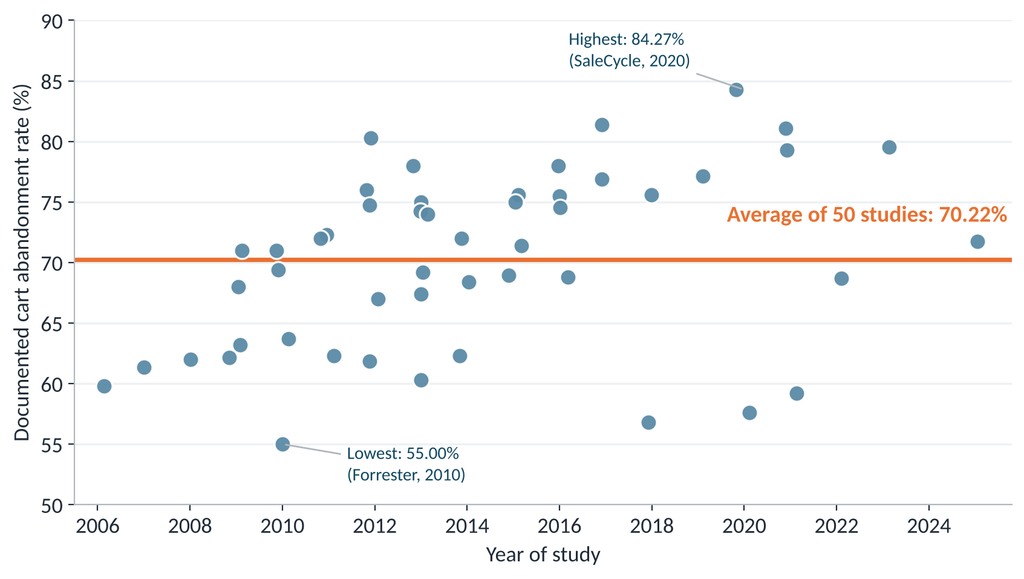
Source: Baymard Institute, Cart Abandonment Rate statistics (updated October 28, 2026).
According to Baymard, quite a bit of this abandonment is necessary; 42% of the US internet users admit to abandoning their carts just “because [they were] just browsing.” The more important issue is what happens after accounting for this.
Why Shoppers Leave
Excluding those “just browsing,” the Baymard survey shows the following. Note that respondents could name more than one cause, which leads to percentages exceeding 100.
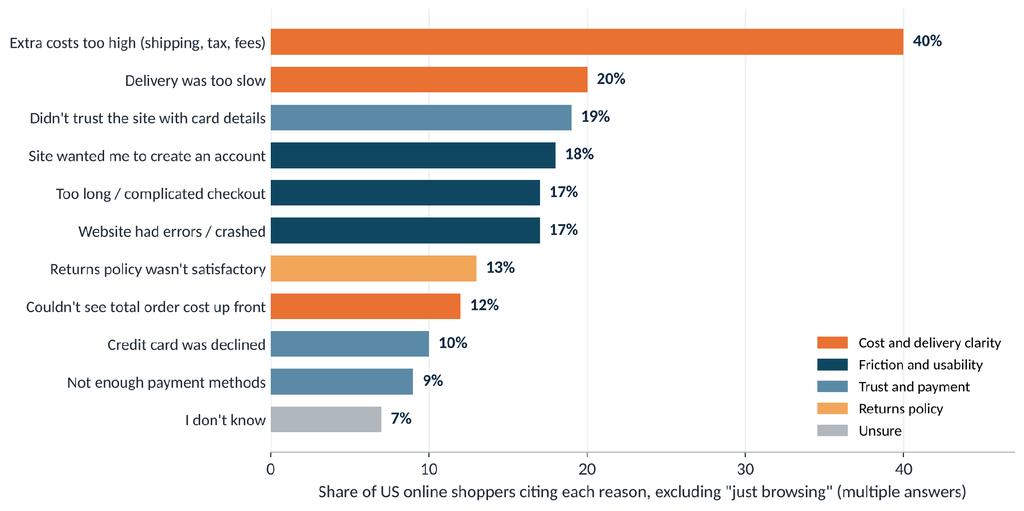
Source: Baymard Institute. Bar colors are our grouping.
Three important facts emerge. The first one is that cost surprise is the major cause; then come slow shipping and total cost surprise – all three expressing the main concern of the buyer, which is the certainty of total cost and delivery estimates.
The second fact is that trust and payment are important reasons for abandonment. The third one is that friction is a significant part of the causes for abandonment.

| Theme | Share | What it points to | Checkout Extensibility lever |
|---|---|---|---|
| Cost and delivery clarity | 39.6% | Surprise fees, slow delivery, unclear totals | Banners that state shipping thresholds and delivery promises; Functions that rename and reorder delivery options; discount Functions so savings appear in the order summary |
| Friction and usability | 28.6% | Forced accounts, long forms, errors | Validation extensions that catch mistakes early; one-page checkout; removing fields that aren’t essential |
| Trust and payment | 20.9% | Card security worries, declines, limited payment methods | Branding that matches the storefront; Functions that sort or hide payment options; Shop Pay |
| Returns policy | 7.1% | Unsatisfactory return terms | Policy links in the checkout footer; a banner restating the returns promise |
| Unsure | 3.8% | No stated reason | None |
Table 3. Mapping abandonment themes to extensibility levers. Shares calculated from Baymard Institute data; the lever column is our interpretation.
Fewer Fields, Fewer Exits
Based on Baymard Institute’s checkout benchmark, the number of form elements for the average checkout in the United States is 23.48 (14.88 if taking into account only form fields). According to the testing performed, the ideal number of form elements is 12 to 14 (7 to 8 fields).
Moreover, it was found out that most of the checkouts can be improved through reducing the number of form elements by 20% to 60% and 17% of online customers have already abandoned orders because of that.

Source: Baymard Institute.


How Custom Checkout Experiences Drive Growth
No quantitative value is shared by Shopify regarding the effects on custom checkout efforts, but the results differ greatly based on the implementation process. What the company offers, on the other hand, is a set of variables that are related to specific business metrics.
1. Conversion: Reduce Friction and Keep the Trusted Flow
Checkout Extensibility is said to be based on modern platform technology, resulting in about two times faster checkout and page transition processes and, accordingly, providing more than 1% average improvement in conversion rate.
This statement further implies that the customizations performed via extensions are compatible with Shop Pay, thus enabling the brand-specific checkout without any sacrifice in familiarity and speed.
The biggest claims made related to Shop Pay belong to Shopify.
According to an external study, Shop Pay can provide up to 50% higher conversion rates compared to guest checkout, beat the rest of the accelerated checkout solutions by at least 10%, and boost lower-funnel conversion rate by approximately 5% (according to the vendor).
The exact numbers depend on traffic demographics and the type of devices used.
The practical recommendations for using this lever are the following:
- Check the fields in the checkout before payment with either UI extension or server-side validation.
- Show the shipping promise and the amount of order to qualify for free shipping in a banner next to the order summary.
- Rearrange delivery and payment options and make the most obvious one the default one.
2. Average Order Value: Offer the Right Add-On at the Right Moment
Checkout UI extensions make the offer to the consumer before the order placement process is completed, while post-purchase extensions make an offer after the purchase and before reaching the confirmation page.
Post-purchase offers include Shopify offers of bundled deals and stackable discounts, as well as defining discount types through Functions.
The internal Shopify data shows that the order value of Shop Pay orders is about 16% larger ($119.37 compared to $102.65). This data refers to two different sets of customers rather than an apples-to-apples comparison between the extensions, and should be considered a nudge rather than a forecast.
The more reliable rule is that one offer beats three applications in a row.
3. Operations and Margin: Put Business Rules Inside Checkout
Functions carry out user logic in Shopify, and the use cases are based on both functional and marketing uses.
Some of the use cases provided by Shopify are renaming, reorganizing, and sorting payment methods and shipping methods, creating a maximum order amount limit for customers with fewer orders, prioritizing fulfillment locations for each line item, and providing pickup location options.
Some other use cases provided by the enhancements include: B2B features, tax ID collection at checkout, regional address fields, and split shipping functionality, which all need to be upgraded.
These rules are transferred to the checkout stage to ensure that these rules are applied before order placement instead of being corrected later.
4. Measurement: Keep Your Data Intact
Instead of code being embedded into the new scripts, web pixels were used. In this regard, Shopify guides sellers to use the Customer events page in the admin console for managing and tracking events.
As per the merchant help sheet of Google, tags need to be transferred to the Google & YouTube app before updating the post-checkout pages because of the possible disruptions.
In case there is a drop in conversion data on the advertising platform after any of the sunset dates, then the first thing that needs to be done is to check the pixel setup.
5. Global Selling: Tailor Checkout by Market
Market-specific overrides within the checkout and accounts editor are available only to Advanced or Plus merchants who have Shopify Markets enabled.
This override helps in customizing the specific market through the branding and configuration settings. It allows merchants to add, reorder, and exclude extensions for a specific market. Shopify suggests using native overrides instead of creating your own market-specific logic.
What the Reported Numbers Say, and What They Don’t
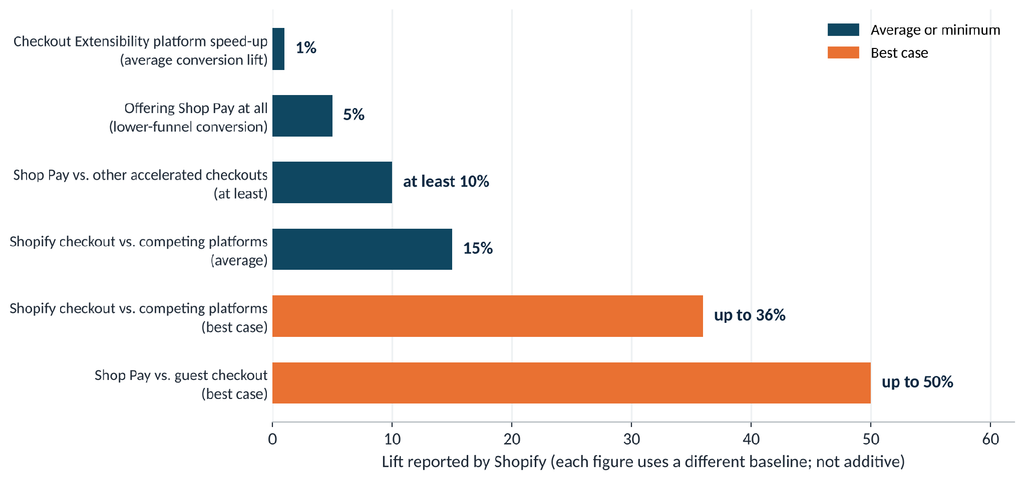
Sources: Shopify enterprise pages and Shopify Checkout Extensibility page.
| Metric | Reported figure | Measured against | Reported by |
|---|---|---|---|
| Shopify checkout conversion vs. other platforms | 15% average, up to 36% | Platforms and custom builds in an external study cited by Shopify | Shopify |
| Shop Pay vs. guest checkout | Up to 50% | Guest checkout | Shopify |
| Shop Pay vs. other accelerated checkouts | At least 10% | Other accelerated checkouts | Shopify |
| Offering Shop Pay at all | About 5% (lower funnel) | Checkouts that don’t offer Shop Pay | Shopify |
| Checkout Extensibility platform speed | Over 1% average lift | Faster interactions and page transitions | Shopify |
| Average order value on Shop Pay | About 16% higher | $119.37 vs. $102.65 for other orders | Shopify |
Table 4. Vendor-reported benchmarks. Sources: Shopify (see source list).
What a Customized Checkout Looks Like
The illustration below is a wireframe, not a screenshot. It shows where each type of extension typically sits.

Numbers match Table 5.
| No. | Element | How it is built |
|---|---|---|
| 1 | Branding | Logo, colors, and corner radius set through the branding API |
| 2 | Banner | A checkout UI extension stating a free-delivery threshold or returns promise |
| 3 | Custom field | An input captured only where the order needs it, such as a gift message or tax ID |
| 4 | Delivery options | Renamed and reordered by a delivery customization Function |
| 5 | Payment options | Sorted or filtered by a payment customization Function |
| 6 | Pre-purchase offer | A UI extension presenting one relevant add-on |
| 7 | Discount | A discount Function applies the rule, and the result shows in the order summary |
| 8 | Footer | Store policy links added with a UI extension and the branding API |
Table 5. Key to Figure 8. Source: Shopify developer documentation tutorials; layout is illustrative.
Where It Fits by Business Type
| Business type | Customization worth considering | Built with | Metric to watch |
|---|---|---|---|
| High-ticket and luxury | Gift message field, delivery options that name the service level, payment options ordered for large baskets | UI extension, delivery and payment Functions | Checkout completion, payment failure rate |
| B2B and wholesale | Tax ID capture, order limits for new accounts, payment option rules | UI extension, validation and payment Functions | Order error rate, manual order edits |
| Repeat-purchase brands | One pre-purchase add-on, a post-purchase offer, bundles | UI extension, post-purchase extension, bundles | Average order value, offer take rate |
| Cross-border sellers | Market overrides, region-specific address fields, local payment ordering | Market overrides, Functions | Conversion by market, address errors |
Table 6. Examples of how common customizations map to business types. These are starting points, not benchmarks.
Implementation Playbook
A Phased Approach
Phase 1: Audit and Parity
- Go to the Settings section of the Shopify admin dashboard, click on Checkout and view the customization report. As mentioned in the Shopify help document, the customization report will show the customizations to checkout.liquid, as well as the scripts and applications that make use of script tags.
- Categorize each entry as an extension, Function, pixel, or public app. Wherever possible, use a public app that works on extensions, as per guidelines from Shopify.
- Before finalizing this task, rebuild your tracking with web pixels to keep your reporting up and running in the meantime.
Phase 2: Quick Wins
- Use branding at the checkout and account editor level to maintain consistency between the checkout flow and the storefront.
- Use only one pre-sale offer and one banner per attributable result; nothing else is allowed.
- Structure delivery and payment options in Functions.
Phase 3: Differentiators
- Create guidelines for your business, covering validation, order limits, and B2B fields.
- Use Additional Market Overrides while working in different locations in Advanced and Plus.
- Check the new checkout features. The checkout features will be implemented by Shopify automatically, and some might override the solutions that you have already built.
Common Mistakes
- The migration of all changes at once without creating a baseline makes it impossible to attribute effects to particular changes, thus making it difficult to distinguish good changes from bad changes.
- Lack of pixel data rebuild causes monitoring and tracking problems.
- Adding unnecessary fields causes field inflation; according to Baymard, there are too many fields in an average checkout.
- Implementation of several upsells in one checkout causes complexity due to visual and functional clutter.
- Lack of plan limitations and changes in Information, Shipping, and Payment checkout steps make it necessary to use the Plus plan; for stores with checkout.liquid, the store needs to be upgraded before using Function APIs.
- Testing should be performed first on desktop interfaces because of Shopify’s estimate of roughly seven-tenths of orders coming through mobile devices.
Metrics to Track
| Metric | Why it matters | Context |
|---|---|---|
| Checkout completion rate | The headline measure of friction | Compare before and after each change, using a similar traffic mix |
| Average order value | Shows whether offers and bundles help | Read alongside conversion. An offer that raises order value but lowers completions can net out negative |
| Offer take rate | Tells you whether the add-on is relevant | Track per placement, pre-purchase and post-purchase separately |
| Payment failure rate | Declines and missing methods cost orders | Baymard finds 10% of shoppers cite a declined card and 9% too few payment methods |
| Interaction speed | Shopify ties faster checkout to higher conversion | Recheck after each new extension is added |
Table 7. A starting set of checkout metrics. Sources: Baymard Institute; Shopify.
The Bottom Line
Nowadays, checkout extensibility is the only way of Shopify checkout extension and thus its usage depends on the objectives to which it is put to use.
All signs point to one direction – cart abandonment is here to stay. The most common aspects where improvements can be made relate to clarity, trust, and effort. Complicated checkouts mean lost revenue. Shopify performance improvements are documented and reported by vendors.
An orderly flow of events would include migrating to checkout extensibility, protecting tracking, optimizing messaging for costs and shipping, removing barriers, and adding revenue-producing components like deals and bundling in steps, each with its own baseline.
Shopify Plus comes with the best set of tools at hand. Other Shopify plans have more room for post-purchase pages, Functions, and tracking pixel improvements.
Grow Your Store with Shopify Experts

Pooja Upadhyay
Director Of People Operations & Client Relations
Sources
https://shopify.dev/docs/apps/build/checkout/technologies
https://shopify.dev/docs/apps/build/checkout
https://shopify.dev/changelog/posts/shopify-scripts-will-be-deprecated-on-june-30-2026
https://shopify.dev/docs/apps/build/online-store/script-tag-deprecation/order-status
https://help.shopify.com/en/manual/checkout-settings/checkout-extensibility/checkout-upgrade
https://community.shopify.com/t/checkout-liquid-is-being-deprecated/191512
