


Let me tell you something that happened in a client meeting about eight months ago. A fast-growing logistics firm around 60 employees had been stitching together seven different SaaS tools: a standalone CRM, a separate accounting platform, a project tracker, an email marketing tool, two HR systems, and Slack. Not unusual. Every time a new department head joined, they brought their favourite app with them. By the time they called us, their monthly SaaS bill had quietly crossed ₹9.5 lakh ($11,400 USD). Per month. For 60 people.
That’s when the conversation about Zoho One started. And honestly, it’s a conversation we’re having more and more not because Zoho pays us to (they don’t influence our recommendations), but because the economics genuinely make sense for a wide band of businesses, particularly in 2026, when platform consolidation has become less of a trend and more of a survival strategy.
But here’s the thing: “Zoho One is cheap” is an oversimplification. Whether it’s worth it depends entirely on which plan you pick, how many people you have, and what you’re replacing. Get that wrong and you’ll either overpay or under-utilise a platform that could genuinely run your business end-to-end.
This piece is our attempt to cut through the pricing page noise and give you a proper answer.
What Exactly Is Zoho One and What Do You Actually Get?
Zoho One bills itself as “the operating system for your business.” That’s a bold claim. But peel back the marketing and what you’re looking at is genuinely one of the broadest software bundles in the SMB market: 50+ integrated applications covering CRM, accounting, HR, marketing automation, project management, customer support, analytics, e-signature, team chat, email, and more all under one admin panel, one login, and one monthly invoice.
The applications aren’t watered-down versions either. You get enterprise editions. Zoho CRM, for instance, comes with the full AI-powered sales assistant (Zia), workflow automation, and multi-pipeline management features that cost $52/user/month if you subscribe to Zoho CRM Ultimate separately.
That consolidation is the core value proposition. Not just saving money on licences, but eliminating the hidden tax of managing a fragmented software stack: the data silos, the integration maintenance, the duplicate entries, the login fatigue.

Fig. 1 — Distribution of Zoho One applications by functional category.
The Two Pricing Models and Why the Choice Matters More Than the Price
This is where most buyers get confused, and understandably so. Zoho One doesn’t have a simple tiered structure like most SaaS products. Instead, it offers two completely different philosophies of licensing and picking the wrong one can cost you thousands annually.
All-Employee Plan
You license every single employee on payroll. In exchange, you pay a significantly lower per-user rate. At $37/user/month annually (or $45/month on a rolling basis), this is some of the most aggressive per-user pricing you’ll find for an enterprise-grade suite. The catch: everyone needs a seat. Your warehouse staff. Your part-time receptionist. Everyone. Zoho does have provisions for light users in some contract negotiations, but the standard T&Cs are firm here.
Flexible User Plan
License only the users who actually need access. No minimum headcount. This sounds appealing but you pay for that flexibility at $90/user/month annually (or $105 monthly). Nearly 2.5x the All-Employee rate per user.

Fig. 2 — Annual licence cost comparison (USD). At 20 active users in a 50-person company, Flexible can cost more than All-Employee even though you’re licensing fewer people.
Here’s the decision framework we use with clients we call it the 40% rule: if more than 40% of your workforce will actively use Zoho, the All-Employee plan almost always works out cheaper in total, even accounting for seats for staff who won’t use it much. Below 40%, Flexible is typically the smarter entry point.
Quick maths: A 50-person company where 25 people actively use Zoho One pays $27,000/year on All-Employee (all 50 licensed at $37 × 12) vs. $27,000/year on Flexible (25 licensed at $90 × 12). It’s a wash — until you realise the All-Employee version gives the remaining 25 people full access too, meaning more adoption, more data in the system, and better ROI over time.
Zoho One 2026 pricing at a glance
All prices in USD. Excludes local taxes (GST, VAT).
All prices in USD. Excludes local taxes (GST, VAT). Table 1 Zoho One standard pricing, 2026. India (₹ INR) pricing is separately structured and excludes 18% GST. Always confirm current rates with a certified Zoho partner.


Zoho One vs. the Competition: An Honest Cost Breakdown
Pricing context is everything. A $37/user number means nothing without something to anchor it against. Let’s look at what you’d spend to replicate Zoho One’s core capabilities by buying tools individually and how it stacks up against Microsoft 365 and Salesforce.
Fig. 3 — Stack-building comparison. “Equivalent stack” assumes: Salesforce Essentials + QuickBooks Online + BambooHR starter + Mailchimp Essentials + Asana Premium + Zendesk Suite Team. Costs are blended per-user estimates.
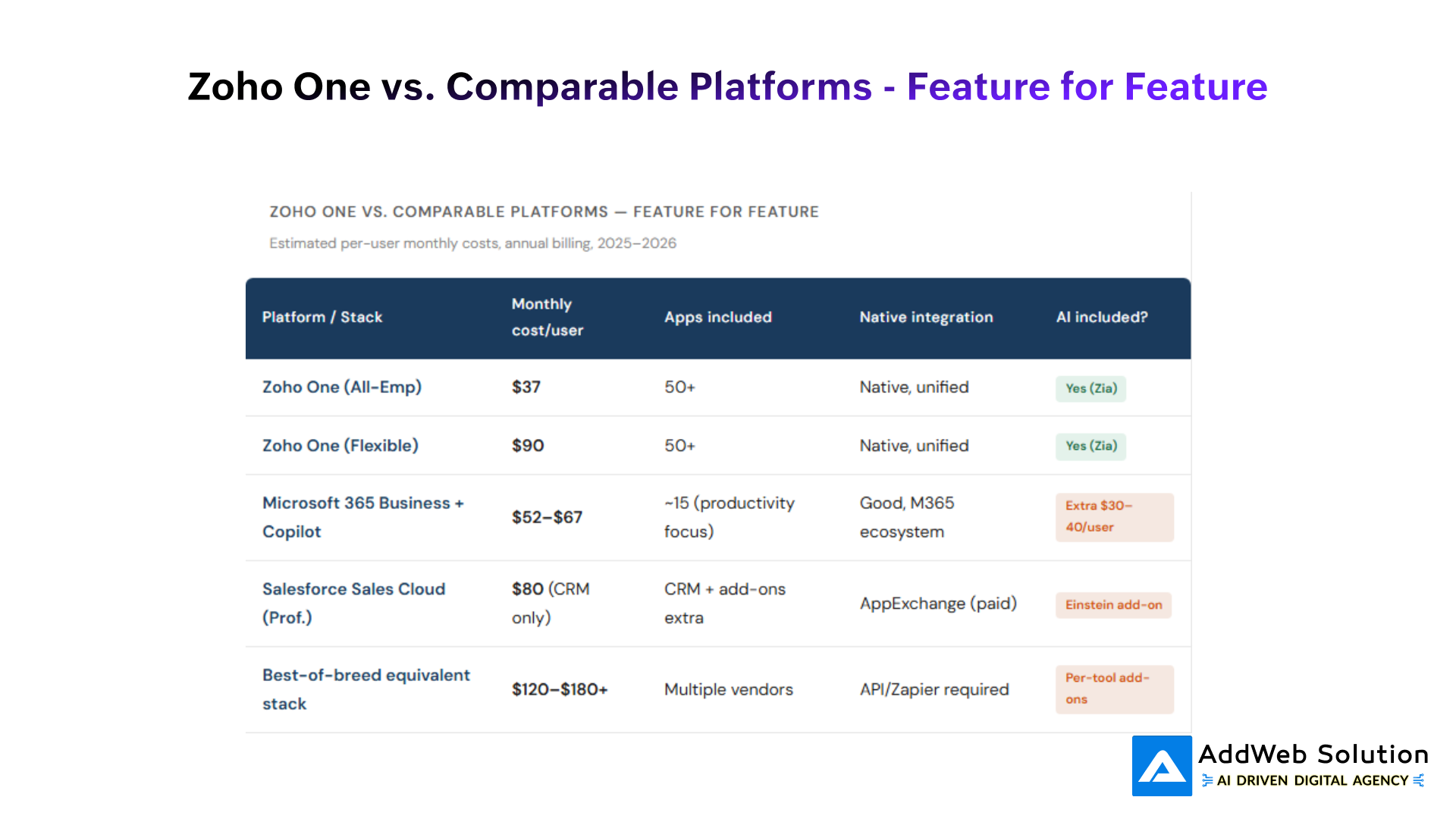
Table 2 — Indicative competitive comparison, 2026. Actual costs vary by contract, region, and negotiation.
The TCO picture shifts even more when you account for integration maintenance. A best-of-breed stack running six tools typically requires either a Zapier subscription ($299–$599/month for business), custom API work, or both costs that don’t show up on any pricing page but absolutely show up in engineering hours and data reliability issues.

Where the ROI Actually Comes From
I want to be honest here: the savings aren’t just about licence costs. That’s often the smallest piece. The real ROI shows up in four places that most cost calculators ignore entirely.
1. Integration overhead eliminated
When your CRM, helpdesk, accounting, and HR platform all live in the same ecosystem sharing a single user directory and data layer you stop paying the hidden cost of stitching them together. One of our retail clients estimated they were spending 18 hours per month on data reconciliation between their old CRM and accounting system. That’s gone with Zoho One.
2. Admin simplification
Single sign-on, centralised user management, one vendor support line. If your IT team (or founder) is spending time managing user access across seven platforms, that time has a cost. Zoho’s centralised admin panel consolidates all of it.
3. Adoption-driven data quality
When finance, sales, and support all live in the same ecosystem, data actually flows between them without manual exports. Your customer support team can see a client’s invoice status. Your finance team can see open deals. That cross-functional visibility is what actually makes forecasts and reports trustworthy.
4. Zia AI now genuinely useful
Zoho’s AI engine, Zia, has matured considerably. In 2026, it handles deal scoring, anomaly detection in financials, automated workflow suggestions, and sentiment analysis in support tickets features that would cost meaningful add-on fees with Salesforce or Microsoft Copilot ($30–$40/user/month). With Zoho One, they’re bundled.
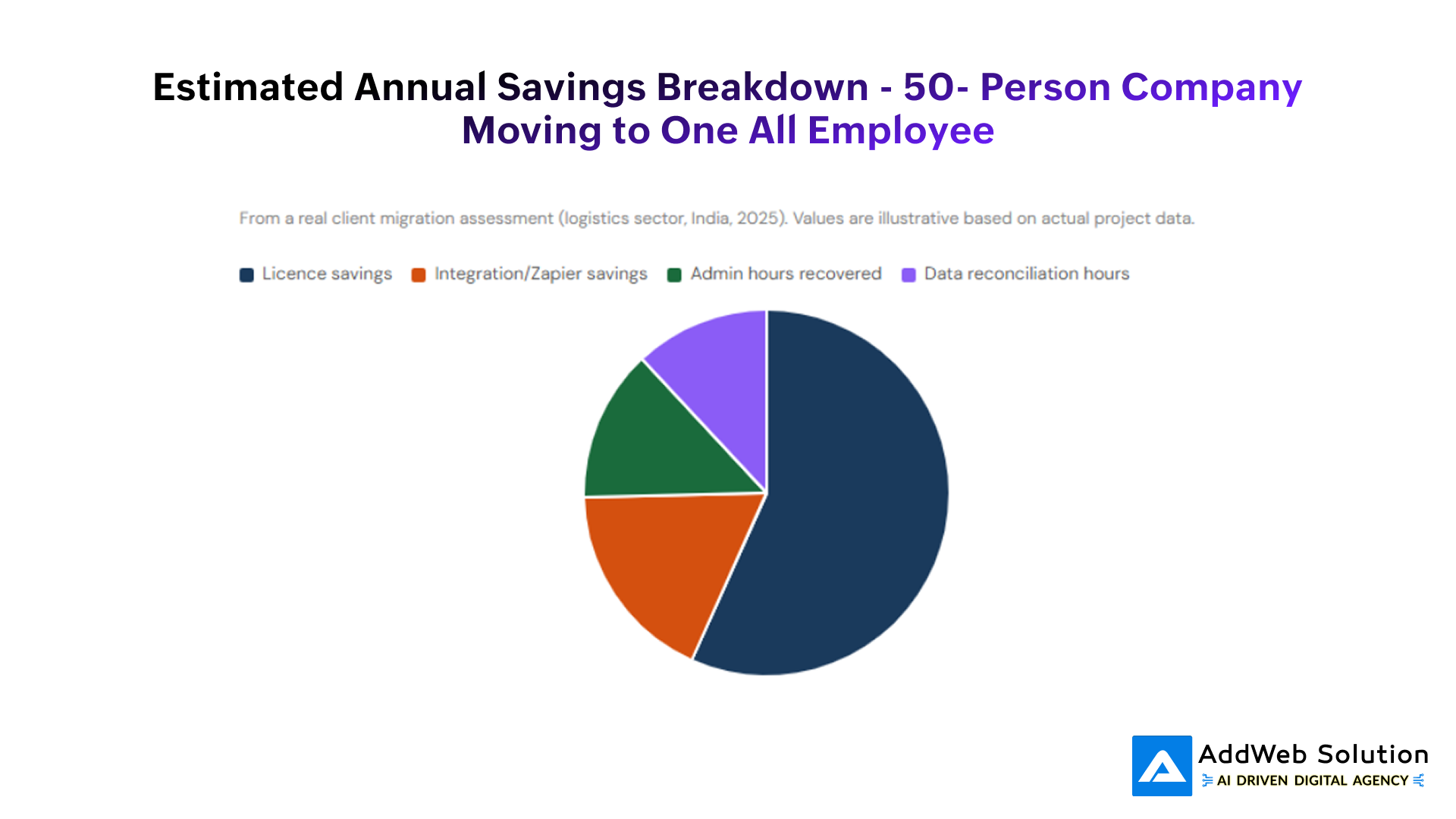
Fig. 4 — Illustrative ROI breakdown for a 50-person company switching from a fragmented stack to Zoho One All-Employee. Annual savings of approximately $67,000 USD modelled across four categories.
Who Should (and Shouldn’t) Buy Zoho One
No honest guide would tell you Zoho One is right for everyone. It’s not. Let’s be direct about it.
Strong fit for:
- SMBs and mid-market companies (10–500 employees) looking to consolidate a fragmented software stack and standardise operations across departments.
- Businesses in India Zoho’s home market, where INR-denominated pricing and GST-compliant accounting (Zoho Books) make it a natural fit. Zoho One India pricing is heavily subsidised relative to USD rates.
- Companies in high-growth mode that need to scale without committing to expensive enterprise contracts they’ll spend 18 months trying to customise.
- Teams with limited IT bandwidth Zoho’s drag-and-drop builders and low-code automation (Zoho Creator, Zoho Flow) handle 80–90% of customisation without needing a developer.
- Professional services firms consulting, accounting, legal where CRM, project management, invoicing, and client communication all need to talk to each other.
May not be the right fit if:
- You’re a large enterprise (500+ seats) with complex multi-BU governance, deep Salesforce AppExchange dependencies, or regulatory requirements that need extensive compliance tooling.
- Your team is deeply embedded in the Microsoft ecosystem if Power BI, SharePoint, and Teams are central to your workflow, the switching cost may outweigh the savings.
- You need highly specialised vertical software (e.g., healthcare PACS systems, construction ERP) that Zoho doesn’t cover and won’t easily integrate with.
- Your internal adoption capacity is low implementation quality matters as much as the platform. A Zoho One deployment without proper configuration and training often results in low utilisation and buyer’s remorse.
Hidden Costs Most Blogs Don’t Mention
This is the part we feel obligated to flag, because it trips up a surprising number of first-time Zoho buyers.
1. Implementation and configuration
Setting up 50+ apps properly customising the CRM pipeline, configuring Zoho Books for your chart of accounts, setting up Zoho Desk SLAs, building your HR workflows in Zoho People takes real time and expertise. For a 30–50 person company, expect 60–120 hours of setup work. If you’re working with a Zoho Partner, factor that into your Year 1 budget.
2. Data migration
Moving historical CRM data, customer records, and financial data from your old systems is often underestimated. Messy data in old systems becomes expensively messy data in a new system unless cleaned first. This is where we see projects stall most often.
3. Support tier selection
Zoho One’s default support (Classic) gives you email, chat, and phone during business hours. If you need faster response times and most businesses running operations on a platform do Premium support adds 20% to your subscription cost, Enterprise support adds 25%. On 50 All-Employee seats at $37, that’s an extra $4,440–$5,550/year.
4. Some specific add-ons cost extra
Most AI features are included in Zoho One. But certain premium Zia features, additional Zoho Analytics data rows beyond the included limits, or integrations with non-Zoho marketing platforms may require paid add-ons. It’s not a dealbreaker, but it’s worth knowing before you finalise your budget.
Our Verdict for 2026
So is it worth it? For most SMBs and mid-market companies we work with: yes, emphatically. But the nuance matters.
At $37/user/month (All-Employee, annual), Zoho One delivers a value-to-price ratio that genuinely has no close competitor in its class. The platform has matured significantly over the past two years. The AI capabilities, the analytics depth, and the inter-app data flows are meaningfully better than they were in 2022–2023. Zoho’s financial model (bootstrapped, profitable, no VC pressure to inflate pricing) also means pricing stability that you simply don’t get from Salesforce or Microsoft.
The platform is not flawless. The mobile apps are inconsistent. Some individual apps particularly Zoho Social and Zoho Survey lag behind best-of-breed alternatives. The UI across apps isn’t fully harmonised. If any one of those areas is absolutely mission-critical for your business, acknowledge that before committing.
But for most companies making the decision in 2026 comparing a fragmented, expensive, and maintenance-heavy stack against a unified, affordable, and genuinely functional alternative Zoho One clears the bar by a wide margin. The 40% Rule holds. The 3-year TCO math works. And the operational consolidation benefits are real.
What makes the difference between a successful Zoho One deployment and a disappointing one isn’t the platform. It’s the implementation of how well the system is configured to your actual processes, how thoroughly your team is trained, and how deliberately you govern adoption in those first 90 days.
Get that part right, and the ROI takes care of itself.
Ready to Streamline Your Business with Zoho?

Pooja Upadhyay
Director Of People Operations & Client Relations
