


A B2B website used to have a fairly simple job.
Explain what the company does. List the services. Add a few logos. Put a “Contact Us” button in the top-right corner and hope someone clicks it.
That model is getting harder to defend.
Today’s B2B buyer can research vendors, compare solutions, read reviews, watch product demos, evaluate pricing models and shortlist providers without ever speaking to sales. Gartner has predicted that 80% of B2B sales interactions between suppliers and buyers will occur through digital channels by 2025.
That changes what a website needs to be.
It is no longer just the company’s online brochure. It is increasingly part of the sales process itself.
And this is where Webflow becomes interesting.
Webflow gives marketing and digital teams the ability to build highly designed experiences while maintaining a CMS, reusable components, integrations, personalization possibilities and a workflow that doesn’t require developers to touch every small content change.
The result?
A B2B website can behave less like a PDF with navigation and more like a living revenue system.
1. From Digital Brochure to Revenue Engine
Think about the last B2B website you visited.
You probably didn’t arrive thinking:
“I’d like to read this company’s brochure.”
You arrived with a question.
Maybe:
- Does this company solve my problem?
- Have they worked with companies like mine?
- What does implementation look like?
- How much does it cost?
- Can their platform integrate with ours?
- Are they credible?
- What happens after I submit the form?
A modern B2B website has to answer those questions quickly.
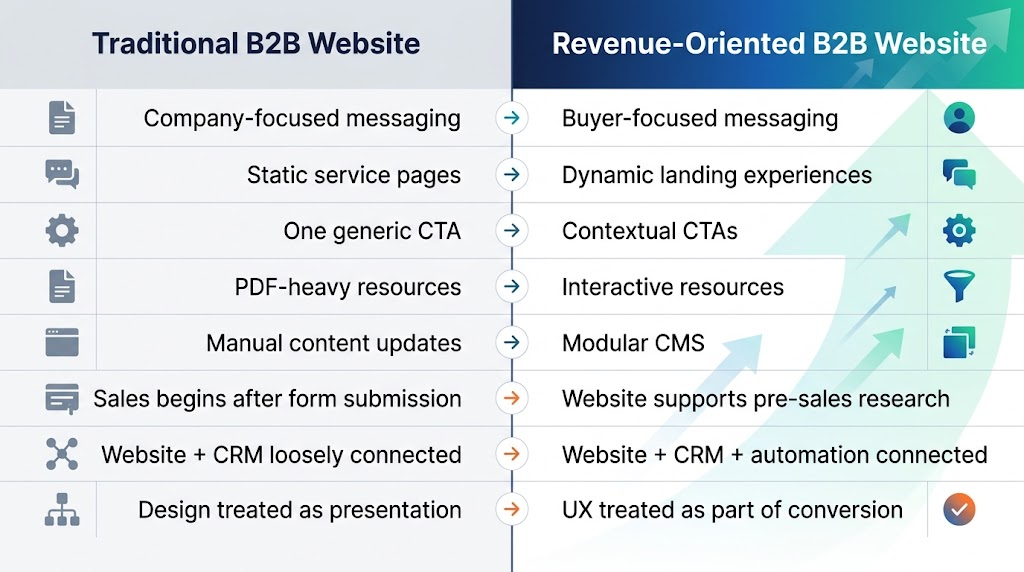
The old model
Homepage → About Us → Services → Case Studies → Contact
The website primarily distributes information.
The newer model
Search → Relevant landing page → Proof → Interactive content → CTA → CRM → Sales
The website participates in the buying journey.
That distinction sounds small, but it changes how the entire site should be planned.
2. Why B2B Websites Are Becoming More Dynamic
B2B buying has become a strange combination of research, skepticism and speed.
Buyers want more information before talking to sales, but they don’t necessarily want more pages.
They want better information architecture.
That means showing the right information at the right moment.
For example, an enterprise cybersecurity company could structure its website around different buying scenarios:
For CISOs
→ Security overview
→ Compliance resources
→ Enterprise case studies
→ Security architecture
→ Book a consultation
For IT teams
→ Integrations
→ Technical documentation
→ Implementation process
→ API information
→ Talk to an engineer
For procurement
→ Pricing framework
→ Contract information
→ Vendor documentation
→ ROI resources
→ Request proposal
Same company.
Completely different journeys.
That’s where a CMS and flexible design system become strategically important.
The Website Is Becoming a Front-End for the Go-to-Market Engine
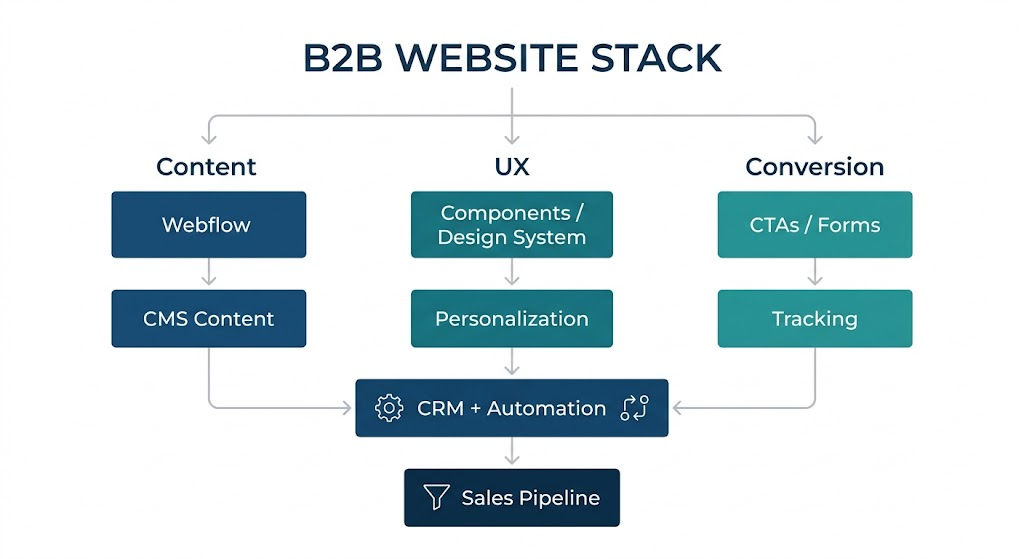
A modern B2B website can connect:
Webflow
↓
CMS + Landing Pages + Forms
↓
Analytics + CRM
↓
Marketing Automation
↓
Lead Scoring
↓
Sales Team
↓
Revenue
Webflow doesn’t replace the CRM, marketing automation platform or analytics stack.
It becomes the experience layer connecting them.
3. Where Webflow Fits Into the Modern B2B Stack
Webflow’s appeal in B2B isn’t simply that it lets teams create attractive websites.
The bigger advantage is the combination of visual control + structured content + reusable design systems + integrations.
That matters because B2B websites tend to grow quickly.
One service page becomes ten.
One case study becomes thirty.
One industry landing page becomes fifteen.
Suddenly, the website that looked simple at launch has become a miniature digital product.
Webflow’s CMS and component-based approach can help teams manage that complexity without turning every content update into a development ticket.
4. Static Website vs. Revenue-Driven Website
Here’s the important distinction.
A dynamic website isn’t necessarily one with animations flying across the screen.
In fact, too much visual motion can make a B2B site harder to use.
“Dynamic” means the website can respond to business needs.
New campaign?
Create a landing page using existing components.
New industry?
Build an industry page from structured CMS content.
New case study?
Publish it without rebuilding the site.
New campaign audience?
Create a dedicated conversion path.
New product?
Reuse the design system rather than starting from scratch.
That operational flexibility is where the real value sits.

5. The Data Behind the Shift
The website transformation isn’t happening in isolation.
Buyer behavior is changing alongside it.
Gartner predicted that 80% of B2B sales interactions between suppliers and buyers would occur through digital channels by 2025.
That doesn’t mean salespeople disappear.
It means the website increasingly becomes part of the conversation before the salesperson enters it.
Another useful data point comes from Gartner’s research into B2B buying journeys: 77% of B2B buyers said their latest purchase was very complex or difficult.
That creates an interesting problem.
If buying is complicated, simply adding more content isn’t necessarily the answer.
The better question is:
Can the website make the complexity easier to navigate?

The Bigger Signal
The important number isn’t really 80%.
The important part is what happens when buyers do more of their research digitally.
Your website has more opportunities to:
- educate
- establish credibility
- answer objections
- demonstrate expertise
- capture intent
- guide visitors toward relevant resources
- connect prospects with sales
That is a much bigger job than “having a website.”


6. What a Dynamic B2B Website Actually Looks Like
Let’s make this practical.
Imagine a SaaS company selling workflow automation software.
Instead of one generic product page, its Webflow site could have:
Product Layer
- Platform overview
- Feature pages
- Integration pages
- Security page
- Pricing
- Product comparisons
Audience Layer
- For CIOs
- For Operations
- For Finance
- For HR
- For IT
Industry Layer
- Healthcare
- Financial services
- Manufacturing
- Professional services
Proof Layer
- Case studies
- Customer stories
- Testimonials
- ROI examples
- Research reports
Conversion Layer
- Demo request
- Free assessment
- ROI calculator
- Consultation
- Product tour
Now the website isn’t simply explaining the company.
It is helping different buyers self-select their journey.
That’s a very different role.
7. Building the Webflow Revenue Machine
A strong B2B Webflow project usually starts before anyone opens the Webflow Designer.
The first question isn’t:
“What should the homepage look like?”
It’s:
“What does the buyer need to understand before they are ready to talk to us?”
From there, the architecture becomes much easier to define.
Step 1: Map Buyer Intent
Identify the questions visitors have at each stage.

Step 2: Build a Reusable Design System
Instead of designing every page independently, create reusable:
- Hero sections
- CTA blocks
- Testimonial sections
- Logo strips
- Feature cards
- Comparison tables
- FAQ sections
- Resource cards
- Case-study modules
This is where Webflow components can become extremely useful.
The site becomes a system rather than a pile of individual pages.
Step 3: Turn Repetitive Content Into CMS Content
Case studies are the obvious example.
Instead of creating every case study from scratch, establish fields such as:
Client → Industry → Challenge → Solution → Results → Services → Technologies → Testimonial
Then create one template.
Every new case study follows the same structure.
That improves consistency while making future publishing considerably less painful.
Step 4: Connect the Website to the Rest of the Stack
The website shouldn’t live on an island.
Depending on the organization, that might mean connecting Webflow with:
- HubSpot
- Salesforce
- Marketo
- Zapier
- Segment
- Google Analytics
- Google Tag Manager
- Email platforms
- Customer data platforms
The exact stack will vary.
The principle doesn’t.
Website activity should create useful business signals.
Step 5: Measure More Than Traffic
Traffic is useful.
But traffic alone doesn’t pay the invoice.
A B2B website should also track metrics such as:
Engagement
→ Engaged sessions
→ Key page visits
→ Resource consumption
Intent
→ Demo clicks
→ Pricing visits
→ Product interactions
Conversion
→ Form submissions
→ Qualified leads
→ Demo requests
Revenue
→ Opportunities influenced
→ Pipeline generated
→ Customer acquisition contribution
That’s when the website starts looking less like a marketing expense and more like a measurable business asset.
8. What This Means for B2B Teams
The Webflow conversation shouldn’t be reduced to:
“Should we redesign our website?”
A more useful set of questions is:
- Can our marketing team launch pages without waiting for development?
- Can buyers quickly find information relevant to their industry?
- Are our case studies and resources structured for reuse?
- Can we create campaign-specific journeys?
- Does our website connect meaningfully with our CRM?
- Are we measuring business outcomes, not just traffic?
- Can the site evolve without requiring another full redesign?
If several answers are “not yet,” the problem may be bigger than visual design.
It may be the website’s operating model.
9. Conclusion: The Website Is Becoming Part of the Sales Team
The biggest change in B2B websites isn’t a new animation, a clever hero section or another redesign trend.
It’s a change in responsibility.
The website is increasingly expected to educate prospects, establish trust, answer objections, organize information and create conversion opportunities before a salesperson ever joins the conversation.
Webflow fits naturally into this shift because it gives teams a way to combine structured content, reusable design systems, marketing flexibility and integrations within one digital experience.
But the platform is only part of the equation.
The real transformation comes from designing the website around how people buy, not simply around how a company is organized.
For B2B brands, that’s the difference between maintaining a website and building a digital revenue engine.
At AddWeb Solution, we approach Webflow projects with that broader lens, combining UX, development, CMS architecture, integrations and conversion thinking to build websites that are designed to evolve with the business.
The next B2B website shouldn’t just tell people what you do.
It should help them understand why it matters, why they should trust you, and what they should do next.
Transform Your B2B Website

Pooja Upadhyay
Director Of People Operations & Client Relations
Sources & Further Reading
https://www.gartner.com/en/sales/trends/future-of-sales
https://www.gartner.com/en/sales/trends/b2b-buying-journey
