


From static screens to adaptive experiences
Traditionally, UI design is based on the idea that one design can be “good enough” for all users, with perhaps a few variations in options and looks. Generative UI turns that on its head: the interface is built on the fly based on each user’s goals, history, device, and other factors.
Main concepts of Generative UI/UX:
- Rather than pre-designing interfaces for all possible states, interfaces are generated on the fly.
- User behavior, preferences, and environment cause layouts and elements to be different.
- AI systems use machine learning to interpret user intent and select UI building blocks appropriately.
Static vs generative interfaces

How generative UI/UX actually works
Generative UI, under the hood, is an architecture, not a feature. It’s composed of data, AI, the design system, and the real-time rendering engine.
The standard pipeline for the application of generative UI is as follows:
- Behavior data capture & aggregation
Clickstream, scroll depth, feature, device, session, etc. data is aggregated continuously. - Modeling user behavior & intent
Machine learning, usually in Python, is used for modeling the users, scoring, churn prediction, etc. - Determining UI config
There’s a ‘decision engine’ where design patterns, constraints, and business logic are applied to arrive at the final decision. - Assemble interface from components
Front-end implementation uses the design system to assemble the final interface on the screen, cards, sections, etc - Close the loop with analytics
The final step involves closing the loop with analytics, which is used for further improvements.
In essence, the conceptual approach to designing with generative UI involves not designing every pixel of every state, but designing the system, where the AI can safely re-arrange the design.


Behavior signals that drive design
Generative UI lives or dies on the quality of its behavioral data. The system needs more than “page views” to make smart choices.
Common behavior and context signals:
- Interaction patterns: clicks, taps, scrolls, hovers, rage clicks, dwell time on specific components.
- Navigation flows: entry points, paths to core tasks, where users drop off or loop back.
- Content engagement: which modules get expanded, ignored, or frequently revisited.
- User profile & role: account type, permissions, industry, device type, sometimes perceptual preferences (font size, spacing).
- Environment & context: location, time of day, network conditions, platform (mobile vs desktop).
Here is an example (illustrative, not from a specific dataset) of how inputs might be weighted inside a generative UI system:

This kind of breakdown helps product and design teams reason about which signals they’re prioritizing when the interface “decides” what to show next.
Why Python sits at the core of generative UI
Python is the default language for machine learning and data-heavy user experience work, and that naturally extends to generative UI. Surveys show roughly 69% of ML developers and data scientists use Python, versus about 24% using R, and about 10% of all Python use is now tied to ML workloads.
Reasons Python dominates this stack:
- Rich ML ecosystem: TensorFlow, PyTorch, scikit-learn, Keras, XGBoost, LightGBM for prediction, clustering, and ranking.
- Data & analytics tooling: pandas, NumPy, and rich SQL/warehouse connectors for cleaning and transforming behavioral logs.
- NLP & perception: spaCy, NLTK, Hugging Face Transformers for text, sentiment, and intent understanding in UX flows.
- Web & real-time APIs: Flask, FastAPI, Django, and Streamlit to expose personalization and layout APIs to front-end apps.
Example Python-centric stack for generative UI
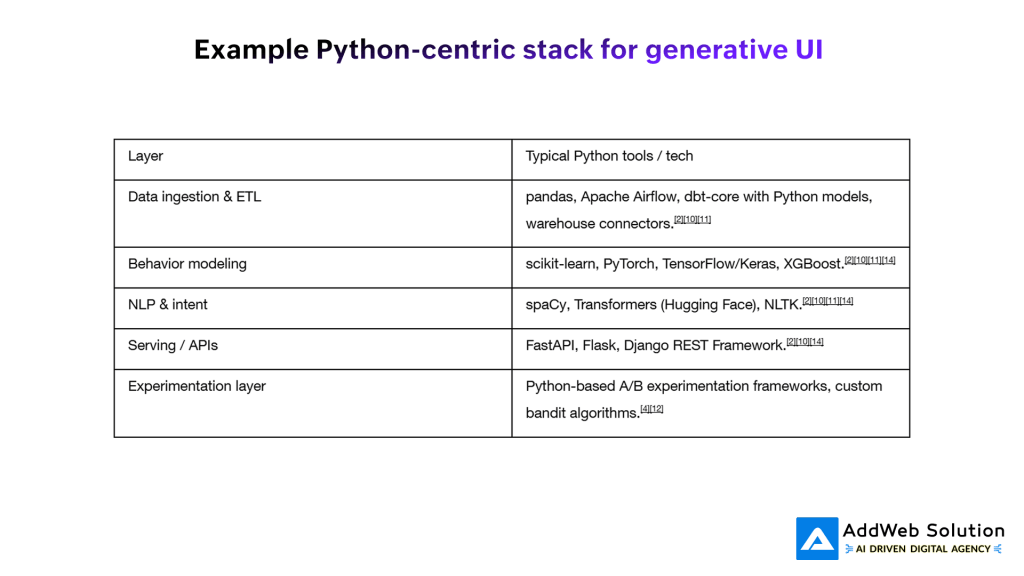
Python isn’t usually rendering the pixels—but it’s deciding which pixels React, Vue, or native mobile layers should place on the screen.
Design patterns emerging in AI-driven UI
As AI has moved into UX, recognizable patterns have emerged that sit very naturally inside a generative UI stack.
Some of the most relevant patterns:

From a UX writing and interaction standpoint, the challenge is to make these powerful capabilities feel transparent, predictable, and reversible rather than magical and uncontrollable.
Example flow: a Python-powered adaptive dashboard
Consider a product analytics dashboard in a SaaS tool that learns from each analyst’s behavior and rearranges itself accordingly. Here’s how Python-based AI might drive that experience end-to-end:
- Log interactions
Every widget click, filter change, time-on-widget, and export action is logged with user, role, and device context. - Train behavior models in Python
Python ML models cluster users by behavior (explorers vs. report-downloaders), score which widgets correlate with task completion, and detect “dead” UI regions. - Decide widget layout
A personalization service (FastAPI) ranks widgets for each user-session and returns an ordered list with size and prominence recommendations. - Render generative layout on the front end
The front end (e.g., React) doesn’t decide what to render; it asks the Python service for a layout spec and then instantiates cards, charts, and filters accordingly. - Measure and learn
Python jobs compare generative layout performance against control groups (static or rule-based layouts) on retention, query success, and time-to-insight.
You can visualize that flow like this:

This loop runs continuously, so the interface gets “sharper” as more behavior data comes in.
Metrics and business impact
Done well, generative UI/UX is not just a shiny demo—it moves core metrics. Research on personalization shows that well-executed personalized UX can increase sales by roughly 10–15% and customer satisfaction by about 20%. AI personalization in SaaS and digital products is also associated with higher engagement and loyalty when applied carefully and transparently.
Example impact table (based on reported ranges)

Of course, these gains are not automatic—poorly designed or opaque AI can harm trust and satisfaction just as easily.
To tell a compelling story to stakeholders, teams often visualize the lift in a simple before/after view:

Again, treat visuals like this as a communication tool; the real numbers should come from your actual experiments.
UX guardrails: keeping generative UI humane
Generative interfaces can overwhelm users if they feel unpredictable, over-personalized, or “creepy.” UX research on generative AI applications highlights a few essential guardrails.
Principles to bake into your system:
- Explain what’s changing and why
Brief, contextual messaging (“We’ve rearranged your dashboard based on your recent activity”) can increase trust. - Give users control and escape hatches
Let users pin, undo, reset, and opt out of personalization instead of locking them into AI decisions. - Avoid over-personalization and dark patterns
Personalization should reduce friction and cognitive load, not manipulate or trap users in narrow experiences. - Design for accessibility and perceptual differences
Generative UI can dynamically adjust typography, spacing, and contrast to match perceptual profiles and accessibility needs. - Validate with user research, not just metrics
Lab tests, diary studies, and interviews reveal confusion and distrust that raw engagement metrics can hide.
Treat generative UI as a design collaboration between humans and AI, not a handover of control to opaque models.
How to get started (practical path for product teams)
If you’re leading a product, design, or engineering team, you don’t need to adopt full-blown generative UI overnight. You can roll it out in controlled slices.
A pragmatic roadmap:
- Instrument behavior data properly
- Capture meaningful events (not just page views) with context: user role, device, feature flags.
- Centralize logs into a warehouse where Python-based pipelines can access them.
- Define a robust component library and design tokens
- Build a well-defined design system so AI can safely recombine cards, sections, and interactions.
- Tag components with semantics (e.g., “primary CTA”, “secondary insight”, “navigation group”).
- Start with one high-impact surface
- A home dashboard, recommendations rail, or onboarding flow is usually a good candidate.
- Use Python ML models to rank components or content and compare to a rule-based baseline.
- Build a thin personalization API in Python
- Expose “get_layout(user, context)” or “get_recommendations(user, screen)” endpoints via FastAPI or Flask.
- Keep front-end integration simple: treat the backend’s response as a layout spec.
- Experiment, measure, and iterate
- Run A/B or bandit tests comparing static, rule-based, and generative variants.
- Track business metrics and UX metrics (task success, satisfaction, perceived control).
- Codify patterns into guidelines
- As you learn what works, document patterns, constraints, and “never do this” rules for your generative UI.
Simple planning table you can adapt

Bringing it together
Generative UI/UX is not a buzzword; it is a practical evolution of interface design where Python-based AI systems assemble experiences in real time around what users actually do and need. If you combine a solid design system, trustworthy data, and a disciplined Python ML stack, you can move from static “best guess” screens to living interfaces that feel genuinely responsive, personal, and human-centered.
⁂
- https://blog.logrocket.com/ux-design/ai-driven-ux-design-patterns/
- https://blog.paullopez.ai/mastering-generative-ui-design-patterns-for-ai-powered-interfaces/
- https://www.andacademy.com/resources/blog/ui-ux-design/generative-ai-in-ui-ux-design/
- https://a16z.com/how-generative-ai-is-remaking-ui-ux-design/
- https://www.uxpin.com/studio/blog/ai-personalization-saas-ui-design-case-studies/
- https://readabilitymatters.org/articles/generative-ui-meets-better-readability
- https://cloud.google.com/blog/products/ai-machine-learning/how-to-build-a-genai-application


