


“The real value teams unlock when they move from WordPress to Webflow isn’t just animation or polish. It’s that marketing, design, and engineering finally work inside the same environment instead of lobbing tickets over the fence.”
If you’ve worked in digital for more than a minute, you’ve probably heard some version of this debate in a meeting: “Should we stay on WordPress or move to Webflow?”
Most teams frame it as a design question—templates vs. custom visuals, themes vs. interactions. The real story is bigger. It’s about how fast your team can ship, how safely you can experiment, and how much energy you’re burning just to keep the site alive behind the scenes.
This article breaks down what businesses actually gain when they move from a WordPress-first mindset to Webflow—not as a hype-driven platform switch, but as a strategic shift in how websites are designed, maintained, and scaled.
Why this shift matters now
WordPress is still the giant in the room. As of March 2026, it powers about 42.6% of all websites and roughly 59.9% of all sites using a known CMS. That’s hundreds of millions of properties and a mature ecosystem you can plug into almost anything.
Webflow, on the other hand, is much smaller in raw share but growing fast. Recent analyses estimate Webflow powers around 0.9% of all websites and about 1.2% of CMS-based sites, with active sites increasing from roughly 320,600 in early 2024 to about 493,000 by April 2025. On the business side, Webflow’s revenue has been reported at around 213 million USD in 2024 with year-on-year growth of roughly 66%—a clear signal that more teams are willing to pay for a visual, managed platform that reduces operational drag.
So the question isn’t “Is WordPress dead?” It’s “Where does Webflow give modern teams unfair advantages beyond just nicer layouts?”
Beyond themes — how the working model changes

From theme-driven to system-driven design
On WordPress, most journeys start with themes and plugins. You grab a theme, add a page builder, bolt on plugins for forms, SEO, caching, maybe a visual builder on top of Gutenberg—and then wrestle everything into your brand system. It works, but every extra plugin and layout hack adds a bit of design and technical debt.wpzoom
Webflow flips this model. Instead of starting with a theme, you start with a design system: global styles, grids, reusable components, interactions, and CMS collections. The visual designer essentially is the front-end layer, outputting semantic HTML and CSS from a single source of truth. That means:
- Your brand rules live inside the platform (not spread across multiple builders).
- Components and patterns are reused instead of rebuilt per page.
- Designers and front-end devs work in the same environment, not separate tools.
For teams that care about consistent UX and motion design, this system-driven approach feels less like “editing a theme” and more like “operating a design system.”
From plugin stacks to integrated workflows
WordPress is famous for “there’s a plugin for that”. SEO? Plugin. Forms? Plugin. Redirects, security, performance, analytics injection? More plugins. It’s powerful—but also where teams start sweating about version conflicts, update risk, and compatibility over the long term.wpzoom
Webflow takes a more integrated route:
- Core SEO fields, sitemaps, SSL, redirects, and basic performance optimisations are built-in.
- Hosting, CDN, and certificates are part of the platform, not a separate decision.
- Many integrations (CRM, marketing automation, analytics) are configured once via project settings or a single embed, not scattered across several plugin UIs.enricher
You trade the infinite flexibility of the plugin ecosystem for a curated, vertically integrated stack. For a lot of marketing teams, that trade means fewer surprises and less “who owns this plugin?” confusion.
From “developer bottleneck” to “guided autonomy”
Both platforms let non-technical editors publish content. The difference is how safely and smoothly they can do it at scale.
Typical WordPress pattern:
- Complex layouts live inside a page builder or custom template.
- Editors can easily break layouts if they mix blocks or shortcodes incorrectly.
- Bigger structural changes often go back to devs or agencies.
Typical Webflow pattern:
- Dev/design teams define CMS collections (e.g., blog posts, case studies, locations) and component layouts.
- Editors work in the Webflow Editor, changing content directly on the page canvas, but within strict design constraints.
- New pages are usually created by duplicating an existing layout or using a preset structure tied to a CMS collection.enricher
This “guided autonomy” is a big reason Webflow adoption is strong among SaaS marketers and agencies who need to ship landing pages and campaigns weekly, not quarterly.grandviewresearch+1
How small agencies scale WordPress delivery, without hiring full-time teams?

Pooja Upadhyay
Director Of People Operations & Client Relations
WordPress vs Webflow — a business-first comparison
Here’s a concise comparison you can visualize as a horizontal comparison chart, card grid, or feature matrix on the blog.

This is exactly the kind of visual matrix you can convert into a carousel, comparison graphic, or animated table in Webflow or WordPress for more engagement.
The macro trend — low‑code, no‑code, and Webflow’s growth curve
The WordPress vs Webflow choice doesn’t happen in isolation. It sits inside a much bigger trend: low-code and no-code tools becoming core to digital transformation.
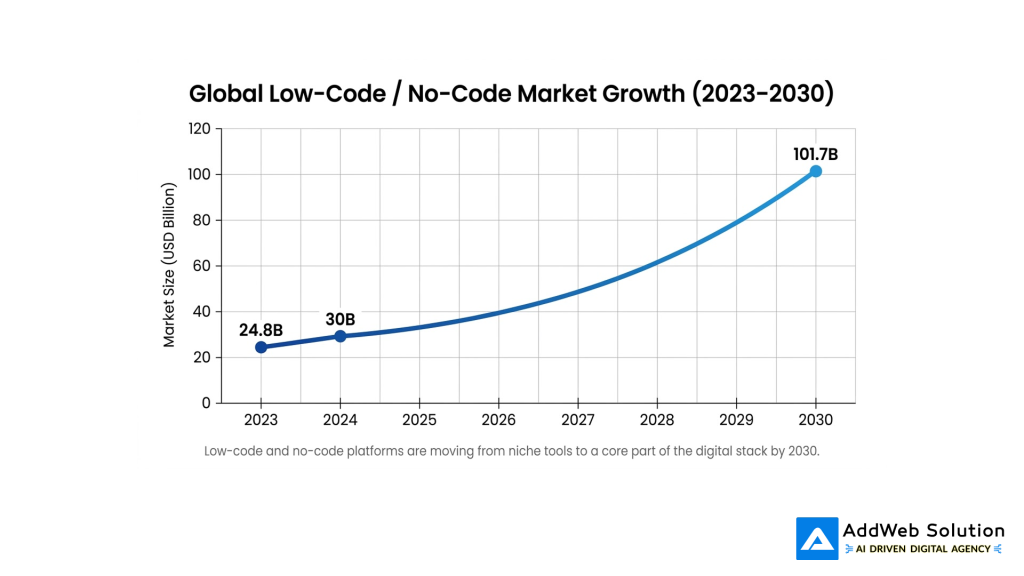
This matters because platforms like Webflow ride exactly this wave. As more non‑IT professionals are expected to work on digital products—with some estimates suggesting that by 2024, up to 80% of non‑IT professionals will help develop IT products and over 65% of them will use low-code/no-code tools—the demand for visual web platforms is only going up.



This adoption is not just hobbyists. Analyses highlight that a significant portion of Webflow projects are built for small and medium businesses, and that its e‑commerce usage grew by more than six times between 2020 and 2023. Combined with reported revenue of around 213 million USD in 2024 and ~66% year-on-year growth, it is clear Webflow is moving deeper into agency and mid‑market territory.popupsmart+3
What businesses gain beyond just “better design”
Let’s get concrete. Here’s what organisations typically experience when they move from WordPress to Webflow for their marketing and brand sites.
1. Speed to first value and iteration
- Faster first launch: Visual dev plus integrated hosting means fewer moving parts and fewer handoffs. A designer–developer hybrid can often go from wireframe to live Webflow site in weeks, not months, especially for net‑new brand or campaign sites.grandviewresearch+1
- Shorter feedback loops: Marketers can tweak copy, CTAs, and even layouts in the Webflow Editor without raising dev tickets. That’s a big deal for growth teams optimising paid campaigns, onboarding pages, or product stories.
2. Governance and brand consistency
- Guardrails instead of chaos: In Webflow, design and dev teams define components, patterns, and CMS structures. Editors operate inside those constraints, which drastically reduces “Frankenstein pages” that don’t follow the design system.
- Centralised updates: Because Webflow runs as a managed platform, security patches, infrastructure changes, and performance upgrades are delivered in the background. Owners of sites built on WordPress remain responsible for coordinating core, theme, and plugin updates and testing for regressions.wpzoom
3. Cleaner integrations and experimentation
- A more predictable front-end: Webflow outputs clean, consistent markup. That makes it easier to integrate analytics, tag managers, customer data platforms, and A/B testing tools without fighting multiple overlapping plugins.popupsmart+1
- Better fit for product-led teams: SaaS companies increasingly see their marketing sites as an extension of the product. A visual builder that still produces solid front-end code helps product and marketing stay aligned on performance and UX.
4. A more honest total cost of ownership (TCO)
WordPress is “free” at the licence level, but serious business sites typically pay for:
- Premium plugins and themes
- Managed or high-performance hosting
- Security hardening and monitoring
- Developer time for updates, fixes, and plugin conflicts
Webflow flips this into a predictable platform fee that compresses many of those operational tasks into the subscription. Independent reports and agency case studies often highlight this as a key reason they lean into Webflow for design‑led marketing sites: higher subscription costs but noticeably lower overhead for maintenance and firefighting.
When does moving from WordPress to Webflow actually make sense?
From AddWeb’s vantage point working with WordPress, Webflow, and custom stacks, here’s the pattern we see most often.
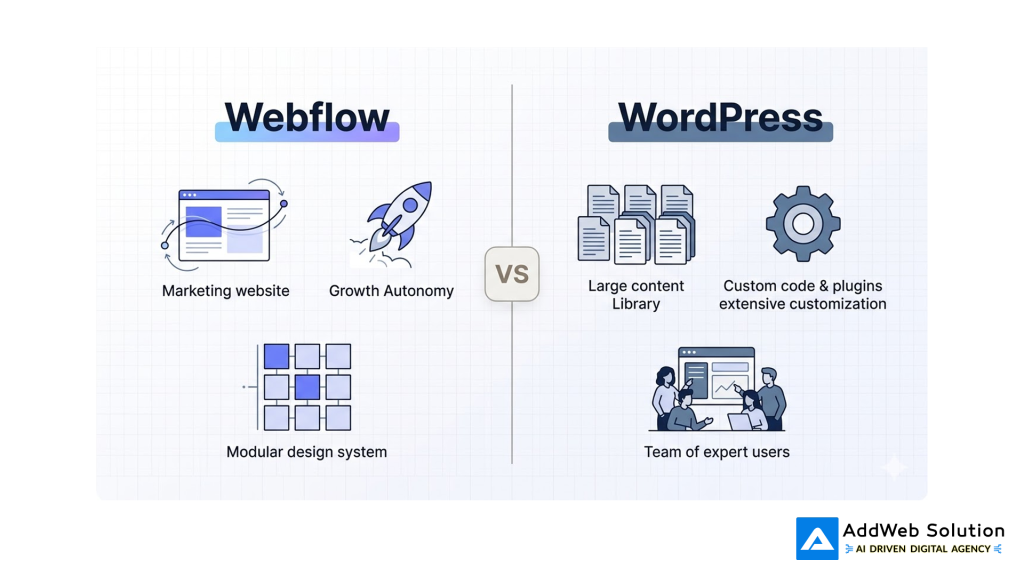
Webflow is usually a strong fit when:
- You run brand-led B2B or SaaS marketing sites where storytelling, motion, and UX are key differentiators, and your app or product runs elsewhere.
- Your growth and content teams want autonomy to launch and iterate pages without always depending on a dedicated front-end squad.
- You’re an agency or studio building many marketing sites and campaign microsites and want to standardise on a reusable, visual design system.
WordPress still shines when:
- You have a large, legacy content estate (multi-author blog, magazine, knowledge base) already deeply embedded in WordPress.
- Your site depends on heavy custom back-end logic or specialised plugins that don’t map neatly into a managed SaaS builder.
- Your internal team already has deep expertise on WordPress and tooling and the incremental benefit of switching doesn’t clear the migration and retraining cost.
You don’t need to think of this as a binary, all-or-nothing move. Many organisations run a hybrid model: WordPress for content-heavy or legacy properties, Webflow for high-velocity brand and campaign experiences.
Practical takeaway — how to explore Webflow without breaking what works
If you’re on WordPress today and curious about Webflow, a low-risk way to explore the move looks like this:
- Pick a net-new project
Choose a campaign microsite, product launch hub, or standalone landing experience to build in Webflow first, instead of rebuilding your main site on day one. - Measure the right things
Track time to launch, number of dev tickets, iteration cycles, and page performance compared to similar WordPress projects. Include qualitative feedback from marketing, design, and engineering teams. - Decide on your long-term mix
Use those data points to decide whether Webflow becomes your primary platform for marketing sites, a specialised tool for specific use cases, or a stepping stone to a broader low-code strategy.
At AddWeb Solution, our teams often work in both ecosystems—deep WordPress engineering on one side, Webflow builds on the other. That dual perspective helps clients avoid “platform religion” and instead design a stack that fits their business, governance model, and growth ambitions.
Thinking of moving beyond WordPress limitations?
Switch to Webflow and build faster, more flexible, and future-ready websites today.
Pooja Upadhyay
Director Of People Operations & Client Relations
Source URLs
- https://www.wpzoom.com/blog/wordpress-statistics/
- https://kinsta.com/wordpress-market-share/
- https://w3techs.com/technologies/details/cm-wordpress
- https://www.thealien.design/insights/webflow-usage-statistics-2025
- https://popupsmart.com/blog/webflow-statistics
- https://www.grandviewresearch.com/industry-analysis/low-code-application-development-platform-market
- https://www.appbuilder.dev/low-code-statistics
