


In 2026, the most productive Laravel teams do not look like superhero coders pulling all-nighters—they look like calm, focused engineers working side‑by‑side with AI assistants that quietly handle the boring parts of the job.
Instead of asking, “Will AI replace developers?”, leading teams ask, “How do we turn every Laravel developer into an AI‑augmented problem solver?”

1. Why Laravel teams suddenly feel 2–5x faster
The hard data behind the feeling
Over the last few years, multiple independent studies have measured the impact of AI coding assistants on real developers:
- GitHub’s controlled experiment found that developers using Copilot completed a realistic coding task 55 percent faster than those without it.
- A randomized trial across Microsoft, Accenture and a Fortune 100 manufacturer measured a 26.08 percent increase in pull requests completed per week for Copilot users.
- At ZoomInfo, 90 percent of developers said Copilot reduced the time it took to complete tasks, with a median self‑reported reduction of around 20 percent.
- Syntheses of several studies show typical 20–40 percent faster coding for individual developers, even after accounting for rework on AI‑generated code.
On top of speed, AI changes how developers feel about their work:
- 60–75 percent of Copilot users report higher job fulfillment.
- 73 percent say they stay “in flow” longer, and 87 percent say it preserves mental energy.
Put simply: AI assistants make everyday development feel lighter, faster, and less frustrating—especially on repetitive Laravel work like controllers, resource classes, and boilerplate tests.
Simple bar chart you can include
You can support this section with a bar chart comparing headline productivity gains from three well‑known studies:
- GitHub Copilot controlled experiment (task completion speed, ~55 percent).
- Microsoft/Accenture multi‑company RCT (PRs per week, 26.08 percent).
- ZoomInfo internal survey (median time reduction, ~20 percent).
Use the attached chart image titled “Reported Productivity Gains from AI Coding Assistants” as your graph for this section.

2. What an AI-augmented Laravel developer actually does
“AI‑augmented” does not mean a developer who presses a button and ships whatever the model generates. It means a Laravel engineer whose entire workflow is quietly supported by intelligent tools at each step.
In a typical day, an AI‑augmented Laravel developer:
- Writes less boilerplate.
IDE assistants like GitHub Copilot, Tabnine or Laravel Boost understand Laravel idioms and can generate controllers, Eloquent models, policies, and test stubs from short prompts or existing code. - Spends less time hunting bugs.
AI‑enhanced tools analyse Laravel logs, Telescope traces, and Pulse metrics to highlight likely root causes and propose specific fixes—like optimizing N+1 queries or adjusting queue configuration. - Gets tests “for free”.
For many endpoints and components, tests are generated as a starting point from route definitions and expected behaviour, then refined by the developer. - Stays in flow more often.
Instead of breaking concentration to Google syntax or dig through docs, the developer asks questions inline—“Why is this query slow?”, “Write a feature test for this controller”—and the assistant responds directly in the editor. - Never ships undocumented APIs by accident.
Autodoc engines analyse controllers, form requests, and resources to keep OpenAPI specs and README files in sync with the codebase in near real time.
The human still owns the architecture, domain logic, and final code review. The AI acts like a tireless junior pair‑programmer who never gets bored of writing yet another CRUD endpoint.
3. Where the 5x leverage really comes from
The title talks about 5x productivity, but the reality is more nuanced. You don’t get 5x from a single tool; you get it by stacking smaller gains across the entire lifecycle.
Compounding effects across the delivery lifecycle
Here’s how those gains stack up for a Laravel team:
| Lifecycle area | Typical AI boost (based on studies) | What changes for a Laravel team |
| Coding & scaffolding | 20–55% faster completion on scoped coding tasks.[3][5][9] | Controllers, models, migrations, and tests are scaffolded from prompts; devs review and refine. |
| Bug fixing & debugging | 15–30% less time on common classes of issues.[1][2] | AI suggests fixes for slow queries, misconfigured queues, and obvious logic bugs. |
| Testing | Higher coverage with less manual boilerplate.[1][12] | AI generates baseline test suites for HTTP endpoints, jobs, and Livewire components. |
| Documentation & handover | Docs stay aligned with code by default.[2] | API docs, OpenAPI specs, and README updates ship automatically on merge. |
| Product flow & delivery | Faster, clearer feedback loops.[8][13] | Ideas turn into prototypes and tests faster, reducing idle time across the whole team. |
A team that is 25–40 percent faster at coding, 20–30 percent faster at debugging, and significantly smoother at testing and documentation can easily ship the same value in a fraction of the calendar time, or deliver many more features with the same headcount.
That is what “5x” looks like in practice: not five times the lines of code, but a step‑change in throughput and business impact.
4. How time actually shifts: before vs after AI
One of the easiest ways to explain AI augmentation to non‑technical stakeholders is to show how the day feels different for the team.
Example before/after pie charts
Consider a typical Laravel team before AI assistants:
- Large chunks of time are spent debugging, reading documentation, and hand‑writing boilerplate tests.
- Developers feel busy but often stuck in low‑leverage work.
Now contrast that with a team that has deeply integrated AI into its workflow:
- Much more time is spent on feature coding and higher‑value test design.
- Less time is burned on repetitive bug fixing and documentation lookup.
You can visualise this shift with two pie charts:
- “Laravel Team Time Allocation Before AI Assistants” – more time on bug fixing and docs.
- “Laravel Team Time Allocation After AI Assistants” – more time on feature coding and tests, less on debugging and docs.
Use the attached charts “laravel_time_before_ai.png” and “laravel_time_after_ai.png” as your pie chart visuals for this section.

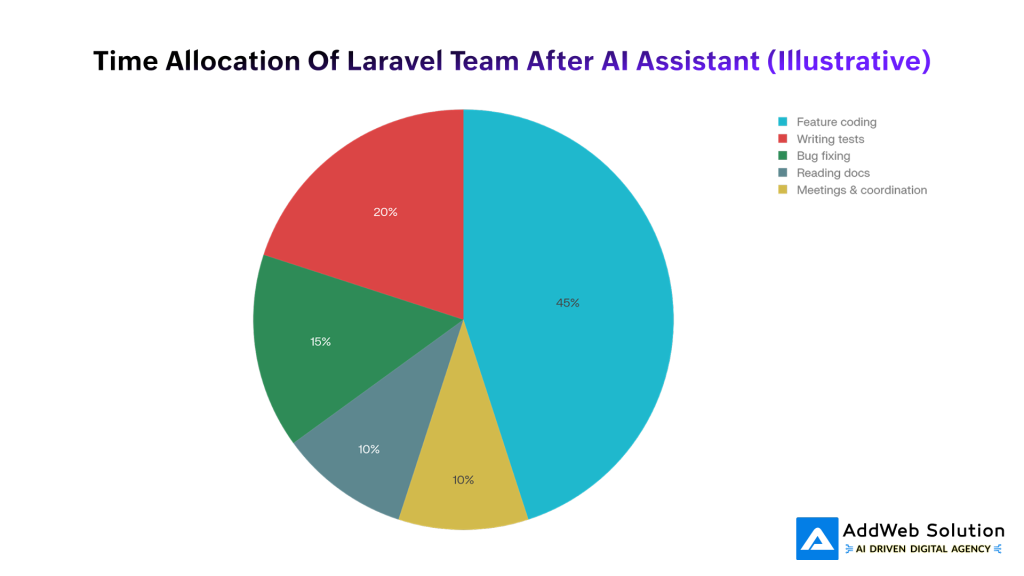
These charts are illustrative, but they mirror how many teams report their day changing once AI is fully embedded: less grunt work, more time on meaningful engineering.
5. The Laravel AI toolstack in 2026
Laravel has moved from “can talk to AI APIs” to “built on top of AI” in many areas of the ecosystem.
Framework-native intelligence
Several capabilities are becoming standard in modern Laravel stacks:
- Laravel AI SDKs and Prism-style integrations
Unified wrappers connect your app to multiple large language models (OpenAI, Claude, Gemini, Qwen, DeepSeek, and others) with Laravel‑style facades and service providers. - AI-aware diagnostics (Pulse & Telescope)
Observability tools do not just show slow endpoints or failed jobs; they propose specific refactors and can even open pull requests with suggested fixes. - Agentic task scheduling
Queues use LLMs to classify and prioritise jobs—for example, detecting a high‑value customer ticket and routing it to a high‑priority queue or AI summariser automatically. - Autogenerated documentation
Autodoc engines continuously analyse controllers, form requests and resources to keep API documentation and developer guides in sync with the actual code.
For a Laravel developer, this means intelligence is available at the framework level, not just inside the editor.
Laravel-specific AI packages and assistants
On top of the framework, a growing ecosystem of AI packages has emerged:
- Laravel Boost – an AI‑powered development assistant from the Laravel ecosystem that generates code snippets, explains internals and accelerates scaffolding and testing.
- Vector & retrieval packages (for example, vectorify-laravel) – tools that store and query vector embeddings to power semantic search, recommendations, and RAG patterns.
- Multi‑LLM bridges (Prism‑style) – packages that make it trivial to swap AI providers and route tasks between them using familiar Laravel patterns.
- Performance helpers (for example, laravel-slower) – analyzers that detect slow queries and use AI to propose indexing and query‑refactor strategies.
- AI Agent Development Kits (for example, Vizra ADK) – opinionated tooling to build reliable AI agents within a Laravel app using mainstream engineering practices.
This stack turns Laravel into a comfortable home for AI‑first product teams.

6. New collaboration patterns in AI-first Laravel teams
Who owns what: humans vs AI
Healthy teams draw a clear line between human responsibilities and AI‑assisted tasks.
| Area | Human-owned | AI-augmented |
| Product direction | Decide what to build and why; define outcomes and priorities. | Turn natural-language specs into scaffolds, user stories, and initial tests. |
| Architecture & security | Design system boundaries, domain models, and security controls. | Suggest patterns, refactors and potential vulnerabilities based on code and configuration analysis. |
| Core business logic | Implement critical flows and complex domain rules. | Propose boilerplate, guard clauses, and alternative implementations for non-critical paths. |
| Testing strategy | Decide what matters most to test and how to evaluate risk. | Generate test cases, mutate tests for better coverage, and run automated checks. |
| Code review | Make final decisions on correctness, style, and maintainability. | Highlight potential bugs, performance issues, and inconsistent patterns across the codebase. |
The rule of thumb: AI drafts, humans decide. Teams that treat the AI as a strong but fallible assistant avoid the worst failure modes and keep quality high.
Emerging human roles around AI
You do not need a new department to benefit from AI, but certain “hats” make a big difference:
- AI Champion / Tech Lead – defines how AI tools are used, curates prompts, and chooses which workflows to automate first.
- AI Librarian – maintains reusable prompts, code‑generation recipes, and documentation templates that fit the team’s Laravel architecture.
- Developer Experience (DevEx) Steward – keeps an eye on how AI affects cognitive load, review queues, and incident rates, making sure speed doesn’t degrade quality.
Often these are part‑time responsibilities for existing leads, but they are critical for turning individual AI wins into consistent team‑level leverage.
7. Implementing AI augmentation in a Laravel team (without chaos)
A practical rollout roadmap
Teams that simply “turn on Copilot for everyone” often hit the productivity paradox: developers feel faster, but overall delivery slows as reviewers and QA struggle with more code and subtle bugs.
A more disciplined rollout for a Laravel team looks like this:
- Measure your baseline.
Track lead time from idea to production, cycle time per feature, escaped defects, and developer satisfaction before you introduce new tools. - Start with editor assistants.
Pilot tools like GitHub Copilot and Laravel Boost on one or two teams, focusing on well‑scoped, lower‑risk work such as internal admin panels or reporting tools. - Layer in AI diagnostics and testing.
Turn on AI‑enhanced Pulse/Telescope features and experiment with auto‑generated tests for existing controllers and jobs, treating all suggestions as drafts that must be reviewed. - Automate documentation next.
Integrate Autodoc‑style generators so that API and developer docs update automatically whenever code changes, then refine the generated content to match your standards. - Introduce agents for repetitive workflows.
Use Laravel AI SDKs or agent kits to handle tasks like log summarisation, incident report drafting, and L1 support ticket triage inside your Laravel app. - Continuously refine guardrails.
Be explicit about what AI must never own (for example, cryptography, complex financial logic, security‑critical routines), and bake those rules into review checklists and CI policies.
This approach keeps the benefits visible while containing the risks.
Human-centric guardrails that actually work
Research shows that without guardrails, teams can end up 19 percent slower on end‑to‑end tasks even while they believe they are 20 percent faster, because extra time is spent reviewing and correcting AI‑generated code.
High-performing Laravel teams therefore:
- Treat AI output as proposed code, not production code.
- Train senior engineers to recognise AI failure patterns (for example, hallucinated Laravel methods or non‑idiomatic Eloquent queries).
- Use AI heavily for explanations and onboarding—having the assistant explain unfamiliar parts of a legacy Laravel codebase—where the risk is lower.
- Regularly review bug rates, incident frequency, and reviewer workload to ensure AI is reducing, not increasing, operational risk.
8. What this means for Laravel leaders in 2026
The evidence from the last three years is consistent: AI coding assistants do make individual developers faster and happier, but the real leverage appears only when teams redesign their workflows around them.
For Laravel leaders, “5x productivity” is not a single purchase; it is the result of:
- Embedding AI throughout the Laravel toolchain—from IDEs to Pulse, queues, docs, and internal agents.
- Changing how teams collaborate, review, and measure success so that speed does not come at the cost of stability or security.
- Investing in people who know how to ask better questions of AI, not just write better prompts but make better engineering decisions with AI in the loop.
Teams that make these shifts now will find that by the end of 2026, “AI‑augmented Laravel developer” is not a differentiator—it’s just what a professional Laravel engineer looks like.

Looking to integrate AI into your Laravel application or development workflow? Our experts help businesses build scalable AI-powered products faster.

Pooja Upadhyay
Director Of People Operations & Client Relations
- https://github.blog/news-insights/research/research-quantifying-github-copilots-impact-on-developer-productivity-and-happiness/
- https://www.infoq.com/news/2024/09/copilot-developer-productivity/
- https://arxiv.org/html/2501.13282v1
- https://aws.amazon.com/blogs/enterprise-strategy/measuring-the-impact-of-ai-assistants-on-software-development/
- https://appspenang.uitm.edu.my/sigcs/2025-1/Articles/2025V1_PAPER01.pdf
- https://www.cerbos.dev/blog/productivity-paradox-of-ai-coding-assistants
- https://www.softwareseni.com/what-the-research-actually-shows-about-ai-coding-assistant-productivity/
