


Choosing a website platform isn’t really a WordPress-vs.-Wix debate. It’s a business decision about control, cost, growth, performance, and what your team will need two years from now.
A website can start innocently enough.
“It’s just a five-page company site.”
Then the marketing team wants a blog. Sales wants lead routing. The CEO wants a new landing page every week. Someone asks for a multilingual version.
Then comes CRM integration, analytics, an AI chatbot, ecommerce, better SEO, faster mobile performance and suddenly that “simple website” is running part of the business.
That is where platform choice starts to matter.
WordPress remains the dominant CMS by a wide margin. W3Techs reports that WordPress powers about 40% of all websites and nearly 59% of websites where the CMS is known. Shopify, Wix, Squarespace, Webflow and other platforms have built strong alternatives around different priorities.
So, should you choose WordPress?
Maybe.
The better question is: What does your business need from its website – and which platform creates the fewest problems while getting you there?
WordPress Isn’t Automatically the Right Answer
Before getting into the eight questions, it helps to remove one misconception.
There is no universally “best” website platform.
WordPress is powerful because it gives businesses enormous flexibility. Shopify is compelling when commerce is the center of the operation. Wix can make sense for teams that prioritize ease of use. Webflow appeals to design-led teams that want visual control without managing a traditional plugin-heavy CMS.
The platform should follow the business – not the other way around.


8 Questions to Ask Before Choosing Your Website Platform
1. How much control will your business actually need?
This is probably the most important question.
Not how much control you want today. How much control the business is likely to need as the website becomes more important.
With a self-hosted WordPress setup, you generally have control over the hosting environment, database, themes, plugins, code and integrations. That opens a lot of doors.
You can build:
- Custom lead-generation workflows
- Membership portals
- Complex content structures
- Multilingual websites
- Custom APIs
- CRM integrations
- Advanced SEO functionality
- Ecommerce through WooCommerce
- Headless or decoupled architectures
- Custom dashboards and user experiences
But that flexibility comes with responsibility.
Someone has to manage updates, security, backups, compatibility and performance.
By contrast, hosted platforms such as Shopify or Wix take more infrastructure management off your plate. That’s attractive for businesses that don’t want their marketing team thinking about servers and plugin conflicts.
The trade-off is simple:
More control usually means more responsibility. More convenience usually means more platform dependency.
Visual: The control spectrum
| Platform approach | Control | Maintenance responsibility | Best fit |
| WordPress | ★★★★★ | ★★★★☆ | Businesses needing flexibility |
| Webflow | ★★★★☆ | ★★☆☆☆ | Design-led marketing sites |
| Shopify | ★★★☆☆ | ★★☆☆☆ | Ecommerce-first businesses |
| Wix | ★★☆☆☆ | ★☆☆☆☆ | Smaller teams prioritizing simplicity |
| Squarespace | ★★☆☆☆ | ★☆☆☆☆ | Content-led brochure sites |
| Custom-built | ★★★★★ | ★★★★★ | Complex digital products |
2. Is your website mainly a marketing asset – or part of your product?
This distinction changes everything.
If your website is primarily there to explain who you are, showcase your services and generate leads, several platforms can do the job very well.
But what happens when the website becomes part of the actual product?
Think about a:
- SaaS company with customer dashboards
- Education business with student accounts
- Healthcare company with secure portals
- Marketplace with multiple user roles
- B2B company with complex resource libraries
- Retail brand with thousands of products
- Media company publishing hundreds of articles
At that point, you’re no longer choosing a “website builder.”
You’re choosing an application foundation.
WordPress can work extremely well here, particularly when custom development is involved. But so can a headless architecture, a custom application, Shopify Plus, Drupal or another specialized stack.
The right question isn’t “Can this platform build it?”
Almost every modern platform can build something.
Ask instead:
“Can we still operate and evolve it efficiently after version 10?”
3. How important is ecommerce?
If ecommerce is your core business model, don’t treat ecommerce as an afterthought.
A company selling 20 products has very different requirements from a retailer managing:
- 20,000 SKUs
- Multiple warehouses
- Regional pricing
- Tax rules
- Subscription products
- Returns
- Marketplace feeds
- Multiple payment providers
- Customer accounts
- Inventory synchronization
WordPress + WooCommerce can be a strong option, especially when the store requires unusual functionality or deep integration with an existing WordPress content ecosystem.
Shopify, meanwhile, is built around commerce from the ground up. Shopify says millions of businesses in 175+ countries use its platform, with 2025 GMV of $378 billion.
That doesn’t automatically make Shopify better.
It does tell you something important: a commerce-first platform can be the smarter choice when selling is the primary job of the website.




4. What will your SEO strategy look like in two years?
This is where platform decisions can become expensive to reverse.
SEO isn’t just about installing a plugin and adding keywords.
A serious SEO program can involve:
- Technical SEO
- Structured data
- Canonical URLs
- XML sitemaps
- Redirect management
- Internal linking
- Content hubs
- Programmatic pages
- International SEO
- Schema markup
- Landing-page experimentation
- Page-speed optimization
- Image optimization
WordPress is particularly attractive for content-heavy businesses because the ecosystem allows developers and SEO teams to customize the technical layer extensively.
But there’s an important caveat:
A flexible platform does not automatically create good SEO.
A poorly configured WordPress website can be slower and harder to maintain than a well-built website on a simpler platform.
Platform capability is only one part of the equation.
5. Who is going to maintain the website?
This question gets ignored during website planning – and becomes painfully obvious six months later.
Imagine two businesses.
Company A
It has an internal marketing team, a developer and an external technology partner.
They are comfortable managing plugins, staging environments, analytics, integrations and technical SEO.
WordPress could be an excellent fit.
Company B
It has one marketing manager who needs to update pages between campaigns and doesn’t want to touch anything technical.
A fully managed platform may be a better choice.
Neither company is making the “wrong” decision.
They’re optimizing for different operating models.
A useful rule
Choose the platform your actual team can operate – not the platform your imaginary future developer might prefer.
6. What is the real cost – not just the monthly subscription?
This is where platform comparisons often become misleading.
A $30/month platform doesn’t necessarily cost less than a $100/month setup.
Your actual website cost can include:
Platform + hosting + development + plugins/apps + maintenance + security + design + integrations + performance optimization + support
For WordPress, the software itself is open source, but hosting, development and ongoing management still have costs.
For hosted builders, infrastructure may be bundled into the subscription, but premium features, apps, transaction fees or advanced plans can add to the bill.
Five-year thinking is more useful than monthly pricing
| Cost area | WordPress | Shopify | Wix/Webflow-style platforms |
| Platform software | Low/free core | Subscription | Subscription |
| Hosting | Separate or managed | Included | Included |
| Custom development | Flexible | Moderate–high | Moderate |
| Third-party apps | Optional | Common | Common |
| Maintenance | Usually higher | Usually lower | Usually lower |
| Migration flexibility | High | Moderate | Varies |
| Long-term customization | Very high | High, within ecosystem | Moderate–high |
The number that matters isn’t “How much does the platform cost?”
It’s:
“How much will this website cost us to run, improve and eventually change?”
7. Can the platform deliver the performance your customers expect?
This one is non-negotiable.
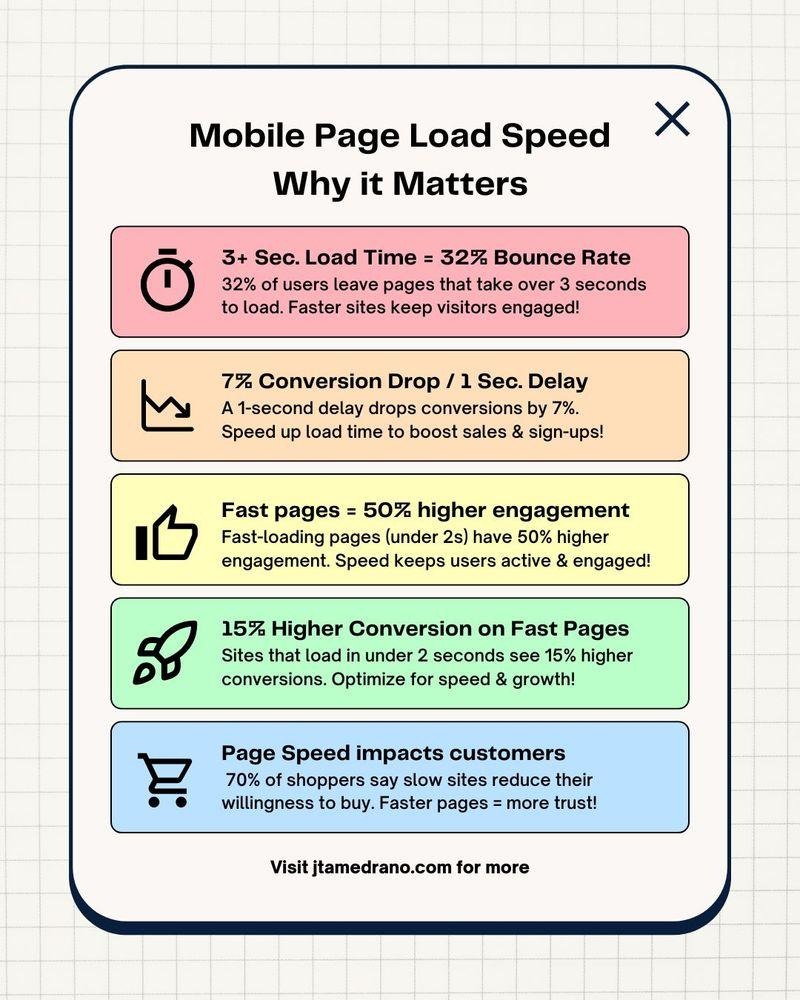
A beautiful website that feels slow is still a bad website.
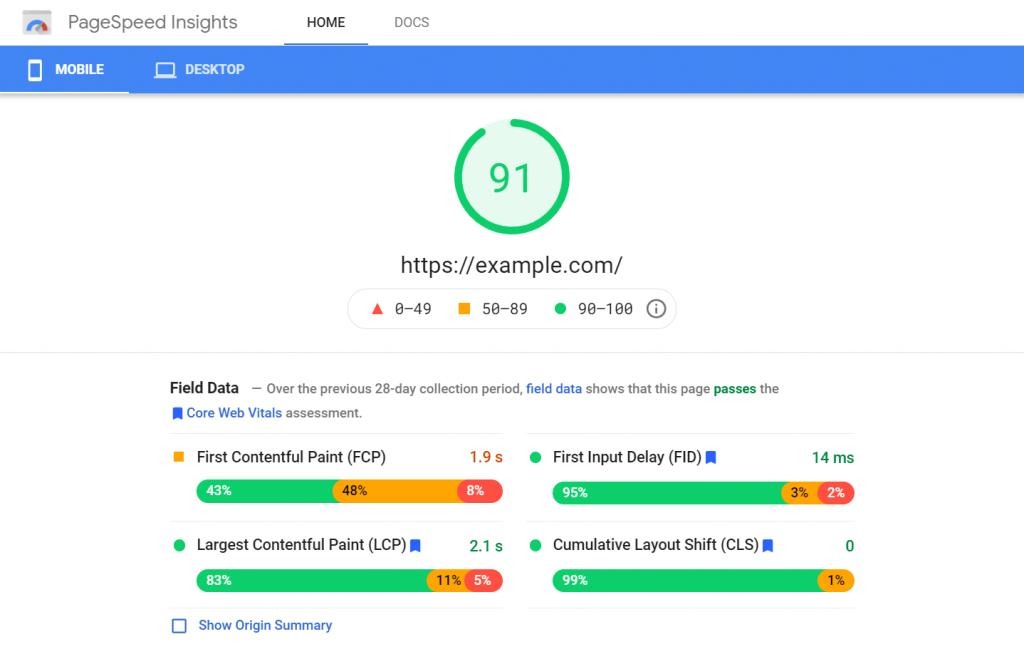
Google’s Core Web Vitals framework focuses on real-world loading, responsiveness and visual stability. In 2024, Google also completed the transition from First Input Delay (FID) to Interaction to Next Paint (INP) as the responsiveness metric.
And there are real business consequences to getting performance right.
In one published case study, Brazilian real-estate marketplace QuintoAndar reduced mobile INP from 1,006 ms to 216 ms and reported a 36% year-over-year increase in conversion volume alongside its performance improvements.
That doesn’t mean “reduce INP by 80% and conversions will automatically rise 36%.”
The company itself notes that the conversion improvement was strongly – but not solely – linked to better engagement.
The bigger lesson is this:
Performance is a business metric, not just a developer metric.

8. What happens if you outgrow the platform?
This is the question most businesses ask too late.
Your website may look perfect today.
But what happens when:
- Your traffic triples?
- Your content team doubles?
- You expand into five countries?
- Your CRM changes?
- You launch ecommerce?
- Your website needs personalization?
- You need an AI-powered support experience?
- Your marketing team needs 50 landing pages?
- Your existing platform gets too restrictive?
Migration isn’t impossible.
It is simply expensive, disruptive and time-consuming.
That’s why we recommend thinking about exit costs before entry costs.
Ask:
- Can I export my content?
- Can I move my domain easily?
- Can I migrate customer data?
- Can I preserve URLs?
- Can I retain SEO equity?
- Can I replace the CMS without rebuilding everything?
- Are my integrations portable?
If the answer to most of these is “no,” you’re not just choosing a platform.
You’re choosing a degree of vendor dependency.
WordPress vs. Everything Else: A Practical Decision Matrix
Here’s a simpler way to look at the decision.
| Business requirement | WordPress | Shopify | Wix | Webflow | Custom |
| Content-heavy website | 🟢 Excellent | 🟡 | 🟢 | 🟢 | 🟡 |
| Ecommerce-first | 🟡 | 🟢 Excellent | 🟡 | 🟡 | 🟢 |
| Maximum customization | 🟢 | 🟡 | 🔴 | 🟡 | 🟢 Excellent |
| Easy for non-technical teams | 🟡 | 🟢 | 🟢 | 🟡 | 🔴 |
| Large plugin/integration ecosystem | 🟢 | 🟢 | 🟢 | 🟡 | 🟡 |
| Infrastructure simplicity | 🟡 | 🟢 | 🟢 | 🟢 | 🔴 |
| Complex business workflows | 🟢 | 🟡 | 🟡 | 🟡 | 🟢 Excellent |
| Long-term portability | 🟢 | 🟡 | 🟡 | 🟡 | 🟢 |
| Developer control | 🟢 Excellent | 🟡 | 🟡 | 🟡 | 🟢 Excellent |
What the Market Data Tells Us
WordPress’s dominance is not accidental.
W3Techs currently reports WordPress at roughly 40% of all websites and 58%+ of websites whose CMS is identifiable. Shopify follows at around 5% of all websites, while Wix is around 4%.
That gap is significant.
But market share shouldn’t be confused with suitability.
A platform can be extremely popular and still be the wrong choice for a specific business.
CMS market snapshot
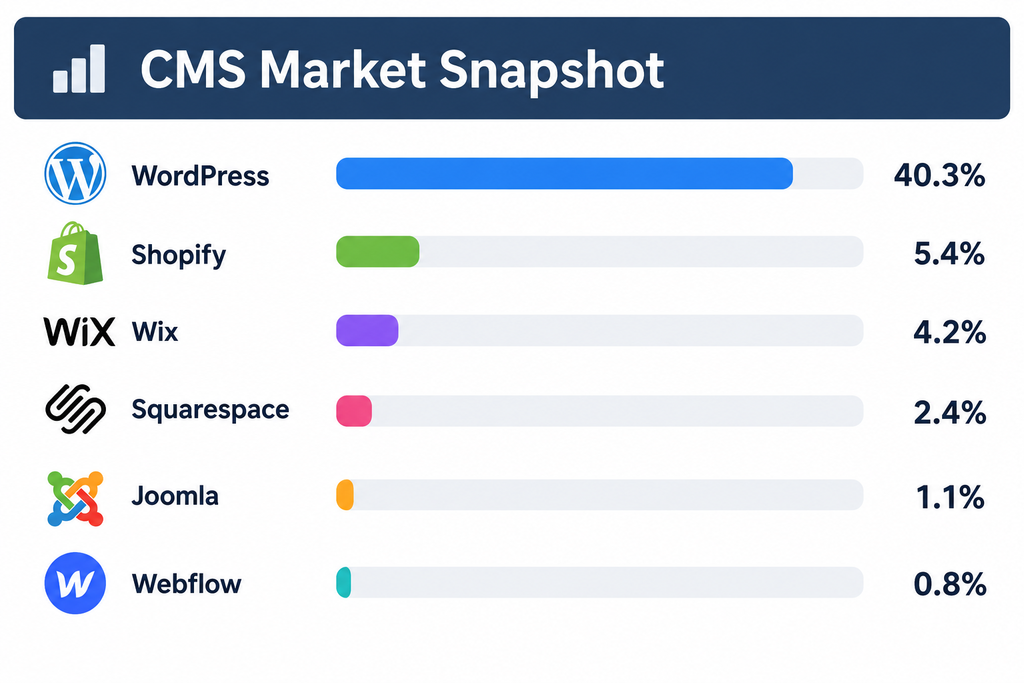
The interesting part isn’t simply that WordPress is ahead.
It’s that different platforms are growing around different business models.
Shopify’s position reflects the demand for commerce infrastructure. Webflow’s appeal is heavily connected to design and marketing workflows. Wix focuses strongly on ease of website creation.
The market isn’t moving toward one winner.
It’s becoming more specialized.
So… Should You Choose WordPress?
If your business needs content flexibility, integrations, custom functionality, strong SEO control and long-term extensibility, WordPress deserves serious consideration.
If your business is fundamentally commerce-first, Shopify may reduce operational complexity.
If your priority is getting a polished website online with minimal technical management, Wix or Squarespace may be enough.
If your marketing team is highly design-driven and wants visual control with a modern workflow, Webflow can be a strong candidate.
And if the website is actually becoming a complex digital product, custom development or a headless architecture may eventually make more sense.
The mistake is choosing based on the platform’s popularity, a developer’s personal preference, or whichever subscription looks cheapest on the pricing page.
Instead, start with the business.
Not sure which website platform is right for your business?

Pooja Upadhyay
Director Of People Operations & Client Relations
Ask these eight questions:
- How much control do we really need?
- Is the website a marketing asset or part of our product?
- How important is ecommerce?
- What does our SEO strategy require?
- Who will maintain the website?
- What will the total cost of ownership look like?
- Can the platform deliver the performance our customers expect?
- What happens if we outgrow it?
Answer those honestly, and the platform choice usually becomes much clearer.
At AddWeb Solution, we don’t believe every business needs the same technology stack. The right approach depends on your business model, growth plans, internal capabilities, integrations and customer experience goals.
Sometimes that means WordPress.
Sometimes it means something else.
The best website platform isn’t the one with the most features. It’s the one that makes your next stage of growth easier not harder.
