


Design files used to be the finish line for designers and the starting line for developers. That line is getting blurry.
A designer creates a polished interface in Figma. The developer opens the file, studies spacing, inspects typography, exports assets, rebuilds components, and then starts the familiar back-and-forth: “Is this padding correct?” “Which font weight is this?” “Can we move this 8px?”
With modern Figma-to-Webflow workflows, much of that translation layer is disappearing.
The goal isn’t simply to turn a Figma file into HTML. It’s to create a workflow where design systems, components, interactions, CMS structures, and responsive behavior move closer to production from the beginning.
For teams working on marketing websites, SaaS products, eCommerce experiences, and large-scale redesigns, that shift can change the economics of web production.
Why Figma × Webflow Is Becoming a Serious Workflow
For years, the standard process looked something like this:
Figma → design handoff → developer interpretation → code → QA → revisions
The problem isn’t Figma. And it isn’t the developer.
The problem is the translation gap between visual intent and production implementation.
A Figma design can specify:
- typography
- spacing
- colors
- components
- breakpoints
- imagery
- interactions
- visual hierarchy
But a production website also needs:
- semantic HTML
- responsive behavior
- reusable classes
- CMS collections
- accessibility
- SEO
- performance
- forms
- integrations
- analytics
- redirects
- structured content
This is where Webflow changes the conversation.
Instead of treating the design file as a static reference, teams can increasingly treat it as part of a structured production workflow.
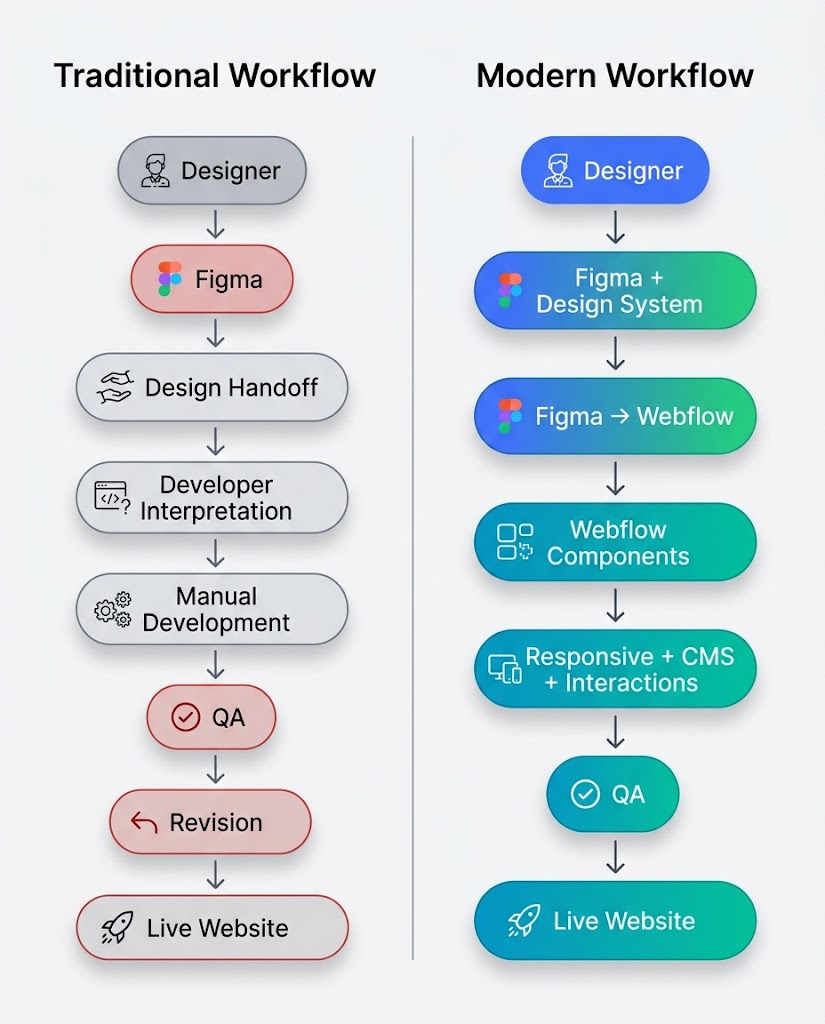
That difference may look small on paper.
In an actual project with dozens of pages, hundreds of CMS items, and multiple rounds of feedback, it isn’t.
What Actually Happens Between Figma and Webflow?
The phrase “Figma to Webflow” can make the process sound like pressing an export button.
It isn’t.
The better way to think about it is:
Figma establishes the visual system. Webflow turns that system into a functioning web experience.
The strongest workflows begin before the first screen is imported.
Step 1: Build the design system
Before moving anything into Webflow, identify:
- colors
- typography
- spacing
- buttons
- cards
- navigation
- forms
- containers
- grids
- reusable sections
This gives the development team a blueprint rather than a pile of individual screens.
Step 2: Establish reusable components
A homepage might contain:
Hero
↓
Logo Cloud
↓
Feature Grid
↓
Testimonial
↓
CTA
↓
Footer
If five other pages use the same CTA pattern, it shouldn’t become five separate development tasks.
It should become one reusable component.
Step 3: Map design structure to Webflow structure
This is the part people often underestimate.
A Figma layer called:
Rectangle 42
doesn’t tell a developer much.
A structured Webflow component called:
Container → Section → Grid → Card → Content
does.
Step 4: Add behavior
A design can show what a website looks like.
The production build must also define what it does.
That includes:
- hover states
- animations
- menus
- forms
- CMS filtering
- interactions
- responsive layouts
- accessibility behavior
That’s where the workflow moves beyond pixel matching.
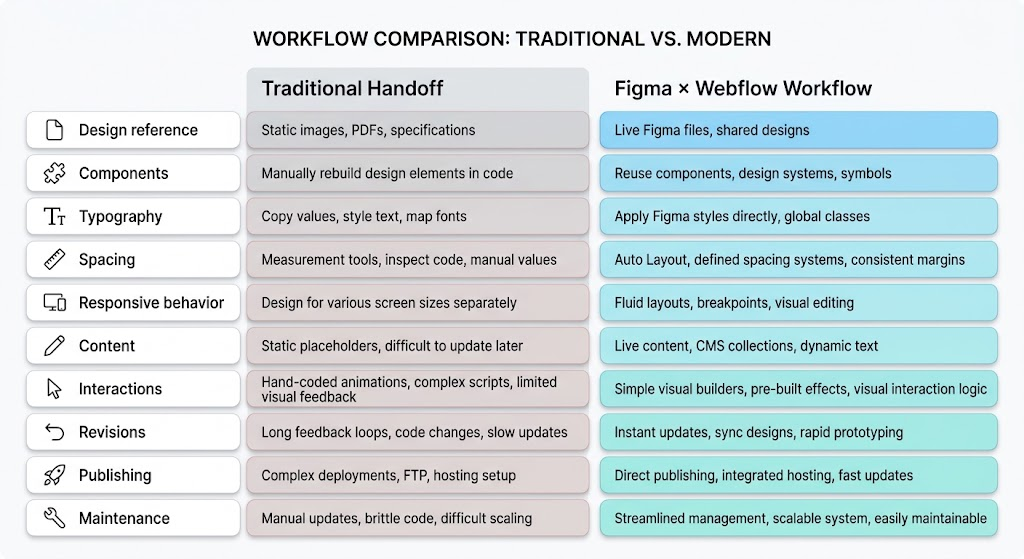
Traditional Handoff vs. Modern Figma-to-Webflow Workflow
The biggest change isn’t necessarily that development disappears.
It’s that less development time is spent recreating information that already exists in the design system.
A useful distinction
Automation removes repetition. It doesn’t remove judgment.
A tool can help transfer structure.
It can’t reliably decide whether a testimonial carousel should exist in the first place.
That’s still a human decision.
Where AI and Automation Enter the Picture
This is where the workflow gets particularly interesting.
Figma-to-Webflow was already reducing manual translation. AI is now beginning to attack another part of the process: production effort itself.
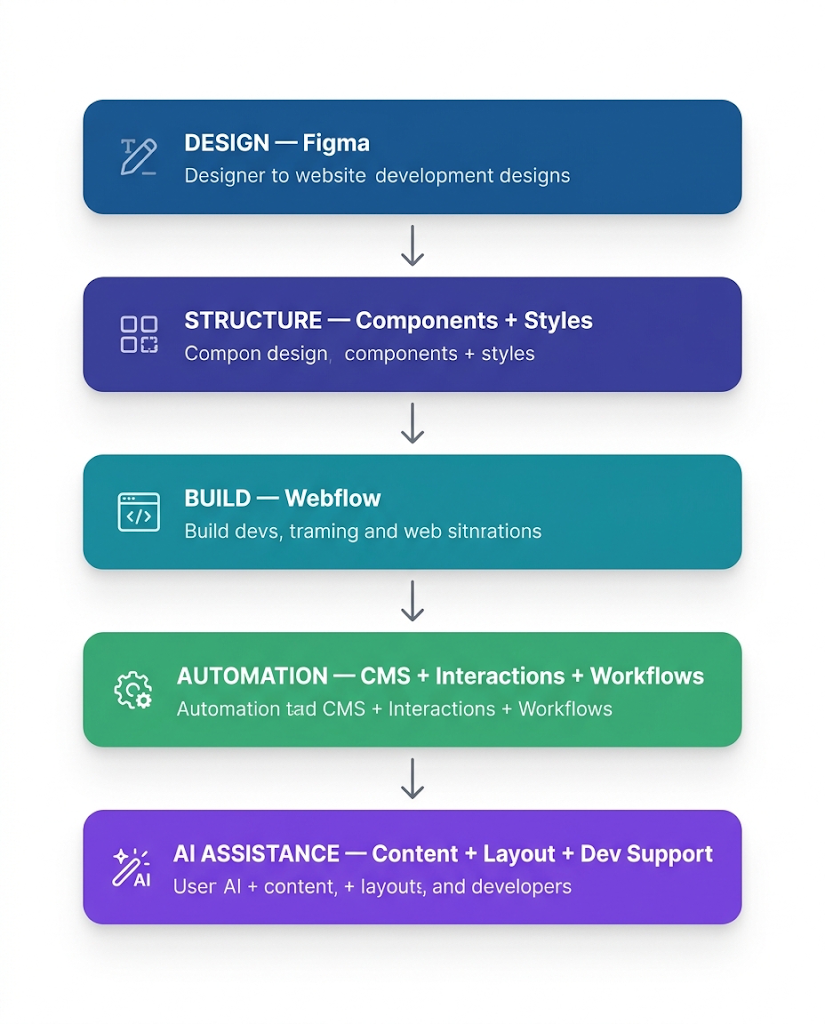
AI doesn’t make the workflow magically autonomous.
Instead, it can shorten specific tasks inside it.
For example:
Content
AI can help generate:
- placeholder copy
- metadata
- product descriptions
- FAQs
- content variations
Development
AI coding assistants can accelerate:
- custom CSS
- JavaScript snippets
- troubleshooting
- repetitive code
- integration logic
Design
AI can assist with:
- early concepts
- content variations
- image generation
- layout exploration
The result is a workflow where humans spend less time on repetitive production and more time making decisions.


The Numbers Behind the Workflow Shift
The broader website ecosystem provides an important piece of context.
Webflow remains a relatively small part of the overall CMS market, but it occupies a particularly visible position among teams looking for visual development, marketing agility, and reduced dependency on traditional engineering workflows.
According to W3Techs, Webflow is used by a measurable share of websites whose CMS technology can be identified, while WordPress remains the dominant CMS by a significant margin.
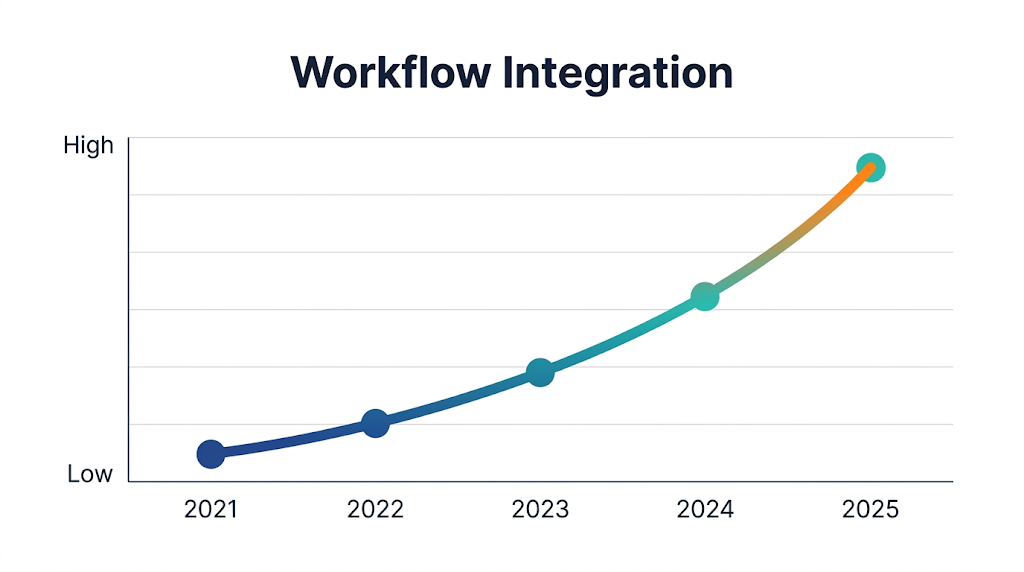
The more interesting trend isn’t simply market share.
It’s the increasing overlap between:
Design systems + visual development + CMS + automation + AI
What About Actual Time Savings?
This is where project context matters.
There isn’t one universal number such as:
“Figma-to-Webflow makes websites 73% faster.”
Claims like that are usually marketing shorthand.
A more useful way to measure efficiency is by looking at where repeated work disappears.
For example, imagine a 25-page website.
If 12 pages share the same:
- navigation
- hero structure
- card system
- CTA
- footer
- typography
- spacing system
then building every page independently creates unnecessary work.
A component-based approach turns those repeated elements into reusable building blocks.
That is where the real productivity gain comes from.
Where This Workflow Works Best
Not every website needs a sophisticated Figma × Webflow pipeline.
For a simple five-page brochure website, the difference may be modest.
For larger marketing ecosystems, it becomes much more meaningful.
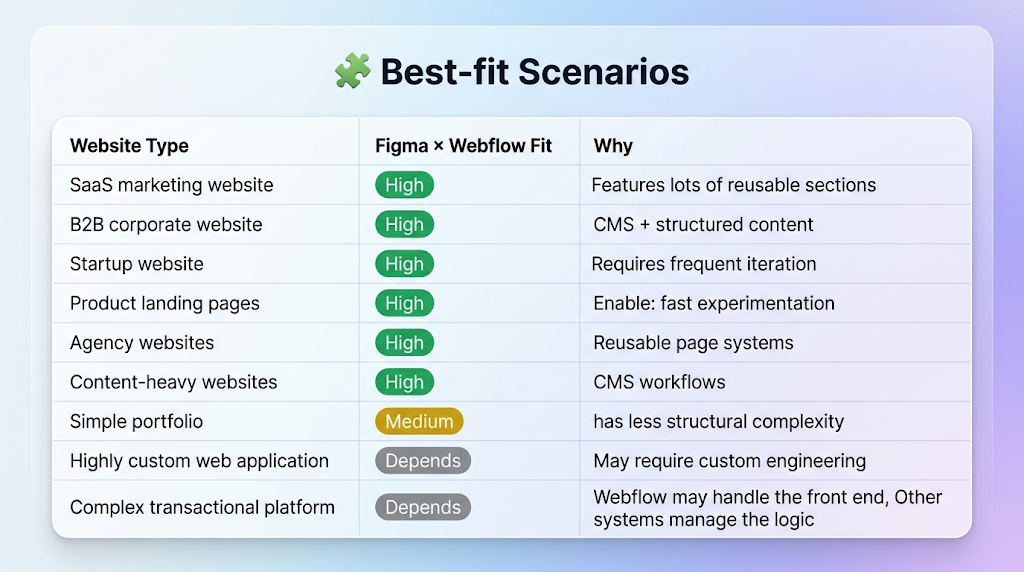
The sweet spot is usually a website where visual quality and publishing speed both matter.
What Still Needs a Developer?
This is probably the most important part of the conversation.
Figma-to-Webflow doesn’t eliminate developers.
It changes where their time is spent.
A strong developer still needs to handle things such as:
Custom functionality
When the website needs behavior beyond native Webflow capabilities.
Third-party integrations
Examples include:
- CRM
- marketing automation
- payment systems
- APIs
- analytics
- personalization platforms
Performance
A visually impressive website can still become painfully slow if assets, scripts, fonts, and third-party tools aren’t handled properly.
Accessibility
Automated workflows don’t automatically guarantee a genuinely accessible experience.
Developers still need to consider:
- semantic structure
- keyboard navigation
- focus states
- contrast
- ARIA where appropriate
- screen-reader behavior
SEO
Webflow can provide a strong foundation, but SEO still depends on implementation and strategy.
That means:
- information architecture
- metadata
- schema
- internal linking
- canonicalization
- redirects
- page performance
- content quality
The future isn’t designer vs. developer.
It’s much closer to:
designer + developer + automation + AI
working from the same system.
The Real Future: Design Systems That Think Like Websites
Here’s where things get interesting.
The next evolution isn’t simply:
Figma → Webflow
It is:
Design System → Components → Content → Code → Live Experience
Imagine a designer creates a new card component in Figma.
Instead of that component becoming a one-off visual element, it becomes part of a larger system.
The team knows:
- how it behaves on desktop
- how it behaves on mobile
- what content fields it needs
- where it can be reused
- which Webflow component represents it
- how it should interact with CMS data
That’s a much more mature way of building websites.
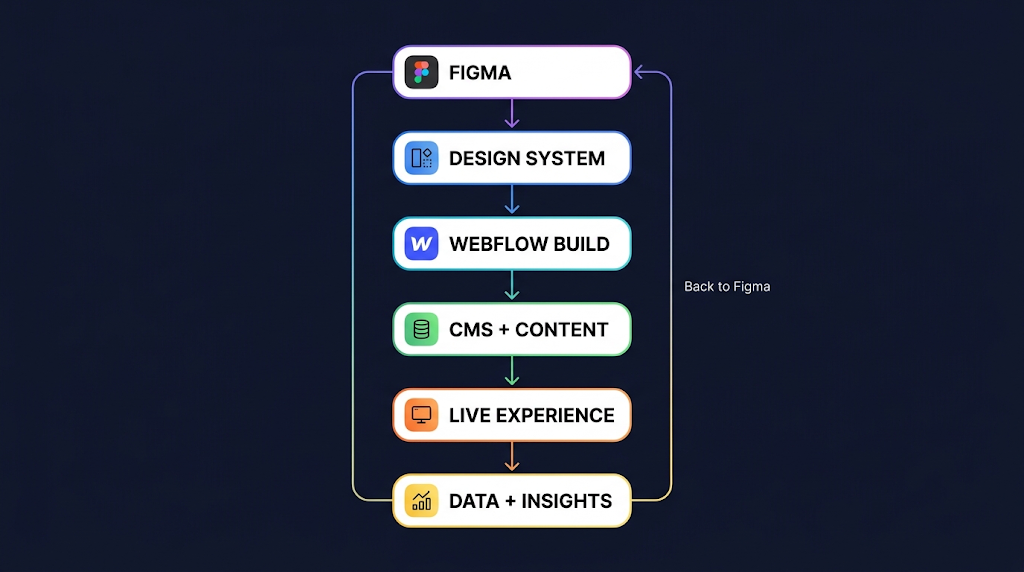
That final arrow matters.
The website isn’t finished when it launches.
Launch data should influence what gets designed next.
The Practical Takeaway
The future of Figma × Webflow isn’t about making designers do development or developers become designers.
It’s about removing the unnecessary distance between the two.
A smarter workflow looks like this:
Design intentionally → Build systematically → Automate repetitive work → Connect content → Test properly → Learn from real users → Iterate
For businesses, that can mean faster launches and easier content management.
For designers, it means their systems have a clearer path into production.
For developers, it means spending less time reconstructing pixels and more time solving the problems that actually require engineering.
And for teams like AddWeb Solution, it creates an opportunity to approach Webflow projects differently: not simply as page-building exercises, but as scalable digital experiences built from design systems and reusable architecture.
The pixel-perfect website isn’t disappearing.
The pixel-perfect handoff is.
Turn Your Figma Design Into a Live Website

Pooja Upadhyay
Director Of People Operations & Client Relations
Sources & Further Reading:
https://www.figma.com/dev-mode/
https://university.webflow.com/
