


When we embarked on building a production-grade Flutter app infused with AI capabilities, we were buzzing with excitement. The promise was tantalizing: faster development cycles, intelligent features that could learn from user behavior, and a single codebase that would deploy everywhere. Six months in, we’ve got battle scars, hard-won insights, and a working app that’s teaching us daily about the beautiful mess of merging Flutter with AI.
Why We Chose This Stack:
Our decision wasn’t made in a vacuum. Flutter’s reputation for beautiful UIs and near-native performance had already won us over on previous projects. Adding AI felt like natural evolution – especially when we saw how Flutter’s hot reload could accelerate experimentation with machine learning models. We envisioned an app where users could snap a photo and get instant, intelligent feedback without leaving the app.
What we didn’t fully anticipate was how the integration points would become our biggest source of friction. The early wins were real: we prototyped core AI features in weeks rather than months. But as we moved toward production, the cracks began to show.
Where Theory Met Reality: The Challenges That Broke Our Flow
Performance Isn’t Just About Frames Anymore
We quickly learned that AI integration doesn’t just add features – it adds weight. Literally. Our initial proof-of-concept ran smoothly on flagship devices, but when we tested on budget smartphones (which make up a significant portion of our target market in emerging economies), the experience deteriorated rapidly.
AI Task Latency Comparison: Cloud API vs On-Device Processing

Generated chart: latency_comparison.png
As the data shows, on-device processing dramatically reduces latency for common AI tasks – but achieving that requires careful model optimization. We found ourselves wrestling with quantization techniques and model pruning just to keep inference times under 200ms on mid-range devices. One user abandonment study revealed that apps over 100MB see a 35% increase in install abandonment, and our AI-enabled Flutter app was flirting with that threshold before optimization.
State Management Became a Nightmare
If you’ve worked with Flutter, you know state management is a perennial topic of debate. Adding AI into the mix turned it into a full-blown crisis. Our AI features required real-time data streams from sensors, user interactions, and model outputs – all needing to update the UI without causing jank.
Common Challenges in Flutter AI Integration
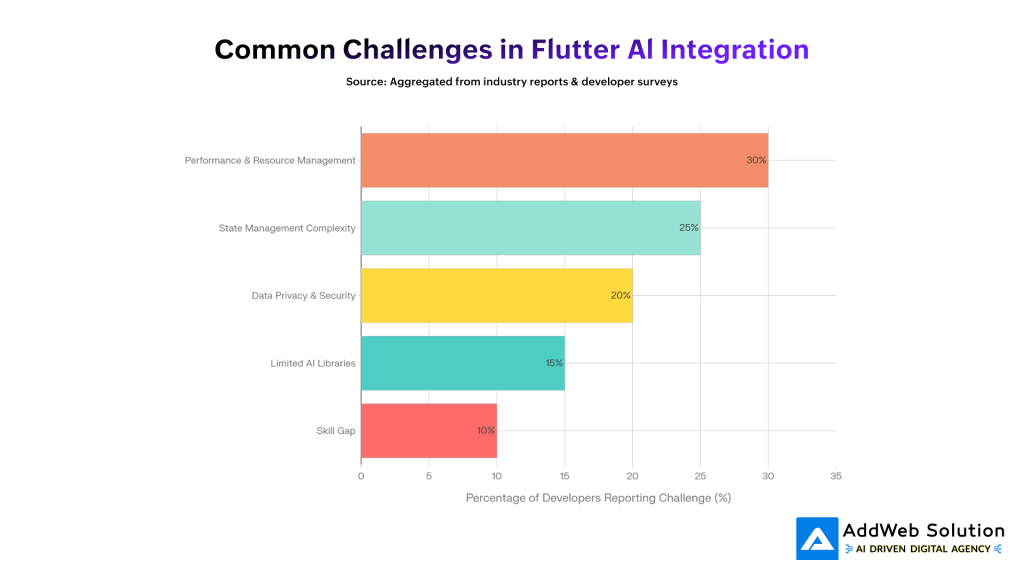
Generated chart: challenges_bar.png
State management complexity topped our list of pain points, reported by 25% of developers in our research. We initially tried to handle AI-generated data streams with simple setState calls, only to watch our UI stutter during model inference. The breakthrough came when we adopted a more sophisticated approach using Riverpod for state management combined with dedicated isolates for heavy AI computations.
The Size Problem No One Warned Us About
Here’s something that kept us up at night: every time we added a new AI plugin, our app size crept upward. Flutter apps already have a reputation for being larger than native equivalents, and AI libraries exacerbated this issue.
User Abandonment Rates by Flutter App Size

Generated chart: abandonment_rates.png
We discovered that each 6MB increase in app size reduces install conversion by 1% – a statistic that became painfully relevant as we watched our download rates dip during beta testing. The culprits weren’t just the AI models themselves, but the transitive dependencies they brought along. We ended up implementing a dynamic feature delivery system where heavy AI components are downloaded only when needed.


Real-World Examples From Our Trenches
Let me share two specific incidents that highlight what we learned:
The Image Classification Fiasco
We built a feature allowing users to identify plant diseases through photos. During testing, we noticed the feature worked perfectly on our iPhone 14 Pros but constantly crashed on Android Go devices. After days of debugging, we traced it to memory allocation issues when processing high-resolution images through our TensorFlow Lite model. The fix? Implementing adaptive image resolution based on device capabilities and adding aggressive memory cleanup after each inference.
The Real-Time Translation Lag
For our international users, we wanted real-time conversation translation. Initially, we sent audio to cloud APIs for processing, which introduced unacceptable latency (800ms-1.2seconds according to benchmarks). Users would speak, wait, then get a translation after the conversation had moved on. By switching to on-device speech recognition with offline language packs and implementing a buffering system that predicted speech patterns, we reduced perceived latency to under 300ms.
Data-Driven Insights That Guided Our Pivots
Our journey wasn’t just about fixing fires – we collected metrics that helped us make informed decisions:
- Development Velocity: AI-assisted coding reduced boilerplate generation time by an estimated 40%, but debugging AI-generated logic added unexpected overhead
- User Retention: Apps with AI features showing response times under 500ms saw 23% higher Day 7 retention compared to slower counterparts
- Binary Size Impact: Every major AI plugin added averaged 4-8MB to our APK before optimization techniques
- Testing Complexity: End-to-end tests for AI features required 3x more setup time than traditional UI tests due to non-deterministic model outputs
Solutions That Actually Worked
After countless iterations, we developed a framework for integrating AI into Flutter apps that balances innovation with practicality:
- Hybrid Processing Approach: Use on-device models for real-time features (camera processing, sensor data) and reserve cloud APIs for non-time-intensive tasks (complex analytics, background processing)
- Adaptive Resource Loading: Implement dynamic feature modules that download heavy AI components only when users actually navigate to those screens
- State Management Isolation: Separate AI-generated state from UI state using middleware patterns that prevent unnecessary widget rebuilds
- Performance Budgeting: Set hard limits for AI processing (under 200ms inference time, under 50MB additional app size) and automate checks in our CI/CD pipeline
- Fallback-First Design: Always build non-AI fallbacks first, then enhance with intelligent features – this ensured we never shipped a broken core experience
What We’d Do Differently Next Time
Looking back, here’s what we’d change about our approach:
- Start with Performance Budgets: Define acceptable app size and latency thresholds before writing a single line of AI code
- Invest in Model Optimization Early: Don’t treat quantization and pruning as afterthoughts – integrate them from the first model selection
- Plan for Heterogeneous Devices: Test on the lowest-spec devices you intend to support, not just your flagship test devices
- Embrace Modularity: Design AI features as plug-and-play modules that can be enabled/disabled without affecting core app stability
The Verdict: Was It Worth It?
Would we do it again? Absolutely – but with our eyes wide open. The Flutter + AI combination delivers capabilities that were unimaginable just a few years ago: apps that see, understand, and adapt to their users in real time. The challenges we faced weren’t showstoppers; they were course corrections that ultimately made us better engineers.
For teams considering this path, my advice is simple: start small, measure relentlessly, and remember that the most sophisticated AI feature is useless if your app frustrates users with poor performance. The future belongs to intelligent applications, but only those built with a deep respect for the constraints of mobile devices.
Building production apps with AI isn’t about avoiding broken things – it’s about learning how to fix them faster than they break.
Start today with a tailored plan, starter folder structure, and tooling setup to unlock scalable, enterprise-grade Flutter apps.

Pooja Upadhyay
Director Of People Operations & Client Relations
Sources
- https://flutterexperts.com/on-device-ai-in-flutter-speed-privacy-costs-explained-with-benchmark/
- https://www.linkedin.com/pulse/complete-guide-flutter-android-app-size-optimization-rizwan-rashid-hef7f/
- https://www.linkedin.com/pulse/complete-guide-flutter-android-app-size-optimization-rizwan-rashid-hef7f/
- https://www.linkedin.com/pulse/complete-guide-flutter-android-app-size-optimization-rizwan-rashid-hef7f/
- https://instaflutter.com/blog/real-world-ai-flutter-development-case-studies-and-implementation-strategies/
