


A personal injury law firm’s website can have an attractive design, professional photography, clear branding, and polished copy while still leaving prospective clients uncertain about what to do next.
The homepage may look impressive. The practice areas may be listed. The firm’s attorneys may have detailed biographies. A contact form may sit at the bottom of the page.
Yet an important business question remains: does the website help the right prospective clients feel confident enough to contact the firm?
For personal injury firms, that distinction matters. Someone searching for an attorney after a car accident, a serious fall, or another injury may be dealing with medical appointments, insurance communications, financial uncertainty, and unfamiliar legal questions.
They may not have the time or patience to navigate a confusing website.
They need to understand whether the firm handles their situation, why they might trust it, and how to take the next step.
A professional appearance can support that decision, but it cannot make the decision for them.
A website should do more than establish an online presence. It should help the firm communicate its relevance, answer important questions, establish credibility, and make contacting the office straightforward.
The challenge is to evaluate the website as part of the firm’s case-acquisition process, rather than treating it solely as a design project.
Key Takeaways
- A visually attractive website does not automatically generate qualified inquiries.
- Prospective clients need to understand the firm’s practice focus, experience, and approach without searching through multiple pages.
- Trust depends on clear, credible information and a consistent user experience, not simply professional design.
- Contact forms, phone numbers, mobile usability, and follow-up processes all influence the inquiry experience.
- Website performance should be assessed using meaningful measures, including relevant inquiries and completed contact actions, rather than traffic alone.
- Improvements should address identifiable problems before the firm invests in a complete redesign.
1. Why a Professional-Looking Website May Not Generate Cases
Website design and website effectiveness are related, but they are not the same thing.
Design helps establish an initial impression. Effectiveness depends on whether the site helps visitors find relevant information, understand their options, and complete a useful action.
Consider a hypothetical personal injury firm with a modern homepage, professional attorney portraits, and a consistent visual identity.
A prospective client arrives after searching for a lawyer following a vehicle collision. The homepage uses broad language about protecting clients’ rights but does not clearly explain whether the firm handles motor vehicle accident claims.
The visitor cannot easily find information about the firm’s process, and the contact form asks for several details before explaining what happens after submission.
The website may be visually successful. However, it has introduced several avoidable obstacles between the visitor’s initial need and the firm’s opportunity to evaluate the inquiry.
This does not mean every visitor who leaves would have become a client. Some visitors will be outside the firm’s practice area, location, or case criteria. Others will choose another attorney regardless of how well the website works.
The more useful question is whether the site is making it unnecessarily difficult for appropriate prospective clients to understand the firm’s services and contact the office.
That is where a business-focused website evaluation begins.
Three different measures of website quality
A law firm should distinguish between three dimensions:
Visual quality: Does the website look professional, current, and consistent with the firm’s identity?
User experience: Can visitors find relevant information, understand it, and navigate the site without unnecessary effort?
Business effectiveness: Does the website contribute to appropriate inquiries, useful conversations, and the firm’s broader client-acquisition process?
A site can perform well in one dimension and poorly in another. A redesign that improves the first dimension without addressing the other two may change the appearance without resolving the underlying business problem.
2. Does the Website Communicate the Firm’s Focus?
When someone reaches a personal injury law firm’s website, they should not have to guess whether the firm handles their type of matter.
The website should explain the firm’s services in direct, recognizable language.
For example, a firm that handles motor vehicle accident claims should make that focus easy to identify. If it also handles premises liability, wrongful death, or other personal injury matters, those services should be explained clearly and organized logically.
The precise structure will depend on the firm’s actual practice and the cases it accepts.
Avoid making visitors interpret vague language
Phrases such as “committed to justice” or “fighting for your future” may communicate values, but they do not explain the firm’s scope of work.
They should not replace practical information.
A more useful page answers questions such as:
- What types of personal injury matters does the firm handle?
- Which individuals or circumstances does the service apply to?
- Where does the firm accept cases?
- What should someone do if they are unsure whether their situation qualifies?
- How can the visitor contact the firm to discuss the matter?
These answers help visitors determine whether it makes sense to take the next step.
Give important services their own useful pages
A single page listing every practice area may be convenient for the firm, but it may not provide enough detail for someone evaluating a specific situation.
Dedicated service pages can explain the relevant issues, the firm’s role, common questions, and the available contact options.
For instance, a motor vehicle accident page should contain information relevant to that service rather than simply repeating the firm’s general homepage copy.
The goal is not to create dozens of thin pages for search engines. It is to provide genuinely useful information for the people the firm wants to reach.
Each page should have a clear purpose and accurately reflect the firm’s capabilities.
3. Is the Content Answering Prospective Clients’ Questions?
Personal injury matters can involve uncertainty at precisely the moment someone is trying to make an important decision.
A website cannot resolve every legal question, and it should not attempt to provide individualized legal advice through generic content. It can, however, explain the firm’s process and offer reliable general information.
Useful content reduces uncertainty about what contacting the firm involves.
Explain what happens next
A prospective client may want to know:
- What information should I have ready before contacting the firm?
- What happens during an initial conversation?
- What if I do not have every document available?
- How does the firm determine whether it can evaluate a matter?
- What should I expect after submitting a contact form?
- Can I call the office instead of completing an online form?
The answers should reflect the firm’s actual intake process. Do not publish promises about response times, consultation arrangements, fees, or case acceptance unless the firm has verified them.
Even a brief explanation of the next step can make the experience clearer.
Organize information around the visitor’s needs
A website often reflects the way a firm organizes its internal operations. Visitors, however, are usually looking for answers to their own immediate questions.
A useful page structure might include:
- A clear explanation of the service.
- The types of matters the firm handles.
- A straightforward description of how the firm approaches the process.
- Answers to common questions.
- Relevant information about the attorneys.
- A prominent way to contact the office.
The order may vary, but the information should be easy to scan and understand.
Treat educational content as part of the client experience
Articles and FAQs can help visitors understand common personal injury concepts and prepare for a conversation with an attorney.
They can also help the firm demonstrate that it understands the questions people bring to an initial consultation.
However, publishing more content is not automatically better. Ten useful, accurate articles can serve visitors better than a large collection of generic posts that repeat the same points.
Legal content should be reviewed for accuracy, current relevance, appropriate qualifications, and compliance with the firm’s applicable professional obligations.
4. Does the Website Establish Trust Without Overpromising?
Trust is particularly important when someone is considering contacting an attorney about a stressful or unfamiliar situation.
A website should help visitors assess the firm using credible, relevant information.
Make attorney information useful
Attorney biographies should explain more than a person’s name and photograph.
Where accurate and approved for publication, biographies can include relevant professional experience, education, bar admissions, professional memberships, and the types of matters an attorney handles.
The firm should verify every credential and description before publishing it.
The objective is to help visitors understand who may handle their matter and why that person’s background is relevant.
Use testimonials and case information carefully
Client testimonials, case results, and representative matters may be useful when their publication is permitted and the information is accurate.
They should not imply that a particular result is typical or guaranteed when that is not supported. Any required disclosures, permissions, and restrictions should be reviewed under the professional rules applicable to the firm.
Avoid unsupported superlatives and claims that cannot be substantiated.
A website does not become more trustworthy by promising outcomes it cannot control.
Pay attention to small signals
Visitors may also notice whether contact information is consistent, whether links work, whether pages contain outdated announcements, and whether the website behaves reliably.
A broken form or an obsolete phone number can undermine an otherwise professional presentation.
These details may appear minor individually, but they affect the overall experience of evaluating the firm.
5. How Easy Is It to Contact the Firm?
A website can communicate the right message and still lose an opportunity if the next step is difficult to find.
The contact experience deserves the same attention as the homepage design.
Make contact options visible
A visitor should be able to identify the firm’s phone number and contact options without navigating through several unrelated pages.
The most appropriate arrangement depends on the firm’s operations, but common elements include:
- A clearly displayed phone number.
- A prominent contact button.
- A straightforward inquiry form.
- A dedicated contact page.
- Clear instructions about what happens after submission.
If the firm offers online scheduling or another intake method, the website should explain it accurately and make sure the process works.
Ask for information the firm actually needs
A long form can create unnecessary friction, especially for someone using a phone or dealing with a stressful situation.
At the same time, the firm needs enough information to understand and route an inquiry appropriately.
The right form balances these requirements.
Start by reviewing each field and asking whether it serves a clear intake purpose. Could the same information be collected later? Is a field confusing? Does the form explain which information is required?
Avoid collecting sensitive details before they are necessary. Forms should provide suitable privacy information and should be designed with appropriate security controls.
A prospective client should not be asked to provide an extensive account of a sensitive matter merely because the form was designed without considering the intake process.
Test the complete contact journey
Do not assume a form works because it appears on the page.
Test it from beginning to end:
- Enter sample information.
- Submit the form.
- Confirm that the user receives an appropriate confirmation.
- Verify that the submission reaches the intended destination.
- Check that the inquiry is recorded or routed according to the firm’s process.
- Confirm that any promised follow-up mechanism works.
Use test data rather than real client information during testing.
Repeat the exercise on a mobile device. Check telephone links, validation messages, error handling, and the visibility of the submit button.
A contact form is not merely a design element. It is an operational connection between the website and the firm’s intake process.


6. What Happens After Someone Submits an Inquiry?
The website’s responsibility does not end when a visitor clicks “Submit.”
A potential inquiry must reach the right person and enter a process that the firm can manage.
Imagine that a prospective client submits a form late in the afternoon. The website displays a confirmation, but the submission goes to an inbox that nobody regularly monitors.
The firm has no clear process for assigning inquiries, checking their status, or determining whether a response is required.
The form may function technically while the overall experience remains unreliable.
Connect the website to the firm’s actual workflow
Depending on the firm’s size and existing systems, useful improvements might include:
- Routing inquiries to the appropriate intake team.
- Recording submissions in an approved CRM or case-intake system.
- Sending an appropriate confirmation message.
- Notifying the responsible staff member.
- Tracking whether an inquiry has been reviewed.
- Monitoring failed submissions or delivery problems.
Not every firm needs a complex integration. A small office may operate effectively with a well-managed inbox and a clear manual process.
The important consideration is whether the chosen workflow is reliable, secure, and appropriate for the firm’s needs.
Protect sensitive information
Law firms should treat information submitted through their websites with care.
The appropriate controls depend on the information collected, the systems involved, the firm’s obligations, and the relevant risk assessment.
At a minimum, the firm should understand where inquiries are stored, who can access them, how they are transmitted, and how long they are retained.
It should also evaluate third-party forms, analytics tools, email systems, and integrations before using them to collect or transfer sensitive information.
Do not assume that a standard contact form or a general-purpose CRM is automatically appropriate for every type of legal intake.
The website and the systems behind it should be evaluated together.
7. Is the Website Working on Mobile Devices?
Prospective clients may discover a law firm through a mobile search, a referral link, or a quick visit while away from a computer.
If the mobile experience is awkward, the website can introduce unnecessary friction before the visitor even reaches the contact form.
Review the site on actual phones, not only in a desktop browser’s preview mode.
Check whether:
- The main message is visible without excessive scrolling.
- Text is readable without zooming.
- Buttons are easy to tap.
- The phone number can be called directly.
- Forms are usable with a mobile keyboard.
- Important information is not hidden behind confusing navigation.
- Images and scripts do not make pages unreasonably slow.
- Error messages and confirmation screens remain visible.
A responsive layout is a starting point, not proof of a good mobile experience.
Also check accessibility. Clear labels, meaningful headings, keyboard navigation, sufficient contrast, and appropriate alternative text can make the site easier to use for a wider range of visitors.
The relevant accessibility requirements should be assessed for the firm’s circumstances rather than inferred from the design alone.
8. Which Website Metrics Should the Firm Monitor?
A website should be evaluated using measures that help the firm make decisions.
Traffic can be useful, but a larger number of visitors does not necessarily mean the firm is attracting more appropriate prospective clients.
The goal is to understand how the website contributes to the business process.
Measure the path from visit to inquiry
Depending on the firm’s analytics setup, useful measures may include:
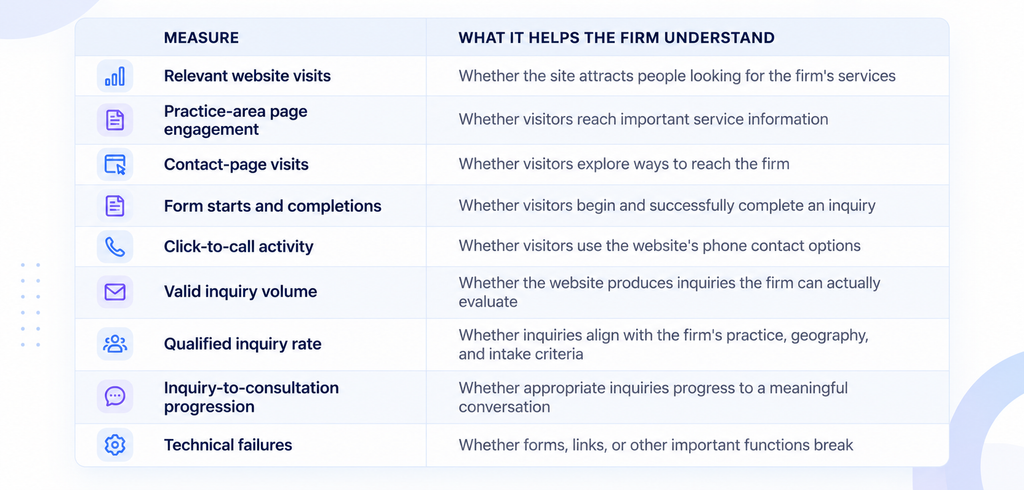
These measures are most useful when definitions are consistent and tracking is reliable.
A click on a phone number does not prove that a call connected. A submitted form does not prove that an inquiry was qualified. A qualified inquiry does not prove that the firm accepted the case.
Each stage should be interpreted separately.
Establish a baseline before making major changes
Before commissioning a redesign, review the information already available.
Identify which pages attract visitors, which contact options people use, whether forms complete successfully, and where the intake process appears to break down.
If reliable data is missing, establish basic measurement before treating assumptions as facts.
For example, a firm might discover that visitors regularly reach its contact page but few complete the form. That observation would justify testing the form’s usability and reviewing its fields.
It would not, by itself, prove why visitors leave. Interviews, usability tests, technical checks, or further measurement may be needed to identify the cause.
Respect privacy when measuring performance
Analytics and conversion tracking should be configured in a way that fits the firm’s privacy obligations and security requirements.
Avoid sending confidential matter details, sensitive form entries, or other unnecessary personal information to analytics platforms.
The firm should review its data collection, disclosures, retention practices, and third-party tools before implementing new tracking.
9. A Practical Website Evaluation Checklist
A useful review does not require the firm to begin with a complete redesign. Start by checking the elements that matter most to the visitor and the intake process.
Practice focus
- The homepage clearly explains the firm’s personal injury focus.
- Relevant services are easy to find.
- Service pages accurately describe the matters the firm handles.
- Geographic coverage and contact information are clear.
Information and trust
- Attorney biographies are accurate and informative.
- Common prospective-client questions are answered.
- Claims, testimonials, and case information have been reviewed and approved.
- Content is current and written in understandable language.
- The website explains the next step without promising a particular outcome.
Contact and intake
- Phone and contact options are easy to locate.
- Forms ask for information that serves a clear purpose.
- Forms work on desktop and mobile devices.
- Submissions reach the intended destination.
- Confirmation messages accurately describe what happens next.
- Staff responsibilities for reviewing inquiries are clear.
Technical quality
- Important pages load and function reliably.
- Navigation, links, and buttons work.
- Mobile usability has been tested.
- Accessibility issues have been assessed.
- Sensitive information is handled appropriately.
- Website analytics do not unnecessarily expose confidential information.
Business measurement
- The firm can identify where website inquiries originate.
- Inquiry volume and qualification are defined consistently.
- Form and telephone conversion events are measured appropriately.
- The firm can identify technical failures.
- Website performance is reviewed alongside the intake process.
Use the checklist to identify a small number of concrete problems. Prioritize issues that prevent visitors from understanding the firm’s services, contacting the office, or moving through the intended intake process.
10. When Does a Redesign Make Sense?
Sometimes a redesign is the right investment. An outdated platform, significant accessibility problems, poor mobile usability, difficult content management, or technical limitations may justify broader work.
But a redesign should not be the automatic response to every disappointing result.
Start by distinguishing between three categories of problems.
Content problems: The site does not explain the firm’s services, answer important questions, or provide credible information.
Experience problems: Navigation is confusing, contact options are difficult to find, or forms are unnecessarily complicated.
Technical and operational problems: Pages fail, integrations are unreliable, submissions are lost, or the platform makes necessary improvements difficult.
These problems may overlap, but they do not always require the same solution.
A content update may resolve an unclear service page. A form redesign may address a specific intake obstacle. A technical repair may restore a broken submission process. A full redesign becomes more compelling when the existing site cannot support the changes the firm needs.
Use a simple prioritization framework
For each identified problem, consider four factors:
- Impact: How much does the issue interfere with a prospective client’s ability to understand or contact the firm?
- Evidence: What observation or measurement indicates that the problem exists?
- Effort: How difficult or expensive is the proposed fix?
- Verification: How will the firm determine whether the change worked?
This framework encourages practical decisions rather than design changes driven entirely by personal preference.
A complete redesign should begin with a defined business objective, a clear scope, and a plan to evaluate the result.
11. Frequently Asked Questions
Does a professional law firm website guarantee more cases?
No. Website quality is only one factor in case acquisition. Demand, competition, reputation, referral sources, practice focus, case eligibility, intake processes, and many other factors affect outcomes. A website should be designed to remove avoidable obstacles and support appropriate inquiries, not to guarantee a particular number of cases.
What is the most important page on a personal injury law firm’s website?
The homepage is often important because it introduces the firm, but it is not the only page that matters. A visitor arriving directly on a service page, attorney biography, or contact page should also be able to understand the information and take an appropriate next step.
Should every personal injury practice area have a separate page?
Not necessarily. Dedicated pages are useful when they provide distinct, accurate information that helps visitors understand a particular service. The structure should reflect the firm’s actual practice and the questions its prospective clients need answered.
How often should a law firm review its website?
The firm should monitor important functions regularly and review content whenever services, contact details, personnel, or relevant information changes. A broader performance review can follow a consistent schedule based on the firm’s resources, website activity, and business priorities.
How can a firm tell whether its website generates qualified inquiries?
It needs a consistent definition of a qualified inquiry, reliable tracking of submissions and calls where feasible, and a way to connect website activity with the intake process. Traffic and form submissions alone are insufficient to establish lead quality.
Should a law firm use a CRM or integrate its website with a case-management system?
That depends on the firm’s size, workflow, existing software, and operational requirements. An integration may improve routing and recordkeeping, but it also introduces security, access, maintenance, and implementation considerations. The firm should define the problem before selecting a tool.
Is a complete website redesign always necessary?
No. Some problems can be addressed through content improvements, usability changes, form fixes, performance work, or better intake procedures. A redesign is appropriate when the existing platform or overall experience cannot reasonably support the firm’s needs.
Is Your Website Converting Visitors Into Opportunities?

Pooja Upadhyay
Director Of People Operations & Client Relations
Conclusion: Evaluate the Website as Part of the Business
A personal injury law firm’s website is more than a digital brochure. It is one part of the experience through which prospective clients discover the firm, evaluate its relevance, and decide whether to make contact.
A polished design can help create a professional first impression. But the business value depends on what happens next.
Can visitors understand the firm’s focus? Can they find credible information? Can they use the website comfortably on a phone? Can they contact the office without unnecessary effort? And does the inquiry reach a process that the firm can manage reliably?
These are more useful questions than whether the homepage looks modern.
The best next step is not necessarily a new website. It is an honest assessment of the current one, supported by evidence and focused on the most important obstacles.
If the website already works well, that assessment can help the firm maintain it. If it has gaps, the review can establish which improvements deserve attention first.
For law firm owners, the objective is not simply to have a website that looks professional. It is to build a digital experience that clearly communicates the firm’s value and supports the way the firm serves prospective clients.
