


Availability counts on the product page represent a promise. If this promise turns out to be incorrect, meaning the product is shown as available despite not being so or vice versa, it comes at a cost very quickly – cancelled orders, refund costs, and unhappy customers.
The issue is that for Shopify store owners, as they introduce more locations, additional sales channels and 3PL partners, keeping this promise becomes a challenge rather than simply a configuration switch.
This article is going to explore the concept of real-time inventory in Shopify, the architectural solutions behind it, as well as the benchmarks that should be taken into consideration.
Why Real-Time Inventory Matters Now
Merchants using Shopify are not selling out of one warehouse anymore. It is common for a medium-size shop to have inventories located in two or three warehouses, a few physical stores, and one or two 3PLs.
Additionally, the products listed on Shopify’s website, point of sales (POS), and Amazon/TikTok Shop are all from the same list of SKU numbers. Each of these requires that all of them match on their numbers at the same time or else overselling will occur.
The pressure has increased for three concrete reasons:
- Channel explosion has increased the number of opportunities for a single unit of stock to be claimed at once.
- The expectation for same-day or next-day delivery leaves little buffer room to detect errors before the customer finds out.
- The Shopify Admin API and webhook framework have developed to the point where near-real-time synchronization is now a matter of engineering rather than limitation of the platform.
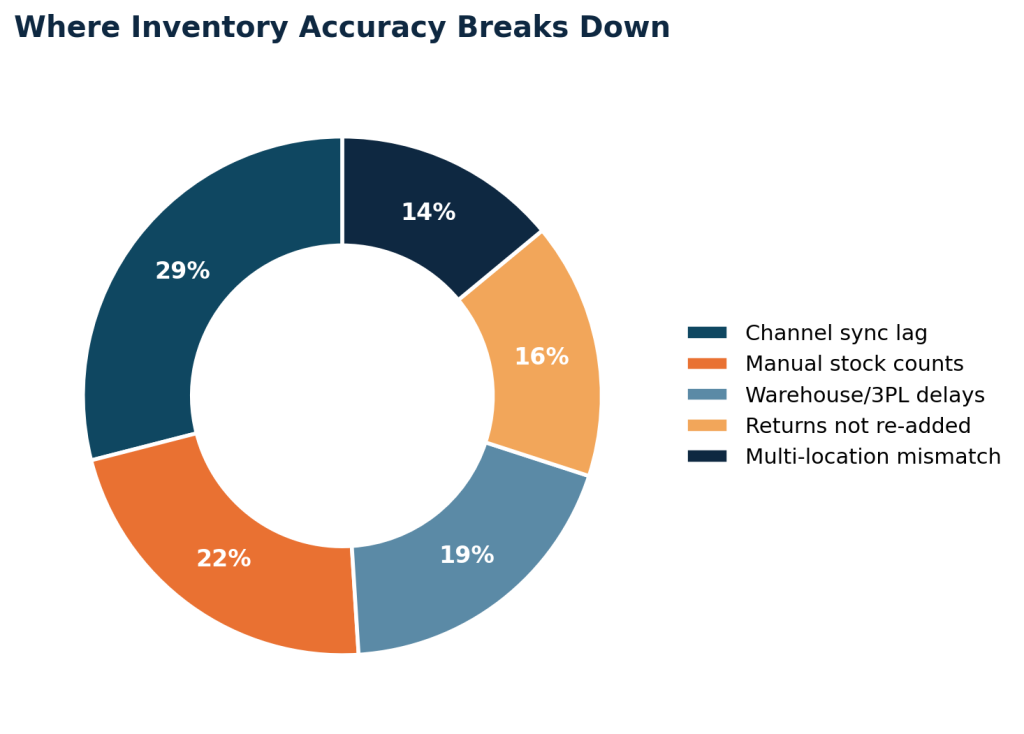
Notice that the two largest contributors, channel sync lag and manual counting, are both solvable with architecture rather than headcount. That’s the throughline for the rest of this piece.
The Core Building Blocks of Real-Time Inventory
Inventory management on Shopify involves the use of different objects that are related to each other. It is therefore important to understand the relationship between these objects.
Webhooks and Event-Driven Sync
Topics for webhooks are generated by Shopify when there is an update to the inventory levels or products through the admin, POS, or even the API.
Subscription to these topics is the highest-leverage action a store can take in place of scheduled polling since it transforms the operation into “told” from “ask periodically” and hence true real time.
Multi-Location Inventory
Shopify’s inventory system based on locations involves inventory levels allocation for each Inventory Item per Location.
Real-time experience requires proper aggregation of this data to determine if the item page needs to show combined availability, location availability, or channel availability. Consistency is important as new locations are created and inventory moved around.
Inventory APIs Worth Knowing
- InventoryLevel – the amount of a particular product at a particular location, updated through set and adjust mutations.
- InventoryItem – the tracked item associated with a particular variant, containing cost information and shipping requirements.
- Fulfillment Orders API – shows stock that is committed but not yet shipped, ensuring there are no duplicate counts of available stock.
- Bulk Operations API – used for big data clean-ups where normal rate limits do not apply.
Common Architecture Patterns
There isn’t one correct way to build real-time inventory, the right pattern depends on order volume, number of locations, and how much latency the business can tolerate. The table below compares the four patterns most Shopify merchants land on.
| Pattern | How it works | Typical latency | Best fit |
|---|---|---|---|
| Scheduled polling | App queries Shopify’s Admin API on a fixed interval and diffs results | 1-15 minutes | Low SKU counts, non-critical accuracy needs |
| Webhook-driven sync | Shopify pushes inventory_levels/update events the moment stock changes | Seconds | Single-location stores syncing to one external system |
| Webhooks, queue | Events land in a message queue (SQS, Pub/Sub) before processing | 1-5 seconds | High-volume stores needing reliability and retry handling |
| Webhooks, edge cache | Events update a cached read layer serving storefront/PDP stock checks | Under 1 second | Multi-location, multi-channel, flash-sale-grade accuracy |
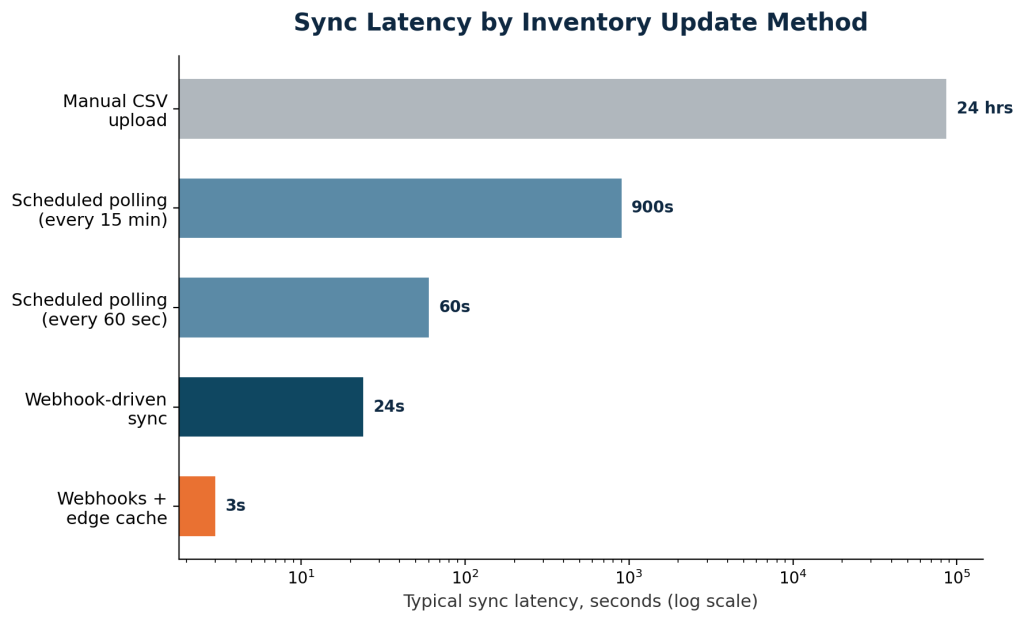
The jump from scheduled polling to webhooks is where most of the latency gain happens. Moving from webhooks to a queued or cached architecture matters less for speed and more for reliability, it’s what keeps sync accurate during traffic spikes, webhook retries, and partial outages.


Benchmarks: What “Real-Time” Actually Looks Like
“Real-time” gets used loosely in vendor pitches. In practice, it’s worth anchoring the term to measurable targets so engineering and merchandising teams are aligned on what “done” looks like.
| Metric | Baseline (batch/manual) | Real-time target | Why it matters |
|---|---|---|---|
| Stock update propagation | 15-60 minutes | Under 5 seconds | Determines how long a sold-out item stays bookable |
| Multi-location reconciliation | Nightly batch | Continuous, event-driven | Prevents phantom stock across warehouses and stores |
| Oversell rate | 3-8% of high-demand SKUs | Under 1% | Directly ties to refund cost and customer trust |
| Storefront stock accuracy | 85-92% | 98%+ | Reduces cart abandonment tied to stock surprises |
| API call budget usage | Unmonitored, bursty | Predictable, rate-aware | Avoids throttling during peak traffic (Plus: 40 req/sec) |
Table 2 – Baseline versus real-time targets across the metrics that matter most for storefront trust.
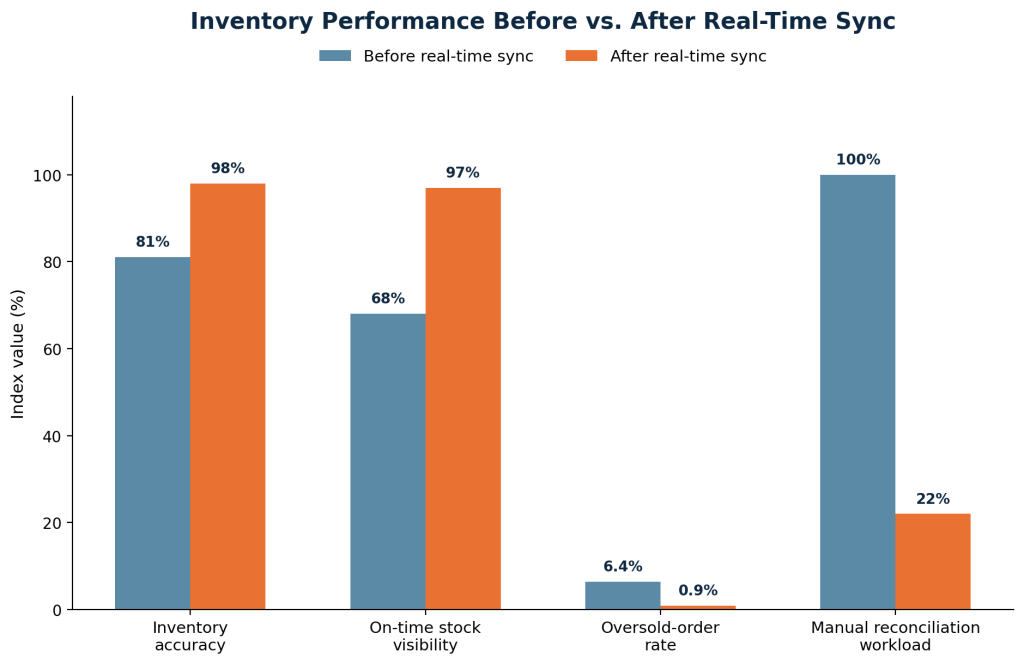
The manual reconciliation workload figure is worth calling out specifically: teams don’t just get faster sync, they get their operations staff back.
That time typically moves toward demand planning and supplier management instead of spreadsheet reconciliation.
Implementation Checklist
For teams scoping this as a project, the sequence below reflects the order that avoids the most rework.
- Audit every system currently claiming a unit of stock, Shopify locations, POS, 3PL, marketplaces.
- Register webhook subscriptions for inventory_levels/update and orders/create, with HMAC verification enabled.
- Decide the availability aggregation model before writing sync logic, combined, nearest-location, or channel-specific.
- Introduce a message queue between webhook receipt and downstream processing to absorb traffic spikes.
- Build a reconciliation job that runs independently of webhooks to catch missed or failed events.
- Instrument latency and error-rate monitoring on the sync pipeline itself, not just on order volume.
- Load-test against Shopify’s API rate limits before a peak sales event, not during one.
Common Pitfalls and How to Avoid Them
Treating Webhooks as Guaranteed Delivery
Webhooks can be delayed, duplicated, or dropped during Shopify-side incidents or app downtime. Systems that assume every event arrives exactly once tend to drift silently. A periodic reconciliation job, even one running hourly, catches this drift before it becomes a customer-facing problem.
Ignoring Committed but Unshipped Stock
Stock that’s part of an open fulfillment order is not available, even though it hasn’t left the warehouse. Storefronts that only read InventoryLevel without checking fulfillment status will oversell during the gap between order placement and shipment.
Under-Provisioning for Rate Limits
Shopify Plus stores are typically capped around 40 requests per second on the REST Admin API, with GraphQL using a cost-based system instead. Bulk reconciliation jobs that don’t account for this can throttle themselves out of syncing during the exact high-traffic windows when accuracy matters most.
Measuring Success
Once real-time sync is live, the metrics worth tracking on an ongoing basis are:
- Average and p95 sync latency, measured from Shopify event timestamp to downstream system update.
- Oversell rate as a percentage of total orders, segmented by channel.
- Reconciliation job discrepancy count, a rising trend usually signals a webhook gap before customers notice.
- Support tickets tagged to stock-related order issues, tracked monthly.
Closing Thought
Real-time inventory isn’t a single feature to switch on, it’s the compounding result of choosing event-driven architecture over polling, building reconciliation as a safety net rather than an afterthought, and treating latency as a metric worth monitoring continuously.
Stores that get this right don’t just reduce oversells; they free up the operational hours that were previously spent chasing stock counts by hand.
Build a Smarter Shopify Inventory System

Pooja Upadhyay
Director Of People Operations & Client Relations
Source URLs:
https://shopify.dev/docs/apps/build/webhooks
https://shopify.dev/docs/api/admin-graphql/latest/objects/InventoryLevel
https://shopify.dev/docs/api/admin-graphql/latest/objects/InventoryItem
https://shopify.dev/docs/api/admin-graphql/latest/objects/InventoryQuantity
https://shopify.dev/docs/apps/build/orders-fulfillment/inventory-management-apps
https://shopify.dev/docs/api/admin-graphql/latest/objects/FulfillmentOrder
