


For many teams, WordPress is where the digital journey starts: it’s fast to launch, non‑technical teams can publish content themselves, and the plugin ecosystem covers almost everything—until it doesn’t.
As your business turns into a product, platform, or multi‑country operation, the same stack that helped you move quickly can start slowing you down with performance bottlenecks, plugin conflicts, and hard‑to-test custom code. That’s usually when Laravel enters the conversation.
This guide walks through when it’s actually worth migrating from WordPress to Laravel and how to do it in a controlled, low‑risk way.
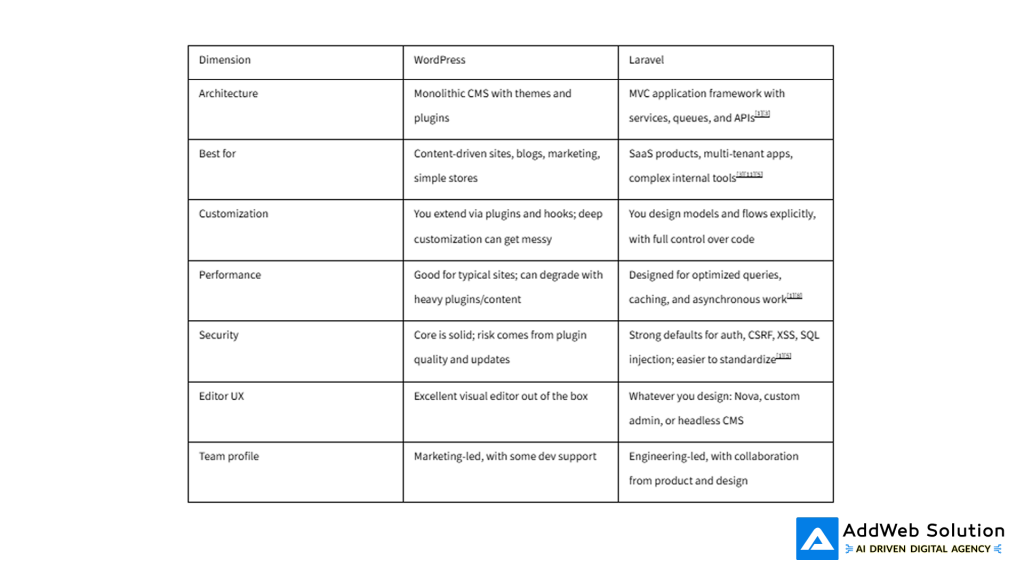
WordPress vs Laravel in one minute
Think of WordPress and Laravel as tools built for different jobs, even though both live in the PHP ecosystem.
High‑level comparison
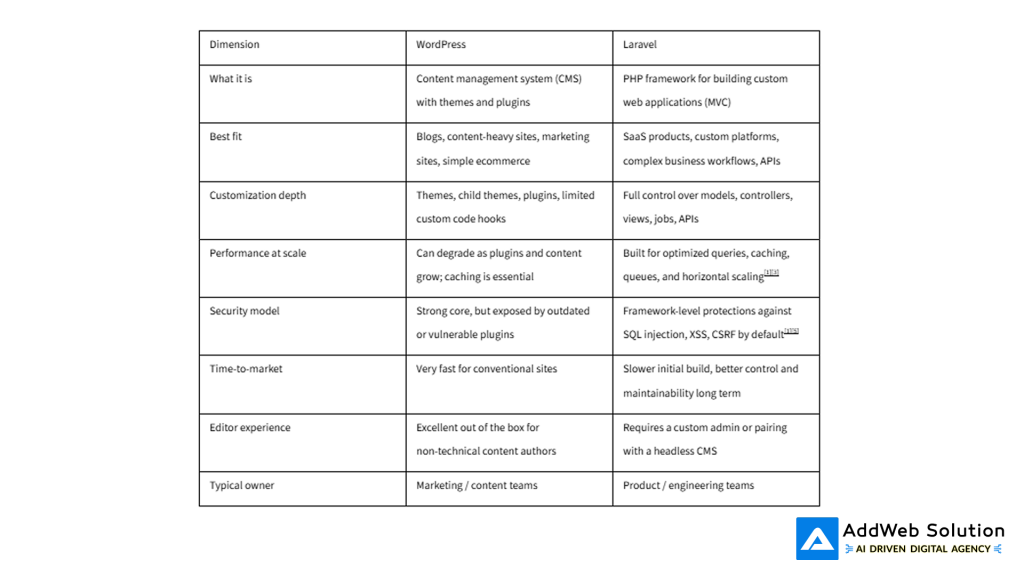
WordPress still powers around 43–44% of all websites and holds roughly 60–62% of the CMS market in 2026—so moving away from it is not an anti‑WordPress decision, it’s a fit decision.
When WordPress is still the right choice
Before talking about migration, it’s worth being honest: you shouldn’t leave WordPress just because “everyone else is”.
WordPress may still be the better choice if:
- Your site is mostly content‑driven (blogs, landing pages, documentation) with light interactivity.
- Your business team lives inside the editor and needs no‑code publishing several times a week.
- Your revenue engine is SEO + content marketing, not a complex application workflow.
- You can solve current issues with better hosting, caching, and a plugin audit rather than a full re‑platform.
If a thoughtful cleanup, good hosting, and a lean plugin stack solve your main pains, migrating to Laravel will add cost and complexity without clear ROI.
Clear signs you’ve outgrown WordPress
Migration makes sense when your site is behaving more like a product or platform than a brochure.
Common “we need Laravel” symptoms

If three or more of these describe your current reality, it’s worth seriously evaluating a Laravel‑based architecture.
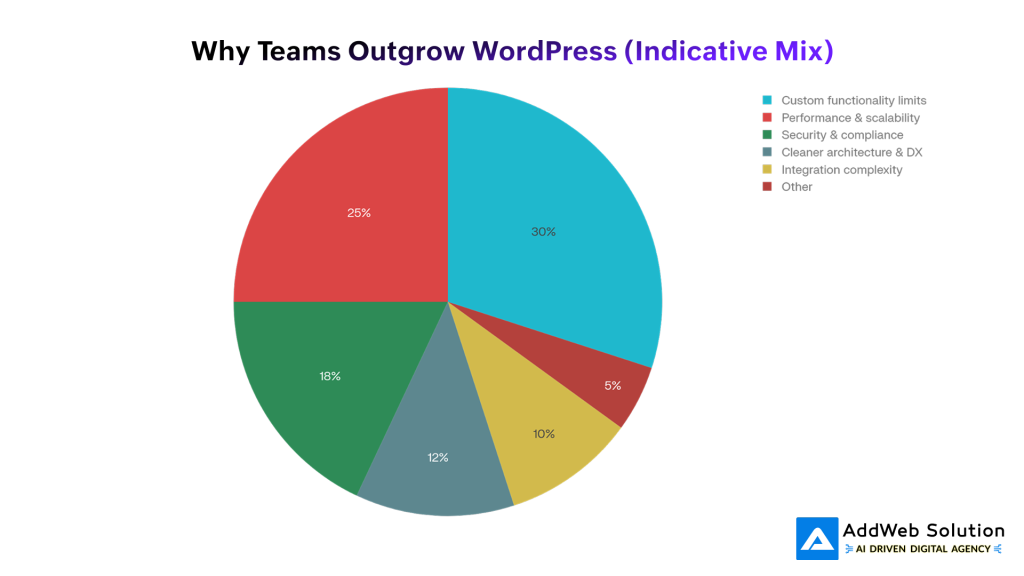
Visual: why teams move from WordPress to Laravel
You can visualize the decision drivers like this:
- Custom functionality limits (≈30%) – when everything starts feeling like a workaround.
- Performance and scalability (≈25%) – especially logged‑in experiences, dashboards, and multi‑tenant setups.
- Security and compliance (≈18%) – risk from third‑party plugins, audits, and regulations.
- Cleaner architecture & developer experience (≈12%) – teams want modern patterns, tests, CI/CD.
- Integration complexity (≈10%) – you’re now a hub for multiple external systems.
You can attach the ready‑made chart file in your CMS and reference it in this section.
Where Laravel shines for growing businesses
Laravel is not “WordPress but harder.” It’s a full application framework designed for building exactly the system you have in mind.
Key strengths
- First‑class architecture
MVC structure, service containers, and clean separation of concerns make it easier to keep complex codebases maintainable as your team grows. - Built‑in security
Protection against SQL injection, XSS, CSRF, password hashing, and rate limiting are part of the framework, not add‑ons. - Scalability and performance
Queues, job dispatching, caching strategies, and tools like Laravel Horizon and Laravel Octane help you handle bursts of traffic and heavy workloads gracefully. - Ecosystem for serious apps
Forge (server management), Vapor (serverless on AWS), Nova (admin panels), Cashier (subscriptions), Sanctum/Passport (API auth)—you get a mature ecosystem that covers most recurring infrastructure problems. - Perfect for custom products
Laravel is already powering SaaS platforms, CRMs, LMS systems, logistics platforms, and enterprise dashboards worldwide.
In other words, Laravel is less about “installing features” and more about designing your own product logic cleanly from day one.
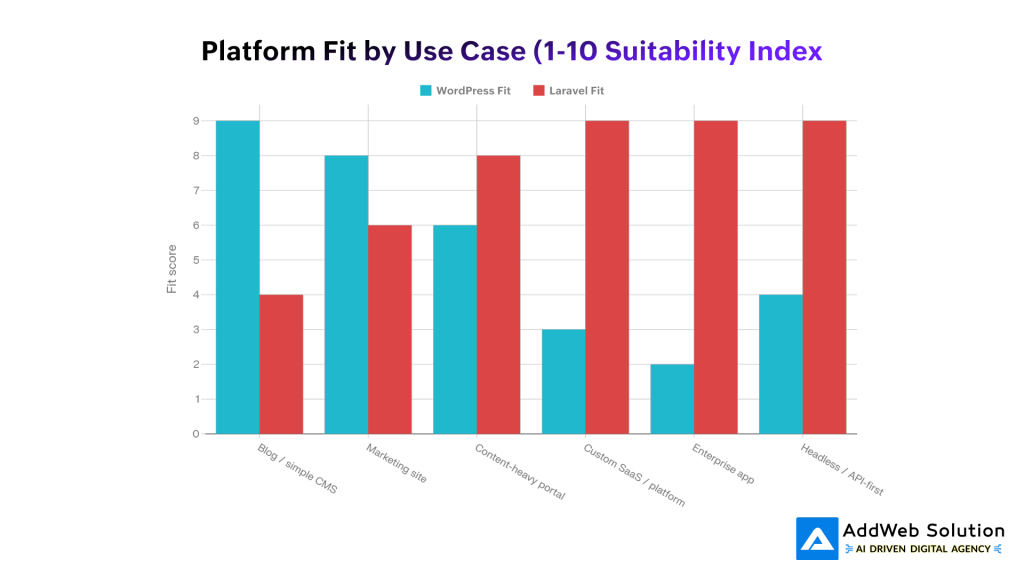
Visual: WordPress vs Laravel by project type
Use this bar chart to communicate where each platform tends to fit best.
Indicative suitability index (1–10):
- WordPress
- 9/10 for blogs and simple CMS sites
- 8/10 for marketing sites and landing pages
- 6/10 for content‑heavy portals
- 3–4/10 for SaaS and complex apps
- Laravel
- 4/10 for basic blogs
- 6/10 for marketing sites (with a headless CMS or custom admin)
- 8–9/10 for content‑heavy portals with custom logic
- 9/10 for SaaS, platforms, and enterprise apps
You can drop this chart in near your “platform fit” discussion to make the trade‑off obvious at a glance.
A simple scoring framework: stay or migrate?
If you want something a bit more concrete than gut feeling, run through this quick scoring exercise with your team.
Rate each dimension from 1–5 for pain on WordPress, then total your score.

- Total under 10 → stay on WordPress and optimize.
- 10–15 → explore hybrid options: decouple parts, add a Laravel microservice, or use headless patterns.
- 16+ → start designing a Laravel‑based rebuild and migration plan.


How to plan a WordPress → Laravel migration (without breaking everything)
Migration is less about “converting templates” and more about re‑architecting your system while preserving business continuity. A good approach is incremental:
1. Clarify what must not break
Start by listing non‑negotiables:
- Existing organic traffic and rankings (URLs, metadata, internal linking).
- Logged‑in users and subscriptions, if applicable.
- Integrations that finance, sales, or operations rely on daily.
This list will drive decisions around routing, redirects, and rollout order.
2. Audit your current setup on WordPress
Do a structured inventory:
- Content map
Post types, taxonomies, archives, landing pages, media library usage. - Functional map
Forms, search, memberships, ecommerce, dashboards, custom plugins, shortcodes. - Technical map
Plugins and themes in use, custom code locations (child themes, mu‑plugins), hosting environment.
Tools from hosting providers and crawl tools make this much easier in practice.
3. Design your target Laravel architecture
This is where migration stops being a “CMS change” and becomes product architecture work.
Typical Laravel‑centric architecture might include:
- Core Laravel app (domain models, controllers, Blade or frontend framework)
- Queue workers for heavy jobs (emails, imports, report generation)
- API layer for internal and third‑party integrations
- Admin panel (Laravel Nova, custom panel, or a headless CMS for content)
Use this step to name your real domain concepts: subscriptions, workspaces, organizations, campaigns, shipments, lessons—whatever actually describes your business.
4. Decide content strategy: migrate or decouple?
You have three main options:
- Full migration
Move both content and application logic to Laravel.- Pros: one stack, full control.
- Cons: you must rebuild a CMS‑like editing experience for marketers.
- Headless / decoupled WordPress
Keep WordPress as a headless CMS and build the front end + application in Laravel, consuming content via REST or GraphQL.- Pros: editors keep their familiar UI; Laravel handles product logic.
- Cons: two systems to maintain and secure.
- Split responsibility
WordPress runs /blog and marketing pages; Laravel powers app.yourdomain.com or /app.- Pros: cleaner separation; easier rollout.
- Cons: UX fragmentation if not designed well.
Most teams with strong content engines gravitate toward headless or split models before eventually consolidating.
5. Map your data models
Content and data rarely map one‑to‑one:
- In WordPress: everything is a post, page, or custom post type with meta fields.
- In Laravel: you should have explicit tables and models per concept.
Example mapping
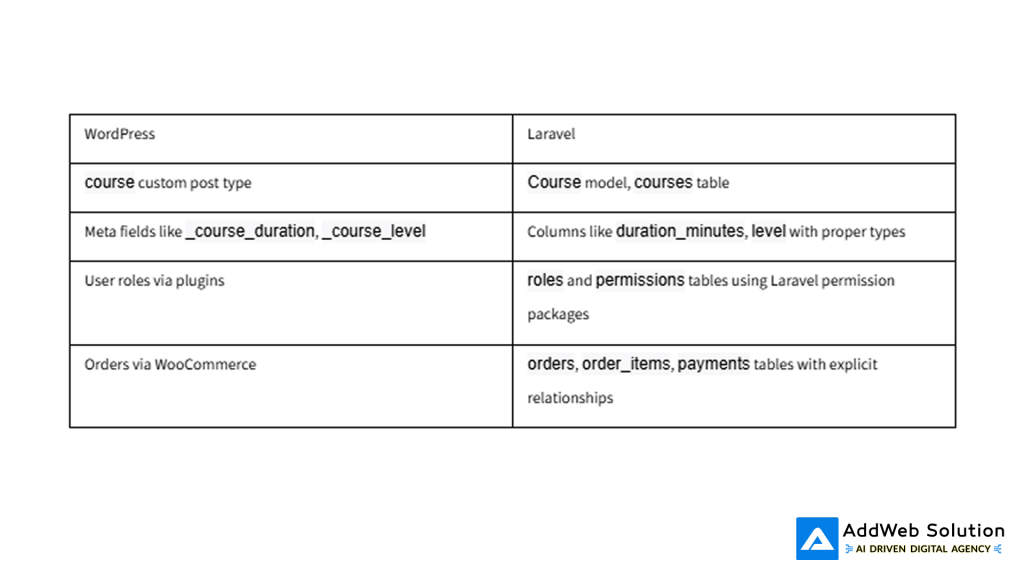
This is where you improve your schema rather than cloning WordPress’s internals.
6. Plan URL and SEO preservation
You cannot afford to break years of SEO equity:
- Maintain or carefully redirect all important URLs (301 redirects).
- Preserve slugs, canonical tags, and structured data where possible.
- Crawl your site before and after to verify nothing critical is lost.
For many teams, the SEO work alone justifies a dedicated sub‑project inside the migration.
7. Build Laravel alongside WordPress
The safest approach is parallel development:
- Set up Laravel on a subdomain or staging environment.
- Build key flows and features while WordPress continues to serve production.
- Run content syncs or partial imports during development to use real data.
This also makes it easier to sell the migration internally—stakeholders can click around a working prototype instead of reading architecture diagrams.
8. Migrate data in controlled phases
Data migration is where projects often get messy. Keep it boring and predictable:
- Dry runs on staging with subsets of data.
- Write repeatable, idempotent migration scripts (not one‑off manual exports).
- Plan a freeze window: content editors pause changes during the final cutover or operate within agreed limits.
- Validate counts (e.g., number of posts, users, orders) before and after.
For some workloads (e.g., active SaaS products), you may also need incremental syncs to keep WordPress and Laravel in step during migration.
9. Cut over gradually
Instead of a big‑bang switch, consider:
- Routing only specific sections (like /app or /dashboard) to Laravel first.
- Letting a segment of users or staff use the new system while others stay on WordPress.
- Monitoring errors, performance, and user feedback closely before widening rollout.
Once confidence is high, you can fully switch DNS/routing to Laravel for the relevant sections.
Example comparison table you can reuse
Here’s a compact comparison table you can drop directly into your blog:
Typical timelines and team setup
Actual timelines depend on complexity, but this matrix helps set expectations.

These are directional, not promises—but they help move the conversation away from “can we migrate in two weeks?” to a more realistic plan.
Common mistakes to avoid
A few patterns repeat across failed or painful migrations:
- Trying to “port” themes and plugins line‑by‑line
Laravel isn’t a drop‑in replacement for WordPress themes; treat it as a fresh application build. - Ignoring content and SEO until the end
URL structure, redirects, and metadata must be first‑class citizens in the plan, not an afterthought. - Underinvesting in admin UX
If editors lose a good editing experience, they’ll quietly resent the new stack and look for workarounds. - Skipping observability
Logging, metrics, and uptime checks across both stacks are essential during transition. - Over‑engineering from day one
You can start with a straightforward Laravel app and introduce microservices only when you earn the complexity.
How to use visuals to keep this topic engaging
To make this article feel polished and human when you publish it:
- Use a real project screenshot or architecture sketch as the hero image instead of stock photography.
- Place the migration reasons pie chart near the “where Laravel shines” section so readers instantly see why teams switch.
- Drop the WordPress vs Laravel fit bar chart before your scoring framework to encourage honest self‑assessment.
- Turn the comparison tables into designed cards or infographics if your CMS supports it.
This combination makes the piece skimmable for executives while still being credible for technical readers.
Final thoughts: migration is a business decision, not just a tech upgrade
Migrating from WordPress to Laravel is rarely about fashion. It’s about recognizing that your website has quietly turned into a product—and products need different foundations than blogs.
If you’re:
- Maintaining growing lists of workarounds and hotfixes,
- Fighting slow dashboards and plugin conflicts,
- Planning features that look more like “platform capabilities” than “pages,”
then it’s time to seriously evaluate Laravel as your next step.
A good migration plan respects what WordPress has done for you, protects your traffic and users, and gives your team a clean, modern base to build on for the next five years—not just the next release.
Planning a WordPress to Laravel migration? Talk to our Laravel experts and build a scalable, future-ready platform.

Pooja Upadhyay
Director Of People Operations & Client Relations
Source URLS:
https://www.wpzoom.com/blog/wordpress-statistics/
https://kinsta.com/wordpress-market-share/
https://barn2.com/blog/wordpress-market-share/
https://www.cminds.com/blog/wordpress/wordpress-market-share-2021/
https://www.magmaroot.com/en/blog/how-many-websites-use-wordpress/
