


While the choice of API for your Laravel app doesn’t boil down to which one looks prettier, there are some practical aspects you have to consider. It depends on what part of the world your users come from, what payment methods they prefer, and how your company earns.
Here’s the comparison of Stripe, PayPal, and other payment systems available globally, in simple terms, with tables, charts, and conclusions without any coding.
Why your gateway choice matters
Despite Laravel making backend development enjoyable, the payment gateway will affect:
- Conversion rate – do customers know and trust your logo on checkout?
- Fees and margins – are you losing 3%, or are you losing 5% when FX and other “add-ons” are considered?
- Opportunities to expand – can you easily enter other countries, currencies, and even sales channels (online, mobile, or even in person)?
For online and international business, Stripe is the preferred gateway; PayPal is good for consumer trust and getting up and running quickly, whereas Adyen and Razorpay work well for multicountry or high-volume situations.
Visual snapshot: who teams usually pick
Different combinations will be observed in the wild, but usually, modern Laravel stacks adopt this formula:
- Stripe for subscriptions and payment card processing
- PayPal as the secondary option to build trust
- Other gateways such as Adyen, Razorpay, Braintree, and more to cater to specific geographical locations or enterprise requirements
You can use a pie chart like this in your article or deck:
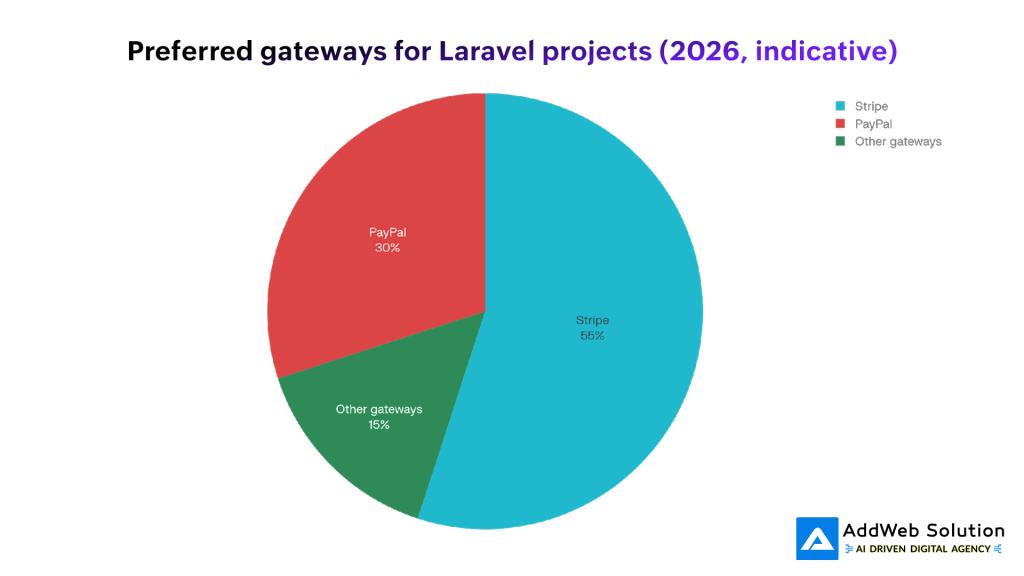
Caption idea: “Indicative gateway preference in modern Laravel projects: Stripe as the core, PayPal as a complement, others filling regional gaps.”
Stripe vs PayPal vs Adyen vs Razorpay: overview
High‑level comparison
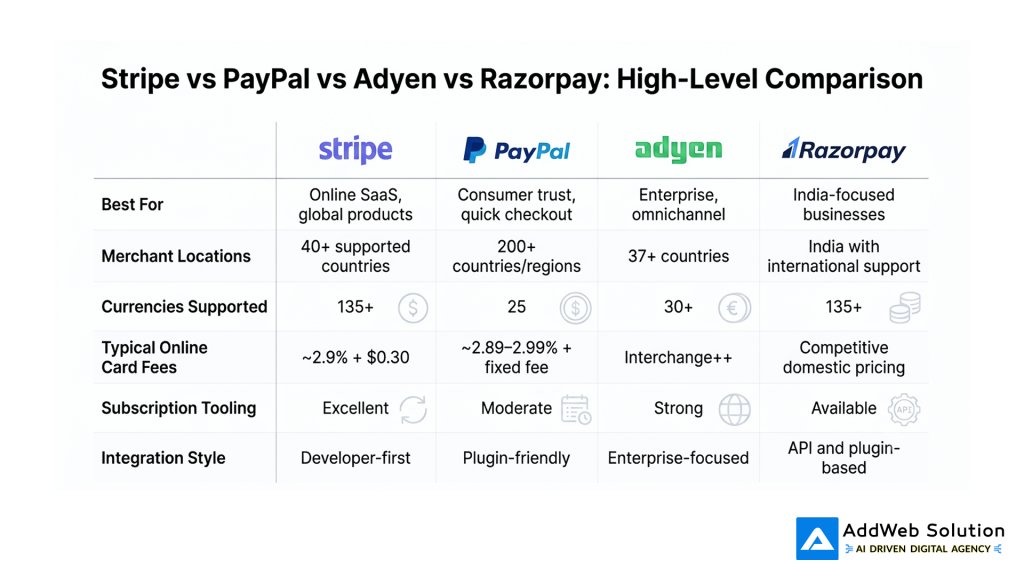
- The payment gateway Stripe works with merchants from more than 40 countries and allows transactions in over 135 currencies.
- The payments solution PayPal is active in more than 200 countries and accepts transactions in 25 different currencies.
- Adyen targets large-scale merchants who require consistent processing both online and offline using the IC++ model and multi-currency settlements.
- Razorpay specializes in the Indian market, although its international payment solutions handle 135+ currencies and transactions from 180+ countries.
Visual: fee comparison at a glance
People inevitably ask, “Which one is cheaper?” A simplified bar chart helps frame that discussion.
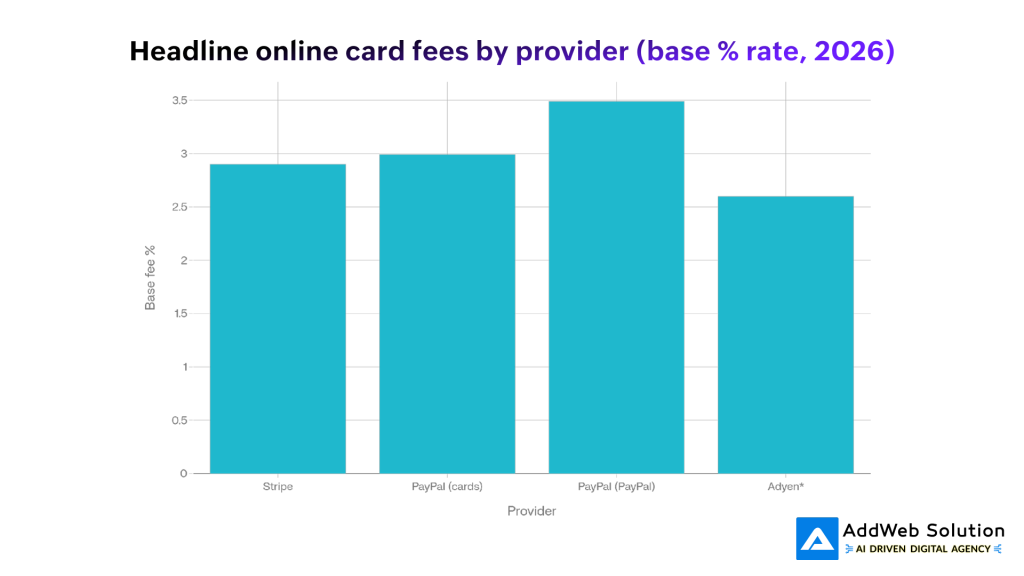
Typical card fees for online payments (without FX and additional services):
- Stripe – ~2.9% + $0.30 for each processed online payment made using cards in the USA.
- PayPal (credit cards) – ~2.89-2.99% + $0.29-$0.49 based on chosen plan.
- PayPal (online wallets, PayPal payments) – typically 3.49% + $0.49 on various online transactions.
- Adyen – follows Interchange++ pricing structure – you pay for interchange, schemes, and markup fees (e.g., interchange + 0.60% + €0.10 in certain countries in Europe).
Depending on a location, business type, and volumes, the numbers may differ, but the principle is the same:
- Stripe: straightforward pricing.
- PayPal: slightly higher but with increased security and wallet options.
- Adyen: potentially cheaper in larger volumes after negotiations.
Settlement speed & reliability (perception)
Technical teams and finance teams will appreciate fast settlements and lower failure rates.
You could create a bar chart to show that:
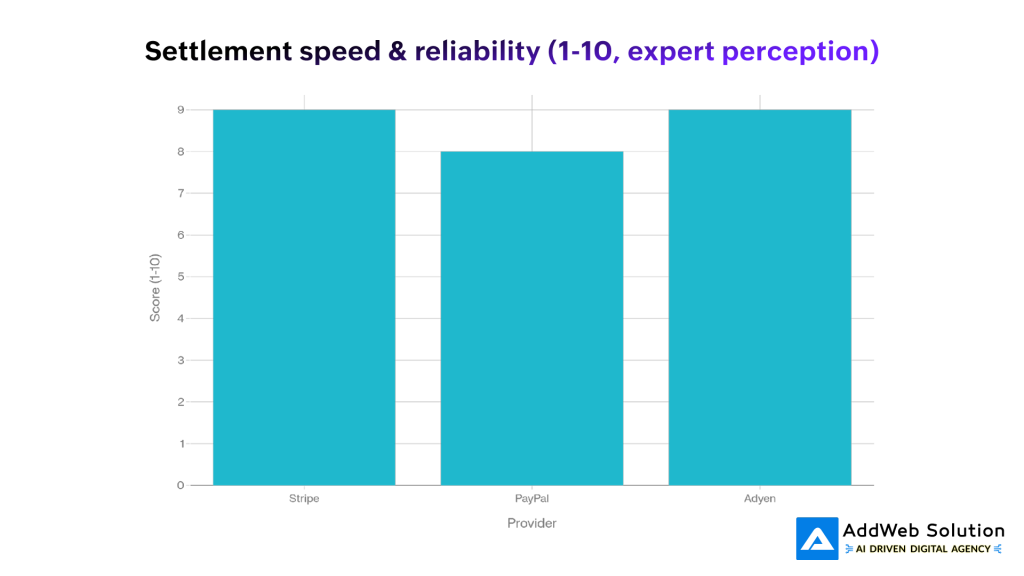
Example interpretations:
- Stripe – “9/10”: quick, guaranteed payments to most countries where the service operates.
- PayPal – “8/10”: good enough, but sometimes keeps the money and has more disputes than other solutions.
- Adyen – “9/10”: built to make sure that the payments get through to enterprise-level businesses.
This is not an analysis, it is just food for thought for our stakeholder community.
Stripe: best default for Laravel SaaS and global online products
Advantages in simple terms
- Designed for online use: Stripe is often suggested as the default for online companies, particularly SaaS and other digital products.
- Billing options: With Stripe, billing your clients on a month-to-month or year-to-year basis, and metered billing, will work perfectly. Thanks to Laravel Cashier, you can manage your subscriptions, create invoices, apply coupons, and handle metered billing without having to re-invent billing.
- Global payments: It works with more than 135 currencies and multiple payment options (credit/debit cards, Apple Pay, Google Pay, bank redirection, local wallets) that are available in its supported regions.
- Fees structure: The basic US fee for online transactions with cards is 2.9% + 0.30 per transaction based on a pay-as-you-go plan, with additional 1% for international cards and another 1% for currency conversions.
When Stripe is usually the right call
Stripe is normally the best option as your main gateway provider when:
- You are developing Laravel SaaS, membership, or subscription products.
- Your users hail from various countries and are paying through credit/debit cards or advanced digital wallets.
- You need one unified platform that scales well according to your requirements from simple subscriptions to advanced ones based on usage models.


PayPal: trust, familiarity, and global consumer reach
Why is PayPal still important?
- Massive customer base: PayPal is one of the most widely used payment service providers in the world with hundreds of millions of customers using it in over 200 countries/regions.
- Trustworthiness: PayPal’s brand name creates trust among users who know that they have three ways to pay – via their PayPal balance, cards linked to PayPal, or PayPal buyer protection.
- Quick onboarding: It’s comparatively easier to set up acceptance of PayPal payments compared to others for small businesses.
Costs and trade-offs
- Complex pricing model: PayPal pricing structure is much more complicated than the simple pricing of Stripe with costs that tend to be a bit higher, considering wallet payments and FX costs.
- Typical rates for online payments: Typically, for most US-based online merchants, credit card payments made via PayPal cost 2.89-2.99%+0.29-0.49, while wallet transactions (PayPal and Venmo) cost 3.49%+0.49.
- Exchange rates: The cost includes a spread over and above the base exchange rate.
When PayPal should be included in your Laravel ecosystem
PayPal is typically a second payment option for Laravel-based projects:
- Include it for consumer transactions if your clients know about PayPal and might feel uneasy about using their credit cards on your website.
- Include it for those consumers that come from less common, long-tail countries if you do not have access to Stripe merchant accounts there but PayPal does.
- Consider it an additional conversion option: just one more button on the checkout page to convert another kind of customer with no alteration to your billing workflow.
Adyen: built for large, complex, multi‑country merchants
Adyen sits in a different league: it’s less about quick integration and more about unifying payments across web, app, and physical stores.
What sets Adyen apart
- Omnichannel focus: It’s designed so big retailers and platforms can use the same provider for in‑store terminals, online checkouts, subscriptions, and marketplaces.
- Interchange++ pricing: Instead of a flat “2.9% + 0.30” style fee, Adyen uses Interchange++ pricing in many regions. This means you pay the actual card interchange fee plus the card scheme fee plus Adyen’s markup (for example, interchange + 0.60% + €0.10 in some European setups).
- Multi‑currency settlement: It can settle funds in multiple currencies, which matters when you have entities and bank accounts in many countries.
When Adyen makes sense for a Laravel project
Adyen is usually a fit when:
- You run a large or fast‑growing enterprise with significant volume.
- You operate in many countries and channels and need deep insights into fees, chargebacks, and payment methods per region.
- You have a finance team that cares about fee transparency and a product team that can handle a more involved integration.
For smaller Laravel applications or early‑stage SaaS, Adyen is often overkill; Stripe or Stripe + PayPal is usually the simpler route.
Razorpay and other regional gateways
Razorpay: India‑first with strong international capabilities
If your business entity is in India or you have a strong customer base there, Razorpay becomes a serious contender:
- Designed for India: Built around Indian banking and RBI rules, with good support for local payment types and tax handling.
- International payments: Razorpay’s international payment gateway supports over 135 currencies and customers from around 180+ countries, letting Indian merchants accept foreign cards and wallets.
- Laravel‑friendly: There are PHP SDKs and community Laravel packages, so the integration pattern is familiar for PHP teams.
Other notable options you might pair with Laravel
- Braintree (by PayPal) – good if you want card processing plus PayPal in a single integration; widely used as a Stripe alternative.
- Checkout.com, 2Checkout, Mollie, eWAY – often chosen for regional strengths (e.g., Europe, Australia) and local payment methods like iDEAL, Bancontact, and others.
- Wise Business (as a complement) – not a gateway, but a way to lower FX and payout costs when withdrawing funds from Stripe/PayPal and paying suppliers in multiple currencies.
Simple decision checklist (no code, just choices)
When you’re helping a non‑technical stakeholder decide, walk through questions like these:
1. Where is the business registered and where are customers?
- Mostly online, global customer base, typical SaaS/E‑commerce → Start with Stripe.
- Consumer‑heavy, need immediate trust and existing balances → Add PayPal to the checkout.
- Registered in India, selling domestically and abroad → Use Razorpay as a primary gateway, plus Stripe or PayPal where it makes sense.
- Multiple entities, physical stores, and online shops across many countries → Evaluate Adyen for unified payments.
2. What payment methods matter most?
- Cards, Apple/Google Pay, subscriptions → Stripe is strongest.
- PayPal balances, PayPal Credit, Venmo (US) → you need PayPal.
- Local methods like iDEAL, Bancontact, domestic wallets → Adyen or region‑focused gateways.
3. How important are subscriptions and invoices?
- Core to the business (SaaS, memberships, metered billing) →
- Stripe Billing + Laravel Cashier give you a mature, opinionated subscription system with trials, coupons, and proration.
- Mostly one‑off sales with occasional recurring add‑ons →
- Stripe is still very good, but PayPal + a simple plan system may be enough at small scale.
4. Who handles finance and reconciliation?
- Lean team that just wants clean dashboards and exports → Stripe keeps things straightforward.
- Larger finance team wanting granular fee visibility, chargeback reporting, and multi‑currency settlement → Adyen becomes more attractive despite extra complexity.
A practical baseline for most Laravel projects
If you had to pick a safe, non‑over‑engineered setup for a typical Laravel product today, it would be:
- Stripe as the backbone
- Primary processor for cards, wallets, and subscriptions, especially when using Laravel Cashier.
- PayPal as the optional “trust” button
- Extra option on your checkout page that catches PayPal‑first buyers, without replacing Stripe.
- Regional gateway as needed
- Razorpay if you’re India‑based, or another regional gateway if your revenue is concentrated in a specific market where local methods matter.
- Enterprise options later
- Once volume, number of countries, or in‑person sales grow significantly, evaluate Adyen or similar platforms for unified, multi‑channel payments.
This combination keeps your Laravel stack manageable, gives you room to scale globally, and lets you talk confidently about why you chose each gateway—without needing to dive into code in your blog.
Need help integrating the right payment gateway into your Laravel application? Our Laravel experts can help you build secure, scalable, and conversion-focused payment experiences.

Pooja Upadhyay
Director Of People Operations & Client Relations
Source URLS:
https://wise.com/au/blog/international-payment-gateway-providers
https://wise.com/us/blog/international-payment-gateway
https://wise.com/us/blog/adyen-vs-stripe-comparison
https://wise.com/in/blog/best-international-payment-gateways
https://www.paypal.com/in/webapps/mpp/country-worldwide
https://razorpay.com/docs/payments/international-payments/?preferred-country=IN
